
Dear TCEA Responds:
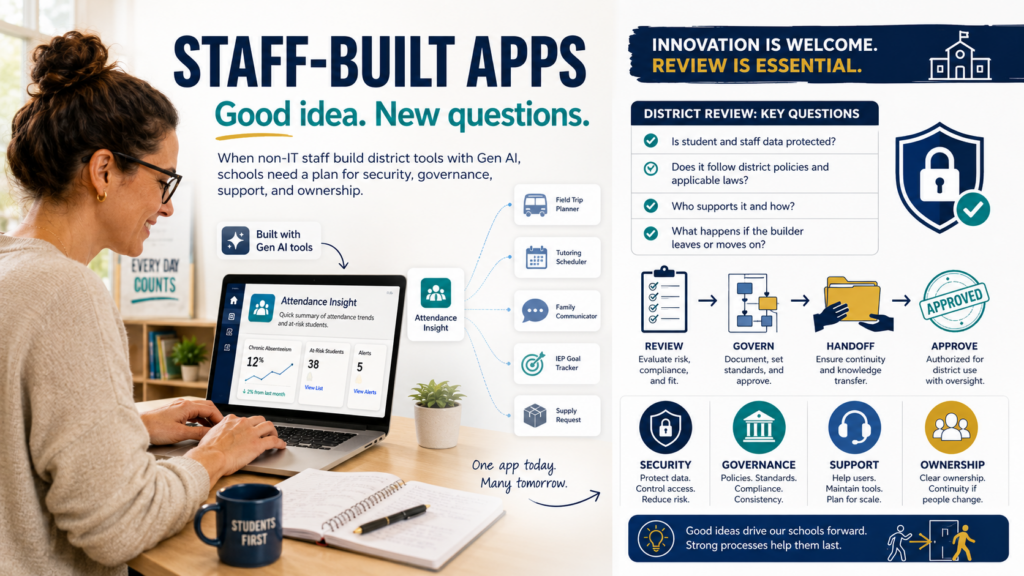
We have a non-IT staff member who used Gen AI tools to build a small application for district use. The app is simple, serves a real need, and the staff member meant well. But it raises questions about security, governance, support, and long-term ownership. My worry is less about this one app and more about the precedent it sets. As AI-assisted development gets easier, more staff with no coding background will build functional tools that solve operational problems. That can drive good ideas. It also introduces risk around data security, compliance, and what happens when the person who built it walks out the door. Have any of you put policies or approval processes in place for staff-developed apps? I suspect this is going to become a much more common challenge for K-12 technology departments.
Thank you,
-Cautious in the Cloud
Dear Cautious:
Thanks for writing. This is a concern I’ve been considering given my perspective as a vibe-coder and some who served as a technology director. As more people are empowered, it’s going to become impossible to stop the avalanche of new vibe-coded apps. Institute a blanket ban, and you will soon have people running their own web servers (hello, 1990s again) on classroom machines and devices. They will keep getting built, and they will live on personal laptops where you can’t see them, especially since many are browser-based and running on browser tools.
You can definitely classify this as shadow IT wearing a Casper the friendly ghost costume. It’s gotten easier than ever to build powerful, helpful, vibe-coding apps that solve real instructional problems, or administrative needs. These apps are friendly, they want to help, and it’s unreasonable to deny them blindly. Disclosure must be easier than hiding. In leadership positions, we need to offer a path forward to correcting the issues of these apps, while allowing them into the sunlight and nurturing the growth of in-house staff creators.
Did You Know?
TCEA offers a self-paced Cybersecurity for Educators course that walks staff through encryption, password protection, secure device use, and safe cloud storage. It is a useful baseline before anyone starts building tools that touch district data.
Understand How the App Got Built
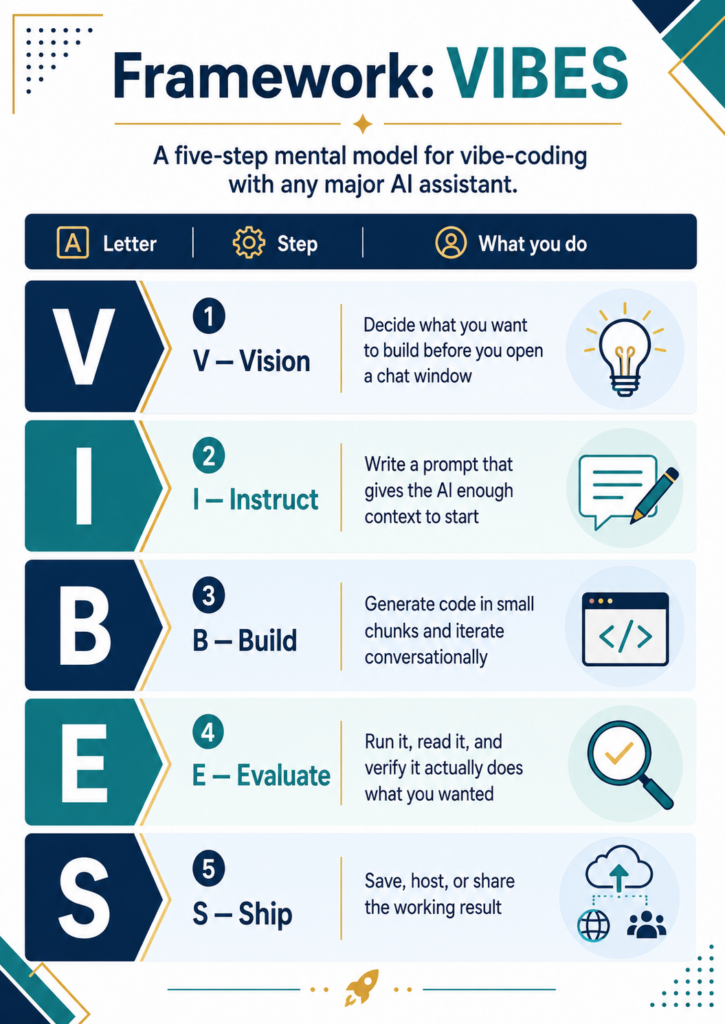
A solid vibe-coding workflow might look like this:
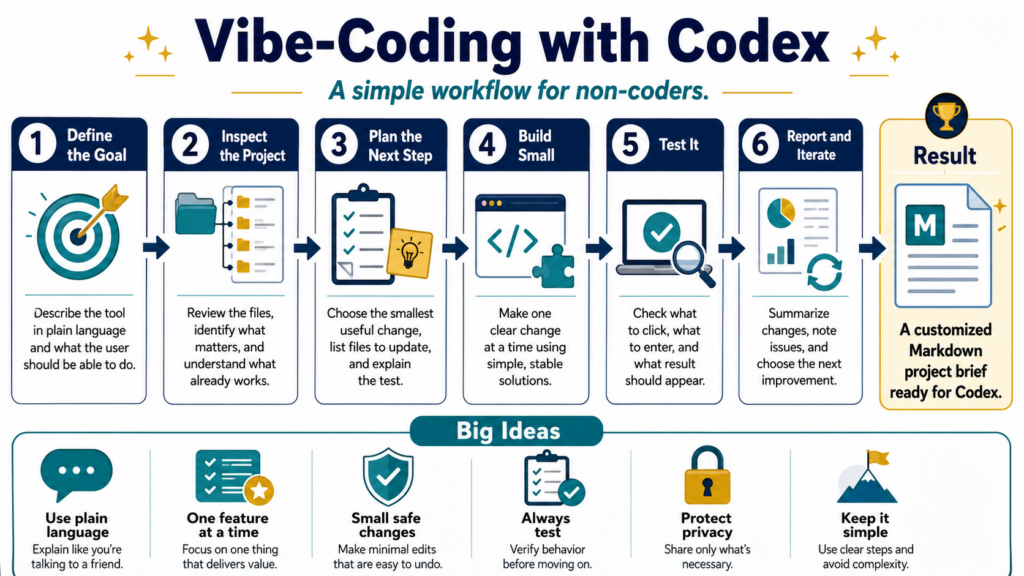
Notice the guardrails along the bottom of that flow: use plain language, change one feature at a time, make small safe changes, always test, protect privacy, keep it simple.
“Protect privacy” is the one, super important guard rail. Use the infographic above as a conversation scaffold to have with staff.
Sort the Risk
Not every staff-built app deserves the same scrutiny. An app that reformats a public bell schedule is not the same as one that ingests student records. If you treat them the same, you will kill harmless projects in paperwork or wave through the dangerous ones.
Note: I have seen harmless projects die by the dozen in schools. I warn you, people leave those kinds of toxic environments. A good superintendent will ensure that those types of environments are stabilized (up to crucial conversations and/or termination of the CTO that is zealously guarding the network and his/her own work load over the benefit of students and staff). If not, you will see people leave.
Whatever happens, you need to sort by what the app actually touches. Let’s take a look at what that looks like:
| Risk tier | What it touches | What you require |
|---|---|---|
| Low | Public or non-sensitive data only, no district systems | Quick disclosure, light review |
| Medium | Staff data, internal workflows, no student PII | Disclosure, IT review, named owner |
| High | Student records, FERPA-covered data, or live district systems | Full review, security sign-off, formal ownership plan |
The question to keep up front and center is, “Does this touch student data?” If the answer is yes, then this app moves in the same circle as a vetted, external, third party app a new principal wants you to implement by next week for discipline. That single question about student data sorts most projects faster than a long checklist does.
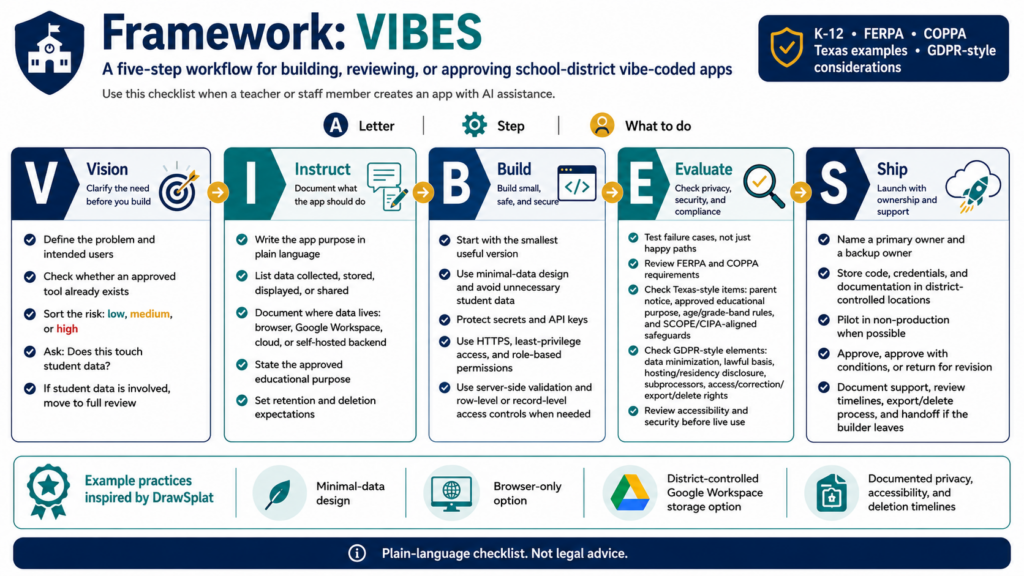
A Checklist To Consider
Where most staff built-apps miss is the boring parts that keep data safe. Someone had a vision, they crafted instructions, they built it, they evaluated it for one thing, and they shipped it (VIBES). But they forgot the not optional parts once the app has real users and real student data. People who skip them end up with data breaches, and increasingly, with lawsuits.
My Big Vibe-Coding Project
I learned a lot after vibe-coding my first big project. I wanted something that was free, browser-based, involved no data-collection. But even then, that wasn’t enough. I know this because when I vibe-coded my first big project, DrawSplat.org, Stacy Pattenaude (Northside ISD) pointed out what I had missed. Those included:
- Texas Compliance
- District Privacy Addendum
- NDPA/DPA Review Packet
- Accessibility Statements
While I had terms of service and privacy policies, I missed these major pieces. So, many hours later on a weekend, I had a combined reference for privacy and compliance.
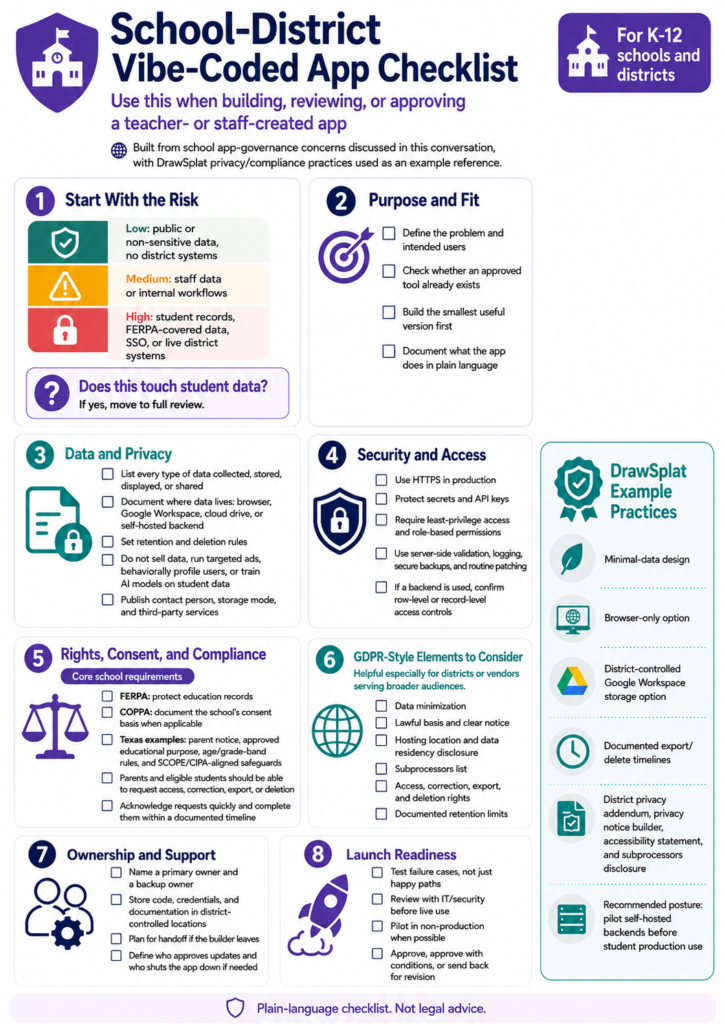
You do not need to be a developer to require this checklist from anyone who built an app for your district. Let’s take a look at six key ideas.
Six Points to Consider
Here are six points to consider. I’d say they are quick and easy, but you may need to think through these in your region and how they might need to be modified:
First, protect the district, not just the app. The moment that tool collects user data, you are in legal territory: FERPA for students, and privacy law like GDPR or CCPA depending on who the users are. There needs to be a privacy policy, and someone has to be able to answer one question: where does the user data actually live?
Second, ask about row-level security. If the app uses a backend database, check the default settings. Some can leave the database wide open. Without row-level security policies in place, a curious user can open browser developer tools and read the whole database. Ask the builder to show you the policies. Zero policies means the app is exposed, and it is usually a five-minute fix. One easy workaround? Use your District’s Google Workspace for Education (e.g. Sheets, Google Scripts) with oAuth for authentication. It’s easy, if slow, and works reasonably well. Better solution? A self-hosted, inside the firewall, MySQL/MariaDB database to handle data.
Third, check they tested the failure path, not just the happy path. Most builders test the version where everything goes right. The bugs hide in the version where things go wrong: wrong password five times in a row, a reset request for an email that does not exist, a verification link clicked twice, a signup with an email already in the system. Walking those failure cases catches the large majority of login and account bugs.
Fourth, run a quick security baseline. The builder can paste a prompt into their Gen AI tool asking it to review the app as a security specialist and check for strong security headers and a solid baseline. Two minutes, and it surfaces the obvious gaps.
Fifth, run an OWASP check. OWASP is the standard reference list of common web vulnerabilities. A prompt asking the Gen AI tool to review the app against OWASP standards and flag vulnerabilities is where the serious problems surface: SQL injection, cross-site scripting, and authentication holes.
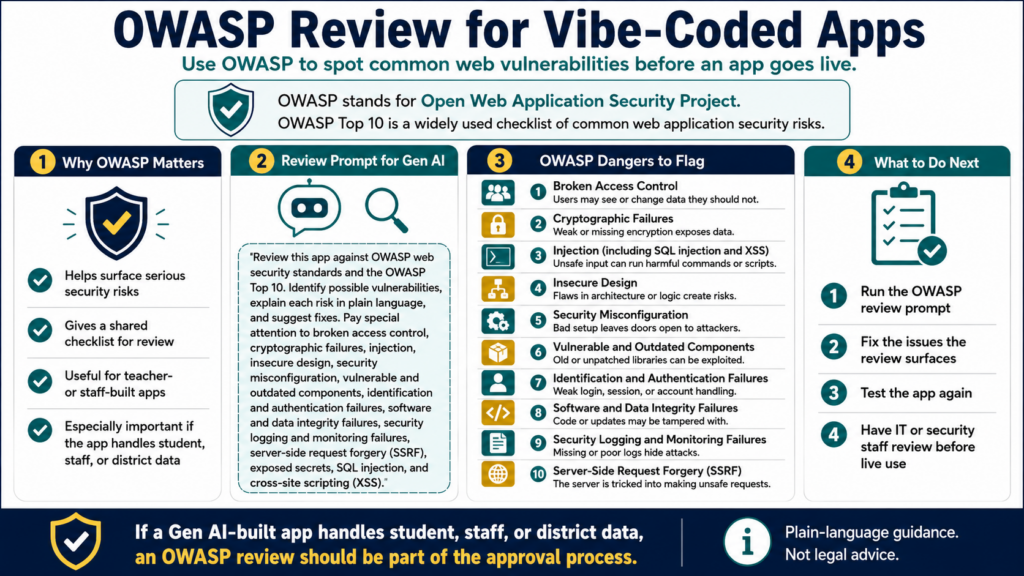
Sixth, make sure validation happens on the server, not just in the browser. Checks that run in the browser are about user experience, not security. An attacker simply turns off JavaScript and hits the app’s backend directly. Every input has to be validated again on the server side.
I will be honest about where this comes from. None of this requires a computer science degree. It requires someone to ask the questions before the app goes live, not after. That is a big lesson to learn…you have to ask the questions first during app development.
A Special Mention
Tony Vincent’s TeacherHive.app is one location where you can find a wealth of vibe-coded apps. These are terrific applications (kudos to Tony Vincent for his efforts) that educators have crafted for use. How does TeacherHive stack up to the TCEA PROTECT rubric v2.0? Getting a perfect score is hard and Tony’s effort here is to make it easy for educators to host their content and be easily accessible. To assess this, I ran TeacherHive.app’s policy through the TCEA PROTECT rubric v2.0. As you can see, TeacherHive.app did quite well for what it was trying to achieve:
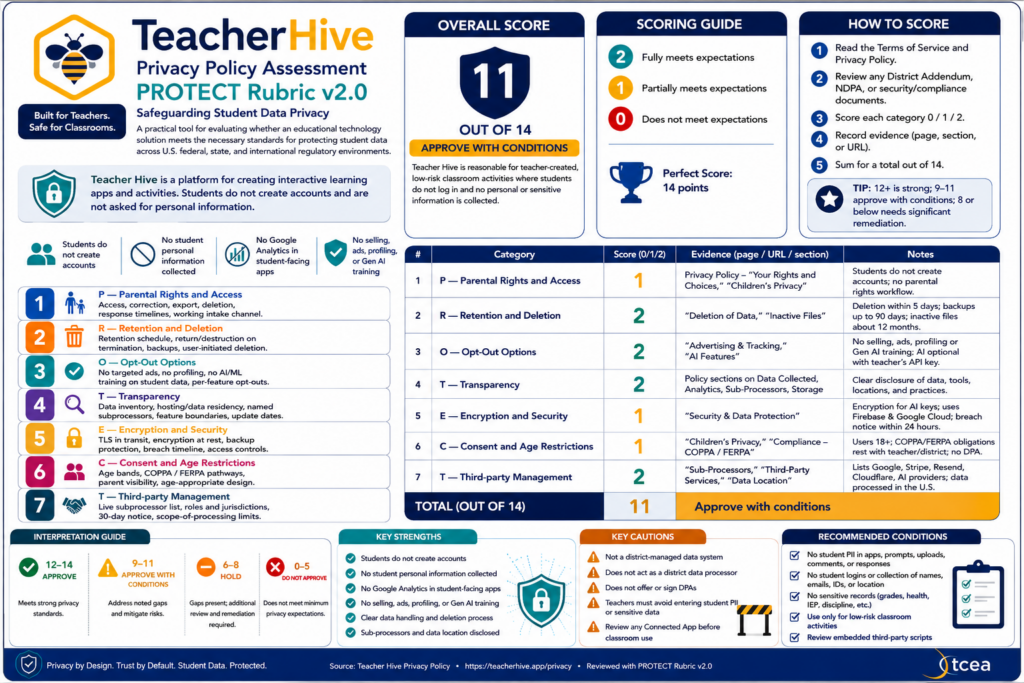
Vibe-Coded App Intake
Let’s take a moment to review one possible process for vibe-coded app intake. I’ve included a tool for your use as well.
Build an Intake That People Will Actually Use
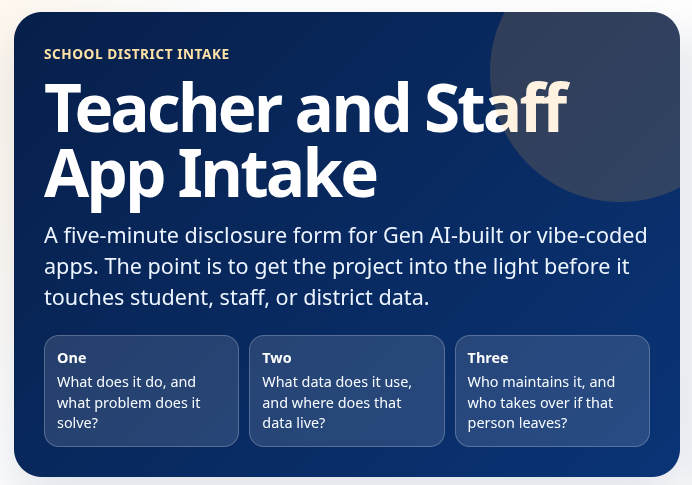
What you want is a one-page intake form (like the mock one above you can grab and adapt for your use) that takes five minutes to fill out. The goal is to make it easy for people to report they’ve created an app rather than it is to hide the project for classroom use because they know all projects get disapproved or lost in the review process.
Ask three things:
- What does it do, and what problem does it solve
- What data does it use, and where does that data live
- Who maintains it, and who takes over if that person leaves
That last question could be the most troublesome. The app works great until the person who built it transfers to another campus. Then, nobody knows the password, the code, or how it connects to your systems. Orphan projects are problematic because districts are left supporting a tool they never chose, or scrambling when it breaks. It adds another level of complexity to “How can we save that teacher’s Google Drive files?” You might want to be up front about what happens to these types of apps if the creator leaves or drops it.
Map It to Rules You Already Have
You probably do not need a new legal framework. You do need to connect this behavior to obligations already on your books. FERPA still governs student data no matter who wrote the app. Your acceptable-use and data-governance policies almost certainly already cover “tools that handle district information,” even if they predate Gen AI. Point staff to those rather than inventing something from scratch.
If a current policy genuinely does not address staff-built apps, that is worth flagging to your leadership team as a gap to close, not a reason to freeze every project in the meantime.
A Quick Reference for Your Next Conversation
When that next well-meaning staff member shows up with an app (there will be an avalanche of those in the Fall, I suspect) they are proud of, here is the short version of how to respond without crushing the initiative:
- Thank them, because you want the next person to come forward too
- Ask how they built it, and whether they followed privacy and small-change habits
- Walk the six-item security checklist together
- Run the three intake questions
- Sort it into a risk tier
- Name an owner and a backup before anything goes live
What do you plan to do next?
👤 Human-directed (Miguel Guhlin) · 🤖 Gen AI-assisted (Claude, ChatGPT)

4 comments
Thanks for putting Teacher Hive’s policy through the TCEA PROTECT framework. Like you, Miguel, I’ve been learning a lot while vibe coding educational apps. From the beginning, I knew Teacher Hive needed to prioritize security, safety, and privacy. I’m still learning and figuring out how to best meet the needs of school districts.
You is awesome, Tony. I met two of your inspired educators (Kathleen and Mandi). Keep showing us the way.
With appreciation,
Miguel
Miguel~ You always stay ahead of the curve! Thank you for this information! You are right about the delicate balance between encouraging initiative and maintaining cyber security and potentially sensitive data. I will be spotlighting your idea of “test the failure path, not just the happy path” across my classes!
Thank you and Happy July 4th~
~Helen
Thanks, Helen! The failure path isn’t the easiest or most obvious, but you can learn a lot as a vibe-coder when you take it. 😄