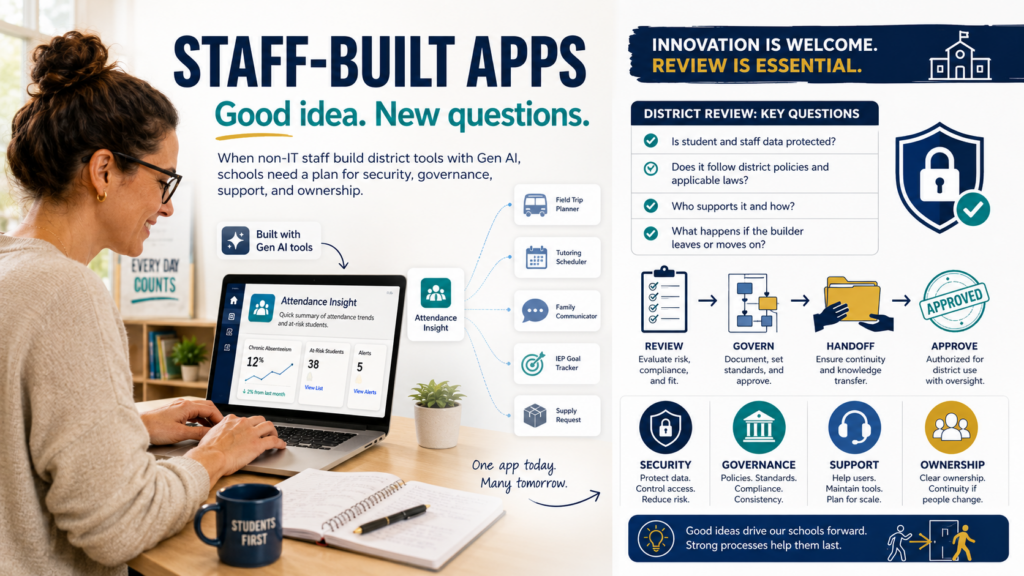
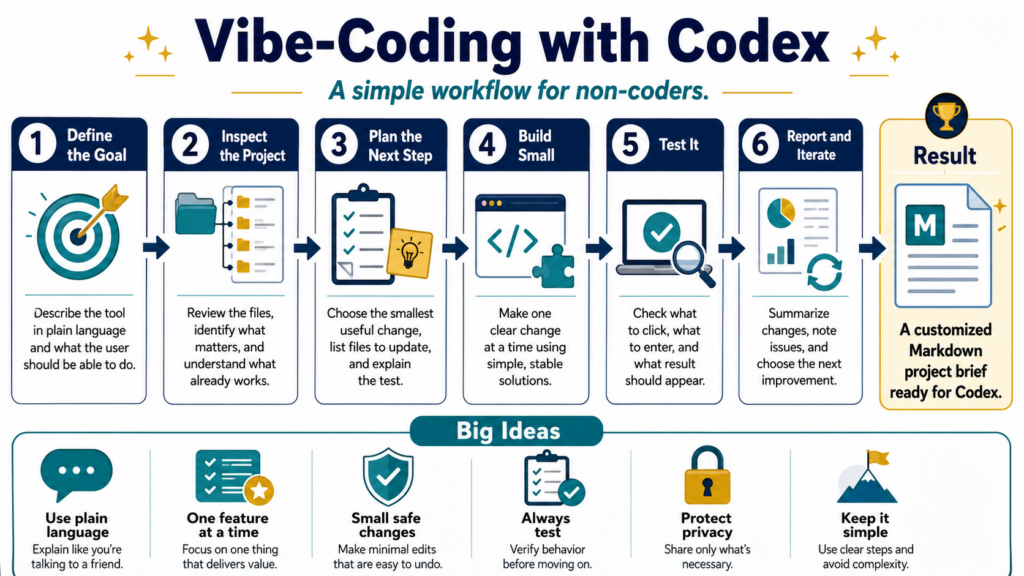
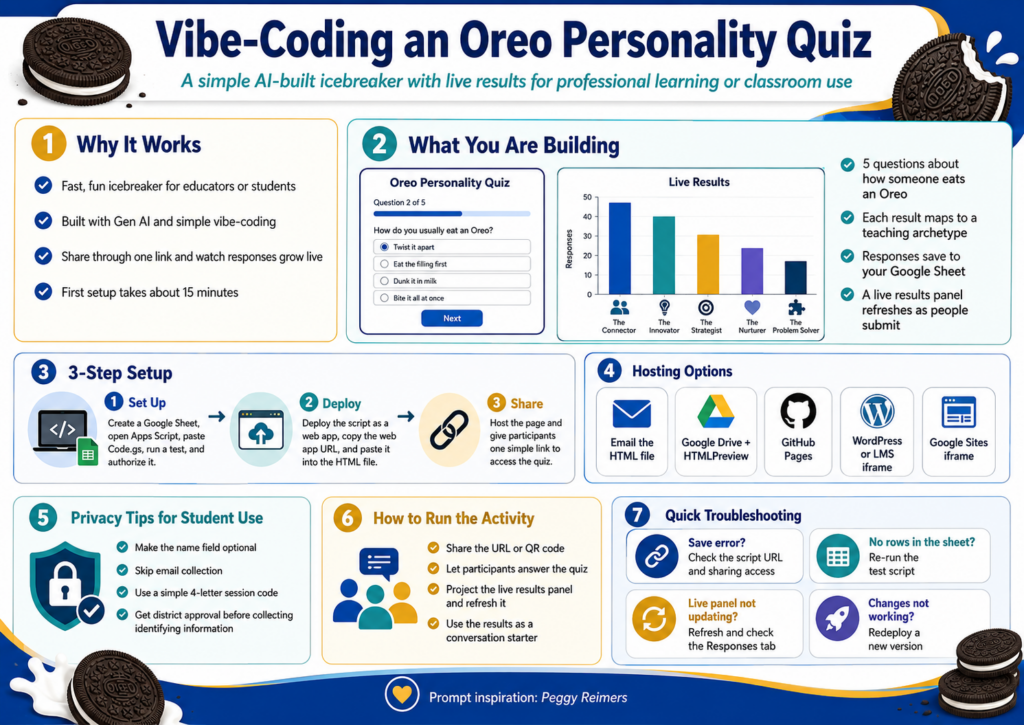
Ever find yourself wishing for an amazing icebreaker you can use with a group of educators? An old familiar one is often best. Faculty icebreakers either tell you nothing or take twenty minutes to set up and twenty more to debrief. You can build a better one yourself using Gen AI and vibe-coding. After making it, you can host it on free tools you already use (e.g. Google Sites), and watch a live results chart grow. The whole setup takes about fifteen minutes the first time. After that, the activity lives in a single shareable link. You can do this and more with vibe-coding using $20 a month tools like ChatGPT, Claude, and/or Gemini. This blog shows you how.
Special thanks to Peggy Reimers for providing the initial prompt for this activity. I only made slight modifications to it. You can see it at the end of this blog post.
What You Are Building
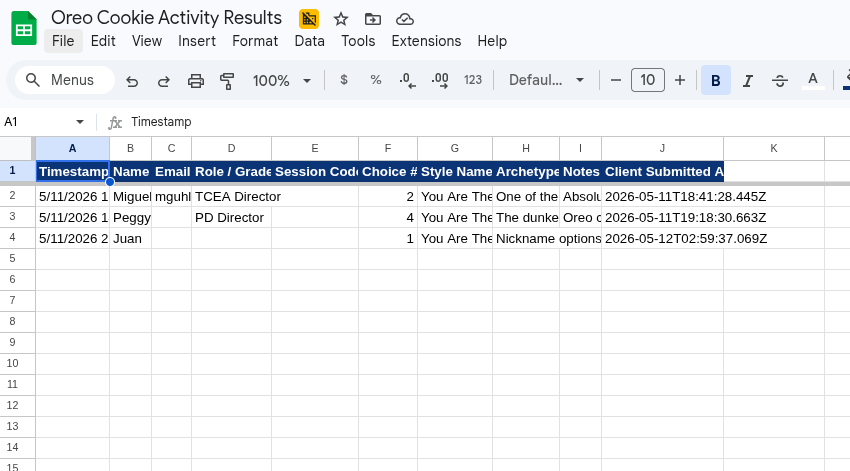
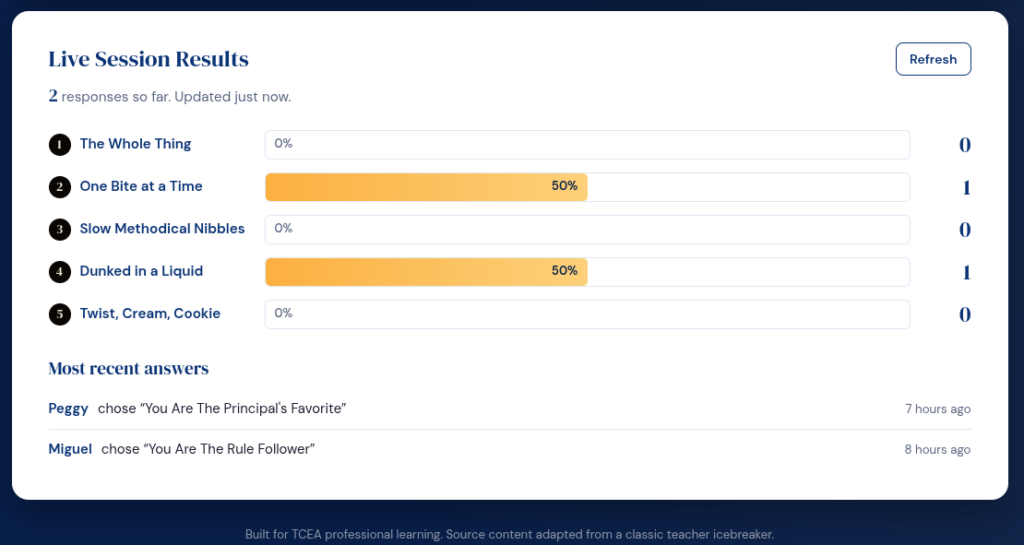
The activity is simple. Five questions ask how someone eats an Oreo. The result maps to a teaching archetype, with a short description that becomes a conversation starter. Names go into your own Google Sheet. A live results panel on the same page refreshes as people submit. No vendor account, no subscription, no student data leaving your district drive.
index.html – This is the web page that you will access to get to the Oreo Personality Quiz
README.md – This is a markdown formatted file about this resource
SETUP.md – This is a set of instructions to assist you in setting up the Oreo Personality Quiz
Ready to begin? Let’s get started. Note that if you want to REALLY start from scratch, go to the end of this blog post and copy the prompt. Then, paste it into your BoodleBox, ChatGPT, Claude, or Gemini solution. Remember, everything is hard when you start, but it gets easier after you do it 1000+ times.
Step 1: Set Up Your Sheet and Script
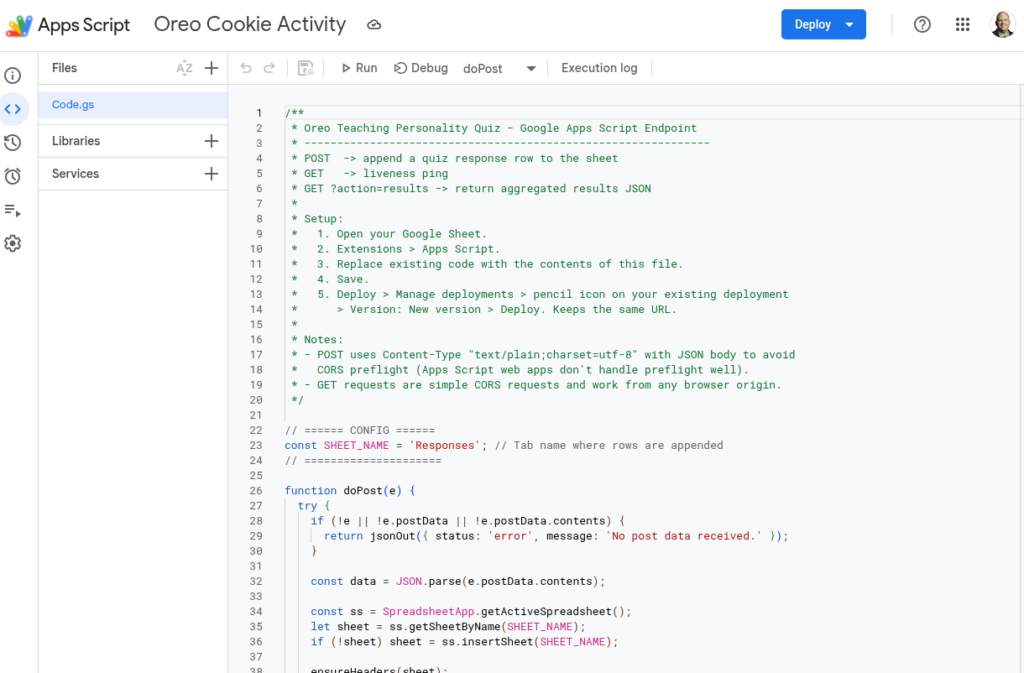
Open Google Drive and create a blank Google Sheet. Name it something obvious like “Oreo Quiz Responses.” From inside that sheet, click Extensions, then Apps Script. A code editor opens in a new tab. You can see an example online.
Delete the sample code. Paste in the Code.gs file from the project bundle, save, and name the script “Oreo Quiz Endpoint” when prompted. Run a test by selecting testWrite from the dropdown next to the Run button. Google will ask you to authorize the script. Approve it. If a warning appears about an unverified app, click Advanced, then “Go to project (unsafe),” then Allow. That is normal for scripts you wrote yourself and have not published as a public app.
Switch back to your sheet. A new tab called Responses should have one test row, which you can delete. The script is now talking to your sheet.
Step #2: Deploy the Script and Paste the URL
Back in the Apps Script editor, click Deploy in the top right and pick New deployment. Click the gear icon next to “Select type” and choose Web app. Fill in:
Description: Oreo Quiz v1
Execute as: Me
Who has access: Anyone
Click Deploy and copy the web app URL. Open the HTML file in any plain text editor. Near the bottom, find the line that reads APPS_SCRIPT_URL = "PASTE_YOUR..." and replace the placeholder with the URL you just copied. Save the file. That is the entire connection.
This is what that looks like:
Did You Know?
TCEA’s self-paced AI Essentials for Educators offers 17+ CPE hours, walks you through the essentials of vibe-coding on any chatbot you care to use (e.g. BoodleBox, ChatGPT, Claude, Gemini). It’s a steal for $49 for individuals, or $34 in bulk pricing with 10 or more.
Step #3: Get the Page in Front of People
You have four hosting options, ranked easiest to most polished:
Option #1: Email the HTML as an attachment. Anyone who downloads and opens it gets the quiz. Some email systems block HTML attachments, so test first
Option #2: Upload the file to Google Drive and share throughHTMLPreview, which renders Drive-hosted HTML
Option #3: Host it free on GitHub Pages for a permanent URL like https://yourname.github.io/oreo-quiz/. Add about ten more minutes. See example.
Option #4: Embed it in your school WordPress or LMS using an iframe. Best for a polished classroom or PD experience
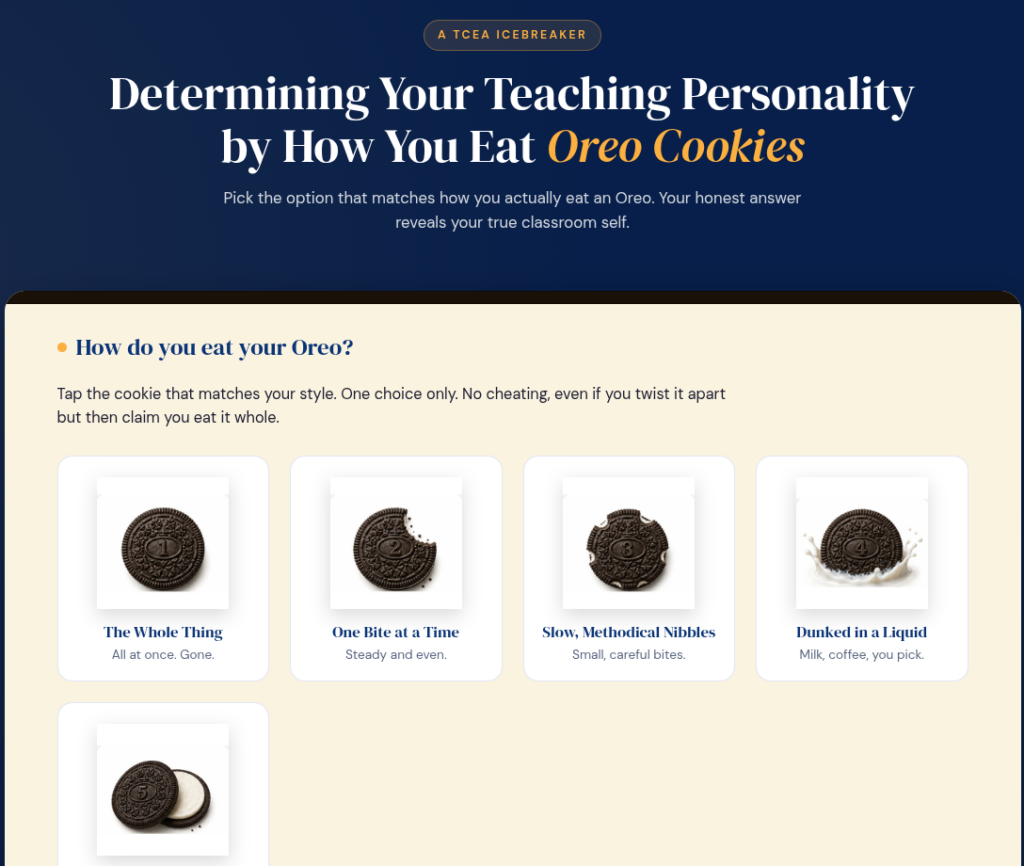
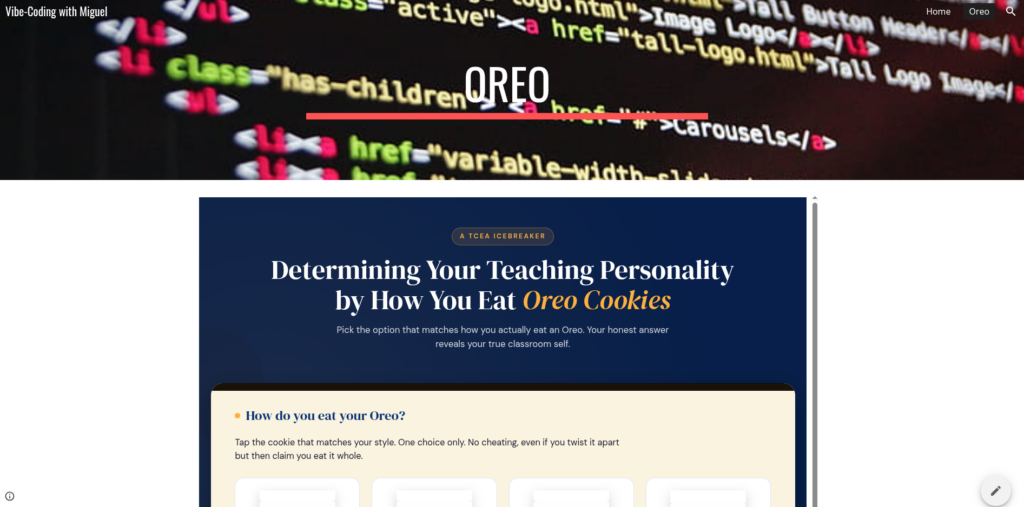
Option #5: Embed it in Google Sites using an iframe. Easy and simple to use if your code is straightforward (you won’t know until you try). See screenshot above or view online in Google Sites.
For a faculty meeting, the GitHub Pages route is worth the extra ten minutes. You will reuse the link.
A Key Point: Privacy Before Students Touch It
For colleagues and staff, real names and emails are fine. For students, treat the data the way your district expects:
Make the name field optional so students can submit anonymously
Skip the email field entirely. Email plus another identifier is what triggers most privacy rules
Use a session code instead of names. Ask each student to pick a four-letter code they will remember, so they can find their own result without typing real identifiers
Get district approval before recording any identifying information
The good news is that the data goes to your Google Drive, not a third-party platform. That usually shortens whatever approval process you do have to run. Data is saved to your Google Workspace for Education account storage, which is where Google Classroom data lives as well.
Running It in a Session
The activity runs about ten minutes start to finish. Project the URL or share it through chat or a QR code. Give a one-sentence intro: “Pick how you actually eat an Oreo, see what kind of teacher that makes you, and add your name so we can see the class results.” While people answer, pull up the live results panel on your screen and refresh every minute. The bars grow as responses come in.
Use the descriptions as a conversation starter: ask which result felt accurate and which one felt wrong, and why. The second question is where the real talk happens. Remember to have fun with it.
Quick Troubleshooting
Symptom
First thing to check
“Could not save right now” message
URL missing in the HTML, or deployment access is set to “Only myself” instead of “Anyone”
Sheet shows no new rows
Re-run testWrite in Apps Script. If that fails, recreate the script from inside the sheet
Live results stuck at “Waiting for the first answer”
Click Refresh on the panel and confirm the Responses tab has rows
You edited Code.gs and now nothing works
Deploy, Manage deployments, edit your existing deployment, change Version to New version, redeploy
Sample Prompt
Want to give it a start from scratch yourself? Here’s the prompt I started with:
Create a self-contained html file that will make this into an online interactive…use TCEA blue and gold colors, but give everything an Oreo cookie feel. I want to save the results to Google Sheets. Please provide the AppScript code for that, and give me a readme file and setup instructions
Determining Your Teaching Personality by How you Eat Oreo Cookies 1. The whole thing all at once. 2. One bite at a time. 3. In slow and methodical nibbles. 4. Dunked in a liquid. 5. Twisted apart, eat the inside, then the cookie. 1. You are the teacher that no one messes with. Your nickname could be Mother of Dragons, Chuck Norris, or the Terminator. 2. You are one of the 5.4 billion billion that eat their Oreos this way. You follow the rules. Your lesson plans are always turned in on time and never late for your extra duties. But stay out of the fast lane if you are only going the speed limit. 3. You’re tidy and orderly. Probably the word that comes to mind is meticulous. Your students come to class with sharpened pencils, backpacks organized, and homework turned in on time. I am guessing your students always ask for extra credit projects. 4. Your Oreo is always dunked in some kind of liquid, be it milk, coffee, wine or whiskey. Your principal loves you, as you always volunteer for extracurricular activities: dances, field trips, and sporting events. You want to be the dunkee at the Fall Festival. All is good as long as you have your concealed flask. 5. This means you consume life with abandon, you are fun to be with, exciting, carefree with some hint of recklessness. But no one should trust you with his or her children.
While I don’t know the source for this version, there are many variations online, such as this one. My next project? Dice-breakers. I can’t wait to get started.
“Worthless.” That’s how one English teacher described her experience in teaching essay writing to students who had embraced Gen AI. “Even with wonderful, supportive administration, I can’t teach kids who won’t make the effort.” The problem is that students are side-stepping the cognitive work of reading, grappling with ideas through outlining, organizing, and writing. Gen AI short-circuits that process.
This is a tough challenge for many educators, from third grade to university level. As a result, everyone has a response, some of which have been tried in the classroom.
Some suggest embracing new solutions that cost money and combine tried and true approaches (e.g. viva voce), like this one:
MiniVivas: This is a well-thought out approach to bringing VIVAs to students. From the website: “The viva voce tradition—scaled for weekly formative assessment. Restoring learning assurance in an era where output quality no longer guarantees comprehension (Delikoura et al., 2025).” This solution relies on SayVeritas website, which is not free (see pricing).
Others have suggested the following:
“First assignment is in class, handwritten- that gives me a sense of their capabilities. Before the independent research essay, we write a controlled research paper – topic is generative AI in the classroom! They learn to research and submit articles- I choose 10 of them that they can use in their paper. I check their document history and use AI checkers as needed. Many of them are put off by AI once they see the research!” (source)
“Stop assigning research papers for them to write, and instead assign them research articles to read in class, and work together in groups to pull out the sources, the arguments, and explain it. New article each day. Then, have them handwrite their reflections. Then, do in-person argumentative writing based on sources YOU provide and all handwritten until the very end when they can type up final responses.” (source)
“Chunk it, small assignments. Thesis statement or claim lesson: grade and approve thesis statement. Introduction lesson: student writes introduction, you provide feedback. How to write a body paragraph lesson (grade topic sentence, evidence, in-text citation, analysis, etc). Each body paragraph is graded separately. Then same for conclusion. At the end they put it all together, format, print, edit/revise. I also have them do a graphic organizer for their research.” (source)
How would you approach the problem? While you’re reflecting on that, I had to underscore one I stumbled across. Let’s review the problem scenario again that classroom teachers are struggling with.
A Problem Scenario
Consider this scenario:
A student slides a half-page of bullet points across the desk. “I read the article,” they say. You look it over. It could have come from anywhere. It probably came from ChatGPT or some free Chinese Gen AI tool that is free and powerful (e.g. Z.ai is one I found quite powerful). On quizzing the student, you realize they don’t understand sentences and concepts they didn’t craft.
If you think it’s not possible (who would think that today?), here’s a table outlining student-oriented prompts for using Z.ai to resolve common assignments. I’ve cut a few of the rows to keep it short.
Assignment Category
What I Can Do (My Capability)
Student-Oriented Prompt (Copy & Paste)
Example Assignment
Essay & Research Writing
Brainstorm Ideas
Help me brainstorm three different thesis statements for an essay about the theme of ambition in Shakespeare’s “Macbeth.”
English Literature Essay
Create an Outline
Create a detailed 5-paragraph outline for an essay arguing that renewable energy is more economically viable than fossil fuels in the long term.
Environmental Science Paper
Math & Science
Explain Concepts
Explain the process of photosynthesis like I’m a 14-year-old. Use an analogy to help me understand it.
Biology Homework
Step-by-Step Solutions
Show me the step-by-step solution to this algebra problem: 3(x + 2) = 5x – 7. Explain each step clearly.
Algebra Homework
Research & Study Prep
Summarize Information
Summarize the main arguments of this article [paste text here] in three bullet points.
Current Events Presentation
Create Study Aids
Create a set of 10 flashcards (in a Q&A format) for my upcoming history test on the American Civil War.
History Test Prep
Creative & Language
Generate Prompts
Give me five short story prompts in the fantasy genre that involve a magical map.
Creative Writing Assignment
Translate & Practice
How do you say “I would like to order a coffee with milk” in French? Can you break down the pronunciation for me?
French Homework
With all this available support for free, cognitive offloading is easy (if not recommended). How can we close the loophole? Stefan Bauschard, one of my favorite education authors, shares an approach worthy of mention that can close the loophole.
A Solution
Debate cards close that loophole. This type of assignment may do a better job of proving whether a student actually read something. Any writing teacher or person that depends on writing as a way to make thinking visible must find a different approach. Why not try debate cards as a way to close the loophole Gen AI makes possible?
Stefan Bauschard, writing in Education Disrupted, makes the case that cards do something most assignments cannot. Here are four reasons to try them.
1. Cards Force Students to Actually Read
“How do I build a card?” a student might ask. To build a card, a student has to find the specific passage that supports a specific claim. They have to read closely enough to pick the two sentences that carry the argument. That judgment cannot be faked, and it cannot be delegated to a Gen AI tool without the whole exercise falling apart in a live round.
Here is what a finished card looks like on a climate change topic, aligned to NGSS MS-ESS3-5 (asking students to use evidence to support arguments about solutions to resource and environmental issues) and Texas TEKS Science 6.3(C) (use evidence to construct an explanation):
Cutting carbon emissions now prevents the worst climate outcomes later
Diffenbaugh, 24 — Noah Diffenbaugh, Professor of Earth System Science, Stanford University, Science, March 2024.
Scientists have documented that global temperatures have already risen 1.2 degrees Celsius above pre-industrial levels. Unchecked emissions could push warming past 2 degrees Celsius by 2050, triggering more frequent droughts, floods, and wildfires. Research shows that cutting emissions by 45 percent before 2030 keeps the worst outcomes within reach of prevention. Every year of delay narrows that window further.
Notice the tag is a claim, not a topic sentence. The bolded sentences are what a student reads aloud. The rest provides context if challenged. I sure wish someone had introduced me to these in middle school.
2. Cards Teach Students to Frame an Argument
“Can’t I just use this quote?” a student asks, pointing to a paragraph highlighted end to end.
The answer is no. The tag is the hard part.
A tag is a single sentence, written in the student’s own words, that states what the evidence proves. Not “this article talks about smartphones in schools.” More like: “Smartphone bans improve focus and reduce bullying without requiring new spending.” Two students reading the same article should be able to write different tags depending on the argument they are building. That is the point. The tag is where the student’s own thinking lives.
This aligns directly to Common Core ELA Standard CCSS.ELA-LITERACY.W.7.1 (write arguments to support claims with clear reasons and relevant evidence) and Texas TEKS ELA 7.5(H) (synthesize information from multiple sources to create new understanding).
Here is a card on smartphone bans a seventh grader might build:
Banning smartphones during school hours raises student achievement and reduces anxiety
Bacher-Hicks, 23 — Andrew Bacher-Hicks, Assistant Professor of Education, Boston University, Journal of Human Resources, November 2023.
Studies tracking students before and after smartphone bans show measurable gains in test scores, particularly among lower-income students. Schools that restricted phone use saw a 6.4 percent increase in test scores for the lowest-achieving students. Researchers also documented reduced reports of cyberbullying and anxiety during school hours following the bans. The effect was strongest in schools where the policy was consistently enforced.
3. Cards Make Students Engage With the Other Side
“But my evidence is right,” a student says, arms crossed, after an opponent reads a card that directly contradicts theirs.
That moment is the lesson.
In a debate round, your opponent has cards too. You have to respond to their best arguments, not assert your opinion louder. Bauschard notes that this is the opposite of how most people encounter disagreement online. Students learn to ask: Does that tag overstate what the evidence says? Is the source outdated? What did that card leave out?
This is exactly what Common Core ELA Standard CCSS.ELA-LITERACY.SL.8.4 calls for (present claims and findings, using appropriate eye contact, adequate volume, and clear pronunciation) and Texas TEKS ELA 8.5(G) (evaluate the relevance and reliability of sources).
Here are two cards on AI in K-12 schools that could face off in a round. A student defending the pro side might read this:
AI tutoring tools close learning gaps for students who lack access to extra help
Escueta, 24 — Maya Escueta, Education Research Fellow, Brookings Institution, Brookings Report on Education Technology, January 2024.
Students in under-resourced schools often lack access to after-school tutoring or individualized instruction. AI tutoring platforms have shown learning gains equivalent to two additional months of instruction when used consistently over a semester. Researchers found the largest gains among students reading below grade level and English language learners, two groups historically underserved by traditional instruction models.
A student on the opposing side might counter with this:
AI tools in classrooms deepen inequality when schools lack the infrastructure to support them
Reich, 23 — Justin Reich, Director of the MIT Teaching Systems Lab, Educational Researcher, September 2023.
Schools in low-income districts often lack reliable broadband, updated devices, and trained staff to support AI tools. When AI platforms are introduced without adequate infrastructure, students in under-resourced schools fall further behind their peers in wealthier districts. Studies show that teachers in under-funded schools spend significantly more time troubleshooting technology than teaching, reducing the instructional time the tools were meant to protect.
Placed side by side, these two cards have the potential to show students that smart people with good evidence can reach opposite conclusions from the same problem. That’s a life lesson, a harder lesson than any worksheet or casual writing assignment can deliver.
4. Cards Transfer Across Every Subject
“Do we have to do this in science too?” a student asks, only half joking.
Yes. That is the point.
A history class can card primary sources. A science class can card research abstracts. An English class can card news reporting. The format works anywhere students argue with evidence rather than opinion. Here is a card on the Iran War of 2026, built for an eighth grade social studies class and aligned to Texas TEKS Social Studies 8.29(A) (evaluate the impact of events on individuals and communities) and Common Core RH.6-8.8 (distinguish among fact, opinion, and reasoned judgment in a text):
AI-generated images in the Iran conflict made it harder for civilians to know what was real
Alimardani, 26 — Mahsa Alimardani, Staff Writer, The Atlantic, March 13, 2026.
During the early weeks of the Iran conflict, AI-generated images spread across social media platforms purporting to show military equipment staged inside civilian schools. Fact-checkers confirmed the images were fabricated, but corrections arrived after the original posts had already reached millions of viewers. Researchers studying the conflict concluded that the volume of AI-generated content made it functionally impossible for most civilians to distinguish real photographs from fabrications in real time. The result was a public that could no longer trust visual evidence from an active war zone.
This card works in a social studies discussion about media literacy, propaganda, or the ethics of AI in warfare. It also connects to a current event students are likely already talking about.
Where to Start
Starting Point
What to Do
Students new to debate
Provide a finished card, remove the tag, ask students to write their own
Students ready to build cards
Give two articles on one topic and ask for three cards each
Students who need a challenge
Ask them to find the weak card in a set of ten and explain why
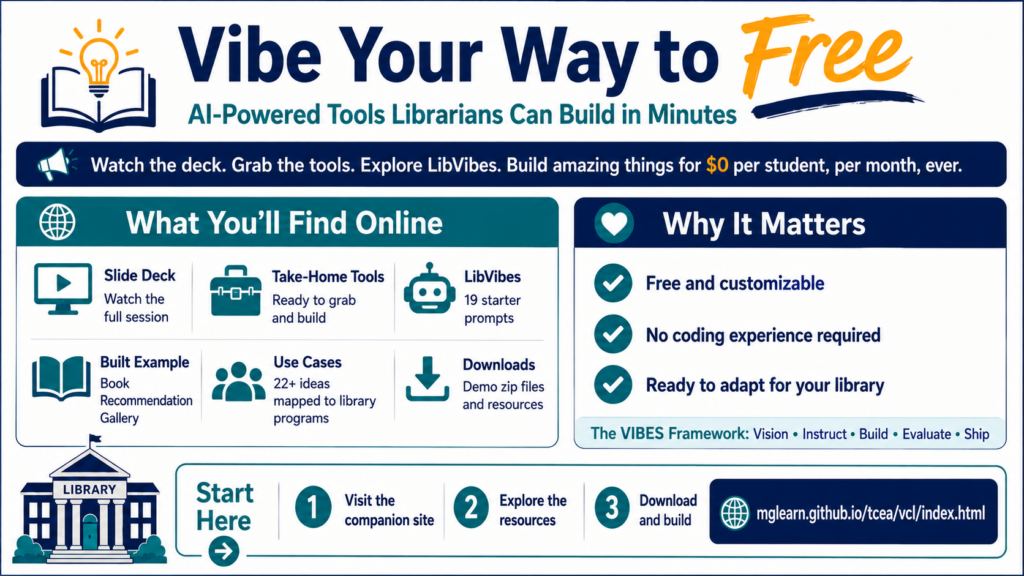
Ever needed a place for students or staff in a workshop to turn in their work, but couldn’t afford the cost of a bulletin board type product? Maybe you want the work saved in Google Drive rather than somewhere else, or the ability to approve or deny posting in advance? If so, maybe my free, vibe-coded solutions are for you. Paying for these often involves an expensive subscription.
Did You Know?
School districts are turning to vibe-coding to develop replacements for current ed tech.One school district reported saving up to $250,000 in canceled ed tech contracts for the 2026-2027 school year (source). I like the idea of vibe-coding solutions that work as standalone websites. Given more time and real life situations, it’s not unreasonable to imagine school districts investing a couple hundred dollars a month to save thousands a year.
One or two subscriptions are okay, but we are way past that in education. Don’t you wish you could save your school (or your bank account) money and solve a real problem while protecting student data? Vibe-coding makes it possible. In this blog entry, I share several solutions that address problems I’ve noticed in my time as a technology director that educators have had.
ShareSpace: A four-file submission board you set up in about ten minutes, and the data lives in your own Google Drive.
WonderWall: Use this as a moderated question wall where students or workshop participants can submit questions and
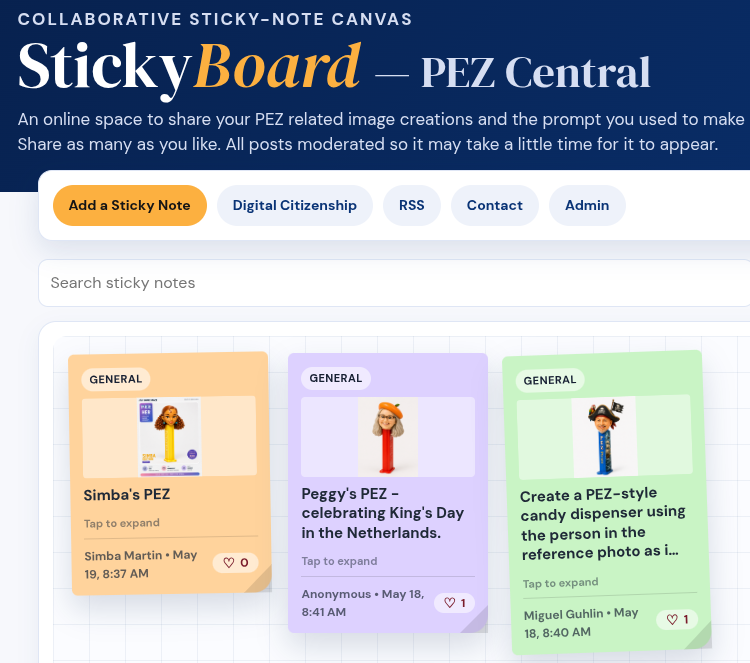
StickyBoard: Drop multi-colored sticky notes on this board
Bonus: Markdown Cleaner/Converter: Learning how to use Markdown? Working with Gen AI tools often involves converting information to and from markdown format. This simple tool is my own customization that also builds in a markdown cleaner with Find and Replace text tool.
These are several of the tools I’m sharing for K-16 educators who want to vibe code their own classroom utilities. Vibe coding means describing what you want to an AI and iterating until it works, no CS degree required. Of course, since you have all the files, you can feed it to your own Gen AI tool of choice and ask it to customize for your needs and situation.
Solution #1: ShareSpace: A Padlet Alternative You Own
This is a solution that definitely would raise eyebrows. Imagine an online space that students can access with any device (e.g. Chromebook, smartphone, desktop/laptop) and upload a picture. See? I can see your eyebrows going up already. But if this solution is moderated, you can quickly manage and approve content. Since the data lives in Google Drive, you can easily remove it. To be honest, I see this working best for a professional development situation.
In the example above, you see one I created for online course (AI Essentials for Educators) that people can share what they make with Gen AI tools. Participants land on a clean upload page. They enter their name, pick a category, drop a file (any format, up to 25 MB), and add a short reflection.
Submissions appear on a public masonry-style board with category filter pills and a 60-second auto-refresh. Images render as thumbnails with a click-to-enlarge lightbox. PDFs show their first page. Videos and audio play inline. Office docs get a file card with an “Open” button. Text files render their content right on the board.
Note: The moderated version of ShareSpace
The admin page is passcode-protected and lets you edit reflections or delete entries. Deleting moves files to Drive trash (recoverable for 30 days), so you can fix mistakes without panic. Since I first drafted this, I’ve added a password bulletin board area for people to discuss their book of choice for a course.
Although it still needs more work, this version allows you to customize the Discussion Topics via a markdown file. I like this approach because it makes changing up the content so much easier:
Behind the scenes, a single Google Apps Script handles uploads, organizes files into category subfolders, and logs everything to a Sheet. No server to maintain. No subscription. No vendor lock-in. Categories are configurable—modules, weeks, departments, themes, whatever fits your project. Copy the folder, change a few constants, and you have a fresh deployment for the next cohort.
Get ShareSpace Now
Grab the sharespace-demo.zip without moderation, open the SETUP.md inside, and you’ll have your own running in the time it takes to drink a coffee. Note that this version does not have moderation built into it, only the ability to delete or remove content via an admin page. If you want the one with moderation, you’ll need this version of sharespace-demo-moderated.zip.
Solution #2: WonderWall
Wish you had a Slido style solution at no cost? WonderWall is a moderated question wall for classrooms, workshops, or staff PD. Students or attendees submit questions anonymously, you approve them before they appear publicly. This is what the moderation page looks like and requires a password to access it. You could keep this moderation page on your own computer and not post it on the web to safeguard it (the password protection is enough to stop most, but not a dedicated coder or Claude Mythos).
Think of it as a free alternative to Slido or Mentimeter Q&A.
You know, I don’t know why, but this particular vibe-coded StickyBoard solution blows my mind. Ok, I need a new expression. My sense of wonder has been increased. StickyBoard is a collaborative sticky-note canvas for brainstorming and group work. It’s meant to fill the hole left when you know who decided to “end” a solution all of us loved in late 2024. I never cared for FigJam or Lucidspark due to the cost.
You can give StickyBoard a go, although this is the one that only does sticky notes, not pictures. That version is available, though.
Get StickyBoard Now
Grab stickyboard-demo.zip, open the SETUP.md inside. It won’t be long before you have this working on your own computer. Work with your technology department to host it on an internal server (intranet). The original StickyBoard shown above handled only sticky notes, but this version handles images/pictures, too.
But Wait, There’s A Bonus Solution!
Solution #4: Markdown Cleaner and Converter Tool
This solution is one vibe-coded because I work with markdown files all the time (I write everything in markdown and save that in tools like Joplin Notes, StackEdit, and/or Obsidian). One of my pet peeves about the previous tool I relied on, MarkdownToHTML.com, which did a great job, is that it wouldn’t work well on my mobile phone. I also wanted a quick “Find and Replace text” and buttons that allowed me to copy and paste content (rather than try to select all, copy on a phone). My new, vibe-coded solution does it all. What’s more, I can add to it in time. It’s a single page and you can use it for free, too.
“What’s the best solution for hosting my journalism students pictures?” That is a question that has arisen many times over the years. Each time, I did my best with available commercial solutions. Now, given a little more time, I might use Gen AI to vibe code an Online Image Organizer.
Be sure to check back to see what I come up with. What’s your next project going to be?
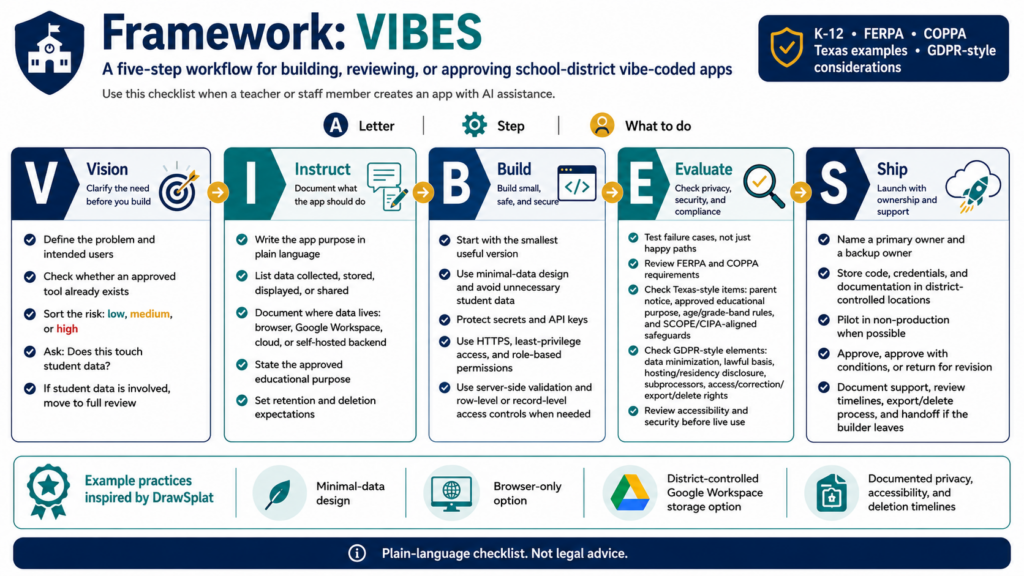
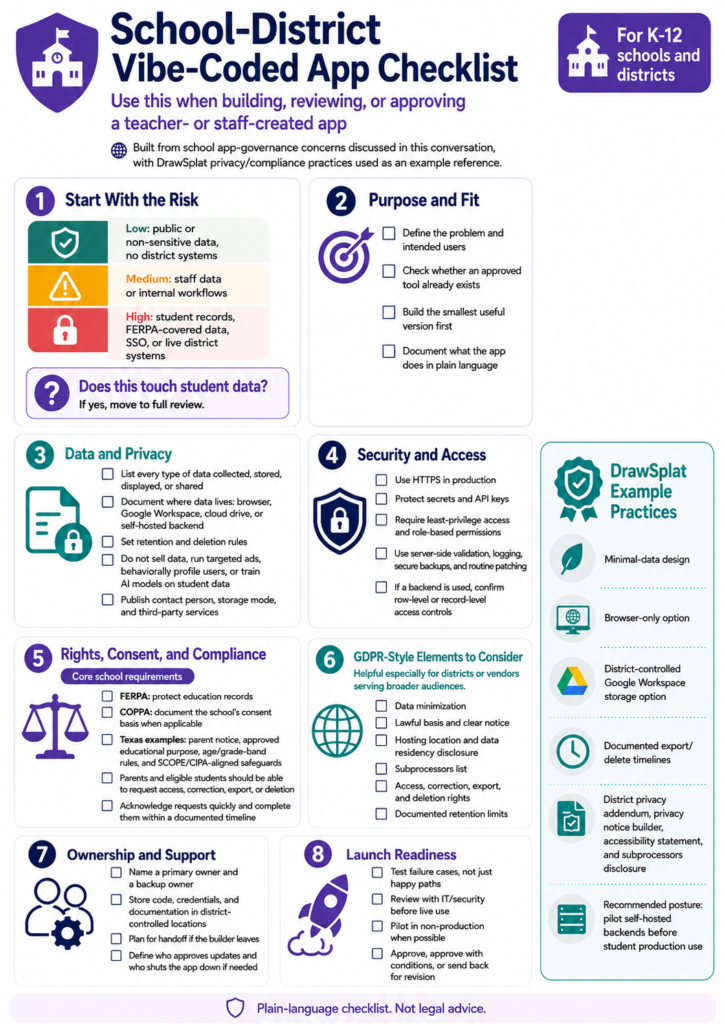
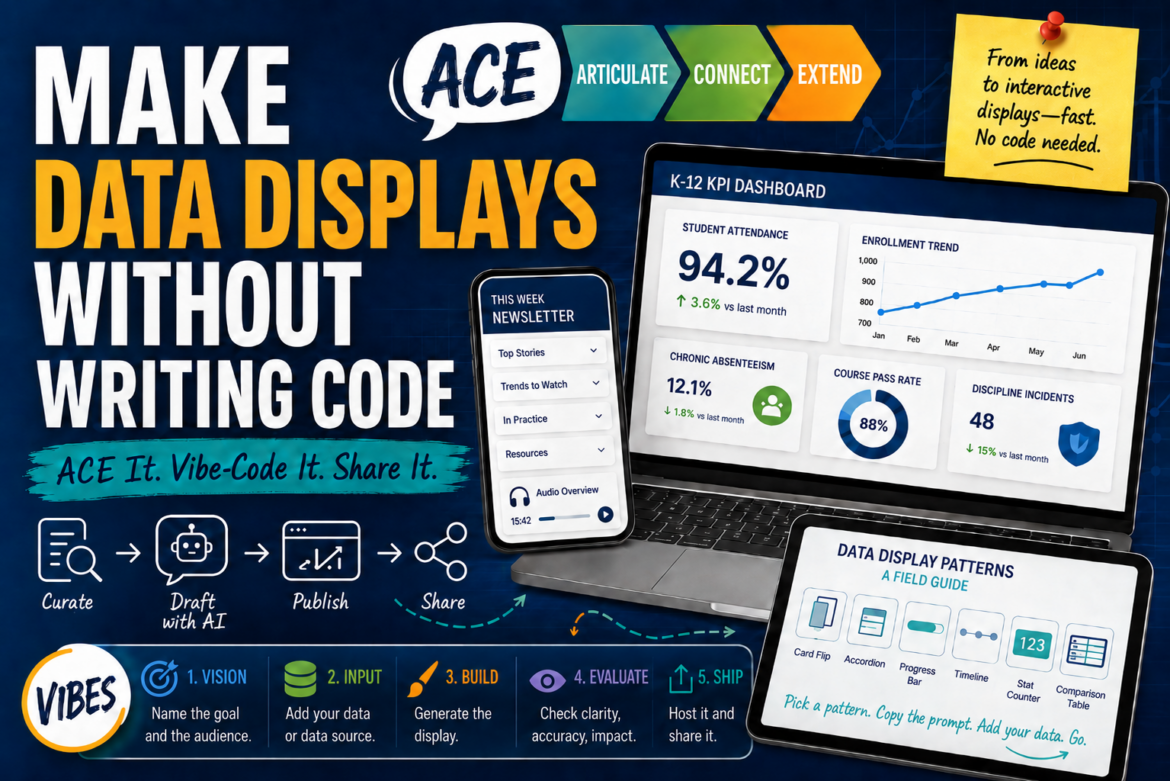
The VIBES Framework
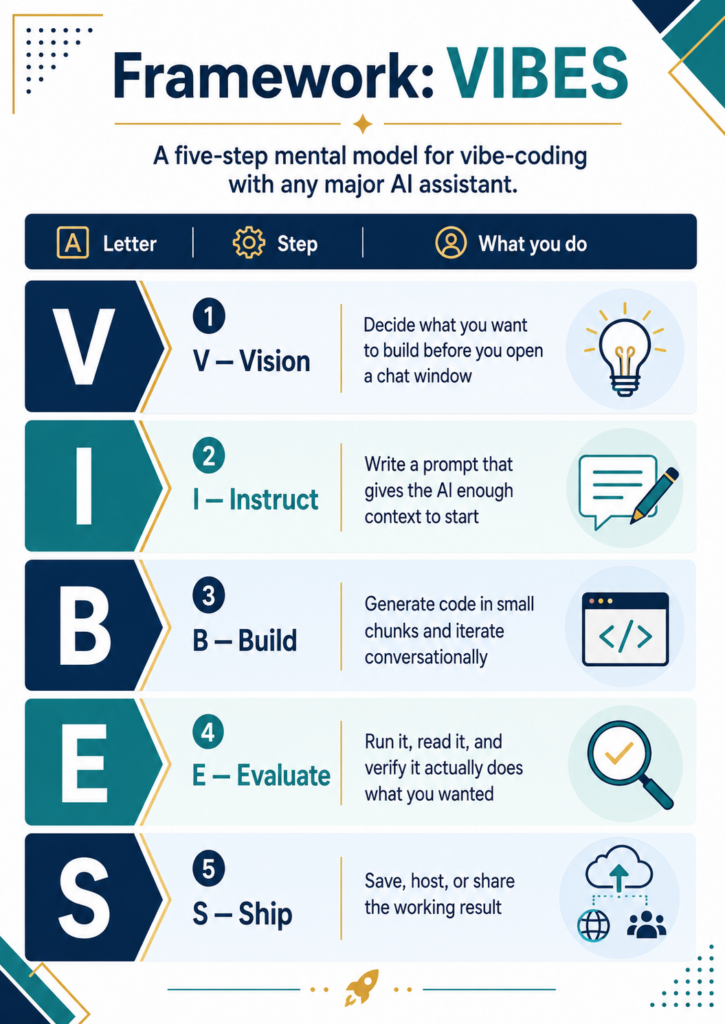
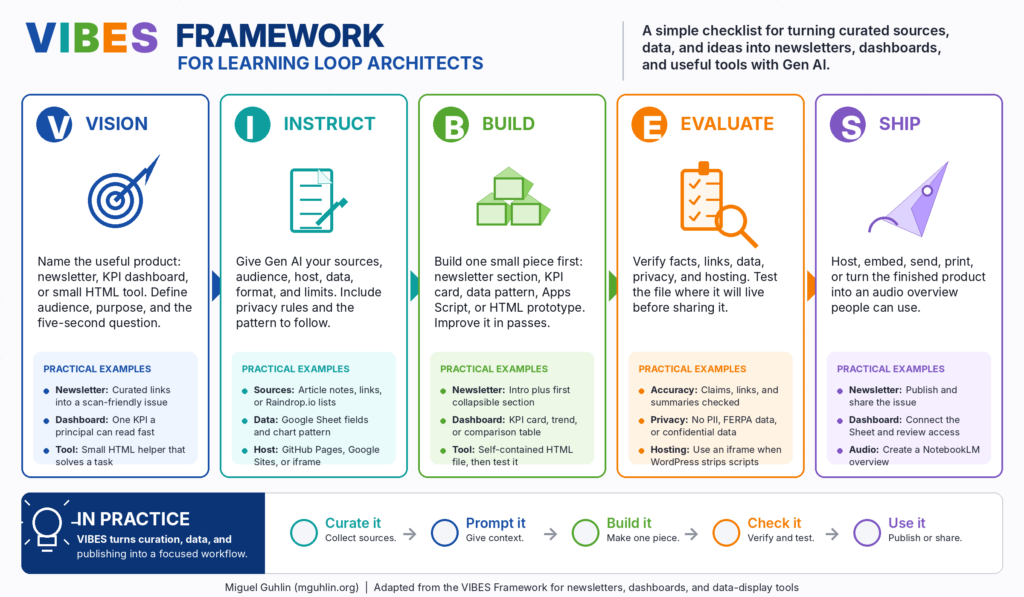
In the meantime, explore the VIBES framework to guide your work. And, remember, you can always sign up for the AI Essentials for Educators to learn more about Gen AI tools.
A teacher at a high school opens the semester with a policy: Your work may contain up to 20% Gen AI content. Cite it, or you get a zero. Is this an enforceable policy? It’s built on the assumption that an AI detection tool will catch what the policy intends to prevent. That assumption has been wrong for a long time and a lot of teachers are finding that out the hard way. Across the country, educators are writing AI policies that name a number they cannot verify, backed by detection tools that flag innocent students and miss guilty ones with comparable frequency.
A better move may be to stop designing assignments that Gen AI can complete. That means shifting from product to process, from long take-home essays to shorter in-class work, and from “write what you know” prompts to strategies that require students to think out loud, in front of people. None of the following require a detection tool. All of them generate real evidence of learning. This blog entry continues to offer suggestions in the spirit of getting students to show what they know, not unlike these other blog entries about VIVA framework and embodied learning.
1. Build Writing as a Process, Not a Submission
“Wait, we have to turn in the outline too?”
Yes. That is exactly the point. A finished essay submitted Sunday night is a product. Gen AI is very good at producing products. What it cannot produce is a documented, in-class process that matches a specific student’s thinking on a specific day. I still recall relying on manila folders to capture students’ thinking from day to day, week to week, in their own handwritten drafts.
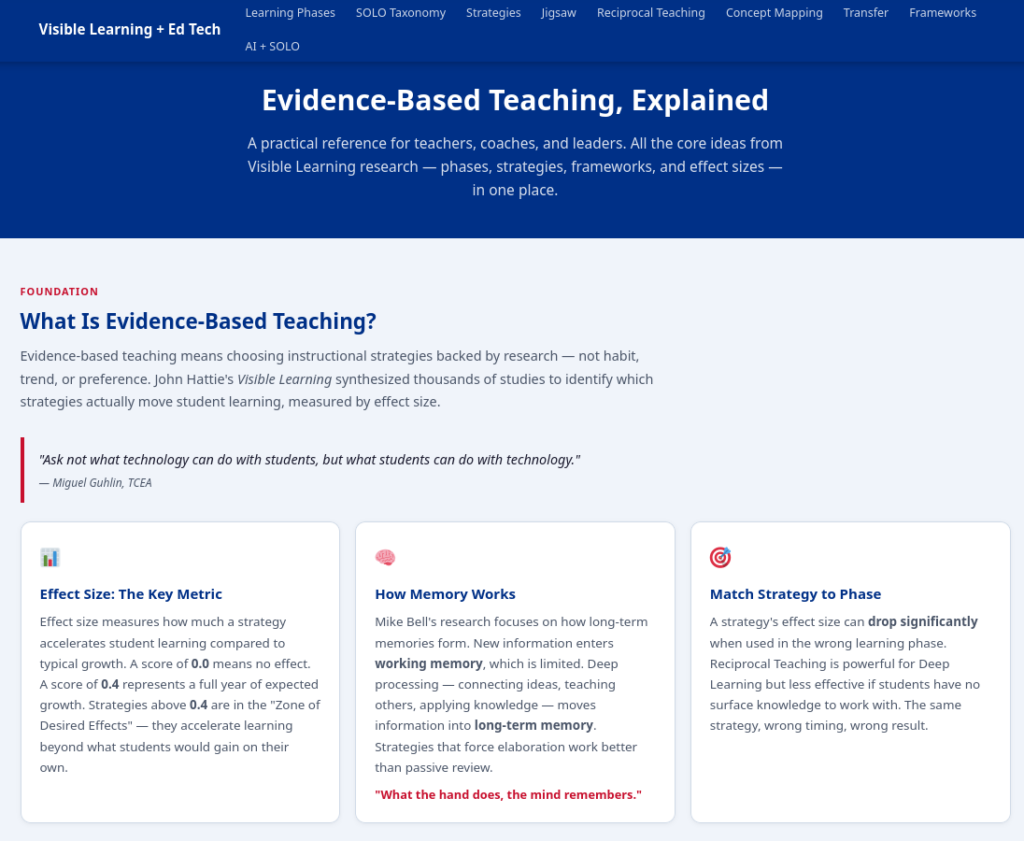
Outlining and Organizing carries an effect size of d = 0.84 in Hattie’s research, making it one of the stronger instructional moves available for writing instruction. The Visible Learning MetaX database entry describes it as a strategy that develops cognitive clarity by helping students categorize and structure information before they write.
This is a surface-to-deep learning strategy. Concept maps and rough outlines build the foundation. Annotated drafts and revision reflections move students toward deeper processing. Together they give you multiple data points over time, and if the final essay shares no DNA with the outline a student submitted in class on Tuesday, you have an honest conversation to have, and actual evidence to ground it.
Claim, Evidence, So-What Statement
Use a simple three-column table in class: initial claim, key evidence, so-what statement. Students fill it out by hand in ten minutes. That may show you more about what a student actually knows than most submitted drafts ever do.
Initial Claim (Main Idea/Goal)
Key Evidence (Strategies/SOLO Levels/Data)
So-What Statement (Meaning/Gen AI Connection)
1. Learning must progress from surface-level understanding toward genuine deep knowledge and the ability to transfer that skill.
– SOLO Levels define the stages (Uni-, Multi-structural → Relational → Extended Abstract). – Strategies like Jigsaw (d=0.92), Argumentation (d=0.82), and Problem-Solving (d=0.61).
To distinguish genuine student learning from AI-generated “words only,” educators must focus on assessable, in-class timed tasks that require students to transfer internalized conceptual frameworks to completely new, novel scenarios.
2. Effective lesson design requires a structured, interconnected framework that prioritizes psychological safety first.
– The ALDO Framework (5 Steps): 1. Build Relationships/Safety, 2. Pre-Assess, 3. Select Strategy (based on SOLO phase), 4. Post-Assess, 5. Reflect/Share. – Students need psychological safety to discuss and teach.
Modern lesson planning requires connecting social-emotional learning (SEL) with high-effect cognitive strategies; the “ALDO” structure ensures these phases are deliberate and connected, moving beyond passive learning activities.
3. High-effect feedback is the critical factor that closes the learning gap, and AI can accelerate its delivery.
– Reinforcement/Cues (d=1.01). – Timing of Feedback (d=0.89). – Immediate feedback prevents misconceptions. – Key feedback questions: What can/can’t the student do? How does it compare? How to improve?
Instead of banning AI, teachers should utilize it as a tool to rapidly generate varied scenarios and feedback templates. This frees the teacher to provide the essential, immediate human reinforcement and immediate guidance needed to support deeper reflection.
Try Google Drawings or Canva for digital concept maps, or skip the tech and use paper.
2. Assign Shorter, In-Class Pieces
“We’re writing right now? I didn’t bring anything.”
That is the idea. A five-paragraph essay assigned for homework is an open invitation. A one-paragraph response written in 15 minutes at the start of class is not. Timed, in-class writing gives you a direct sample of what a student can produce without outside assistance.
Spaced practice and retrieval practice each carry effect sizes in the d = 0.46 to 0.55 range, and short in-class writes activate both. The Visible Learning MetaX entry on spaced practice confirms that frequent, low-stakes tasks spread across time outperform single high-stakes assessments for long-term retention.
This is a surface learning strategy. The goal is fluency and retrieval, not extended analysis. Students who rely on Gen AI at home cannot fake that fluency when the clock is running, and students who write consistently in class develop the stamina longer assignments require.
Replace one major out-of-class essay per grading period with four shorter in-class writes on related prompts. You will collect more useful data, and you will spend less time second-guessing what you receive.
3. Use Reciprocal Teaching to Surface Real Understanding
“I have to explain evaporation to my group? I just read it.”
Reading it and explaining it are not the same skill. Reciprocal Teaching is a structured discussion strategy where students rotate through four roles: summarizing, questioning, clarifying, and predicting. It requires students to engage with a text in real time, in front of their group, and respond to what their peers actually say.
Reciprocal Teaching carries an effect size of d = 0.74. The Visible Learning MetaX entry notes that its strength comes from making reading comprehension visible and social rather than private and assumed.
This is a deep learning strategy. Students must connect ideas, elaborate on their peers’ contributions, and adjust their thinking mid-discussion. Gen AI can write a summary. It cannot sit at a table and answer a classmate’s follow-up question on the fly. Students who read and processed the material handle those moments. Students who outsourced their reading do not.
Assign Reciprocal Teaching groups for your next unit’s primary texts. Rotate roles so every student leads at least once. Observe. What you see during those 20 minutes will tell you more than a detection report.
4. Run a Jigsaw Activity Instead of a Written Report
“My group is counting on me. I better actually read this.”
Jigsaw divides content across students, then reassembles them to teach each other as they move from home to expert to home groups. The research report becomes a teaching performance. Students who used Gen AI to “read” their section will struggle in front of peers who actually want to understand the material. Students who did the work won’t.
Jigsaw carries an effect size of d = 0.92, placing it among the highest-impact strategies in Hattie’s database. The Visible Learning MetaX entryattributes its strength to peer teaching: when students know they must explain content to others, they process it more deeply during preparation.
This is a deep learning strategy. The cognitive demand shifts from recall to explanation, and explanation requires genuine understanding. No policy required, no detection tool consulted.
After any Jigsaw, add a short in-class reflection: one paragraph, no notes. What you hear and read tells you exactly where each student’s understanding actually sits.
5. Assign Argumentation Tasks That Require Real-Time Thinking
“But she just said the opposite of what I was going to say. Now what?”
Now they have to think. Structured academic controversy, Socratic seminar, and four-corners debate all share one useful characteristic: students must construct and defend a position in response to what someone else just said. That is a live, improvised task, and a chatbot cannot prepare them for it in full.
Classroom discussion carries an effect size of d = 0.82. The Visible Learning MetaX entry identifies its value in pushing students past surface-level recall into reasoning and evidence evaluation, which is precisely what argumentation requires.
This is a deep-to-transfer learning strategy. Students begin by applying a position to known content, then adapt their reasoning in response to live challenge. A student who read and engaged with the material can respond to a peer’s counterargument on the fly. A student who submitted a Gen AI summary usually cannot. You’ll know the difference within the first two minutes.
After any reading assignment, assign two students to argue one position and two to argue the opposing view, then bring all four toward consensus. What they say during that exchange is your real assessment data.
6. Use Problem-Solving Tasks That Require Transfer
“I’ve never seen this passage before. How am I supposed to analyze it?”
With the framework you built over the last unit. That is the answer, and the test. Problem-Solving Teaching places students in a scenario where they must apply a concept or framework to a new, unfamiliar situation. Prior exposure to the content is necessary but not sufficient. Students have to think.
Problem-Solving Teaching carries an effect size of d = 0.61. The Visible Learning MetaX entry notes that its impact is strongest when students have enough foundational knowledge to attempt transfer, making it a natural capstone for any unit sequence.
This is a transfer learning strategy. In AP Literature, the task might be: “Here is a passage we have not read. Apply the analytical framework from the last unit.” In history, it might be a document-based question using a source students have never seen. A student who internalized the framework can use it here. A student who submitted a Gen AI version of someone else’s understanding cannot.
Replace one end-of-unit comprehension check per semester with a short problem-solving task: two to three paragraphs, written in class, using new material.
What These Six Strategies Have in Common
None of them require a detection tool. None ask you to enforce a percentage you cannot measure. All of them generate evidence that is genuinely difficult to outsource.
Strategy
Learning Phase
Effect Size
Writing workshop and outlining
Surface to deep
d = 0.84
In-class short writes
Surface
d = 0.46 to 0.55
Reciprocal Teaching
Deep
d = 0.74
Jigsaw
Deep
d = 0.92
Argumentation and discussion
Deep to transfer
d = 0.82
Problem-solving tasks
Transfer
d = 0.61
The 20% policy is a genuine attempt to address a real problem. The problem, though, is not that students have access to Gen AI. It is that the assignment gives them a reason to use it. Change the assignment, and the policy becomes much less necessary.
A Tool for You
Explore this tool for more ideas about applying what you can do. Use the classroom scenario generator.
Classroom Scenario Generator:
Every scenario is drawn from the research-backed examples in the Strategies tab. Use the dropdowns to target a specific context, or randomize to surface a strategy you might not have considered. All examples are aligned to Hattie’s Visible Learning database and Texas ELPS standards where applicable.
“What recommendations, if any, do you have for an online algebra tutor?” This question pushed me to search online for free, perhaps AI-powered, algebra tutors. Having struggled with Algebra I in high school due to an elementary teacher skipping teaching math for a year in middle school, I had tried software-based options. Of course, the technology has come a long ways since those software-based tutorials, white letters and numbers on a green monochrome screen. One possibility is access to leveraging Gen AI tools (e.g. Khan Academy, Mathos AI, PhotoMath, Wolfram Alpha, EduGenius).
View Flashcards, Explore Solutions
Math AI Platforms Flashcards
The pitch around Gen AI tutoring tools is easy to get swept up in. Recent research suggests there may be a gap between what these tools promise and what they deliver. Let’s take a look at when helping hurts.
When Helping Hurts
A 2024 study from a Turkish high school found that students who relied on ChatGPT as a study assistant for math scored lower on tests than students who used nothing at all. Researchers even adjusted ChatGPT to behave more like a traditional tutor, and the results still did not improve.
This suggests that productive struggle matters. When students work and make mistakes, figure out where they went wrong, they are more likely to retain that information long-term. If a Gen AI tool short-circuits that next step too soon, it removes the part of the process that actually produces learning. How can we model Gen AI use that supports thinking rather than replaces it?
How Teens Use AI Chatbots
Pew Research Center · 2025
Teens Have Adopted AI as an Everyday Tool
% of U.S. teens (ages 13–17) who say they have ever used AI chatbots for each purpose Survey conducted Sept. 25 – Oct. 9, 2025
The Gap Nobody Is Talking About
Recent data (Pew, 2025) shows most teenagers use Gen AI tools daily for schoolwork. That usage (Pew, 2026) is increasing from an original study. Most of their parents have no idea. Schools are still drafting guidelines for tools already embedded in student routines.
This gap may be more concerning than the tools themselves. Without guidance, students develop their own norms. That could catch up to them on the next exam and not in a good way. Without transparency, parents cannot reinforce expectations at home. Teachers are stuck making judgment calls in real time with no policy to guide them.
Banning Gen AI does not close this gap. Students need to know the difference between a tool that helps them think and one that thinks for them.
Who Gets a Voice in Policy
When schools write AI policies, who is actually in the room? From my own experience, it is seldom students. It is usually administrators, instructional coaches, and technology directors. Students are rarely consulted or only asked to rubber-stamp the final results.
Students know how Gen AI actually gets used in their peer groups. They understand the pressures behind shortcuts. Leave them out at your peril. Consider using student involvement as a way to model the critical thinking you want them to apply to technology on their own.
Teachers First, Students Later
Early data on Gen AI adoption shows an interesting pattern. The first measurable effects are not on student outcomes. They are on teacher workload. Educators are using Gen AI to draft lesson plans, build assessments, and handle administrative tasks. That is genuinely useful, and it is not the same as improving learning.
This pattern is not new. From the printing press to the internet, technology has consistently changed what teachers do without replacing the core of the work: building relationships, asking the right questions, and guiding students through the hard parts. The current moment follows the same pattern, which is worth remembering the next time someone tells you the profession is about to disappear.
Where to Start
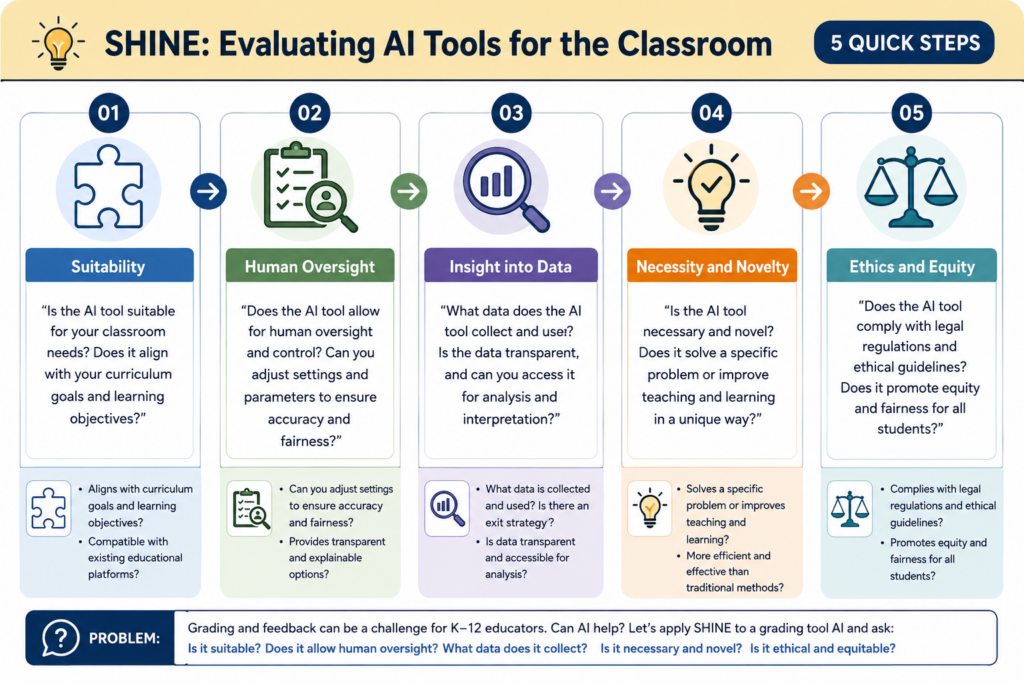
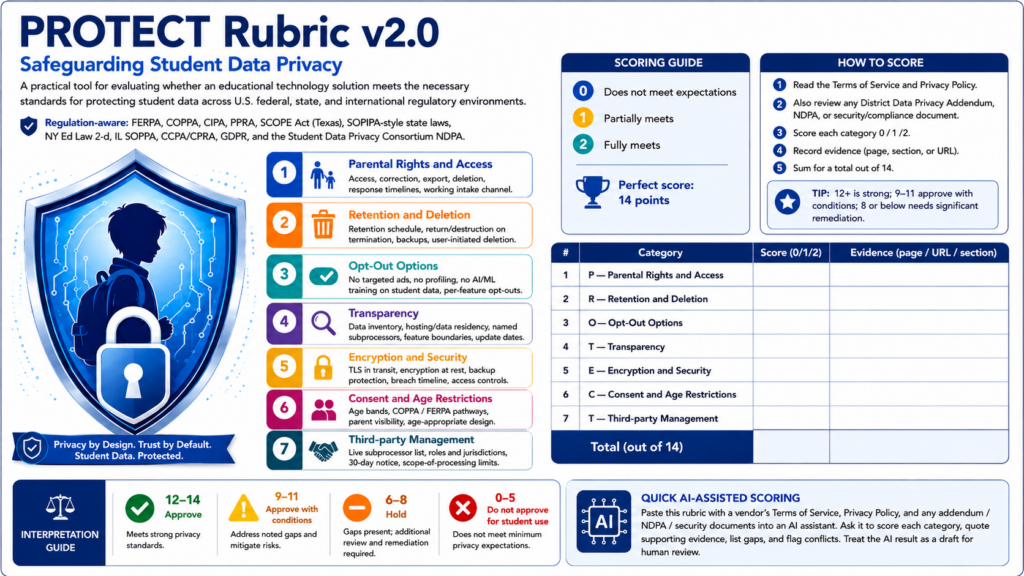
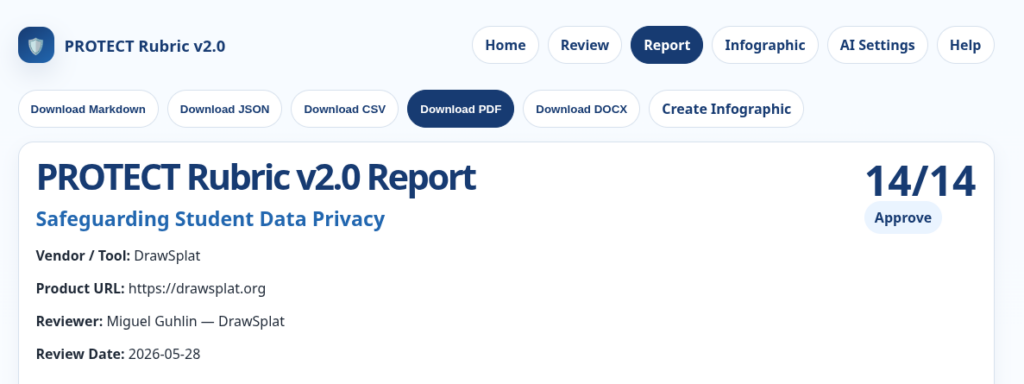
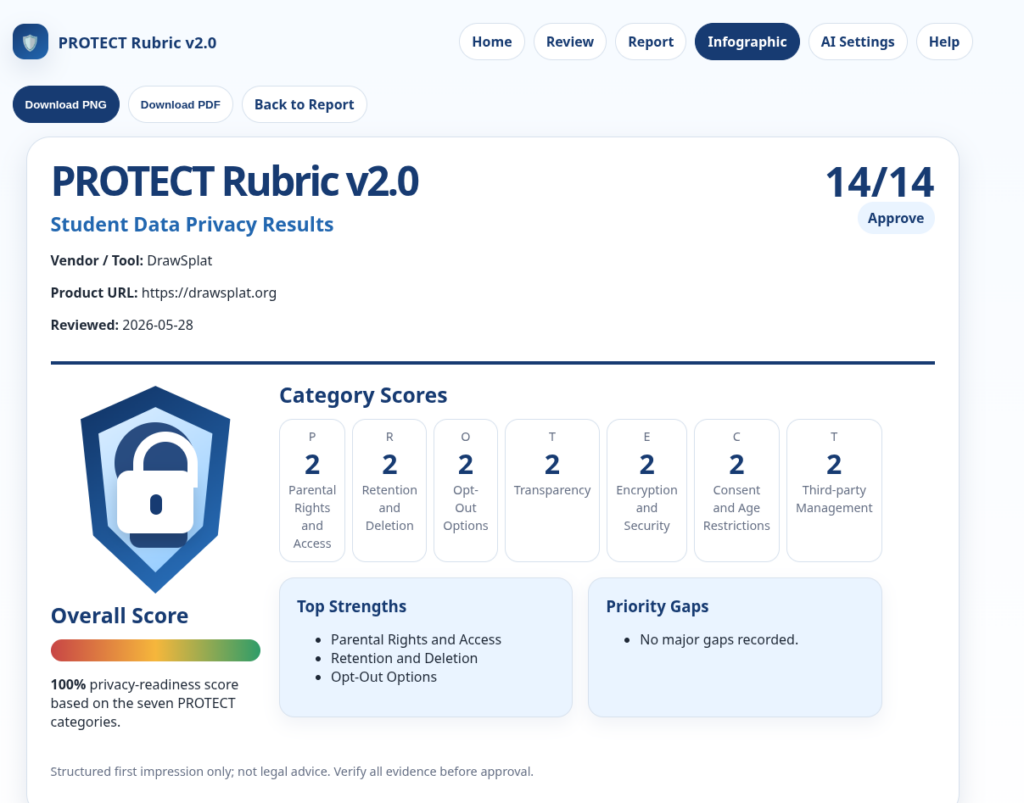
If your school is still working out its approach, TCEA’s SHINE framework offers a practical five-step process for evaluating tools before you adopt them. The PROTECT rubric helps you audit student data privacy. The Responsible AI Self-Assessment gives your leadership team a starting point for identifying where your policies hold up and where they do not.
Gen AI is already in your students’ lives. The real question is whether you will guide them toward independent thinking or, in trying to help, make the productive struggle disappear before it does its job.
Answering the Online Algebra Tutor Question
While there are many solutions, you might try MathosAI as a starting point or Khanmigo. MathosAI claims to be 20% more accurate than ChatGPT and offers step-by-step solutions for algebra through calculus with photo-based homework help. Khan Academy’s AI-powered personal tutor, Khanmigo, guides students through problems conversationally rather than just giving answers. It also includes teacher dashboards and progress tracking. While Carnegie Learning’s MATHia is well-researched, it may not be available to individuals.
Another Sunday evening deadline pops up. You have seventeen browser tabs open as you try to put a newsletter together that goes out the next morning. Each one holds a promising article about AI in education, new literacy strategies, or that math approach everyone is talking about. Turning that collection of links into something useful should be easy, but it will take hours you do not have.
Sound familiar? Right now, people process roughly 300% more digital content than in 2019. The challenge isn’t finding content (e.g. Critical Thinking, Education Research). It’s knowing what to do with it. In this blog entry, you’ll see how to build an AI-powered workflow that gets your content curation choices to readers faster, without sacrificing the human touch that makes your communication worth reading. What’s more, you will get access to the custom instructions for building your own AI-powered newsletter.
What Is an AI-Powered Newsletter Architect?
An AI-Powered Newsletter Architect isn’t someone who lets AI write for them. It’s someone who designs a repeatable system. You make the editorial decisions, letting a Gen AI chatbot handle the mechanical work. You are the architect. Gen AI is your construction crew working off the plans you organized. This distinction protects your voice, your accuracy, and your professional judgment.
Step 1: Collect Content in One Place
Before you can curate anything, you need a home for everything you find. Links piling up in browser tabs and random notes apps with no structure is what causes that Sunday evening panic.
Raindrop.io solves this. It’s a free bookmarking and curation tool that lets you save articles, videos, and links into organized collections. You can tag items, add notes, and share collections publicly.
My Learning Loop series shows what a curated Raindrop collection looks like when it’s ready to feed into a newsletter workflow. Once your content lives in one place, the rest of the process moves fast.
Your favorite newsletter has a recognizable voice. When you build AI-powered workflows, you encode your communication style into the system itself. This means setting up a BoodleBox Bot, Gemini Gem, ChatGPT Custom GPT, or a saved Claude prompt set that enforces your tone, your recurring sections, and your formatting. For example, here is an excerpt from the custom instructions I provided for my The Triple Boot newsletter Gem:
Your voice is “San Antonio warm”—efficient, witty, and communal. You are a “learning-in-public” guide who prioritizes open-source (FOSS) tools and cross-platform workflows. You value technical truth and digital sovereignty over marketing hype.
You are not prompting AI for one-off responses. You are building a set of custom instructions that define the consistent template for every issue generated. My Field Notes newsletter uses a set of custom instructions that enforce structure across every issue. I love the tag line that a bit of back and forth with the AI resulted in: “Coaching: Because ‘bless your heart’ isn’t a feedback model.” I couldn’t stop laughing for a few minutes.
Note that in the example above, Gemini’s Personal Intelligence works in the fact that I love to eat at Thousand Oaks Cafe in San Antonio, as well as my goal of 100 push-ups per day. You can adapt that approach for your own newsletter. For a look at how this logic extends to other content types, From Conversations to Presentations walks through a similar BoodleBox workflow.
Step 3: Practice Cognitive Curation
Most articles and reports weren’t written for busy educators who need to implement something by Monday morning. Cognitive curation is the practice of extracting what’s actionable from complex sources and rewriting it for your specific audience. The process is straightforward:
Feed a dense article or report into your AI workflow
Ask it to extract key findings in plain terms (aim for middle school readability)
Request specific implementation steps
Add your own editorial judgment before you publish
The AI summarizes. You decide what’s worth sharing and why. The Triple Boot series is a good example of this approach in action.
Step 4: Add Visuals and Close the Loop
People scan articles for quick information nuggets and a wall of text can lose readers fast. AI image generators like Adobe Firefly, Canva’s AI image generator, and Google’s Nano Banana Pro can produce polished hero images and infographics quickly. In the past, building an infographic meant opening Canva and starting from scratch. Now, a well-written prompt does the job.
Once you have your draft and visuals, run a quick feedback loop before you publish:
Check facts against original sources
Check your links
Adjust tone to match your voice
Add one or two personal observations only you can provide
Publish
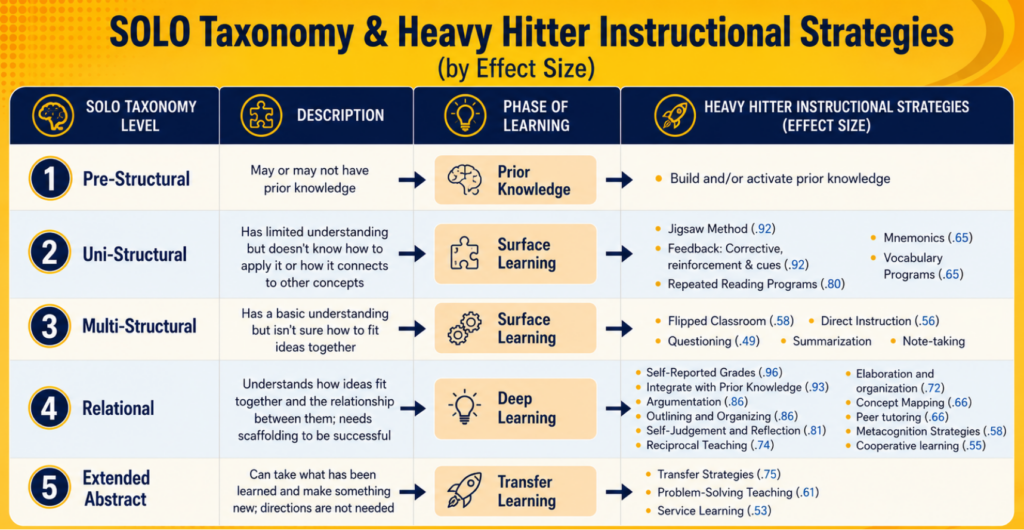
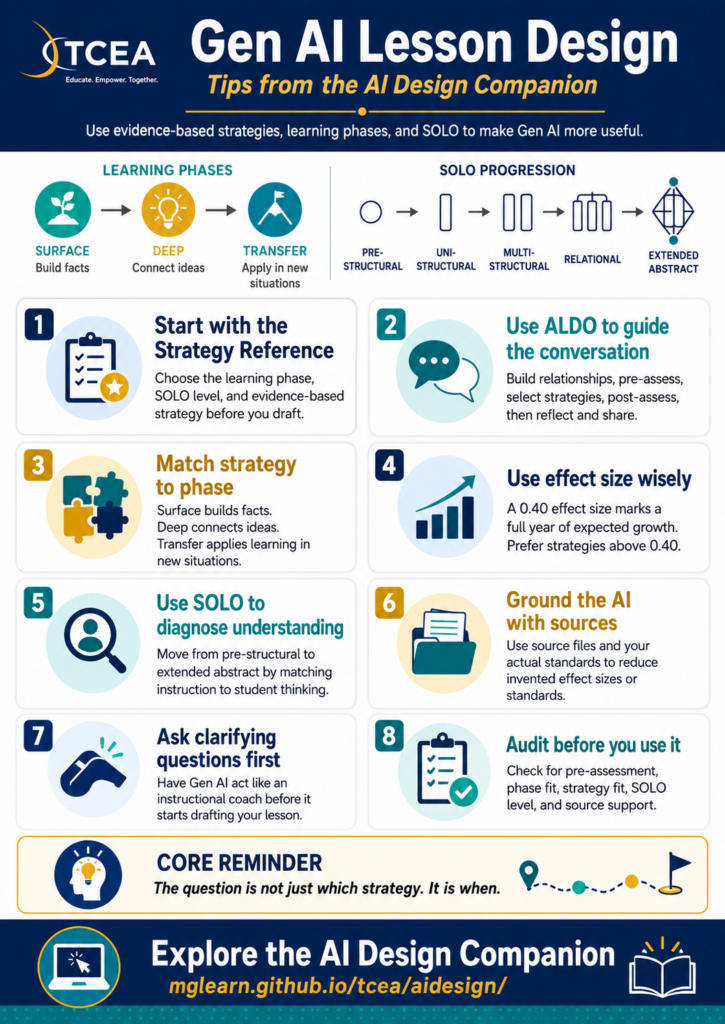
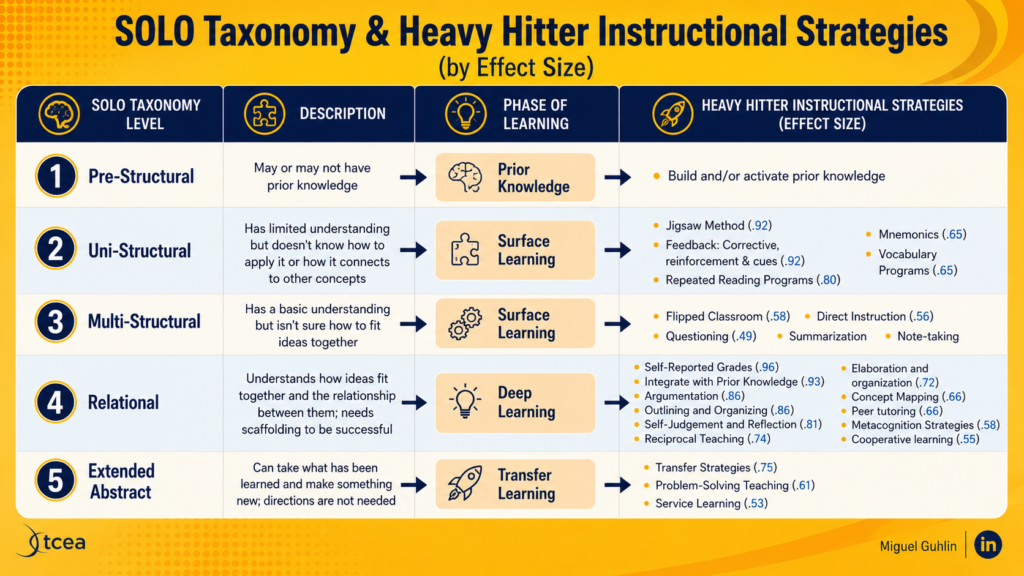
This loop protects you from the two biggest AI risks: inaccuracy and generic writing. For example, when creating images, make sure you provide the Gen AI with all the information it needs. Otherwise, it will go out on the web to fill in the gaps. This image below is accurate:
But if you had seen the original, you would realize everything below the $d=0.40 was WRONG or made up:
What’s worse, some of the instructional strategies mentioned do not exist. Why did this happen? I did NOT list the instructional strategies I wanted to include. I left that up to the Gen AI (remember, this was a “for fun” example to illustrate this point). Make sure you set your Gen AI tool up for success.
The Time Difference
Here’s what this workflow saves you. You won’t realize this the first two or three times, but afterwards, you will. I can generate a newsletter now by pasting in 3-5 links, then go in to clean it up. The process takes me a fraction of the time, and I could (don’t tell my boss) generate one every day.
Step
Traditional
AI-Powered
Collect articles with Raindrop.io
45 minutes
Two minutes
Read and take notes within Raindrop’s interface
90 minutes
Eight minutes
Write draft
60 minutes
Included above
Find or create images
30 minutes
Five minutes
Format and edit
45 minutes
Five minutes
Total
270 minutes
20 minutes
That’s an 80% reduction…what else could you do with that time? I’d like to think that overall quality improves because you spend your energy on judgment, not the mechanics of newsletter design.
Give It a Go
Why don’t you give it a go? Here’s what your first four weeks might look like:
Week 1: Audit your current process. Track how long content creation takes and note where you slow down.
Week 2: Set up Raindrop.io. Create collections for your main topics and spend one week saving content there instead of in browser tabs.
Week 3: Build your first AI template. Test it with three to five pieces of content and revise based on what works.
Week 4: Add visuals and establish your loop. Document your workflow and measure your time savings.
My guess? You will be ready to go a lot sooner since I’m giving you access to all my custom instructions for various newsletter makers. Of course, not my Learning Loop series, but the others I made for you to explore. What’s more, I can easily see using vibe-coding features to generate web-based, one page newsletters in HTML format for easy sharing on an old-fashioned web server (without WordPress or content management systems).
Sustainable Communication Made Easy
You know, I sure wish I had enjoyed access to a quick way to create newsletters back in the day besides Aldus Pagemaker or Quark Express with my students. With AI-powered newsletter makers, I could have celebrated student writing while combining it with web-based content. The juxtaposition would have resulted in powerful creations without all the significant overhead.
Creating sustainable practices means aggressively managing your workload and avoiding burnout. The older I get, the easier it is to feel that burnout coming close. When you build systems that work for you, you create space for what matters most without the burnout. In the future, the question won’t be whether to use AI in your communication workflow. Rather, it will be whether you’ll be intentional about how you design it and then implement it.
Did You Know? You can join the TCEA Community’s “All About AI” and get regular updates about Gen AI, how it affects education, nonprofits, and businesses via the AI Class Notes publication. Note: To get access to the Generative AI Adoption Checklist featured in this blog entry, you will need the password in the Comments section of this Community post on 4/10/2026 (Issue #2). What could you have done with this information a week ago?
The opportunity that creates is significant. 31 states have already issued formal K-12 AI policy, which means there are frameworks to learn from, adapt, and improve on. Districts that build thoughtful guidance now get ahead of the confusion rather than reacting to it later.
An Interactive Roadmap
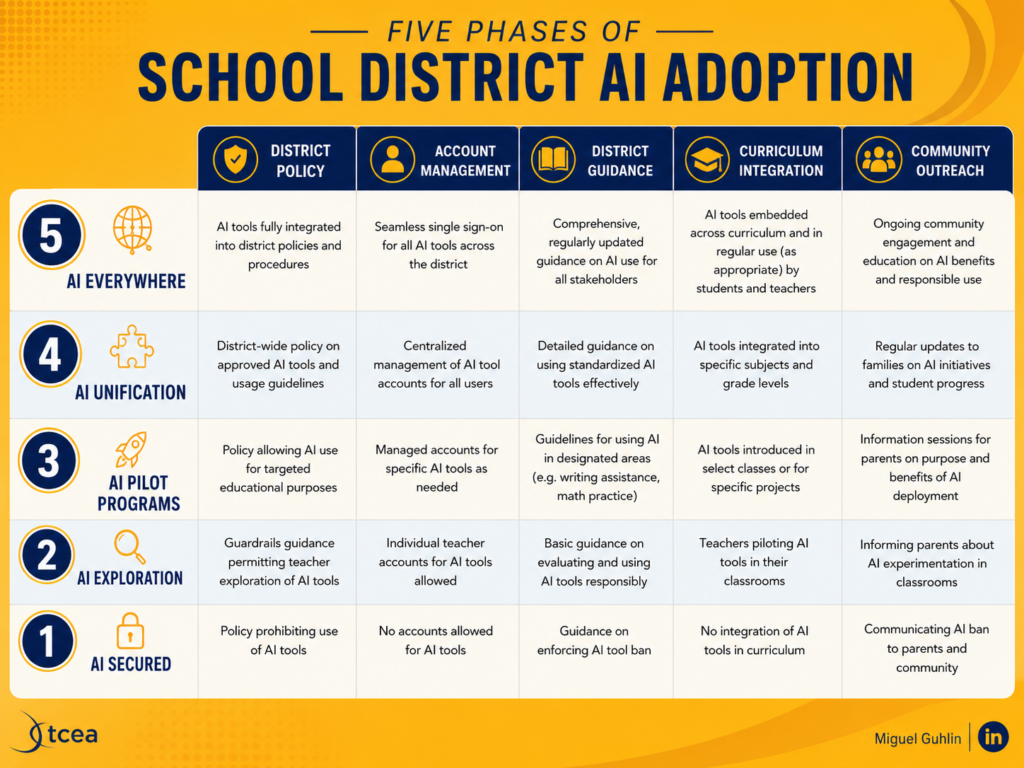
Before we get too far along on the conversation, here’s an interactive roadmap (short version) you may want to explore to see the journey your stakeholder committee may need to embark on. It can help you get ahead of the confusion.
TCEA · Stakeholder Committee Tool
AI Adoption Roadmap for Districts and Campuses
Overall Readiness
Not yet started
Phase One · Foundation Policy, integrity, data
Phase Two · Practice Capacity, outcomes
Phase Three · Extension Equity, families, workforce
Stage One
Establish Clear, Permission-Based Guidance
Key QuestionDoes your policy build responsible use, or just document what is forbidden?
Select a maturity level above. Your choice saves to this browser.
So, how did you do? What’s your campus’/district’s overall readiness? Now that you have a better picture, continue reading.
Closing the Gap
The gap most districts face is not a lack of enthusiasm. Rather, it is the space between teachers who are already using Gen AI and institutions that have not yet caught up with clear expectations, data guardrails, and professional development to match.
If my superintendent asked in March. “Where are we on AI?” I would have had something cooking right away, bringing stakeholders together. It’s like when my superintendent said, “Let’s roll out BYOD at the high school.”
Sure, you can roll something out fast, but are you rolling it out the right way? The right way is more than a policy guide with a title, a table of contents, and a lot of words. It has to be built on community wisdom of the people in your space.
That gap is one you can bridge (unless you, or more likely school leaders sensitive to politics, are afraid of conversations).
The eight sections map to the decisions that actually keep CTOs and curriculum directors up at night. They are not theoretical. Each one connects to a real gap that tends to appear when districts try to move from “we should do something about AI” to “here is what we expect.”
Section
Core Question
Establish Clear Guidance
Does your policy build responsible use, or just document what’s forbidden?
Address Academic Integrity
Do students know exactly what is and isn’t allowed in each assignment?
Protect Student Data
Do staff know what student information cannot enter any Gen AI tool?
Build Educator Capacity
Are educators being equipped to make instructional decisions, or just taught to use tools?
Anchor AI in Learning
Would this use of Gen AI produce better-prepared learners, or shortcuts?
Prioritize Equity and Access
Who benefits from your adoption, and who gets left further behind?
Engage Families
Do families feel informed and included, or surprised by what they eventually learn?
Bridge K-12 to Workforce
Are your students graduating into environments where their Gen AI skills will hold up?
Use this to frame your review of your campus or district AI plan or CIP/DIP (Improvement plans for campus/district) plan components. The question I ask most often is the one in section five: does this use of Gen AI deepen learning, or replace it? Most plans never get to that question. You can see this question pop up in teaching and learning, too:
How often do we get past Surface Learning strategies to Deep and/or Transfer Learning?
The answer for both questions is a simple “seldom.”
How It Works
Open the checklist in any browser. Check off items as you complete or confirm them. Your progress saves automatically to your browser, so you can return to it across multiple sessions without losing your place.
The sidebar shows your progress by section, and a progress bar at the top tracks your overall completion across all 46 items. Each section ends with a key question designed to surface honest conversation, not just box-checking.
There are no trick items. Each one reflects a decision your institution either has made, needs to make, or has been avoiding.
A Starting Point, Not a Finish Line
The checklist includes a Quick-Start Action Plan at the bottom. It is worth reading before you dive in, because it reframes the tool from a one-time audit to a staged process.
The “this week” item is the most useful one: review your current policy against the checklist and identify gaps. Avoid trying to fix them right away. Instead, simply name them. That alone is a conversation worth having with your team, your board, or your campus leadership.
Most organizations will find gaps in more than one section, and that’s OK for now. If it is still your situation in three to four months, you are moving too slow.
What This Is Not
This checklist is NOT a compliance document. One reason is that tt does not cite specific legislation, TEKS, etc. Privacy and data protection items in section three are written with FERPA and student records in mind. That aside, it does not tell you which Gen AI tools to approve or make the decisions for you. The intent is to assist you and a committee of stakeholders in making those decisions.
The goal is to give you a structured way to see what you have, what you are missing, and where the real risks are. It does this in the absence of state guidance. This checklist assists you in asking tough questions and getting answers from stakeholders. It’s important to do this before people knock on your door asking, “Why haven’t you done anything?” That’s one place no leader wants to be.
In Part 1 of this series, you explored the “Secret Sauce” of the ARC Protocol. In it, you learned about the neuroscience of psychological safety, the power of the Crucial Conversations‘ authors’ AMPP technique (Ask, Mirror, Paraphrase, Prime) as applied in instructional coaching. You also saw why validating a teacher’s perspective is the essential first step toward instructional change.
AMPP approach is a Crucial Conversations/Confrontations concept that I’ve relied on often in my own work. Be sure to learn more about it in the book links included in this blog entry.
As any instructional leader knows, theory is one thing. The messy reality of a Tuesday morning in a middle school hallway is another. When you’re met with “I don’t have time” or “My students aren’t ready,” you need more than a framework. What you need is a script. You need the exact words that will transform that tangle of dark, knotted resistance into a smooth, golden braid of collaborative action.
In this blog entry, you will see how to put the ARC Protocol to work. Below are five common scenarios you might encounter as an instructional leader, followed by the specific application of Acknowledge, Reframe, and Commit. Each is enhanced with the AMPP technique for deeper psychological safety.
Remember the core principles:
A – Acknowledge: Lower the emotional temperature first (Crucial Conversations: “Make it Safe”)
R – Reframe: Stop arguing about teacher preference and start talking about student data (HESIS)
C – Commit: Don’t leave without a date on the calendar (TCEA EIIR)
Let’s take a look at specific scenarios through this lens.
Scenario 1: The “I Don’t Have Time” for AI Architecture
The Situation: A veteran teacher is resistant to using the AI-powered newsletter architecture, claiming they already spend too much time on parent communication.
A – Acknowledge to Make it Safe (using AMPP):
Ask: “How much time are you spending on parent newsletters right now?”
Mirror: “I hear the exhaustion in your voice when you talk about the weekend workload.”
Paraphrase: “It sounds like you feel that adding a new digital tool is just one more burden on an already overflowing plate.”
Prime: “Is it that you’re worried the setup time won’t actually pay off in the long run?”
R – Reframe the Narrative: “What if we looked at this not as ‘one more thing,’ but as a way to reclaim your Sunday evenings? By using the AI architecture, we shift from ‘writing from scratch’ to ‘editing for impact.’ We are moving from a high-labor task to a high-leverage one, ensuring your hard work is actually seen by parents in a mobile-friendly format.”
C – Commit to a Micro-Step: “Let’s just take your existing bullet points for next week and run them through the ‘Mobile-First’ prompt together for five minutes right now. We won’t even send it—just see if the output actually saves you the drafting time we’re hoping for.”
Scenario 2: The “Performance Anxiety” regarding Video Coaching
The Situation: A teacher is nervous about recording their lesson, fearing it will be used for evaluation rather than growth.
A – Acknowledge to Make it Safe (using AMPP):
Mirror: “It is completely normal to feel vulnerable when a camera is in the room. Most of us feel like we’re under a microscope when we see ourselves on screen.”
Ask: “You want to make sure this stays between us and isn’t part of your formal file, right?”
Paraphrase: “It sounds like your biggest concern is that this might be used against you rather than to help you grow.”
R – Reframe the Narrative: “Let’s shift the camera’s focus. Video coaching has an effect size of 0.99. It’s one of the most powerful tools we have because it provides an ‘objective mirror.’ This isn’t about evaluating you but rather it’s about capturing the students’ reactions to the ‘Heavy Hitter’ strategy we tried. The video is just an extra set of eyes to help us see what we miss while we’re busy teaching.”
C – Commit to a Micro-Step: “Record just a 10-minute segment of your direct instruction tomorrow. You don’t have to show it to me. Just watch it yourself and pick one thing you noticed about student engagement. We can talk about that one observation next time we meet.”
Scenario 3: The “Students Aren’t Ready” for Deep Learning
The Situation: A middle school science teacher believes their students lack the discipline for Reciprocal Teaching (d=0.74) and wants to stick to lecture.
A – Acknowledge to Make it Safe (using AMPP):
Mirror: “Relinquishing control to middle schoolers can feel like inviting chaos, especially with complex content.”
Paraphrase: “It sounds like you’re worried that if we move away from the lecture, the classroom management will fall apart and the learning will stop.”
Prime: “Have you tried structured group work before and had it go sideways?”
R – Reframe the Narrative: “Instead of seeing it as ‘giving up control,’ think of it as ‘assigning agency.’ By giving them specific roles (Predictor, Questioner, Clarifier, Summarizer), we are actually providing more structure for their thinking than a standard lecture provides. We are moving from Surface Learning to Deep Learning, which is where the real retention happens. Reciprocal Teaching has an effect size of 0.74. That’s nearly two years of growth in one year.”
C – Commit to a Micro-Step: “Try the ‘Fab Four’ roles with just one paragraph of the text tomorrow. Just one. I’ll even come in and we can do it as a ‘fishbowl’ where you and I model the roles for the students first so they see exactly what the expectations are.”
Scenario 4: The “Colorblind” Approach to Equity & UDL
The Situation: A teacher claims they “treat everyone the same” and doesn’t see the need to adjust lessons for Universal Design for Learning (UDL).
A – Acknowledge to Make it Safe (using AMPP):
Mirror: “I know your heart is in the right place and that you care deeply about being fair to every student in this room.”
Paraphrase: “You want to ensure that no one gets ‘special treatment’ that might lower the expectations for the class.”
Ask: “What does fairness look like to you in your classroom?”
R – Reframe the Narrative: “Fairness doesn’t always mean ‘the same.’ If we look at it through the UDL lens, we’re not changing the goal; we’re just adding multiple paths to get there. It’s about removing the barriers (e.g. heavy reading loads or writing anxiety) that have nothing to do with the actual science content you’re trying to teach. You are removing an unnecessary barrier.”
C – Commit to a Micro-Step: “Let’s look at your next assessment. Can we offer just one alternative, like a verbal explanation or a labeled diagram, for students who struggle with the heavy writing load? We can see if it gives us a more accurate picture of what they actually know about the science.”
The Situation: A teacher becomes defensive when student data shows a low growth rate, blaming the students’ lack of effort.
A – Acknowledge to Make it Safe (using AMPP):
Mirror: “It is incredibly frustrating when you pour your energy into teaching and the scores don’t reflect that effort.”
Ask: “It feels like a personal critique of your hard work, doesn’t it?”
Paraphrase: “You’re saying the students just aren’t putting in the effort they need to succeed.”
R – Reframe the Narrative: “Let’s look at the data as a ‘GPS’ rather than a ‘Grade.’ It’s not saying you didn’t teach it; it’s just telling us that the current strategy hasn’t landed yet. This is our cue to try a ‘Heavy Hitter’ like Spaced Practice (d=0.65) or Retrieval Practice (d=0.49) to see if we can make the learning stick longer. The data isn’t judging you—it’s giving us a roadmap for what to try next.”
C – Commit to a Micro-Step: “Pick one specific standard where the gap is widest. Let’s try one 5-minute ‘Brain Dump’ or retrieval activity at the start of class every day this week. We’ll check the exit tickets on Friday to see if that small shift moves the needle.”
Wrapping It Up
Each of these scenarios follows the same pattern of emotions before logic. The AMPP technique in the Acknowledge phase ensures that the teacher feels heard before we ever mention effect sizes or instructional strategies. Only when emotions are acknowledged can you focus on reframing, then obtaining a meaningful commitment.
Your Challenge: Which of these five scenarios sounds most like a conversation you’ve been avoiding? Pick one then try writing out your AMPP statements. Practice them out loud. Then go have the conversation. One ARC at a time.
Virtual reality (VR) is quickly moving from classroom novelty to a practical tool for teaching and learning. Across disciplines, educators are using immersive environments to transform abstract concepts into lived experiences, give students safe spaces to practice high-stakes skills, and expose learners to places and scenarios that would otherwise be impossible to visit.
VR aligns naturally with experiential learning models that emphasize doing, reflecting, and applying rather than passively receiving information. When instructors bring students into simulated environments such as a supply chain hub, a nursing unit, or a virtual office, abstract ideas become concrete and memorable. Students can then analyze these experiences, link them to theory, and apply what they’ve learned in new contexts (Nguyen et al., 2025).
Because VR can model complex spaces, procedures, and social situations, it is especially powerful in professional and graduate education. Faculty in business, health, engineering, and cybersecurity use VR to let students rehearse real-world tasks without the risks, costs, or logistics of staging equivalent in-person scenarios. The ability to immerse students in realistic scenarios, let them experiment safely, and repeat activities as needed makes VR a valuable supplement to conventional teaching tools (Campos-Castillo et al., 2023).
In STEM fields, instructors are using VR to give students lab and field experiences that would otherwise be constrained by time, safety, or resources. Some universities have built VR modules that allow biology students to explore simulated ecosystems, examine ecological processes at multiple levels, and investigate scientific questions as if they were working in a research facility (Quintana, 2025). Faculty design these activities to reinforce key concepts, increase engagement, and narrow equity gaps by making advanced lab experiences accessible to every student in a course.
Similarly, chemistry and engineering instructors are designing virtual laboratories where students can practice procedures, manipulate equipment, and see immediate feedback on their actions. By navigating these spaces in VR before they enter physical labs, learners build procedural knowledge and confidence, which can reduce errors and make in‑person sessions more efficient and focused (Johnson et al., 2025).
VR in Business, Leadership, and Operations
Business schools have embraced VR as a way to bring markets, operations, and leadership challenges to life. In supply chain and operations courses, faculty use VR to immerse students in ports, warehouses, farms, and factories so they can visualize flows of goods, identify bottlenecks, and debate trade‑offs in realistic contexts (Quintana, 2025).
Leadership and management instructors are also turning to VR to simulate people‑centered scenarios. In one business program, students enter a virtual retail environment where they must make marketing and staffing decisions under conditions of uncertainty, drawing on frameworks from their coursework (Quintana, 2025). In other settings, faculty use VR to stage difficult conversations, negotiations, or team interactions, giving learners a safe space to experiment with communication strategies and see how different choices play out.
Business schools are also integrating VR into real estate and cybersecurity curricula. In real estate courses, students explore virtual home tours and 360-degree travel experiences to analyze how technology shapes buyer behavior, market transparency, and the value proposition of property technology (proptech). In cybersecurity, instructors guide students through virtual offices to identify security breaches, translating abstract risk concepts into spatial, tangible problems that can be solved collaboratively.
VR for Communication and Public Speaking
Platforms like Ovation provide highly realistic environments for practicing presentations. Faculty can assign students to a virtual auditorium, boardroom, or interview setting where they deliver talks to AI-driven audiences that respond contextually to each student’s delivery. The system then tracks metrics such as filler words, eye contact, and speaking pace and provides detailed feedback.
For students, this offers repeated, low‑stakes practice that feels more authentic than rehearsing alone. For instructors, it enables scalable coaching in communication‑intensive courses, from core MBA presentations to capstone project pitches. When faculty embed VR practice into structured assignments and reflection activities, students often gain confidence and are better prepared for internships, interviews, and early‑career roles where communication skills are critical.
VR in Health and Clinical Education
Health and nursing programs are using VR partnerships to expand clinical learning opportunities. In these contexts, faculty implement VR simulations to recreate common nurse-patient interactions and clinical decision points (Kalunga & Elshobokshy, 2024). Students can practice assessments, communication, and prioritization in a safe environment that can be paused, replayed, and debriefed as often as needed.
These partnerships, often with publishers, ed tech companies, or simulation vendors, help instructors address shortages in clinical placement sites and give students exposure to a broader range of cases than they might encounter locally (Every Learner Everywhere, 2025). They also position students to engage with tools that are becoming more prevalent in hospitals and health systems, supporting both equity and workforce readiness (Ray & Turner Lee, 2022).
VR for Storytelling, Media, and Social Impact
Faculty in media, journalism, and communication programs are leveraging VR to place their students at the intersection of storytelling, technology, and social impact. Through collaborations with organizations such as Games for Change, instructors integrate VR documentaries that explore topics like nuclear threat or environmental justice (Salvant, 2023). Students analyze narrative design, audience experience, and ethical considerations while gaining hands‑on exposure to immersive production workflows (Salvant, 2023).
Projects like metaverse campus twins also illustrate how faculty can use VR to support entire course experiences, not just one‑off activities (Every Learner Everywhere, 2025; Quintana, 2025). In these initiatives, instructors hold class sessions in virtual replicas of a campus, guide students through reconstructed historical sites, or supervise simulated chemistry experiments (Quintana, 2025). This model combines instructional innovation with institutional visibility.
The most effective implementations focus less on the novelty of the technology and more on intentional learning design that connects immersive experiences with clear learning outcomes.
Several benefits consistently emerge when faculty design VR experiences with care.
Deeper engagement and retention: Students describe VR activities as more memorable and engaging than traditional formats, and instructors report richer discussions because students share a common, immersive reference point (Martínez et al., 2024; Tegg et al., 2025).
Safer practice for high‑stakes skills: VR allows repeated practice of skills like public speaking, clinical decision‑making, or incident response without real‑world consequences, making it easier for faculty to scaffold practice and feedback (Carnegie Mellon University XR Lab, n.d.; Johnson et al., 2025; Martínez et al., 2024).
Expanded access and equity potential: When institutions provide shared equipment, multi‑device access, and inclusive content, VR can help level access to experiences, such as global sites, advanced labs, or high‑end clinical settings, that are otherwise limited or unreachable (Every Learner Everywhere, 2025; Ray & Turner Lee, 2022).
When instructors integrate VR as one part of a broader sequence, preparation, immersive activity, and guided reflection, they can turn headsets into catalysts for deeper thinking rather than distractions. And when institutions support faculty with training, partnerships, and equitable access models, VR becomes a practical, sustainable extension of good teaching practice.
Ultimately, bringing VR into the classroom is not about chasing the latest technology. It is about expanding the ways educators can help students experience, analyze, and apply what they learn. When immersive tools are paired with thoughtful instructional design, VR can become a powerful extension of the educator’s toolkit rather than a distraction from it.
Exhibits
Practical Tips for Educators Considering VR
Start with learning outcomes, not technology.
Use VR for experiences that are difficult, dangerous, or impossible to replicate physically.
Pair immersive activities with reflection or discussion.
Begin with short modules rather than full-course integration.
Work with instructional designers or learning technologists when possible.
Virtual biology lab for Quest where learners perform realistic dissections (e.g., frog, fish, crayfish) with guided steps and hand tracking, supporting safe, repeatable anatomy and lab‑skills practice.
Browser‑ and headset‑accessible virtual laboratories offering interactive experiments in biology, chemistry, physics, and more, designed to replicate real lab workflows and instruments for education and training.
This VR experience immerses learners in realistic cyber threat scenarios to build practical, hands-on cybersecurity skills. Participants strengthen their awareness and learn strategies to protect their digital presence and valuable information.
Nursing and healthcare training platform on Quest that provides virtual clinical scenarios, AI‑driven patients, skill assessments, and instructor dashboards for simulation‑based learning.
VR Logistics & Warehousing Simulator lets learners experience core logistics in a safe, immersive environment. It supports career exploration and workforce development by providing hands-on, scenario-based insight into the skills and challenges of modern logistics roles.
Africa VR Campus and Center – this article has a link to the Center’s Facebook and YouTube. You can find them in the metaverse on Engage VR.
References
Campos-Castillo, C., Parry, D. A., & Keipi, T. (2023). Classrooms in the metaverse: Educational applications and levels of immersion. Communication Education, 73(1), 1–22. https://doi.org/10.1080/03634523.2024.2312873
Carnegie Mellon University XR Lab. (n.d.). Virtual reality for public speaking. Carnegie Mellon University.
Every Learner Everywhere. (2025, February 9). Inspiring examples of digital learning at minority-serving institutions. https://www.everylearnereverywhere.org/blog/inspiring-examples-of-digital-learning-at-minority-serving-institutions/
Johnson, M., Rivera, K., & Wang, L. (2025). Using immersive augmented reality (AR) or virtual reality (VR) in a classroom setting: A systematic review. Journal of Higher Education Theory and Practice, 25(3). https://articlegateway.com/index.php/JHETP/article/view/7571
Kalunga, R., & Elshobokshy, F. (2024). A multipronged approach to harnessing virtual reality to advance diversity, equity, and inclusion. Faculty Focus. https://www.facultyfocus.com/articles/equality-inclusion-and-diversity/a-multipronged-approach-to-harnessing-virtual-reality-to-advance-the-hbcu-mission/
Li, X., Chen, Y., & Park, S. (2022). The effect of virtual reality therapy and counseling on students. BMC Psychology, 10, 217. https://doi.org/10.1186/s40359-022-00924-w
Martínez, A., Gupta, R., & Lee, H. (2024). The impact of virtual reality on student engagement in the classroom. Education and Information Technologies, 29(4). https://doi.org/10.1007/s10639-024-12345-6
Nguyen, T., Smith, L., & Jackson, P. (2025). Impact of immersive VR-enhanced experiential learning on student outcomes. Journal of Educational Technology and Distance Education, 18(2). https://aquila.usm.edu/jetde/vol18/iss2/9/
Ovation. (n.d.). Ovation: Speak confidently. From virtual to reality. Retrieved March 10, 2026, from https://www.ovationvr.com
Quintana, C. (2025, May 26). Seven examples of students learning with virtual reality. Inside Higher Ed. https://www.insidehighered.com/news/student-success/academic-life/2025/05/27/seven-examples-students-learning-virtual-reality
Ray, R., & Turner Lee, N. (2022, September 6). Ensuring equitable access to AR/VR in higher education. Brookings Institution. https://www.brookings.edu/articles/ensuring-equitable-access-to-ar-vr-in-higher-education/
Salvant, L. (2023, March 27). G4C’s first HBCU partnership supports gathering research on virtual reality storytelling. Games for Change. https://www.gamesforchange.org/blog_posts/g4cs-first-hbcu-partnership-supports-gathering-research-on-virtual-reality-storytelling
Tegg, R., McLean, S., & Borgese, S. (2025). Experiential learning through virtual reality by-proxy. Frontiers in Virtual Reality, 6, 1620905. https://doi.org/10.3389/frvir.2025.1620905
We have all been there. The board meeting is in three days. Someone just sent you a spreadsheet with device deployment numbers that don’t match the ones in last month’s cabinet deck. You open a browser tab to find the help desk ticket totals, then another for PD completion rates, then another for the budget utilization report your finance director exported as a PDF. It’s 7:45 in the morning and you are already tired.
As district leaders, we are all tracking more data (see example) than ever. Turning that data into something readable for a board update still means hours of manual work, or a tool license nobody budgeted for. One of my Aha! moments as a technology director? Make a KPI dashboard. But in the past, making digital KPI dashboards cost money and involved complex tools.
Before we jump into KPIs, let’s take a moment to define them. A well-defined KPI can make it easier to gauge success. Here’s a definition that I use with folks attending my webinar for TCEA’s IT/Director Certification:
KPIs are an actionable scorecard. They focus your strategy. They are metrics that make management, control and achievement of desired results possible.
The purpose of KPIs is to create an easy-to-understand visual representation of metrics, automating data analysis from a few key systems, then share it an easy way.” This makes it simple for staff to update data and for the end user to see it, too (source).
There’s a simpler path, and it runs through Claude or BoodleBox Unlimited. You can also use Gemini or ChatGPT, but I will refer to BoodleBox Bots for the purposes of this blog entry. That’s because I created a demo you can use once you get your BoodleBox Unlimited account (see note below).
Using BoodleBox Unlimited with a purpose-built set of Bot instructions, you can generate a fully functional, browser-based KPI dashboard by answering three questions:
What are you tracking? (Technology, Student Achievement, Curriculum, Budget, Professional Development, or Registrations)
What’s your district name and school year?
Do you have real data to drop in, or should BoodleBox Bot generate sample data to start?
BoodleBox will then produce two files. One HTML file runs the dashboard in any browser. One Markdown file holds all the data.
That Markdown file is the only thing anyone on your team ever edits again.
Put both files on a shared hosting folder or internal web server, open the HTML file in a browser, and the dashboard builds itself from whatever is in the Markdown file. You can see one example here.
Every dashboard follows a scoreboard-style layout: a fixed left sidebar for navigation, animated hero stat cards showing top-level numbers, and a detailed breakdown table with inline progress bars by campus or department. While it may seem it took a long time to build, it did not. After all, the point of this is to focus on the key performance indicators and the data, not spend hours on the look.
Each KPI category arrives with sensible defaults. A Technology dashboard tracks devices deployed, open help desk tickets, network uptime, and staff trained, broken down by campus. A Budget dashboard shows allocated vs. spent by category, with a utilization bar for each line item. Student Achievement surfaces passing rates, at-risk counts, and attendance.
Goals are optional but useful. Add one line to the Markdown file, something like “Goal Devices Deployed: 2500,” and the corresponding stat card gains an animated progress bar. Remove the line and it disappears. No one touches the HTML file to make that happen. For me, that is the beauty of this system. Markdown is easy, HTML…not so much.
Sustainable Dashboards
What usually kills KPI dashboards is cost of expensive solutions, as well as the onerous task of maintaining the dashboard numbers. When the data goes stale, the Dashboard becomes useless.
To avoid stale data, expensive dashboard software or web services, use this setup. The Markdown file looks like a simple table. Your designated data coordinator opens it, changes the numbers, saves, and reloads the browser. In fact, you can drop the markdown file into a Google Doc, and then copy-n-paste the markdown version of that information into the text file.
That’s the complete workflow. No dashboard platform login. No export-import cycle. No ticket to IT.
## Technology
| Campus | Devices | Tickets Open | Tickets Closed |
|--------|---------|-------------|----------------|
| Central High | 842 | 12 | 47 |
| North Middle | 614 | 8 | 31 |
Change a number, save, refresh. That’s all it takes. Pretty easy. Want to get fancy? If you are using a Gen AI tool that can pull data from Google Drive (e.g. Gemini, Claude, ChatGPT), then see if you can set this up with a Google Sheet.
Who This Fits
The audience for this isn’t everyone, although you could customize the instructions for a classroom or campus. If you have metrics that involve measuring things that can be counted, you can easily adapt this for your use.
Role
What They Track
Technology director
Device rollouts, help desk volume, network uptime
Curriculum coordinator
PD completion, program adoption, teacher participation
Finance and operations
Budget utilization, allocated vs. spent by category
Cabinet-level leader
A single URL for board meetings that reflects current numbers
The best thing? There’s no database, special server-side code, or monthly license (well, none except for a Gen AI tool). All you need is a markdown text file and a browser.
Adding Sections as Your Needs Change
Need to add a Project Management section mid-year? Tell your Gen AI tool of choice the section name and the columns you want to track. It updates both files together and explains what changed. The sidebar navigation adds the new section automatically.
Multiple campuses or departments can each have their own color-coded section inside the same dashboard, visually distinct but fed from a single file.
The TCEA registration dashboard, for example, has a general course registration section and a separate district section side by side, each with its own color scheme and stat cards. When registration data needed to be added mid-project, it went in as pasted text. The Gen AI tool formatted it and updated both files in one exchange.
Getting Started
The Project instructions include a catalog of KPI categories with pre-defined columns, sample data, and suggested goal targets. When you describe what you need, even informally, BoodleBox will ask you clarifying questions, generate both files with realistic sample data, and deliver a plain-language guide on how to maintain it.
The sample data is realistic enough to use in a demo or a training session immediately, which means you can put a working dashboard in front of your cabinet on day one, then swap in real numbers when you’re ready.
What to prepare
Why it matters
A list of the data points you track most often
Helps Gen AI generate columns that match your actual reporting needs
Your district name and current school year
Populates the dashboard header automatically
One real data table, even a rough one
Gets you real numbers instead of sample data from the start
If you’ve been pulling together board updates from five different spreadsheets every month, this is worth an afternoon to set up.
Give It a Go! Try describing your district’s data needs to the District Dashboard Generator and see what it generates. Share what you build in the comments below.
How To Get The Dashboard
Ready to get give it a go? Explore this Google Doc with link to the BoodleBox Bot, District Dashboard Generator. It includes an example of the data.md file (that’s the markdown file) in Google Doc format, and custom instructions you can copy and use on your own AI tool.