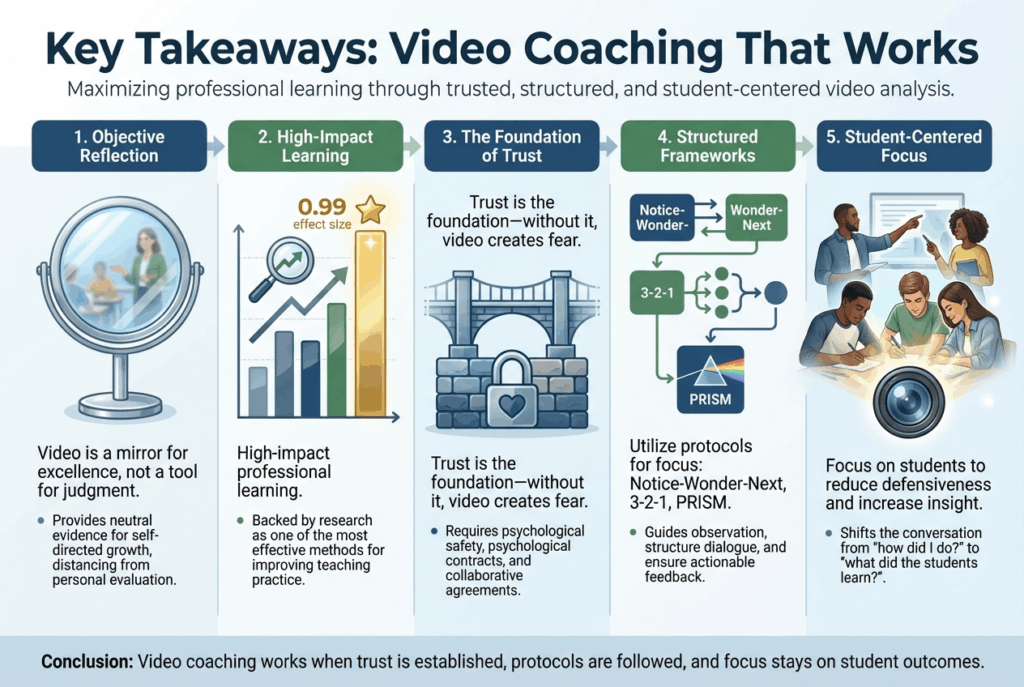
Video-based coaching, now known as micro-teaching, isn’t just another ed tech trend. According to John Hattie’s research, it has an effect size of 0.99 on teacher growth. This suggests it has the potential to accelerate or even double the rate of professional learning. Despite this evidence, however, many may still view the camera as a tool of judgment rather than transformation.
Micro-teaching: A technique in which a teacher delivers a short, recorded lesson that is then analyzed by the teacher and/or other teachers and leaders for the purposes of improvement. The lessons are usually videotaped to assist with the subsequent analysis. (source)
“I don’t want to see myself on camera. I already know I talk too much,” said one teacher. What changed her mind? Making the shift from focus on her to finding evidence of student growth. We can all overcome our shyness and fear in front of the camera when we focus on student learning.
From “I Feel” to “I See”
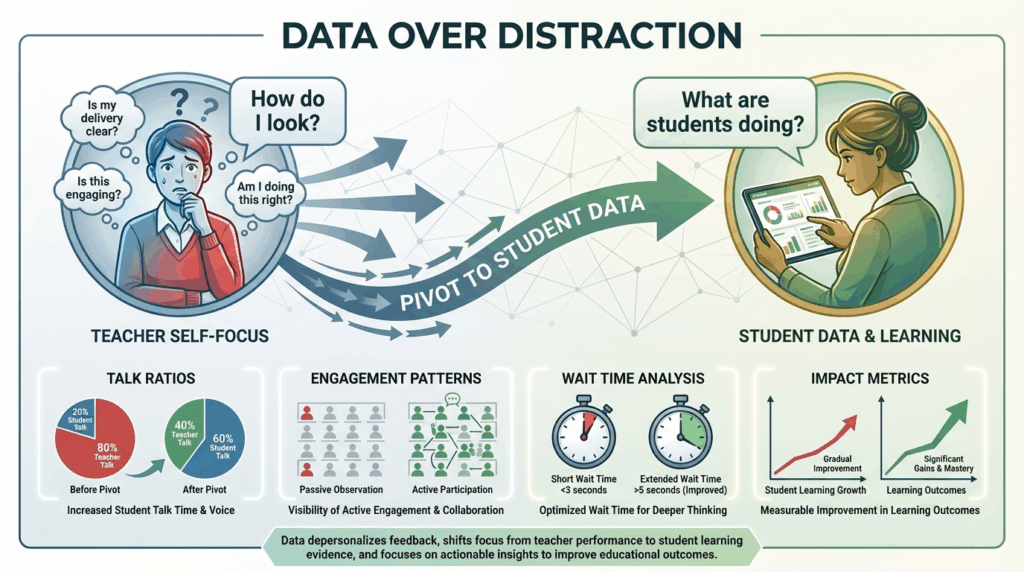
A significant challenge in instructional coaching is the gap between what a teacher remembers happening and what actually happened. Our brains naturally fill in gaps, creating a subjective narrative that often differs from reality. A teacher might say, “I feel like the lesson went well,” but video reveals a different story: 40% of students were off-task during transitions and/or the teacher called on the same five students throughout the period.
Video changes the conversation. By focusing on objective evidence (student talk ratios, engagement patterns, pacing, body language), we move from feelings to facts. This isn’t about catching mistakes. It’s about capturing excellence and making the invisible visible.
The EIIR Framework: Your Roadmap for Growth
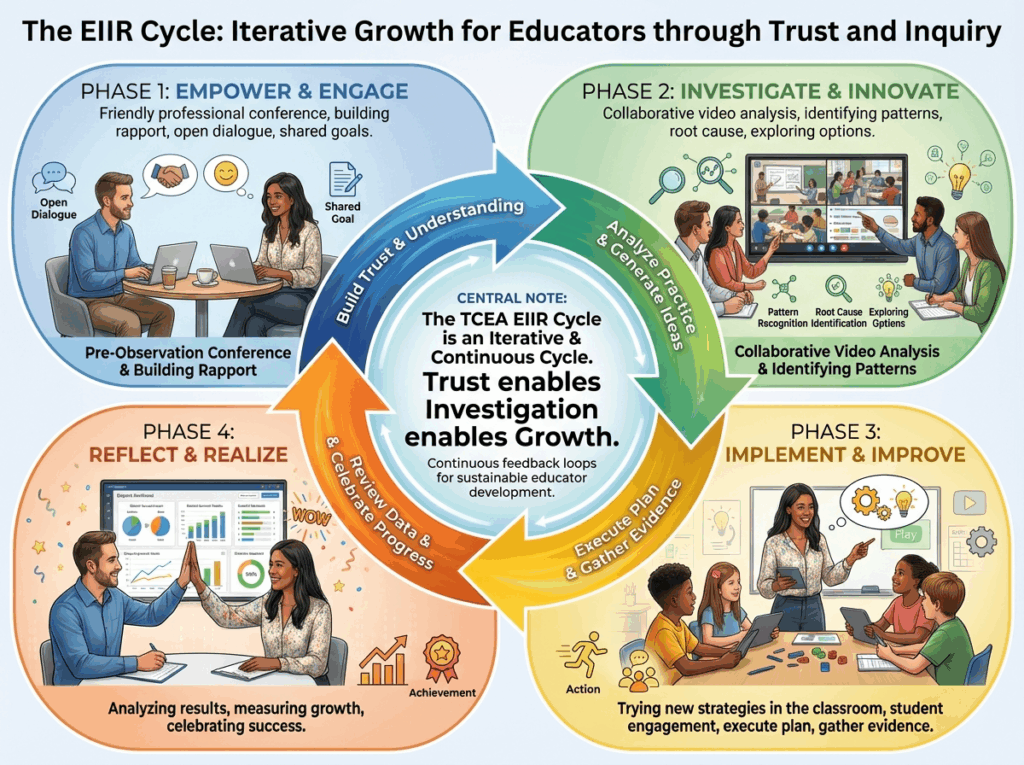
To make video coaching sustainable and effective, you might consider using the TCEA EIIR Framework, a continuous cycle of improvement:
1. EMPOWER: Set clear, meaningful goals together using the RISE framework (Relevant, Inspiring, Specific, Evidence-based). The teacher owns the process from the start.
2. IMPLEMENT: Record practice. Here’s the key: short clips of 10-15 minutes work best. Full-hour recordings are daunting and difficult to analyze. Start small.
3. INVESTIGATE: Analyze the footage using structured protocols like PRISM (Purpose, Reflection, Insight, Strategies, Monitoring). This keeps the debrief focused on instructional impact rather than personal appearance.
4. REALIZE: Celebrate the “Glows,” identify the “Grows,” and set new targets. This cycle repeats, creating continuous improvement over time.
Of course, you can always use your favorite coaching cycle, such as Diane Sweeney’s Results-Based Coaching Tool or Jim Knight’s The Impact Cycle. Or an eclectic combination that your organization decides is better.
The PRISM Protocol: Keeping Feedback Focused
You may be familiar with PRISM, which often focuses on multiple levels of the SOLO Taxonomy. PRISM often starts out with completely different definitions. However, when debriefing video, I thought it might be fun to adapt it as a way to ensure conversations stay productive:
| PRISM Element | Core Question | Coaching Focus |
|---|---|---|
| Patterns | What patterns do you notice? What general patterns help us understand what’s going on in the classroom? | Teacher-led observation before coach input |
| Reasoning | How do things fit together? What makes sense when you look at everything? What was the learning goal? | Alignment between objective and instruction |
| Ideas | What surprised you? What other ideas should we explore? What happens when we try new ways of thinking? | Moments of discovery about student learning |
| Situation | How does what happened connect to instructional strategies? | Evidence-based instructional moves |
| Methods | How will you track progress? How can we check progress? How do we know which answer is right? | Next steps and success indicators |
This structure moves us away from subjective feelings (“I think I did okay”) toward objective evidence (“I see that only three students responded during the discussion”).
Overcoming the “Cringe” Factor
“I’m glad to see you started with the fear factor about video in the classroom,” says Brian Lamb of SWIVL. We were reflecting on the fact that watching yourself on video is uncomfortable. You know, I’m right there with anyone who worries about how they look, how they sound, whether their hair is messy (well, I don’t have that problem now!). These concerns are valid, but they’re also distractions from what matters most. That is, student learning.
One way to bridge the gap between distractions and our focus? Build a Trust Bridge. You can do this by taking the following actions:
- Model Vulnerability: Film yourself first and share it with your team. I started with audio, then slowly moved up to video to capture my body language, too. Those non-verbal cues really can send their own message or amplify your spoken words. When I did this, I discovered I said “um” 47 times in a 15-minute lesson. Sharing that vulnerability opened the door for others.
- Focus on Students: Pivot the conversation away from the teacher’s appearance and toward student reactions. Ask: “What do you notice about student engagement during the transition?” instead of “How did you feel about your explanation?”
- Ensure Safety: Establish a “We Will” commitment. The teacher owns the footage. It’s used for growth, not evaluation. Confidentiality is non-negotiable.
- Start Small: Use the “Micro-Coaching Sprint” approach. Record just 10-15 minutes. Choose a low-stakes moment. Build confidence before tackling more complex lessons.
A quick note: We’ve all worked in low-trust environments. At some point, you make a decision to separate your teaching actions from your personal ego. You can always get better. As a professional, you trust yourself to always be improving and deal with critiques that may or may not be accurate. Let the chips fall where they may.
Practical Tools: From Smartphone to Swivl
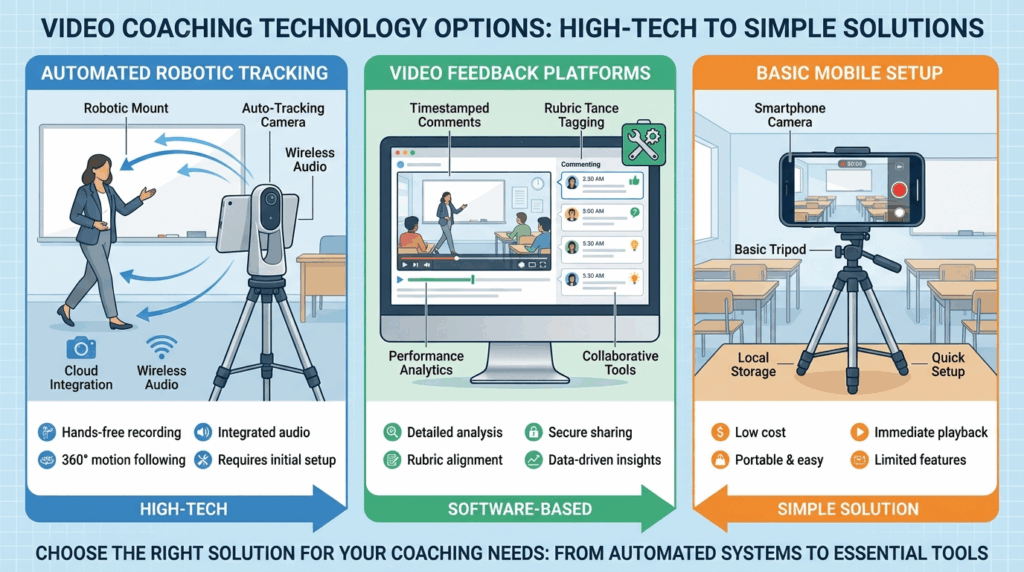
Getting started with video-based coaching doesn’t need to cost an arm and a leg. You don’t need a Hollywood budget to start video coaching. Here’s your Mobile Prep Sprint checklist:
- [ ] Storage: Ensure 2GB of free space on your device
- [ ] Battery: Charge to at least 80%
- [ ] Do Not Disturb: Activate to prevent interruptions
- [ ] Positioning: Place camera where it captures both teacher and students
- [ ] Audio Check: Test sound quality in the actual classroom
For those ready to level up, tools like the Swivl M2 robot can automatically track a teacher’s movement, ensuring the “pilot” of the lesson stays in frame.
Creating Questions from Video: AI-Powered Analysis
Once you’ve captured video, you can extend its impact by creating reflection questions or student assessments. I like to transcribe audio and/or video, then run it through an AI chatbot for analysis. While tools like SWIVL offer various frameworks, you can also use some like the TCEA EIIR framework for that. Explore the Coaching That Clicks Custom, a BoodleBox bot.
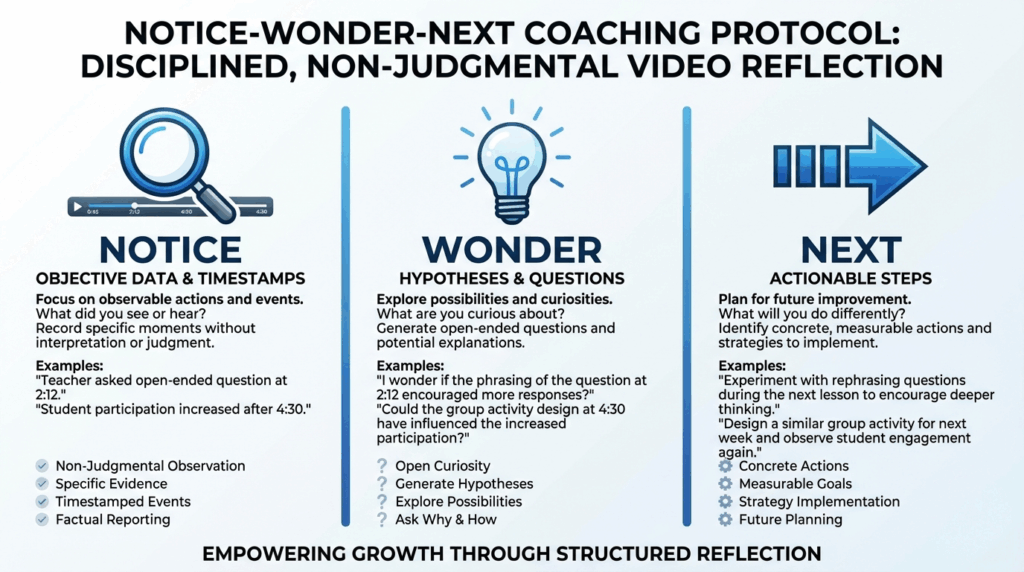
The Notice-Wonder-Next Protocol
When analyzing video with teachers, use this simple three-step protocol:
1. NOTICE: What objective data do you see? Some items to look for include:
- Student talk time,
- Wait time,
- Questioning patterns
2. WONDER: What questions does this raise? Those can include:
- Why did engagement drop during independent work?
- How might different grouping affect participation?
3. NEXT: What will you try differently? The goal is to provide feedback that is specific and actionable for the next lesson)
This protocol keeps feedback descriptive rather than evaluative, empowering teachers to drive their own growth.
A Quick Reminder
Remember, video-based coaching is not about catching mistakes, assessment, or staff appraisals. Rather, it’s about making student learning visible and focusing on finding ways to apply evidence-based strategies. Adopt structured protocols like EIIR and PRISM, or whatever protocols you already have in place, to work towards better student outcomes. With a 0.99 effect size, video-based coaching represents one of the most powerful levers we have for improving instruction.
Helpful Links
PDFs (video-based coaching strategy)
- Coaching Cycles (PDF) — coaching-cycle workflow using reflections + video to document growth and structure coach/teacher conversations.
- How to Use Reflectivity + Robot for Teacher Prep Programs (PDF) — reflection + time-stamped feedback/rubrics model that maps well to coaching cycles.
- Step-by-step guide: Setting up video observation (PDF) — operational checklist for running observation/recording routines consistently.
- UTSA Robot + Teams Setup Guide (PDF) — practical multi-user setup notes (useful for coach teams/pilots).
Articles (coaching / video observation strategy)
- Why Video Coaching is Important this Fall — rationale + trust/buy-in framing for video coaching programs.
- How to Cultivate Best Teaching Practices Using Video Observation — using video observation to support reflection + coaching support structures.
- Using Video for Instructional Coaching — concrete ways video can strengthen the coaching process.
- Getting Started with a Video Program — how to launch a video coaching program with goals, roles, and routines.
- Instructional Coaching at Waukesha School District — rollout + buy-in + refining coaching techniques (district story).
Videos (coaching / reflective practice)
- Instructional Coaching: A Reflective Practice (Workshop Recording) — reflective practice lens for coaching conversations.
- How Coaching Changes the Game for New Teachers — relationship-centered coaching discussion (Jim Knight). (YouTube)
- Webinar Replays & Coaching/Reflection Content — coaching-related webinars and observation workflows.
- Resources and trainings hub — centralized page linking to guides, workshops, and coaching-oriented materials.
👤 Human-directed (Miguel Guhlin) · 🤖 Gen AI-assisted (Claude, ChatGPT)