
Instructional coaches are often pulled in a dozen directions, but your calendar can be your greatest ally in protecting the time that makes the most impact. In this post, I’ll share three practical, tech-savvy strategies to protect your coaching time using digital calendars: scheduling personal planning time, blocking dedicated coaching windows, and setting up booking time slots that put you in control of your availability. These simple shifts can help coaches move from reactive to intentional, making space for stronger partnerships and more meaningful support for teachers.
Schedule “Me” Time
Coaches invest in the growth of others. That’s the job. To be a better coach, you must invest in yourself. That means scheduling personal time to prepare for coaching, plan professional development, and participate in professional growth.
Similar to teachers needing time to prepare for instruction, coaches need time to prepare for collaborative planning and coaching cycles. If a coach enters a planning or coaching cycle unprepared, it can have unintended consequences, including disengagement and frustration from teachers.
For example, I schedule “work the list” time every Friday. This time is to address two ongoing tasks.
One is my email inbox. On Friday, I go back to Monday of that week to ensure that I have addressed all emails. This could include providing a response, completing a task requested in an email, or adding an action item to my to-do list.
Another task to address is the ever-evolving to-do list. I have a notepad for tiering the priority of my to-do list into three categories: have to, want to, and hope to.
- The “have to” list needs to be addressed first, either due to deadline or impact.
- The “want to” list can be addressed if time permits but can be pushed to the next week.
- The “hope to” list can be addressed if there is an opportunity, but there is no urgency.
Working out my to-do list makes Monday morning feel less overwhelming.
Block Coaching Time
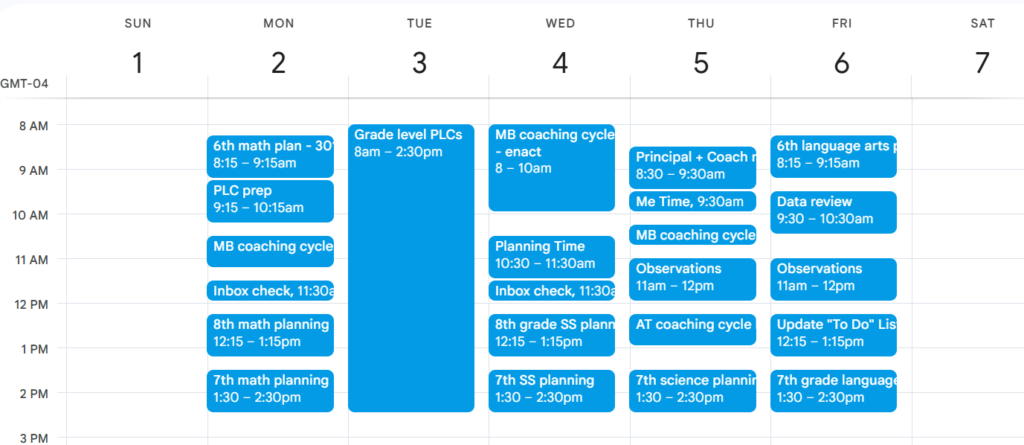
Coaching cycles and collaborative planning take the largest amount of time, so block those times.
For example, create a recurring meeting in your digital calendar for weekly collaborative planning. Title it with the content or teacher name and room number. Set it to be recurring until the end of the school year. Invite others who are participating in the meeting. You can also attach files, such as a collaborative document, to type notes and gather resources.
This also provides a way to communicate absences or cancel meetings if you or any colleagues are out when a collaborative planning session is scheduled.
Another consideration is coaching cycles. These can be tricky to schedule due to the three phases: pre-conference, enactment, and reflection. They do not necessarily happen at the same time of day. Pre-conference and reflection might be scheduled during the teacher’s planning block. Enactment will be scheduled during class time. These phases also require differing amounts of time.
Strategically scheduling these will allow for more than one coaching cycle to occur within the same timeframe.
Appointments
Using appointment slots in your digital calendar is a great way to be efficient.
Scheduling meetings with teachers, colleagues, community members, and others can be a time-sink. Back-and-forth emails like “Are you free on Thursday at 9?” or “How about Tuesday morning?” take up valuable time.
Using appointment time slots in your calendar eliminates this. These slots are in your existing calendar, preventing double-bookings. You can share a “Book a Meeting” link in emails and other communication. These appointments are 15–30 minute chunks of time that can fit around other scheduled commitments.
Being proactive with appointment slots saves time on administrative tasks, so you can spend more time doing coaching work.
Bonus Move: Coachable Moments
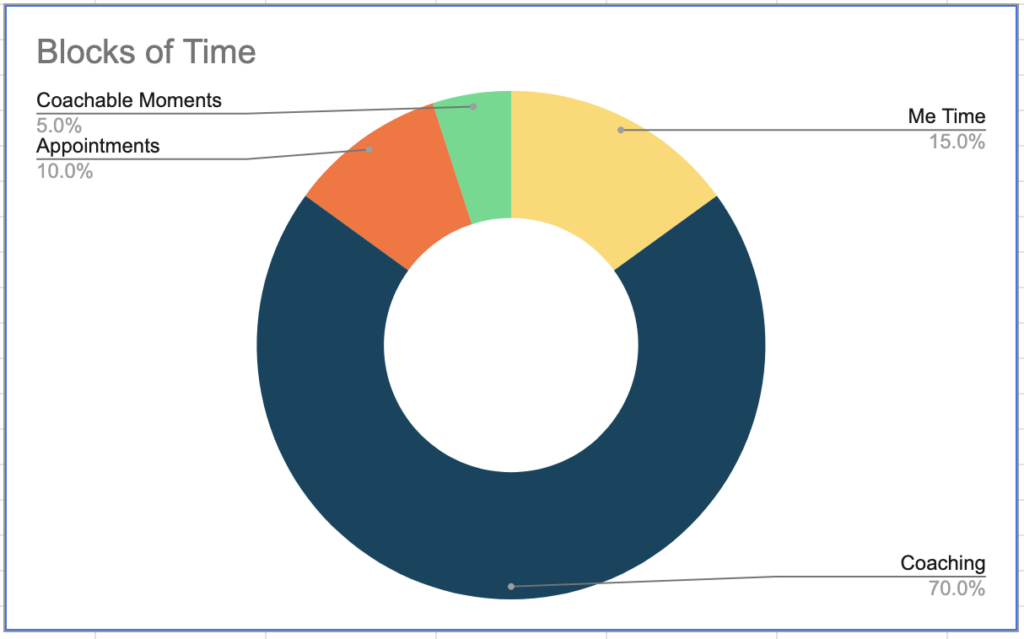
It feels uncomfortable to have unscheduled time in your calendar. I encourage you to resist the urge to schedule every minute of the day. If that is not possible, schedule “coachable moments” into unscheduled time. Unstructured coaching time provides opportunities for in-the-moment conversations, informal observations and feedback, and time to be present with those you support.
Take Control of Your Time
Doing these three moves allows you to be intentional and efficient with your time, your most limited and valuable resource. It is about taking control of your schedule instead of letting it control you.