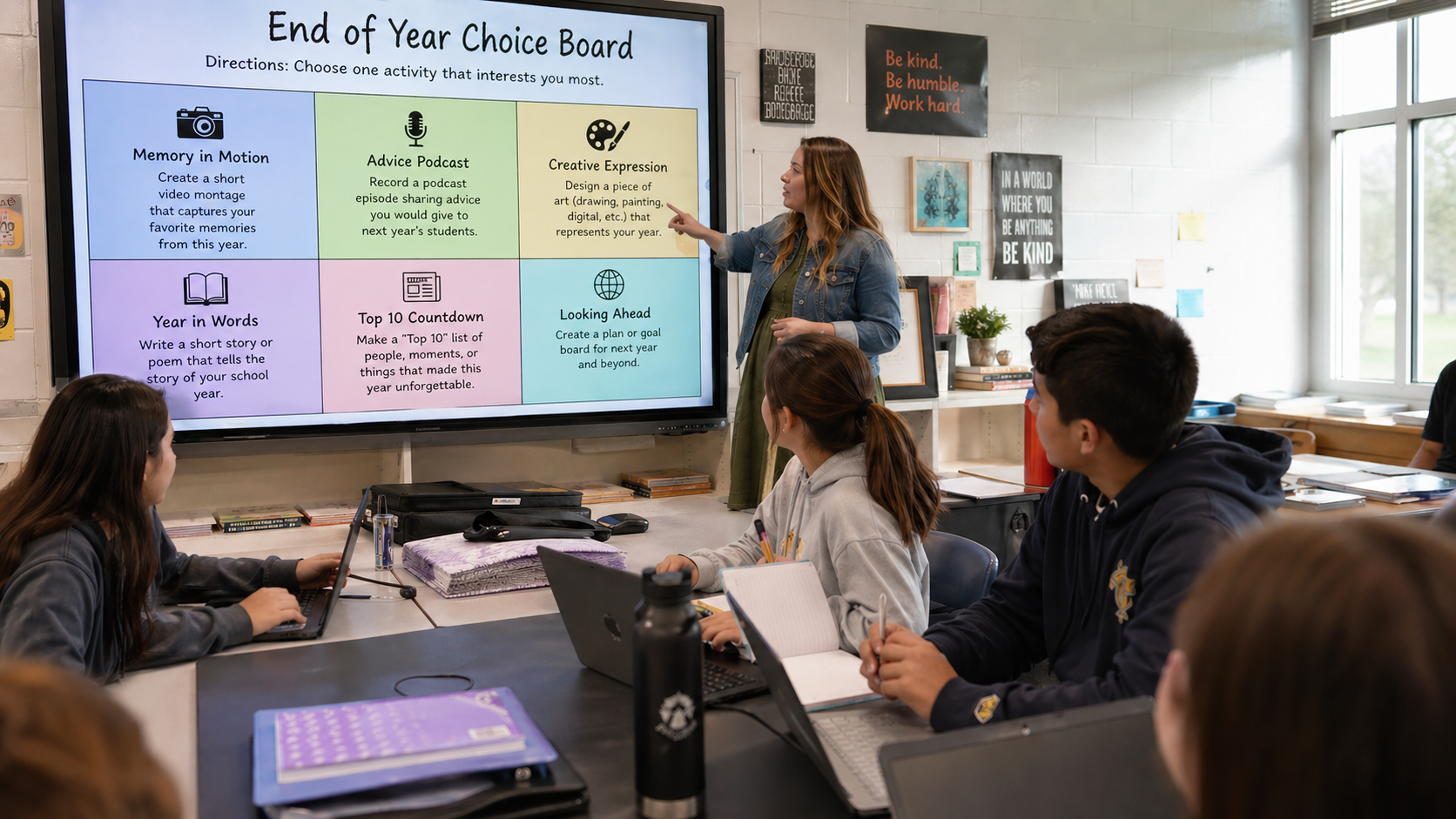
The last few weeks of school are a strange time, especially when it comes to classroom activities. Students are mentally checked out, but teachers still have real work to do. End-of-year review is supposed to reinforce learning from an entire semester or year, yet the same worksheets and test-prep packets that may worked in October fall flat in May.
The good news: you do not need a new curriculum. You need a better structure. A choice board end-of-year review gives students ownership over how they demonstrate mastery, which makes them more likely to engage with the content. It also gives you a flexible, standards-aligned tool you can build once and use every year.
Here is exactly how to build one that works in a middle school classroom.
What Is a Choice Board and Why Does It Work for Review?
A choice board is a visual grid of activity options organized around learning objectives. Students select which tasks they complete, giving them agency over their own review process.
Choice boards are an effective way for teachers to promote student agency and engagement around specific learning objectives. At their core, they give students ownership over their learning, which leads to more intrinsic motivation and increased engagement.
That matters at the end of the year when motivation is low. A traditional review packet tells every student to do the same thing the same way. A choice board says: here are the concepts we are reviewing, now show me what you know in a way that works for you.
A review and practice board is a practical alternative to a traditional study guide. It positions students to make decisions about which activities would be most valuable as they work with key vocabulary, concepts, and skills.
How to Design Your Choice Board for End-of-Year Review
Step 1: Decide How You Want to Organize Your Standards
Choice boards are flexible by design. You can build a board focused on a single standard, with all activities giving students different ways to demonstrate mastery of that one concept. Or you can create a board where activities draw on multiple standards at once, asking students to make connections across what they have learned throughout the year.
Neither approach is better than the other. A single-standard board works well when you need students to go deep on one skill or concept before an assessment. A multi-standard board works well for end-of-year review when the goal is integration and synthesis across a broader body of content.
Choose standards or skills that students have already been exposed to. The goal is to reinforce and strengthen their understanding of key concepts and their ability to apply specific skills.
Decide which approach fits your review goals, then build your grid around that decision.
Step 2: Choose Your Grid Format
Two formats work well for middle school review. A 2×2 grid offers two activity options per column and works well when time is short or when you want to keep the cognitive load manageable. A 2×3 grid offers three activity options per column, giving students greater flexibility. This format works well when you have a few extra class periods or when you want to include a higher-level task as a third option.
Either format keeps the structure simple enough that students can self-manage their work without constant redirection.
Keep the activity formats varied in both cases. Mix written responses, visual products, and collaborative tasks so students with different strengths have a real choice. Options might include creating an annotated diagram, writing a short explanation for a peer, recording a quick explainer video, building a concept map, or designing a quiz question with an answer key.
Step 3: Layer Your Activities Across Depth of Knowledge Levels
This step is what turns a fun activity menu into a rigorous review tool.
Webb’s Depth of Knowledge framework categorizes tasks into levels of cognitive rigor. DoK 1 focuses on recollection and reproduction. DoK 2 requires knowledge application, where students choose an approach and work through distinct steps. DoK 3 calls for strategic thinking, where students tackle abstract problems that require planning, reasoning, and higher order thinking.
For a 2×2 board, include one DoK 1 and one DoK 2 activity per column. For a 2×3 board, you have room to add a DoK 3 task as the third option in each column. Here is what that looks like in practice:
- DoK 1 (Recall): Define key vocabulary, identify examples, or list steps in a process
- DoK 2 (Application): Explain a concept in your own words, solve a multi-step problem, or classify examples with justification
- DoK 3 (Strategic Thinking): Analyze a scenario, compare two related concepts, or evaluate a claim using evidence from the unit
A note on DoK 4: Webb’s framework actually includes a fourth level, Extended Thinking, which asks students to connect knowledge across subjects and sources over an extended period of time. Long-term research projects and complex real-world problem solving are good examples. Because a choice board end-of-year review typically spans two to three class periods, DoK 4 is not a practical target here. Levels 1 through 3 are the right fit for this kind of structured, time-bound review.
The DoK level reflects the complexity of cognitive processes the task demands, not just how hard it feels. It describes the depth of understanding required to complete the work successfully.
This structure ensures every student engages in meaningful review, whether they choose the recall-level task or push toward strategic thinking.
How to Launch It in Your Classroom
Start with a short walkthrough. Show students the grid, explain what the board is asking them to review, and clarify how many tasks they need to complete.
Set two clear expectations before students begin. First, they must complete one task per column (or based on your expectations). Second, they document their work in a consistent place, whether that is a notebook, a shared Google Doc, or a class folder.
Use this work time intentionally. Pull individual students or small groups for targeted support, give feedback on work in progress, or conduct brief check-ins to monitor understanding.
This is the answer to the question teachers ask most often: “What do I do while students work?” The choice board structure creates the time and space for the kind of small-group instruction that is hard to fit into a regular lesson.
Tips to Make It Work
- Attach a simple rubric. Each task needs clear success criteria. Students should know what a complete, quality response looks like before they start.
- Add a must-do anchor. If one concept is non-negotiable, make it a required task rather than a choice. Place it outside the grid and label it clearly.
- Set a firm timeline. One to two class periods works well for a 2×2 board. A 2×3 board may need two to three periods depending on the complexity of the tasks. A clear window keeps students focused.
- Vary the cognitive demand. If every task requires the same level of thinking, students will always choose the easiest path. The DoK structure prevents that by design.
Build Your Choice Board Faster with AI
Designing a choice board from scratch takes time, especially when you are mapping activities across DoK levels. The TCEA Choice Board Generator GPT handles that work for you. Enter your subject, priority standards, and grade level, and it generates a complete 2×2 or 2×3 choice board ready for your classroom. Use the output as-is, swap in your own activities, or treat it as a starting point. Access it here: Choice Board Generator GPT.
A choice board end-of-year review does not ask you to reinvent your curriculum. It asks you to reorganize it around student agency. When middle schoolers have a say in how they demonstrate what they know, they invest more in the work.
You have spent all year building their knowledge. Give them a meaningful way to show it before the school year ends.
Ready to build yours? Go to the Choice Board Generator GPT, enter your standards, and have a complete, DoK-aligned choice board ready before your next planning period ends.