
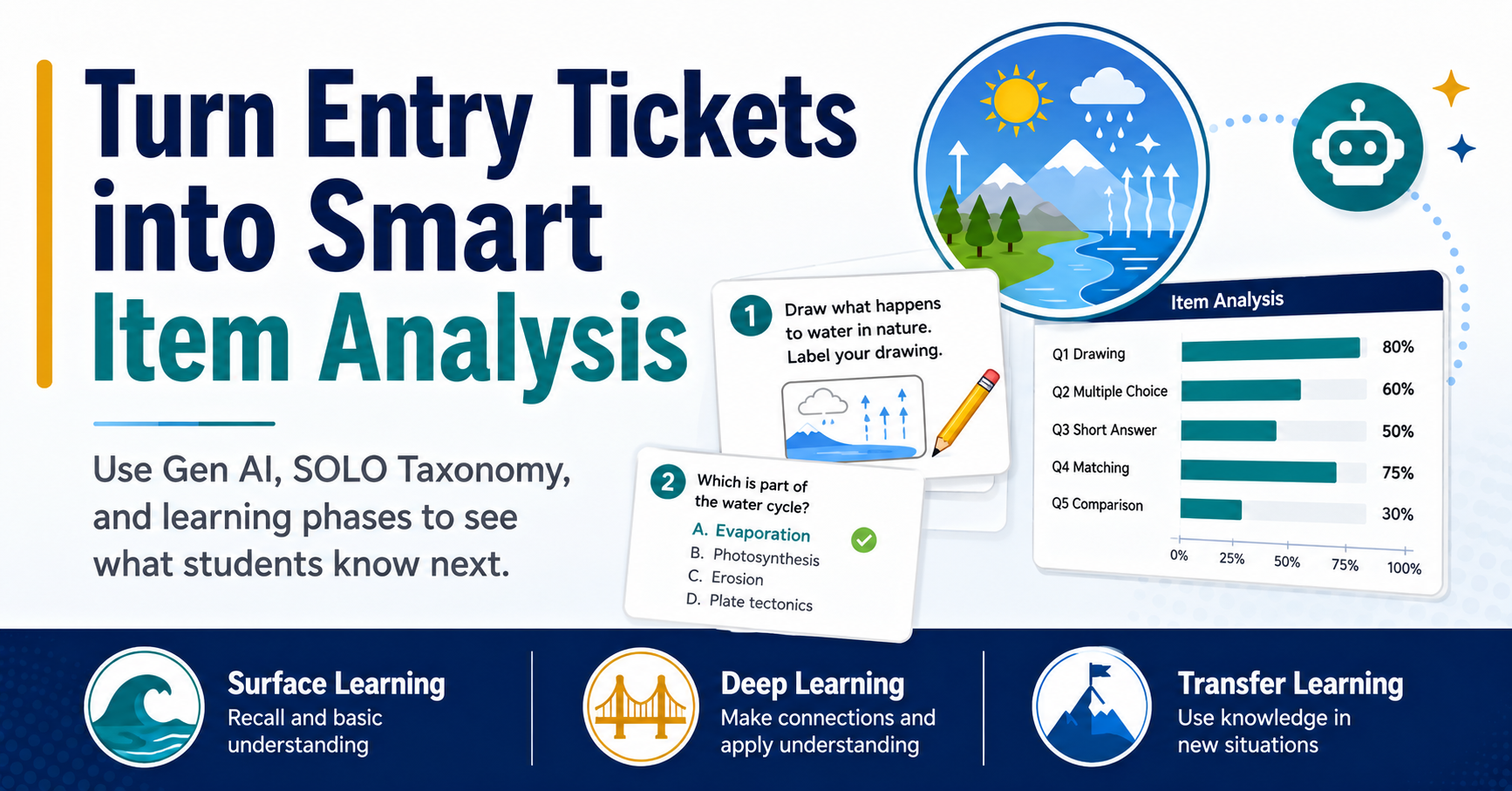
Creating lesson plans with Gen AI tools is child’s play. It takes someone with insight, experience, and knowledge of evidence-based strategies to create a lesson that works. How can you make that happen, while leveraging Gen AI tools? One approach is to set your Gen AI helper up for success, as you would a student. In this blog entry, I share an approach that stands on the shoulders of research, pedagogy, and educational technology. And, of course, this approach empowers Gen AI (a little ironic, right?) to be successful in creating content that predictable and usable. We will finish up with Gen AI-powered smart item analysis.
Start with ALDO, but do not pick the strategy first
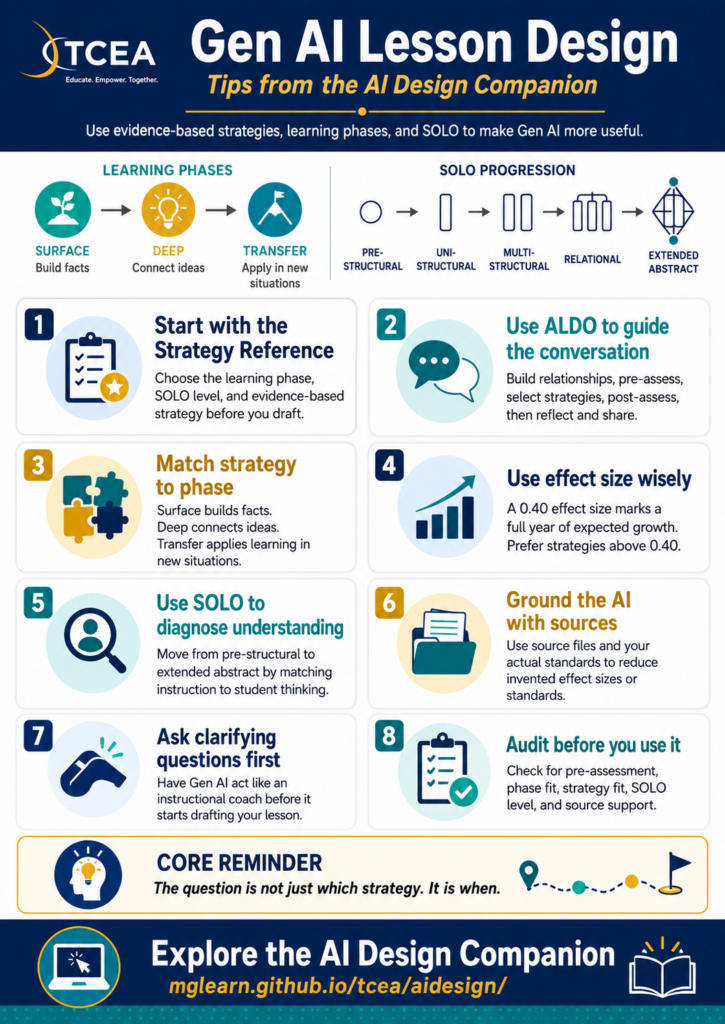
The first step is to reframe your thinking using a tool I introduced before Gen AI was cool. It is the Amazing Lesson Design Outline (ALDO). As you can see in the table below, it gives you a simple lesson design path:
| ALDO step | What you check |
|---|---|
| Build relationships | Who are these learners, and what do they need from you? |
| Pre-assess | What do students already understand? |
| Select strategies | Which strategy fits the learning phase? |
| Post-assess | What evidence will show growth? |
| Reflect and share | What did you learn from the lesson? |
The order matters because, without pre-assessment, strategy is worthless. Pre-assessment identifies what phase of learning students are in, and that makes it possible for your to select instructional strategies that work best for that learning phase.
If you don’t know where your students are, when you ask for a lesson from an AI, the chatbot jumps straight to activities. It does not know your students. It has not seen their exit tickets and has no idea which part of the lesson may be causing students trouble.
Imagine if you are teaching fraction word problems. Could it be, as my mother (a veteran math teacher) always said, student grasp of math vocabulary? Equal parts? Translating the word problem into a model? It’s critical to know, and you get that data from a pre-assessment.
Match the strategy to the learning phase
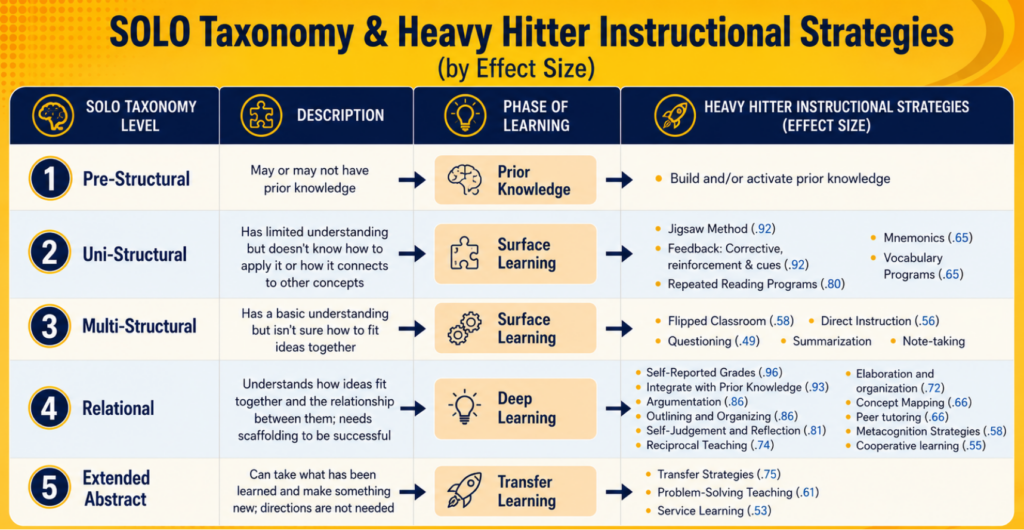
Students do not move from “I heard it once” to “I can use it anywhere” in one clean jump. Learning usually moves through three phases:
| Phase of Learning | What students are doing |
|---|---|
| Surface | Building facts, vocabulary, and basic skills |
| Deep | Connecting ideas and explaining how they fit |
| Transfer | Applying the learning in a new situation |
A strategy that works well in one phase can flop in another. Problem-solving teaching, for example, belongs in transfer. Use it before students have enough surface knowledge, and you may get frustration dressed up as “productive struggle.” I did this quite often in my own teaching, using the wrong strategy for the phase of learning students were in. Of course, then, I didn’t know about learning phases, high-effect size instructional strategies. I was simply a teacher hunting for engaging strategies to use to get students hooked on learning. Sometimes a strategy worked, sometimes it didn’t.
Identifying Strategies with Gen AI
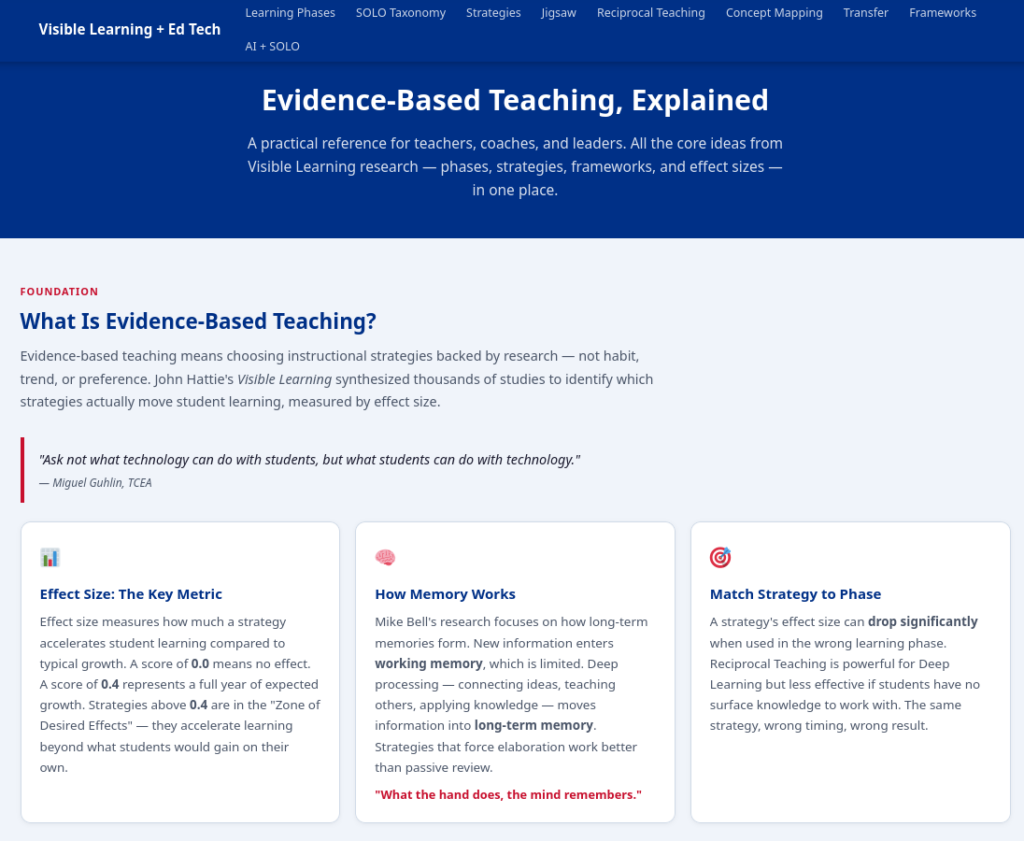
You can ask Gen AI to identify strategies with an effect size above 0.40 and label the learning phase each one supports. Jigsaw (0.92) is especially useful because it can support both surface and deep learning. Reciprocal teaching (0.74), Argumentation (0.84) and Concept Mapping (0.66) live more naturally in deep learning. Problem-solving teaching (0.61) belongs later, once students have enough to work with.
The important question is not, “Which strategy sounds strong?” Rather, it is, “Which strategy fits where my students are right now?” One way to assess that is to rely on the SOLO Taxonomy.
The SOLO Taxonomy
SOLO Taxonomy gives you another check. It describes the quality of student understanding, from prestructural to extended abstract. While Gen AI may give you a “middle of the road” type lesson full of facts and activities, you can tailor the lesson to match specific levels of the SOLO Taxonomy. More important, you can use Gen AI and the SOLO Taxonomy to shift your lesson from introductory level (surface learning) to deeper conceptual learning, making connections between ideas (deep learning), or even, applying that learning to new situations (transfer learning).
Hot tip: Once Gen AI has the SOLO Taxonomy and the content of your lesson, you can ask it to design a pre-assessment for your students. Then, after anonymizing the data, feed the pre-assessment results for each student into Gen AI for an item analysis to get a SOLO Taxonomy level for each student. This is breathtakingly easy to do, when before, it might have taken hours. See end of blog entry for details on how to do this.
Know where Gen AI breaks
Gen AI usually fails in predictable ways. Once you can name the pattern, you can catch it faster. Most teaching (82%) falls into surface learning. Some teachers never get beyond surface learning lessons to deep learning, much less transfer learning. Gen AI may reinforce this unless you prepare it for success.
| Failure mode | What it looks like |
|---|---|
| Generic output | A one-size lesson that sounds fine but knows nothing about your students |
| Bad sequencing | Activities come before pre-assessment, connection, or readiness checks |
| Invented research | Fake effect sizes, vague studies, or made-up citations |
| Surface-only design | Students list facts but do not connect or transfer the learning |
When working with students, the goal is to build tasks where students have to show their thinking as it develops, not just submit the finished product. Again, a framework like ACE (Articulate, Connect, Extend it) can be quite helpful since it is easy to remember and built atop the SOLO Taxonomy foundation.
Predictable Success with Gen AI
If you’re wondering, how do I do this? How do I ensure my Gen AI conversation will result in predictable success, you do not need a special tool to do this. That is, this prompt will work with any Gen AI tool (including free, Chinese or French ones).
You need two things. The first is a better conversation starter:
Act as my instructional coach. We are designing a lesson on [TOPIC] for [LEARNERS]. Walk me through ALDO, one step at a time: relationships, pre-assessment, strategy selection, post-assessment, and reflection. For strategy selection, recommend only strategies with an effect size above 0.40. Label each strategy by learning phase and SOLO level. Ask clarifying questions before drafting. Use only the sources I provide.
Notice the two lines: “ask clarifying questions” and “use only the sources I provide.” Let’s think about why they work so well.
The first line slows the tool down. It makes the Gen AI chatbot ask about students, prior knowledge, misconceptions, time, materials, and standards before it starts drafting. The second line keeps it from inventing research because it has run out of grounded material.
Once the draft appears, do not stop there.Check it with an audit question:
| Audit question | What to look for |
|---|---|
| Where is the pre-assessment? | Evidence of what students already know |
| What phase is the lesson targeting? | Surface, deep, or transfer |
| Does the strategy match the phase? | A clear reason for using that strategy now |
| Where is the SOLO move? | Facts, connections, or transfer |
| What source supports the claim? | A real source you can check |
The audit assists you in deciding onwhen and what. The when is the phase of learning a student is in, the what is the best instructional strategy to use to meet them where they are at.
Context is Everything
I mentioned you needed two things earlier. The first was a conversation starter. I have over 240 of those for you already. But prompts are a dime a dozen these days, if not cheaper.
The second thing you need is context. Context is a zipped file constructed for you that has everything the Gen AI needs to know about SOLO Taxonomy, high-effect size instructional strategies, and more. You can provide this zipped file to the Gen AI along with a conversation starter, and make your own Gen AI Instructional Design Partner. A Gen AI chatbot can process the text files in that zip file in a moment. It might take your the morning to process, and a little longer to apply it to your work. For the AI, it is done in an instant.
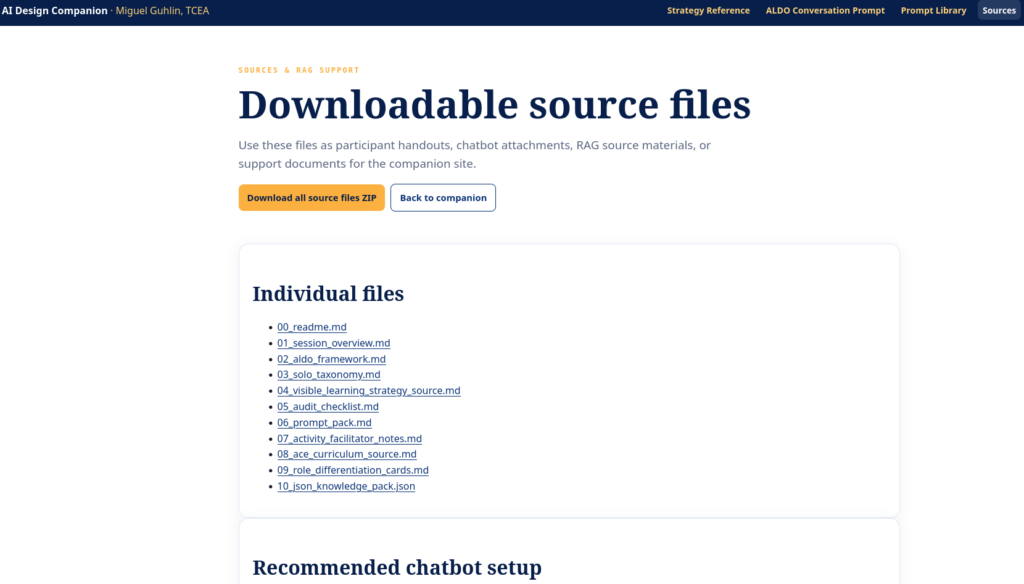
All of this is available via the website, the AI Design Companion. The companion site gathers the strategy reference, TEKS-aligned prompt library, downloadable source files for RAG, and the TCEA Strategy Partner bot trained on the Visible Learning content.

Did You Know? TCEA offers Gen AI courses and microcredentials for educators ready to go deeper. You can get the AI Essentials for Educators course at discounted rate through the end of June, 2026. It is the most comprehensive course on Gen AI that TCEA offers, addressing BoodleBox, ChatGPT, Claude, Gemini, and Perplexity. It also covers vibe-coding with rich examples.
But wait, there’s more! Let’s talk item analysis.
Pre-Assessment Item Analysis with Gen AI: A Bell Ringer Entry Ticket
You are already familiar with the benefits of bell ringer activities. This section, excerpted and updated from PRISM: Support Student Thinking, goes well with this blog entry.
PRISM is an older framework (now replaced with ACE) that stands for Patterns, Reasoning, Ideas, Situation, and Methods. ACE is the Articulate It, Connect It, and Extend it. Both are based off the SOLO Taxonomy.
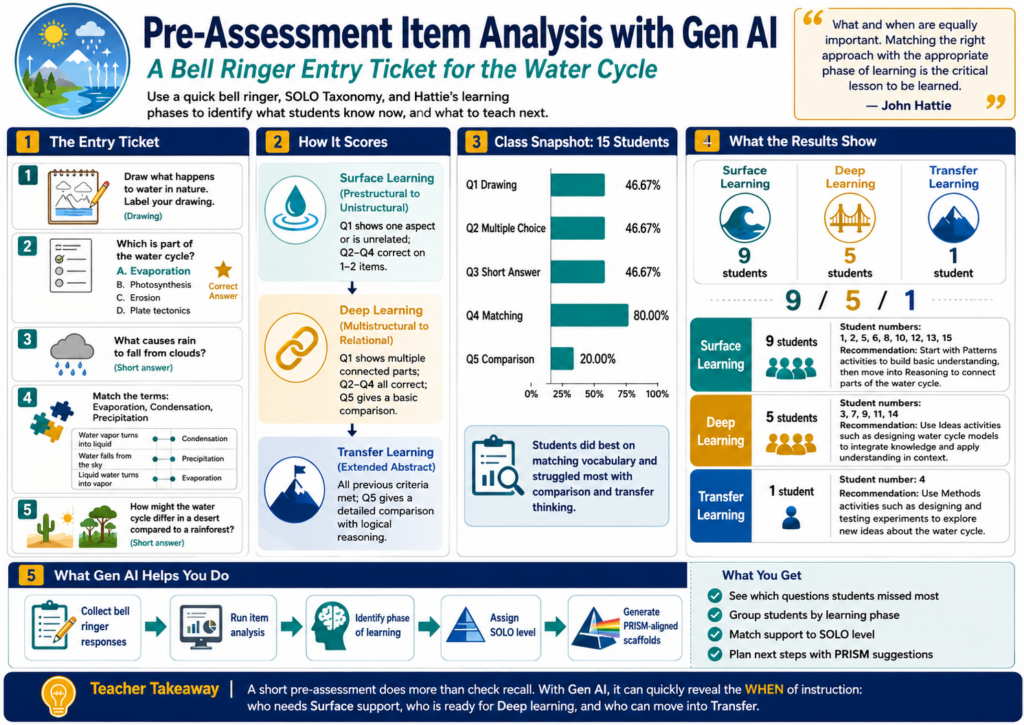
The goal of this pre-assessment is to assist you in identifying students’ current understanding of the water cycle.
What’s more, it aligns to the SOLO Taxonomy levels and John Hattie’s phases of learning (e.g. Surface, Deep, Transfer Learning). The mix of questions tries to adjust to different levels of understanding.
“What and when are equally important when it comes to instruction that has an impact on learning. Approaches that facilitate students’ surface-level learning do not work equally well for deep learning, and vice versa. Matching the right approach with the appropriate phase of learning is the critical lesson to be learned.” (John Hattie)
Let’s use a quick assessment to start us down the path of identifying the WHEN.
Water Cycle Pre-Assessment Entry Ticket
Here are the pre-assessment items for the entry ticket:
- Draw what you think happens to water in nature. Label your drawing. (Drawing question)
- Which of these is part of the water cycle? (Multiple choice)
a) Photosynthesis
b) Evaporation
c) Erosion
d) Plate tectonics - What causes rain to fall from clouds? (Short answer)
- Match the following terms to their definitions: (Matching)
- Evaporation
- Condensation
- Precipitation
Put the correct term from above next to the definition below:
| Definition | Term |
|---|---|
| Water vapor turns into liquid | __ |
| Water falls from the sky | __ |
| Liquid water turns into vapor | __ |
5. How might the water cycle be different in a desert compared to a rainforest? (Short answer)
Scoring Guide:
Surface Learning (Prestructural to Unistructural):
• Question 1: Drawing shows only one aspect of the water cycle or is unrelated
• Questions 2-4: Correct answers on 1-2 items
Deep Learning (Multistructural to Relational):
• Question 1: Drawing shows multiple connected parts of the water cycle
• Questions 2-4: Correct answers on all items
• Question 5: Provides a basic comparison
Transfer Learning (Extended Abstract):
• All previous criteria met
• Question 5: Provides a detailed comparison with logical reasoning
Assessing Your Class
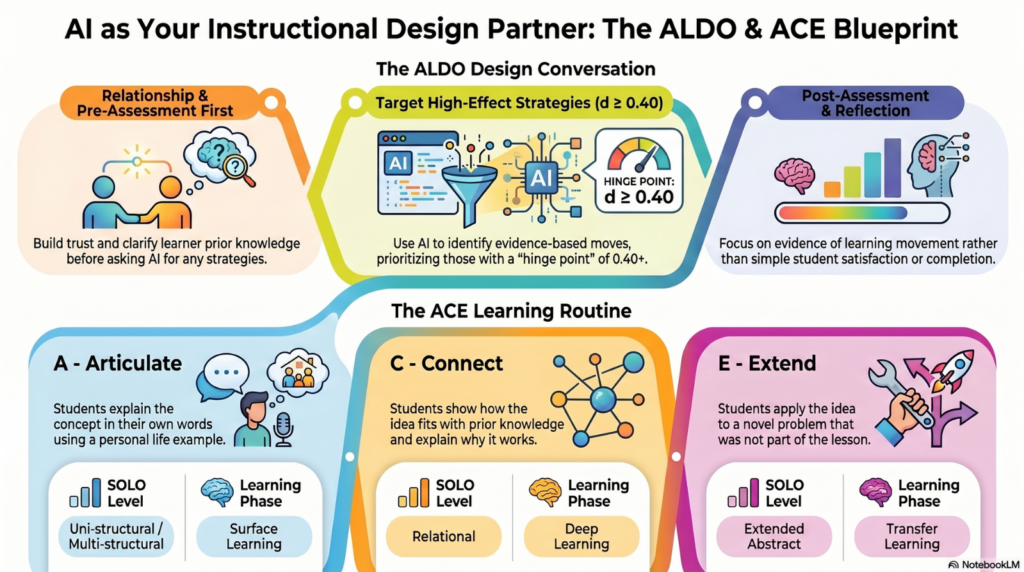
Given a class of fifteen students (wouldn’t that be nice?), you might see results similar to the following. Note the item analysis is followed by an identified phase of learning and SOLO Taxonomy level. Finally, you also get an ACE Framework related suggestion to better assist scaffold student learning. Please note the names of students have been anonymized for their privacy. See Item Analysis section at the end of the blog entry for details.
Item Analysis (Percentage of students who got each question correct):
- Q1 (Drawing): 46.67%
- Q2 (Multiple Choice): 46.67%
- Q3 (Short Answer): 46.67%
- Q4 (Matching): 80.00%
- Q5 (Comparison): 20.00%
With this information in mind, you can now come to some conclusions.
Identifying Surface, Deep, and Transfer Learning
Here’s a breakdown of what phase of learning students are in. The chart summarizes the number of students in each learning phase, combines recommendations, and displays the corresponding student numbers (in lieu of student names).
This table provides a clear overview of the distribution of students across learning phases and offers consolidated recommendations for each group.
Item Analysis Details
Explore the flash cards below for each student. Based on the student’s response, what Phase of Learning, SOLO Taxonomy level are they at? Using a tool like the ACE Framework, what learning recommendation would you offer? You can see the specific suggestions offered for each question.
Item Analysis Tool
Wish you had an item analysis tool of your own that does NOT depend on Gen AI? Maybe you are worried that using a Gen AI tool is tough because you might accidentally send confidential student data? If so, you might give this browser-based item analysis tool a try. No data actually leaves your computer (you could save the webpage to your device, and run it there without an internet connection). It’s not as powerful as a Gen AI tool, but it’s also not as risky.
Simply follow the steps via this website to get the results. The hardest step may simply be how to export data from your spreadsheet or gradebook as a comma-separated values (CSV) data file. You can read this tutorial on how to export CSV files from a variety of assessment tools available.
Quick Summary
This article explains how teachers can use entry ticket or exit ticket data to guide instruction. The item analysis tool accepts CSV data, calculates student and question performance, and provides recommendations connected to SOLO Taxonomy, the ACE Framework, and editable TEKS alignment.
The tool is designed for K-12 teachers, instructional coaches, and campus leaders who need a practical way to move from formative assessment data to instructional action. Students are grouped into surface learning, deep learning, or transfer learning, then matched with ACE next steps: Articulate, Connect, or Extend.
Best for: formative assessment, bell ringers, exit tickets, entry tickets, TEKS-aligned intervention planning, instructional coaching, and data-informed lesson adjustment.
👤 Human-directed (Miguel Guhlin) · 🤖 Gen AI-assisted (Claude, ChatGPT)

2 comments
Loved the article and looking for ways to incorporate into my instruction. One issue, though. Whenever you use an acronym, please, at least the first time, tell readers what it is. Don’t assume that they know. I’m talking about even when saying the United States of America (USA). Most don’t know that there is also the United States of Mexico. In this article, SOLO is never spelled out. SOLO taxonomy and SOLO progression are used interchangeably. The word “outcomes” never appears when searched. Likewise, PRISM isn’t spelled out. I don’t mind looking things up, but it can help readers and those new to the concepts if you keep this in mind. Thanks again for a fascinating model.
Herb, you are absolutely right! Since I excerpted some of the content from a LONG blog entry, I neglected to include the acronym explanations for SOLO and PRISM. I write about them so frequently here, I imagined the reader might be familiar with them. Still, that doesn’t let me off the hook. I’ve added the explanations of each acronym (e.g. SOLO, PRISM, and ACE) more explicitly in the blog content.
Thank you for pointing those omissions out, and please know that they are now resolved.
-Miguel