

Many of you are doing great things with Google Apps and Chromebooks in your districts and classrooms. Share your knowledge by becoming a presenter! The call for proposals for the Chromebook Academy is now open.
We would love for you to share your Google expertise by submitting a proposal to present. The presentations are 50 to 90 minutes in length and cover a variety of topics, from the best educational add-ons and extensions to Chromebook management to the latest Google updates. In addition, presenters with at least three hours of sessions selected will have their registration fee waived. Registrants will receive a ton of resources, along with lunch both days and a complimentary year of TCEA membership. In addition, there will be time to network with your peers and see how other school districts are implementing Chromebooks to their full potential. You can learn more about this awesome two-day learning extravaganza here.
Don’t delay! The deadline for submissions is May 1, 2017 and you don’t want to be left out.




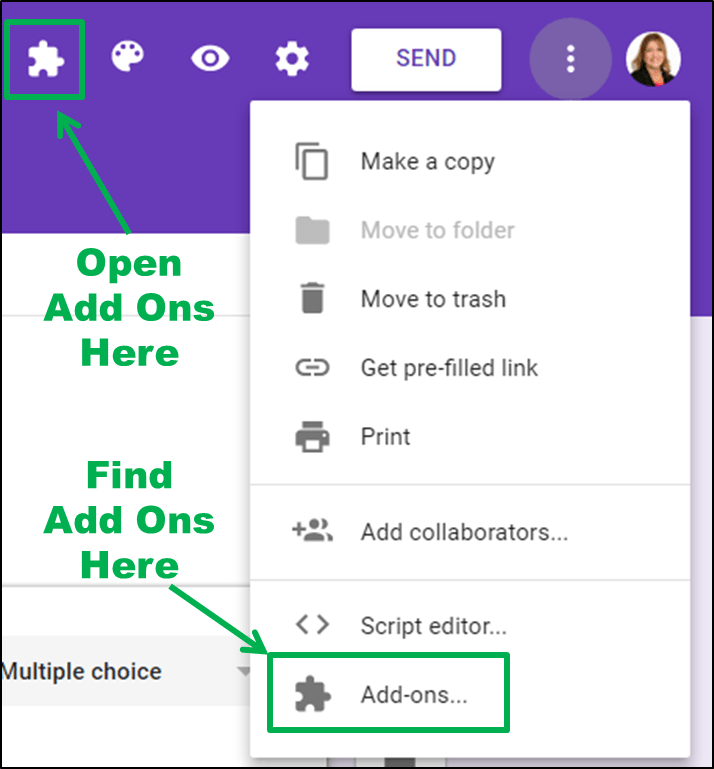 To find Form add-ons, click on the More button (which looks like three little dots in the upper right-hand corner of your form) and then scroll to Add-Ons. You can browse through the add-ons and install the ones you want. You’ll then get a new puzzle piece icon in Google Forms, with a menu that lists each of your add-ons.