Stay updated on the latest education trends. Explore tools, strategies, and insights to keep your teaching and learning practices innovative.

Last October, I wrote a blog post on Open Education Resources (OER). While doing the research, I realized that the state of Texas needed to do a better job of embracing and promoting these resources. This led to the drafting and eventually passing of several bills that will make it easier for teachers and districts to access and utilize high-quality open education resources. SB 810 defined OER as:
Resources that reside in the public domain or have been released under an intellectual property license that allows for free use,
reuse, modification, and sharing with others
What That Means
The key phrases in the definition are “free,” “reuse,” and “modify.” In order for a resource to be considered an open resource, it has to not only be free, but the user must also have the rights to reuse all or part of it for his own purpose. Let’s take, for example, a high school English literature teacher preparing to teach a unit on Shakespeare who finds the play As You Like It, on the OER Commons website. In order for this resource to truly be an openly-licensed material, the entity that is hosting this resource would grant the teacher the rights to use and adapt all or part of the play. You will notice that the license allows you to remix and share the resource so it qualifies as an OER.
The legal definition of open educational resources, as defined by SB 810, also identifies these resources as full courses, course materials, modules, textbooks, streaming videos, tests, software, or any other tools, materials, or techniques used to support access to knowledge. As an example, Pearson has a sixth grade math course available which a district could use as is or adapt to meet the district’s specific learning goals. This course could easily be inserted into a district learning management system and be reworked and adjusted to meet the district’s curriculum design.
Texas Use of OER
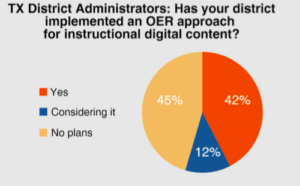
The ability to take a resource and adapt it to meet a district’s scope and sequence and learning objectives is one of the reasons Texas districts have begun investigating and using open education resources. According to the most recent SpeakUp Survey, 42% of Texas administrators have implemented some form of OER within their district, and an additional 12% are considering it. 44% of the technology leaders in Texas consider OER to be one of the high growth digital initiatives.
These numbers will increase as some as the elements of SB 810 are implemented. TEA is required to have an OER repository that will be used by educators as a place to share materials created by districts, teachers, or the state. The new law also will create an instructional materials review service that will compare materials based on price, technical requirements, TEKS alignment, and editorial reviews. This service will help provide the quality control that has been missing for free materials.
 In addition, the state budget for the next two years includes $20 million for the state to arrange for an outside entity to produce open educational resources for the state’s use. It is expected that TEA will begin with instructional materials that meet the specifications for the English Language Arts adoption that will be implemented in the 2019-2020 school year. This would give districts the ability to use high-quality OER materials for this adoption, which has the potential to save them money. TEA recently announced the availability of some OER that were acquired by TEA for district use.
Open Educational Resources Blog Series
To help facilitate the exploration of open educational resources, I will write a monthly blog post that will hopefully answer the questions you may have. Some of the things I hope to address in the blog series are:
- What districts in Texas are using open education resources and with what results
- What resources are already available, both within and outside of Texas
- Updates on the implementation of the OER bills that were recently passed
- How to create your own OER
- How to give attribution for open education resources and what the different licenses mean
- The best practices in implementing OER.
These are just a few of the topics we will explore. Please use the comment section below to give me feedback or ask the burning questions you may have. See you next month!


 This has to be the easiest Twitter wall to set up. You have multiple themes available, can upload your logo, and identify one Twitter keyword, username, or Instagram keyword on the free version. There are four layouts (text, text and images, images, and instructions) which you can use in any combination or use all four (my preference) set on timers.
 Though not quite as extensive as The Wallrus, Activity Walls does do a nice job of showing the most recent tweets. Just identify your hashtag, set the colors (which can be a little quirky, depending on what browser you are using), and your wall is instantly created. Using Chrome, I can quickly jump to full screen for a nice projected view; using Internet Explorer, I can customize the accent, background, and text colors.
 Tweet Monsters is simple and focused. The free account is for personal use; you’ll need to contact them for pricing on corporate and other uses. Begin by identifying your hashtag. Customize text and background colors as well as the font, transition type, and transition speed. If needed, you can use the custom word filter to identify words to be filtered out and to either not show the tweet or substitute the bad word with an *. The downside of Tweet Monsters is that you only see one tweet at a time.
 This Twitter wall has the most options available without a cost. You can add lists, searches, tweets by geolocation, exclude specific hashtags or words, and color code your timeline, mentions, and direct messages if needed. You do have a variety of setting to change regarding the speed, fall size, language, font size, and whether or not to show retweets. When finished tweaking your wall, you will want to click on the Presentation Mode link for easier viewing for your attendees. Though not the most professional looking wall, it does give the most flexibility. And, when I’m in a Twitter chat, I use this wall to follow the exchange and participate.
 Now that you have a few Twitter walls to choose from and some tips to get you started, we’d love to see what you do with them. Share the link to your Twitter wall in the comments below.
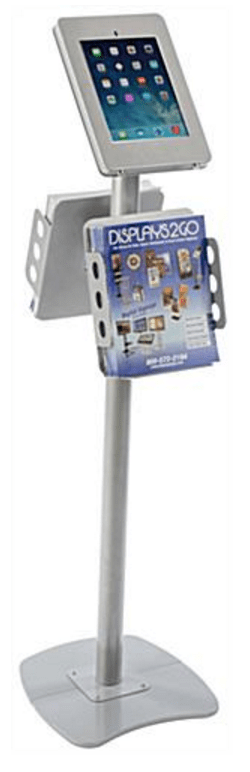

 Different solutions help you combine a paper notebook and the benefits of handwritten notes with digital search capabilities. You may not need a tablet if you already have a smartphone and a laptop/desktop computer.
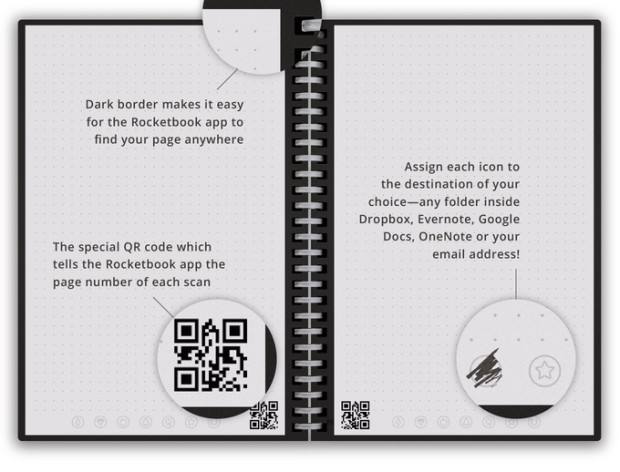 Benefits of Digital Paper