Supervising a web developer in a school district can be fun. Your idea starts out as a simple website, but then, pretty soon, the web developer is making suggestions about accessibility you hadn’t even thought of. If you haven’t been listening to your web developer, then you may want to. There’s a clock ticking and an upcoming deadline. This blog covers digital accessibility (A11Y for short) and offers some suggestions to prepare, if you haven’t already. You will get access to several tools and questions to ask, chatbot custom instructions, and see a sample report.
Upcoming Free Event: October 14, 2026 at 4:30 PM (Central) – Register Now
Digital accessibility is a Texas-sized topic with an impact on every learner. For the past decade, Mary Rice and Raymond Rose have explored how accessible digital environments support students, faculty, administrators, and parents—and they have witnessed growing awareness across education. Whether you are just discovering digital accessibility or ready to dig deeper, this session offers something for DigitALL learners. Come learn how accessibility makes digital learning more inclusive, practical, and effective for everyone. Join the presentation for a lively discussion, questions, and shared ideas.
Join us live for the presentation, then stick around for 30 minutes of open conversation and Q&A with the presenters.
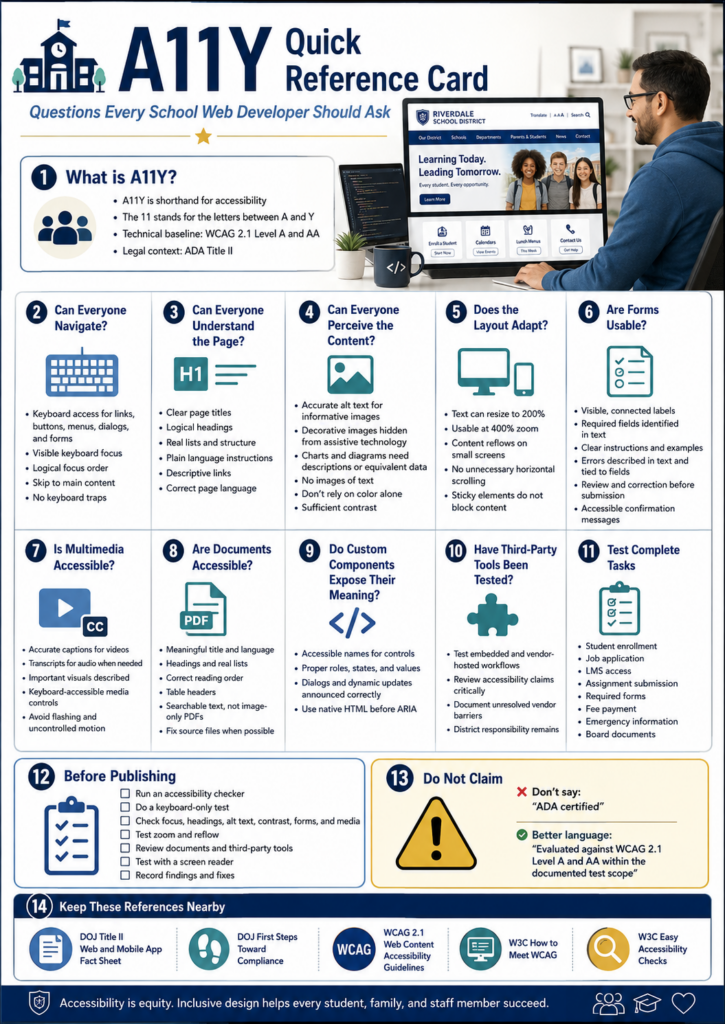
Questions to Ask
Here are some questions that you, as a web developer, should be asking. Or, maybe you should ask your web developer where your website stands on these:
Scenario To Avoid
Imagine yourself as a parent. A parent opens your district website to register a child for school. The registration link just says “Click here,” the form fields carry no labels a screen reader can announce, and the required handbook turns out to be an image-only PDF with no readable text behind it. For most families that adds up to a minor annoyance. For a parent who navigates by screen reader, it can stop the whole process before it starts.
Become a CyberSmart Educator with a practical, self-paced course designed to help you protect sensitive data, secure accounts and devices, recognize social engineering attacks, respond appropriately to cybersecurity incidents, and build stronger digital safety habits. The course is $49 at full price or $34 at the discounted rate. Register online through TCEA Courses.
School websites stopped being brochures a long time ago. Families rely on website for all sorts of necessary tasks, such as:
registering students,
checking calendars,
applying for jobs,
reading emergency notices,
making payments, and
reaching learning resources.
Once the site becomes the front door to a public service, accessibility is no longer a design nicety (if it ever was). Now, there’s a federal standard that clarifies expectations.
What Changed Under ADA Title II?
The U.S. Department of Justice updated the regulations for Title II of the Americans with Disabilities Act. Under the rule, state and local governments, public schools and districts included, have to make their web content and mobile apps accessible.
The technical standard is Web Content Accessibility Guidelines 2.1, Level AA, usually shortened to WCAG 2.1 AA. You will also run across accessibility written as A11Y, where the number stands in for the eleven letters between the “A” and the “Y.”
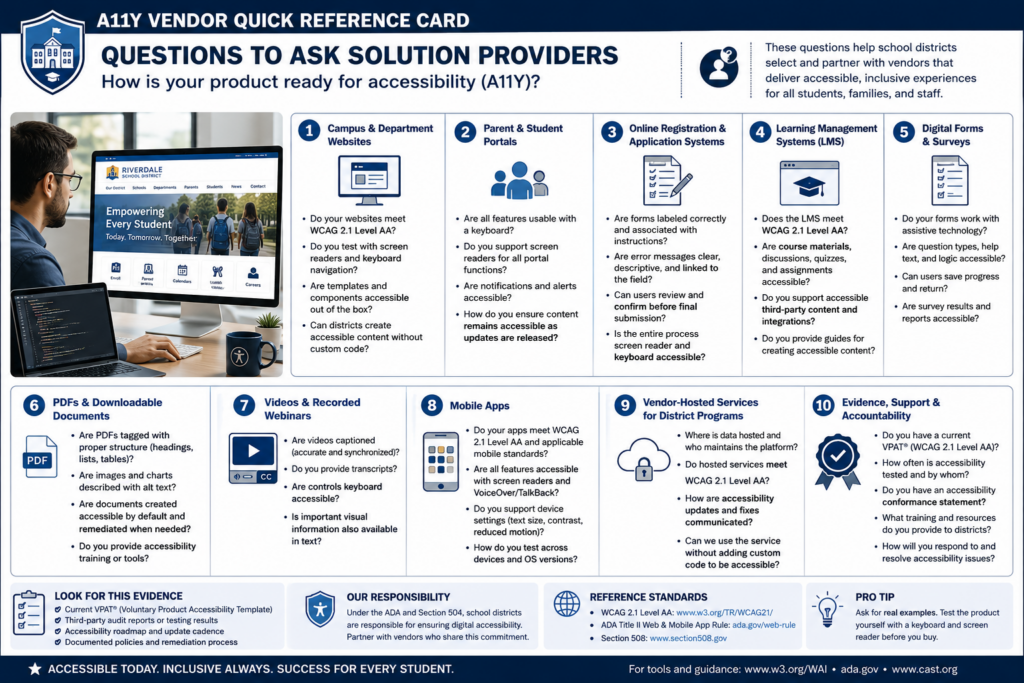
The rule reaches well past your homepage. It can cover items that have you ask third-party solution providers how their products comply. Here’s a short list and a list of questions for those solution providers:
Campus and department websites
Parent and student portals
Online registration and application systems
Learning management systems
Digital forms and surveys
PDFs and downloadable documents
Videos and recorded webinars
Mobile apps
Vendor-hosted services used to deliver district programs
As you can see, some of the products schools and district use every day have to comply. Read that list again and notice the bolded items. To me, those bolded items would surely have been a “not my circus, not my monkeys” kind of situation. However, they are significant performers in schools and districts.
Simply put, a vendor resource does not get a pass just because it sits behind a login or belongs to a vendor. The Department of Justice fact sheet points out that content and apps delivered through contracts, licensing, or other arrangements are covered right along with everything you build yourself.
When Do Schools Need to Comply?
The Department of Justice extended the original compliance dates in April 2026. Public entities serving a population of 50,000 or more now have to meet the technical requirements by April 26, 2027, while smaller public entities and special district governments have until April 26, 2028. Both dates appear in the 2026 interim final rule.
One possible concern is that “population” refers to the jurisdiction you serve, not your student enrollment. The DOJ explains that distinction in First Steps Toward Compliance. Some school districts may confuse jurisdiction with student enrollment, resulting in mistakes.
Keep the following information in mind: The population figure determines which ADA Title II compliance deadline applies. A district might enroll only 8,000 students but serve a jurisdiction with more than 50,000 residents. Using enrollment would wrongly place that district in the smaller-entity category and could make it plan around the later deadline.
Public entities already carry ADA duties around effective communication and equal access, and those duties did not move with the deadline. A family can raise a barrier today, and courts have recognized web accessibility claims for years.
Start With What Families Actually Have to Do
One way to approach this is to start with the essential tasks a family or staff member has to complete:
Enroll a student
Apply for a job
Submit a required form
Find emergency information
Get into a course
Read a board document
Ask for help
Work through each one using a keyboard alone, no mouse, then run the same pages through a screen reader and zoom to 400 percent to see what falls apart. From there, make sure to check the following:
Forms,
Videos,
PDFs, and
Error messages inside tasks
When you find an issue, fix it in the shared template or component rather than page by page. That may assist you in preventing the problem from reoccuring across the hundreds of pages you maintain.
Who Owns This?
As you may have guessed, your web developer isn’t the sole person responsible for this. While you may wear that hat in your role, this is actually a “A11Y is everyone’s responsibility” situation. Consider that Communications manages pages, teachers upload documents, human resources posts job applications, curriculum staff build courses, and vendors run the biggest platforms.
Wherever people publish, that’s where the responsibility has to be assigned as well. It’s a big job, especially if you outsource solutions like learning management systems, content management systems, video hosting, parent/student portals.
You will need to put a system in place to manage all the components, including a content inventory, a named accessibility owner, staff training, purchasing requirements that ask vendors to prove conformance. You will also need a clear way for people to report barriers, and a written remediation plan. I would also recommend a committee to share the compliance load.
Here’s a list of questions you can use:
As you might imagine, you are not trying to earn an “A11Y certified” badge. The goal is that a person with a disability can reach the same information as anyone else. And, also, that someone needing A11Y can finish the same school tasks with comparable privacy, independence, and ease.
Focus
What to do first
Essential tasks
Test enrollment, job applications, and forms by keyboard and screen reader
Shared templates
Fix the component, not the individual page
Documents
Replace image-only PDFs with readable, tagged versions
Purchasing
Require vendors to document WCAG 2.1 AA conformance
Ownership
Name an accessibility lead and train the people who publish
Not only is A11Y a legal requirement, it is also a long-term goal that schools and districts need work towards achieving and maintaining.
Just wanted to say I liked your package about accessibility. It was very comprehensive. Ideal for folks who get it and need help making their school/district in compliance. Nice job.
Raymond Rose
A Tool to Help: Digital Accessibility Readiness Assessment
Do you have access to a paid chatbot, such as ChatGPT, Claude, or Gemini? Get it to do the initial, first-step work of assessing your websites and other services. Use these custom instructions (get a copy) and paste them into your chatbot of choice. Then, ask it to assess the website or learning management system. It won’t be perfect, but it may get you further along than simply eyeballing a website.
For fun, I used ChatGPT to assess the TCEA.org website using the custom instructions…you can see my prompt was short and to the point.
Wondering how to use the instructions? Copy-n-paste them into a chatbot screen. You might even create a custom Project (Claude and ChatGPT call them “Projects,” while Gemini may refer to it as a “Gemini Notebook and Gem”) if you know this is something that you’ll be doing again and again.
Wouldn’t it be nice to have a report like this available to kick your A11Y committee work off?
Pick one high-traffic task on your site this week, the enrollment form is a good candidate, and try to finish it using only your keyboard. What you run into will tell you exactly where to start. Share what you learn in the comments.
👤 Human-directed (Miguel Guhlin) · 🤖 Gen AI-assisted (Claude, ChatGPT)
It is month six of your district’s artificial intelligence initiative, and the AI ROI numbers on your screen are not the numbers you wanted. Usage is flat. The pilot campuses look a lot like the campuses that never got the tool. Somewhere in the building, a board member is preparing a question you do not have a comfortable answer to yet: was this worth what we spent?
You have two options, and both feel risky. Kill the initiative now and cut your losses. Or defend it with a “trust the process” argument that starts to sound thin the third time you make it. Here is a better option: figure out which situation you are actually in before you decide anything.
Amara’s Law: You Are Probably Early, Not Wrong
Amara’s Law states that you overestimate the short-term impact of new technology and underestimate its long-term impact. It explains why so many district AI investments look disappointing at exactly the six-month mark and then look inevitable at the 18-month mark.
Picture a district like yours, a year into an AI-assisted feedback tool for writing instruction. At month six, usage is inconsistent. A few enthusiastic teachers use it weekly. Most touch it once and quietly go back to their old workflow. The dashboard looks like a failed pilot.
But teacher practice change follows its own timeline, and it is slower than technology adoption curves suggest. The first six months are rarely about the tool. They are about teachers rebuilding habits, testing whether the feedback actually helps students, and deciding the tool is worth the friction of learning it. That work does not show up as usage numbers. It shows up as a slow bend upward in month 10 or 12, right after most districts have already pulled the plug.
The Caveat: Not Every Slow Starter Is a Late Bloomer
Here is the uncomfortable part. Amara’s Law can become an excuse to fund something that was never going to work. Not every flat month six is a story waiting to bend upward.
The test is not whether usage numbers moved. It is whether practice moved. Are teachers who touched the tool doing anything differently, even a little, even inconsistently? Are the conversations in team meetings referencing it unprompted? If the answer is genuinely no across the board, you are not looking at a slow bloomer. You are looking at a tool that never found a foothold, and Amara’s Law will not save it.
Goodhart’s Law: When the Metric Stops Meaning Anything
Goodhart’s Law states that when a measure becomes a target, it stops being a good measure. Districts fall into this trap constantly with adoption metrics, and seat license logins are the clearest example.
In a district like yours, the technology office might track daily logins as its primary adoption metric because it is the easiest number to pull. A campus where every teacher logs in each morning, glances at the dashboard, and closes the tab looks like a success story. A campus where a smaller group of teachers logs in twice a week but genuinely integrates the tool into lesson planning looks like it is underperforming.
The login count rewards the wrong behavior. It cannot distinguish between a habit and a routine, and it will actively mislead you if you let it drive funding decisions. If you are measuring adoption, measure something closer to actual use: assignments created, feedback cycles completed, or teacher-reported changes in practice. Logins tell you who opened the door. They do not tell you who walked through it.
Three More Laws Worth Knowing
Sturgeon’s Law says that 90% of everything is mediocre, and your inbox proves it weekly. In a district like yours, the technology director might keep a running count: 14 AI tool pitches in a single grading period, most from vendors nobody on staff has heard of and half promising to solve the same problem the district already pays for elsewhere. That is not a sign the district is being targeted or that its vetting process is broken. It is the normal base rate of a fast-moving, underregulated market. The useful move is to stop treating each mediocre pitch as a fresh disappointment and start treating the 90% failure rate as the baseline you are filtering against. A vetting process built around that expectation looks for reasons to say yes quickly, rather than exhausting itself trying to fairly evaluate everything that lands in the inbox.
Brooks’s Law says that adding people to a late project makes it later, and district technology offices run into this every time a rollout stalls. When a writing tool’s adoption lagged at a campus like yours last fall, the instinct was to pull in two more instructional coaches to run extra training sessions. But the coaches were not the bottleneck. Teachers were not confused about how to use the tool. They were unconvinced it was worth the extra 10 minutes per assignment, and no amount of additional training addressed that. The coaches spent weeks reteaching a skill that was never the actual barrier, while the real question, whether the tool’s value was clear enough to justify the time cost, went unanswered. Before staffing up a struggling rollout, find out what is actually stalled. More hands help with a training gap. They do nothing for a value gap.
Hofstadter’s Law says it always takes longer than you expect, even when you account for Hofstadter’s Law, and a timeline like yours is a tidy example. The original plan called for full staff onboarding by October, padded from an initial August target because the district had learned from past rollouts to expect delays. October came and went with about 60% of staff onboarded. The padding was not wrong. It was simply not enough padding, because the sources of delay, staff turnover, a mid-year schedule change, a competing curriculum adoption pulling attention away, are the kind of thing no timeline fully anticipates in advance. That is not a planning failure worth punishing. It is what timelines for anything involving human behavior actually do, and building in a second layer of slack, beyond the slack you already added, is a more realistic response than treating each slip as evidence the plan was flawed.
The Law of Diminishing Returns: Your Fourth Platform Is Not Helping
The Law of Diminishing Returns states that each additional unit of input yields less benefit than the one before it, and your AI tool stack is a clean example. A third platform might add real capability. A fourth one, layered on top of two that are already underused, mostly adds a login screen and a renewal invoice.
Run the math on what you are actually paying for right now. If your district is paying licensing costs on three platforms and only one is seeing consistent use, the other two are not idle assets waiting to be activated. They are recurring costs with no offsetting benefit, quietly renewing every year until someone notices.
What to Do With This at Month Six
You do not need to guess whether your initiative is a slow bloomer or a dead end. Before your next budget or renewal conversation, pull three things: a practice-change signal, not just a usage number; a real count of what platforms you are paying for and which ones show actual use; and an honest answer to the caveat question above.
If you want help running that check, TCEA’s AI Investment Audit walks district leaders through exactly this kind of review, and it pairs directly with our earlier post, “Does Your AI Support Your District Improvement Plan? A Practical AI ROI Check.” If you read that post when you launched your initiative, month six is the right time to revisit it. Reach out to Bruce Ellis at TCEA to talk through what your own numbers are actually telling you.
For school technology leaders, cybersecurity is no longer an issue that sits quietly in the background. It is part of the day-to-day work of keeping schools running, protecting sensitive information, and ensuring students and educators can access the technology they depend on.
The challenge is that knowing cybersecurity is important and knowing exactly what to do about it are two very different things.
School systems face an increasingly complex threat landscape while operating with limited time, staff, and budgets. At the same time, many established cybersecurity frameworks were developed for industries with very different environments and resources. Education leaders need an approach that helps them translate cybersecurity best practices into practical steps that make sense inside a school district.
That’s where the Cybersecurity Rubric (CR) can help.
A Cybersecurity Framework Built for Education
Developed by the Cybersecurity Coalition for Education, an alliance formed by ClassLink and education organizations committed to strengthening cybersecurity in schools, the Cybersecurity Rubric gives education leaders a common framework for evaluating and improving their cybersecurity practices.
The CR is aligned with the National Institute of Standards and Technology (NIST) Cybersecurity Framework while being designed specifically around the realities schools face.
That distinction is important.
A framework becomes far more valuable when teams can use it to answer practical questions: Where are we today? Where are our greatest risks? What should we prioritize next? How can we demonstrate progress over time?
Instead of approaching cybersecurity as an endless list of technologies to purchase or boxes to check, the CR can help districts establish a clearer picture of their current cybersecurity posture and create a roadmap for continuous improvement.
Moving From Assessment to Action
Completing an assessment is only the beginning.
The real value comes from what happens next: interpreting the results, identifying priorities, bringing the right people into the conversation, and turning findings into sustainable cybersecurity practices.
That work can feel daunting, especially for technology leaders already balancing infrastructure, applications, support, data privacy, instructional technology, and countless other responsibilities.
Hands-on training can help bridge that gap.
As part of the TCEA SysAdmin Conference, technology leaders will have an opportunity to dig deeper into the Cybersecurity Rubric during the free pre-conference session Cybersecurity Mastery: A Hands-On Cybersecurity Implementation Deep Dive.
Designed specifically for edtech leaders, this immersive masterclass goes beyond cybersecurity theory and focuses on implementation.
Participants will work through practical, NIST-aligned training using the Cybersecurity Rubric, exploring how to assess current practices and translate findings into meaningful improvements across their schools and districts.
Through interactive exercises, expert-led activities, and real-world scenarios, attendees will develop skills they can take back to their teams and put to work.
Participants will also receive actionable tools to support continued implementation after the conference, along with an exam waiver for the Certified Cybersecurity Rubric Evaluator credential.
Build a Cybersecurity Roadmap Your District Can Use
Strong cybersecurity isn’t a one-time project. Threats evolve, technology changes, staff members come and go, and school systems continually introduce new tools and services.
The goal, then, isn’t to reach an imaginary finish line. It’s to build the structures, habits, and shared understanding that allow a district to continually evaluate risk and strengthen its defenses.
The Cybersecurity Rubric gives schools a framework for doing that work. The TCEA SysAdmin pre-conference masterclass gives technology leaders an opportunity to learn how to put that framework into practice.
Cybersecurity Mastery: A Hands-On Cybersecurity Implementation Deep Dive takes place Wednesday, Nov. 4, from 11:30 a.m. to 4:30 p.m. and is free with TCEA SysAdmin Conference registration.
Space is limited to 80 participants, and attendees must be registered for SysAdmin to participate.
Cybersecurity challenges aren’t slowing down. The good news is that school technology leaders don’t have to navigate them without a roadmap.
Most districts didn’t adopt artificial intelligence carelessly. You had a district improvement plan. You had specific content area goals. When you brought in an AI tool, you likely had a real reason for it, maybe it was supposed to support a literacy initiative, ease the load on your special education staff, or help teachers personalize instruction faster. The plan wasn’t missing.
Here’s a question worth sitting with. If a school board member or a reporter asked you right now what specifically changed because of the AI tools your district already has, could you answer? Most leaders can’t, not because the tools failed, but because nobody wrote down what “changed” was supposed to mean before the tool showed up. That gap is the actual problem this post is about.
What’s usually missing is the connective tissue: a clear, written answer to how a specific AI tool supports a specific goal, and whether it actually can. Many districts have responded to that uncertainty in a reasonable way, by keeping AI use teacher-facing for now and away from direct student contact, given legitimate concerns about safety and student data. That’s not indecision. It’s a sensible starting point. But it changes what you should be measuring. If students never touch the tool directly, your return on investment (ROI) question isn’t about learning gains showing up on a test. It’s about capacity: did this tool free up time or attention for your teachers, and did that reclaimed capacity actually go toward the goal it was meant to serve?
Why this is harder than it looks
A new curriculum or intervention program usually comes with its own success metric built in. You get benchmark scores, fidelity checklists, and a vendor who tells you exactly what “working” looks like. AI tools rarely come with that. Worse, many districts haven’t worked out the causal chain between “this AI tool is available to our staff” and “this specific line on our district improvement plan.” That chain has to be built on purpose. It doesn’t arrive in the box, and for a lot of districts, it didn’t arrive with a box at all.
The AI That Came with the Platform
Not every AI tool in your district was purchased as a separate product. Depending on your platform edition, licensing, and administrative settings, AI features such as Gemini or Copilot Chat may already be available within systems your district licenses. In other cases, a tool received a general nod of approval—“this can help with lesson planning”—without ever being tied to a specific goal. None of this is necessarily a personal or unofficial use question. The tool may be district controlled and officially available while still sitting there largely unexamined.
This category is genuinely harder to audit than a tool you bought on purpose. A purchased tool eventually comes up for budget review, and that renewal conversation forces someone to finally ask if it’s working. A bundled tool usually renews automatically as part of a much larger platform contract, so it can go years without anyone isolating it as its own line item or asking what it’s actually for.
The fix isn’t complicated, but it does have to be deliberate. Schedule a periodic review, once a semester is reasonable, of every AI feature that’s turned on by default across your platform licenses. For each one, make an explicit choice: assign it a specific purpose and start measuring it, restrict or turn it off if it isn’t earning its place, or leave it available with clear guidance while being honest that it isn’t being measured yet. Any of those three is a defensible answer. Leaving it on with no decision at all is the one that isn’t.
Consider a middle school that purchased an AI tool specifically to support a literacy goal on its district improvement plan. Leadership deployed it teacher-facing only, for lesson planning and feedback drafting, which made sense given the safety concerns at the time. Six months later, nobody can say whether it moved the needle on that literacy goal, not because the tool failed, but because no one defined, before rollout, what “supporting the goal” would actually look like. Was success measured in hours of prep time reclaimed? Faster turnaround on writing feedback? Something else entirely? Without that target, the campus has no way to know if the investment is paying off, even if it is working well right now.
Setting your own target
Even though the semester has already started, it’s not too late to name two or three things you expect to change because of a tool, whether you purchased it deliberately or it came bundled into a platform you already had. Be specific. Instead of “improve literacy instruction,” try “reduce the time teachers spend drafting written feedback on student essays by half” or “increase the number of small-group intervention sessions a teacher can run each week.” Write these down, share them with your campus administrators and instructional coaches, and check them explicitly rather than relying on a general satisfaction survey. A survey tells you how people feel about a tool. It doesn’t tell you whether the specific goal you set out to support actually moved.
The AI you didn’t purchase
Here’s a layer many districts haven’t fully accounted for. Alongside any officially provided tool, bundled or deliberately purchased, your teachers and staff are almost certainly already using free or personally purchased AI tools, on the school network during the day or at home in the evening. They’re using them for lesson planning, parent communication, feedback drafting, and more. This is happening whether or not you’ve measured it, and it deserves an honest look rather than being ignored.
Two things follow. First, find out what’s already happening informally. You may discover both hidden value, teachers who’ve quietly found real efficiency gains, and hidden risk, particularly around student data ending up somewhere it shouldn’t. Second, give your teachers a simple, personal way to gauge value for themselves. Not a district form. Just a private gut check: did this save me real time this week, and would I miss it if it disappeared tomorrow? That question alone helps a teacher separate a tool that’s genuinely earning its place from one that’s just become a habit.
Whether a tool is bundled, deliberately procured, or personally chosen, the same rule applies. Never enter personally identifiable student information into an AI tool that hasn’t been vetted and approved by your district.
The equity layer you can’t see from the district office
If you only measure AI’s impact at the aggregate district level, you risk missing something important. One campus might show strong results while another falls further behind, and averaging the two together can hide that gap entirely. This applies to deliberately purchased tools, where some campuses may have received more training or more consistent access, and it applies just as much to bundled tools and personal use. A teacher with a paid personal subscription may be getting meaningfully more value than a colleague relying on a free tier, a gap your district didn’t create and might not even see, since it’s happening on personal devices and personal accounts. Disaggregate your data by campus wherever you can, and ask specifically whether your rollout, official or otherwise, is widening any existing gaps.
Budget reality
A lot of AI spending over the past few years leaned on temporary funding, grants, one-time allocations, or ESSER dollars. That ESSER money is gone now. The final spending extensions expired in March of this year, and bundled tools carry a related risk of their own, since they can quietly disappear or change scope whenever the parent platform contract is renegotiated. If an AI tool in your district was ever propped up by ESSER funding, you’re not waiting for a funding cliff anymore. You’re standing at the bottom of one, deciding right now whether that tool earns a permanent, deliberate place in your general fund budget. Setting a clear target today gives you the evidence you’ll need to make that case, one way or the other, in a conversation that’s already happening rather than one still ahead of you.
If you’re heading into a tighter budget year and need help deciding what to keep, improve, or cut, contact Dr. Bruce Ellis at bellis@tcea.org to learn more about TCEA’s AI Investment Audit.
The audit gives districts a clear picture of where AI is being used, including tools that were bundled or pre-approved, where adoption is falling short, and which investments are earning their place. That means your next decision can be based on evidence instead of guesswork.
What to do this week
The next step looks a little different depending on your role.
CAMPUS ADMINISTRATOR
Bring one question to your next grade level or department meeting: what’s one thing you’ve stopped doing, or started doing faster, because of AI this semester, whether it’s the district’s official tool, something bundled into your platform, or something a teacher found on their own?
You’ll likely hear answers you didn’t expect, and you’ll have the beginning of a real target instead of a guess.
For a step-by-step starting point, download the
Campus Administrator Guide to Measuring AI ROI.
CTO/DISTRICT TECH LEADER
Prepare for your next AI-related budget conversation by answering one question first, for every AI tool your staff have access to, bundled or purchased: what specifically changed because of this tool, and how do you know?
If you can’t answer that yet, that’s not a failure to hide from your board. It’s the actual finding, and naming it honestly is the first step toward a target you can defend next year.
For a step-by-step starting point, download the
CTO and District Technology Leader Guide to Measuring AI ROI.
You already had a plan when AI entered your district. Now give yourself a way to know if it’s working.
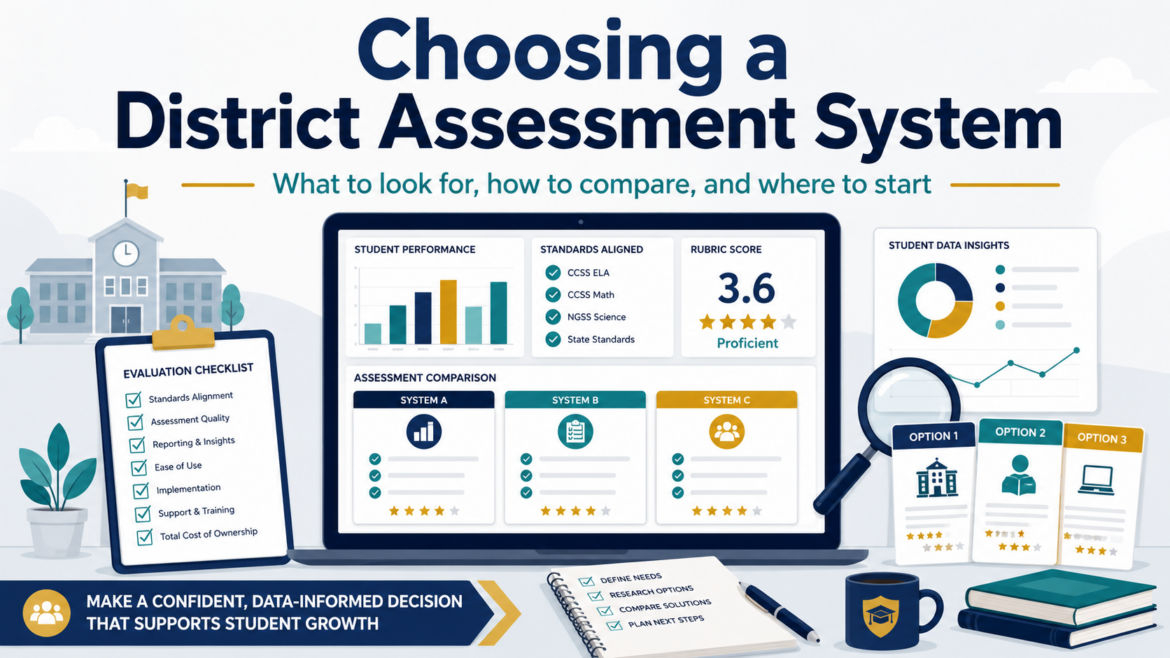
Find yourself building a workaround in a spreadsheet or other convenient tool? That may be a sign that your enterprise assessment system needs a hard look. I still remember visiting with key campus staff to figure out, “How many hoops do you need to jump through to get the assessment data needed for decisions affecting students?” Sometimes, it was a curriculum coordinator who could not get item analysis quickly enough to help campuses. Sometimes, it is a platform that still works, but only if everyone remembers the odd little steps nobody wrote down.
The way I convinced my superintendent and his cabinet? Conduct video interviews with counselors, assistant principals, principals, instructional guides responsible with wrangling the assessment data.
Whether your district uses Schoolnet, Eduphoria Aware, Mastery Connect, Performance Matters, DMAC, LinkIt!, Otus, or something else, the question is the same: what does your assessment system need to do now?
Start With the Data-Wranglers’ Work
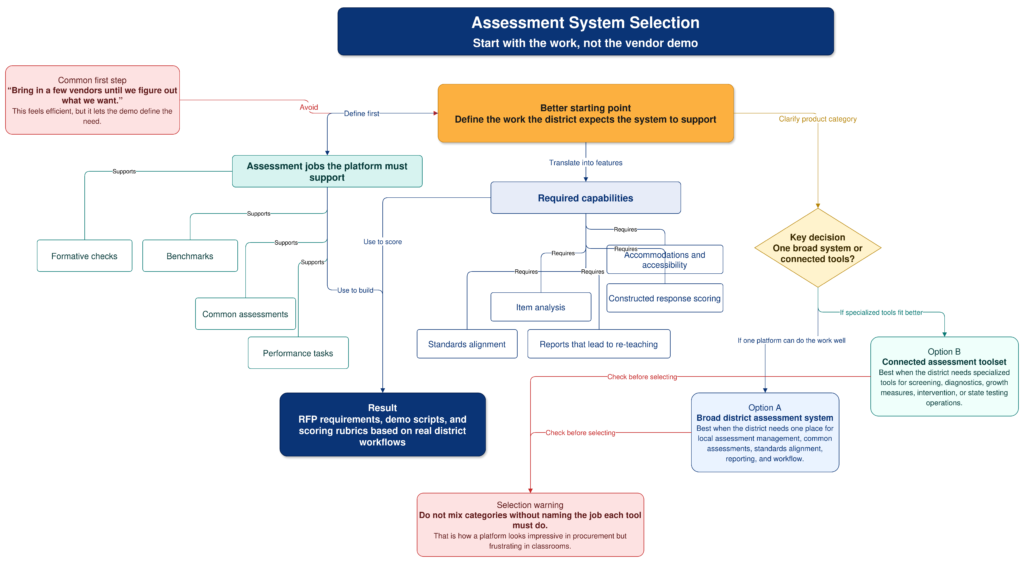
“Bring in a few vendors until we figure out what we want.” While this may seem obvious in hindsight, it’s often the first, wrong step. Do not begin with vendor demos. Begin with the work your district expects the system to support.
A strong assessment platform should help teachers build and deliver formative checks, common assessments, benchmarks, and performance tasks. It should support standards alignment, accommodations, item analysis, constructed response scoring, and reporting that leads to re-teaching. If the system only tells you who passed and failed, it is not doing enough.
You also need to decide whether you want one broad district assessment system or a set of connected tools. Some products are built for local assessment management. Others are stronger for screening, diagnostics, growth measures, or state testing operations. Mixing those up during selection is how you get a platform that looks impressive in procurement and frustrating in classrooms. Use the flowchart above to scaffold your discussion.
Use Gate Checks First
Before scoring features, use gate checks. These are not the nice-to-haves, but rather, the conditions that require serious consideration. For example, ask whether the vendor can provide a signed district data privacy agreement, SSO, automated rostering.
To that, add on role-based permissions, current accessibility documentation, audit logs, clear retention rules, and exportable item and results data.
Interoperability matters here. For example, OneRoster supports exchange of roster, course, and grade data, while QTI is designed for moving tests and questions between systems.
If a vendor cannot clearly answer how your data gets in, how your data gets out, and what happens when the contract ends, slow down. I always want to know the exit policy. You must do your due diligence, don’t just be wooed by the “don’t hurt our feelings by asking tough questions” vendor representative. They are trying to sell you something that is quite expensive. Even if the product is free, there are costs involved.
Score the Fit
Use a weighted rubric so the loudest demo, or most persuasive solution provider, does not win by default.
Criterion
Weight
Instructional fit and assessment design
15
Standards alignment and item banks
12
Authoring, delivery, accommodations, and scoring
12
Data use, dashboards, and MTSS action
15
Interoperability and migration
12
Privacy, security, and accessibility
15
Usability, support, and professional learning
10
Cost, contract, and exit terms
9
I would also run the same rubric against your current system, then tweak the rubric as needed. The incumbent may still be good enough in some areas, and weak enough in others to justify the pain of switching.
Build a Practical Shortlist
Your shortlist might include Eduphoria Aware, Mastery Connect, PowerSchool Performance Matters, LinkIt!, DMAC Solutions, Otus, Renaissance DnA, Cambium Assessment, NWEA MAP Growth, i-Ready Assessment, Renaissance Star Assessments, and Schoolnet by Pearson.
That list is not a recommendation to invite everyone. It is a reminder to separate categories. These jobs are related but not identical:
District assessment management,
Benchmark testing,
Analytics,
Intervention support,
Universal screening, and
Growth measurement
The best system is the one teachers will use, data staff can trust, and technology staff can support without quietly inheriting a second full-time job. I’ve seen that last one happen all too many times. It happens when the superintendent or her deputy super makes a decision and everyone in the room can sense it. Instead of encouraging critical analysis, s/he has rubber-stamped a solution that should never have made it through the door.
An Interactive Assessment System Rubric for RFP Scoring
Use the interactive rubric below to score each option before the sales call shapes the conversation. This rubric is one you will need to tailor and customize for your own use.
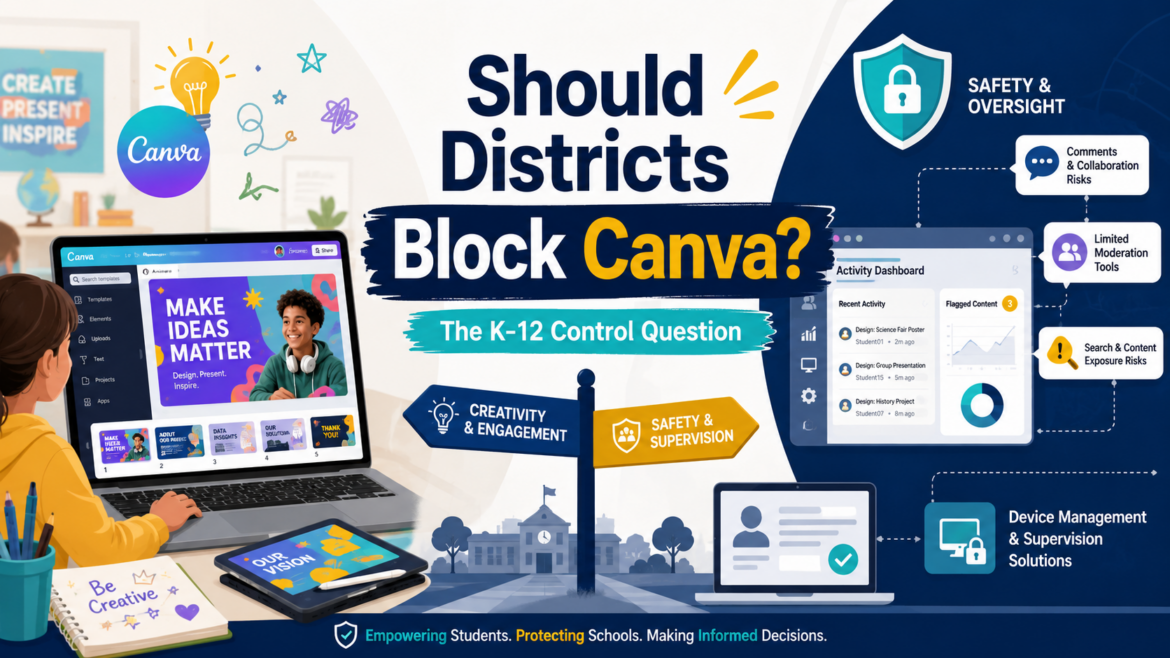
A district technology leader recently raised a question (a TCEA Community conversation) that probably made several CTOs pause over their coffee: Should Canva be blocked for students next year?
If you are staggering in shock at the question, you are not alone. I found myself astonished any district would consider blocking Canva Edu because it an extremely popular solution. Teachers like it. Students like it. It helps students make polished visual work without needing a full design course first. Unfortunately, that is also part of the problem.
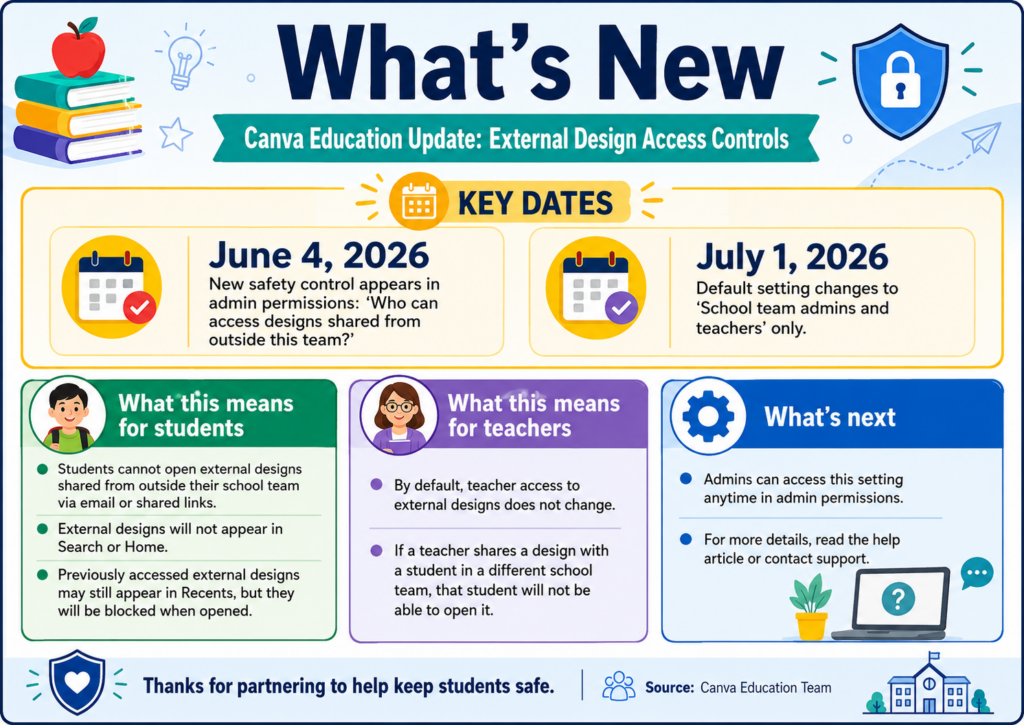
A Quick Update (7/1/2026)
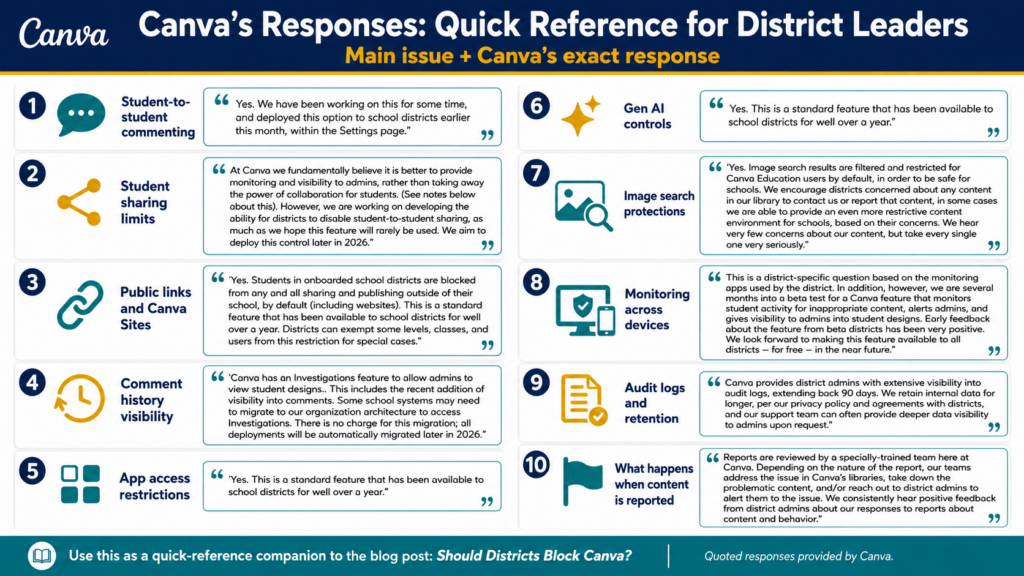
Thanks to a TCEA member for sharing an update about possible changes that took effect today, July 1, 2026. This update focuses on external design access, but what about the commenting aspects? For a more detailed update, see responses to key questions in the “Canva Responds” section.
Adapted from email “Updated student safety controls in Canva Education” from Canva no-reply@canva.com and sent on Thu, Jun 25, 2026 at 12:37 AM
Framing the Problem
With that update under consideration, let’s take a look at the actual problems teachers and schools are facing. To frame the problem, imagine your students involved in a Canva Edu project. Everything is going great but then teachers find that:
Students are chatting through shared designs,
Comments are used like messaging,
“Suggestive images” appear in search results, and
Limited district-level controls (see update above).
If you add one-to-one iPads to the mix, where monitoring inside apps can be harder than monitoring browser activity, you can see where the problem is. If this conversation sounds familiar, that’s because any technology leader has encountered it many times before.
Whether it’s Google Slides, or other popular tools, anything with un-monitored chat or comment features is now a potential student attack vector.
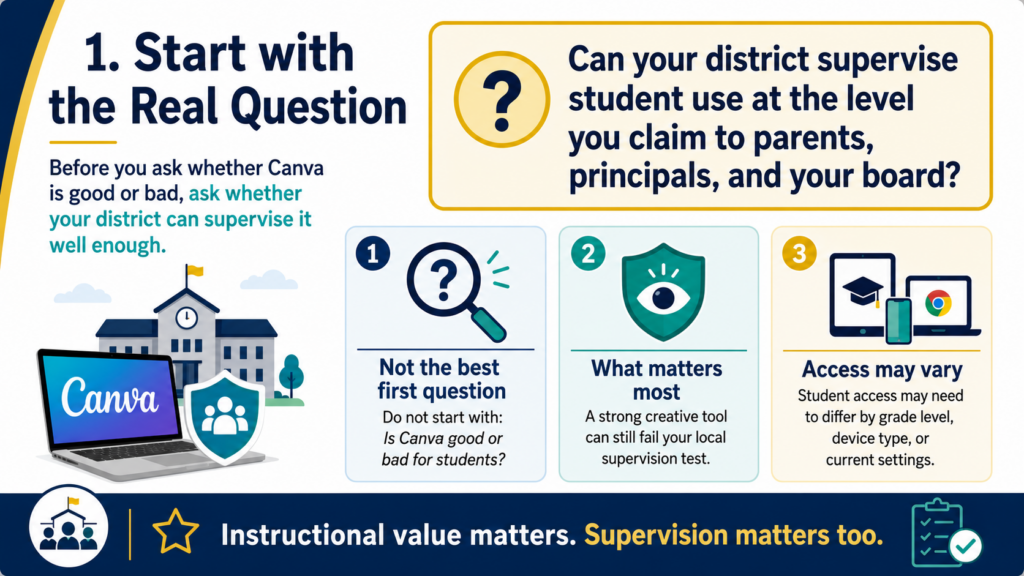
1 – Start with the Real Question
Understanding the actual problem is a key starting point. It’s easy to simply ask, “Is Canva good or bad for students?” This is the beginning of the browser wars, the Office Suite wars, and many more. As such, it’s not the best question to start with. Instead, you might ask, this one instead:
Can your district supervise student use at the level you claim to parents, principals, and your board?
Canva may be a strong creative tool and still fail your local supervision test. A district may love the instructional value and still decide that student access is not appropriate in certain grades, on certain devices, or under current settings.
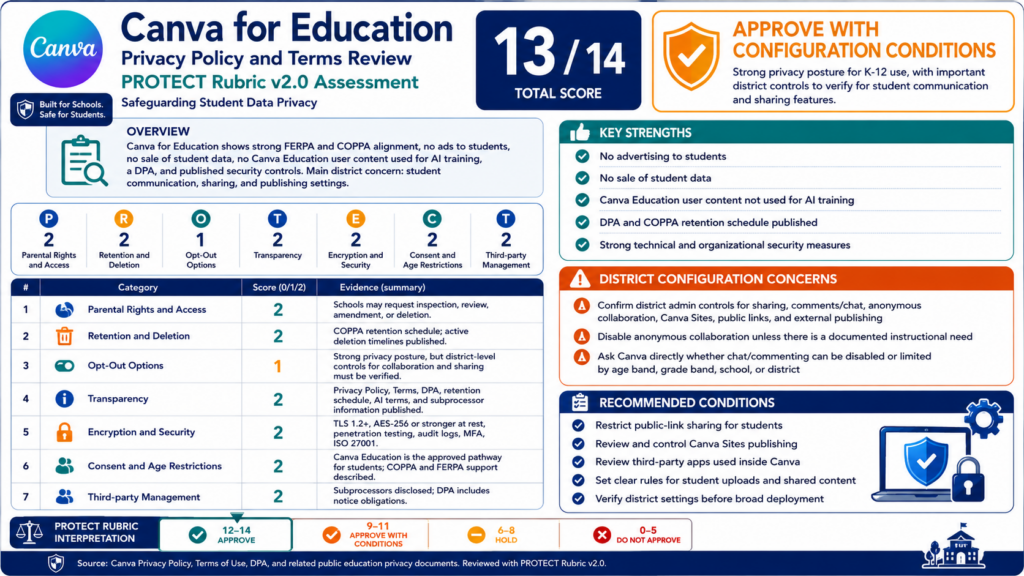
Canva for Education is positioned as a K-12 tool, and Canva’s education trust page says it is FERPA and COPPA certified, with references to the National Data Privacy Agreement and state addenda. Those are important. If I run Canva through the TCEA Protect Rubric v2.0, here’s how they score:
That aside, if Canva cannot answer the tough questions, that could be a “show-stopper” (one of my favorite colloquialisms) in some districts. Those questions can include inquiries a CTO has to answer on a Tuesday afternoon. You know, when a principal calls about student messages inside a shared design.
2 – Behavior Problem or Platform Problem?
Another way to frame the conversation is whether this a behavior problem or a platform problem? I like this approach because education is a people issue, not a technology one. We use educational technology tools to support teaching and learning efforts, not impede human to human interactions or inhibit behavior. There are ALWAYS detours to the technology roadblocks. If teacher intervention isn’t available to meet technology where it is at, then you may as well not use the technology. The goal is to minimize, as much as possible, the level of teacher effort and time required.
Students misusing comments, sharing, or collaboration tools is a behavior issue. But if the platform does not give the district enough visibility, logging, retention, or control to respond, then it becomes a platform governance issue.
I would not call this “chat” too quickly. Vendors can argue there is no chat feature. What districts are describing is student-to-student communication through collaboration spaces. Canva’s own public safety guidance notes that users can invite others to edit and comment in real time. That is the part that matters for schools.
If students can communicate in a space adults cannot effectively supervise, you have a supervision gap.
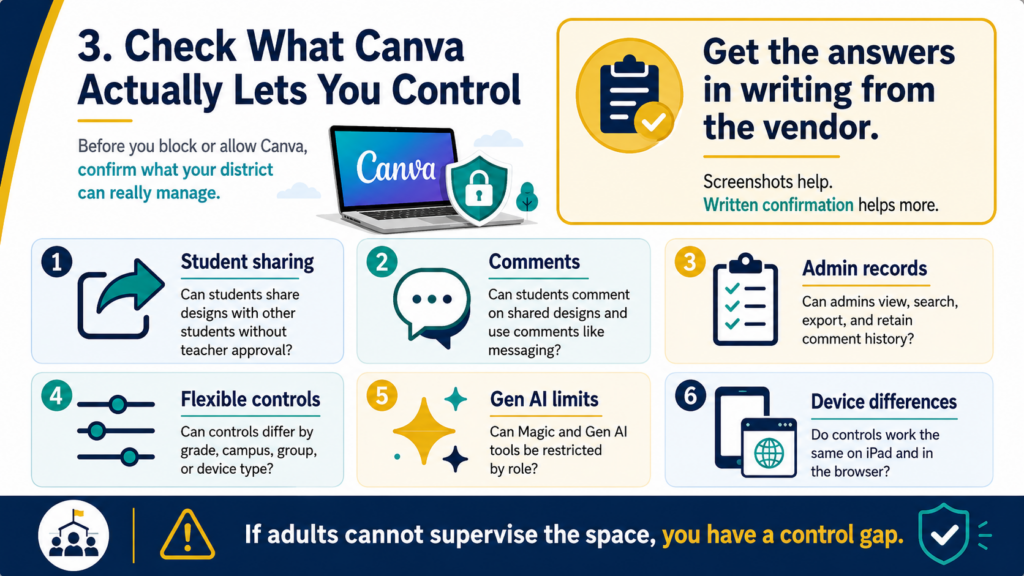
3 – Check What Canva Actually Lets You Control
Canva does provide some controls. For example, Canva documents app restrictions for students, access controls for Magic and Gen AI features, and comment-related permissions. Canva also states that, by default, K-12 students cannot edit or delete their own comments.
If students cannot delete comments, that helps with accountability. But it does not fully solve the concern. A harmful message, inappropriate image, or unsafe conversation can still happen before an adult sees it.
That is the gap districts are wrestling with.
District question
Why it matters
Can students share designs with other students without teacher approval?
This creates a private communication path
Can students comment on shared designs?
Comments can become messaging
Can admins view, search, export, and retain comment history?
Investigations require records
Can controls differ by grade, campus, group, or device type?
Younger students may need stricter limits
Can Gen AI tools and apps be restricted by role?
Canva now includes many Gen AI-connected features
Do controls work the same on iPad app and browser?
Monitoring may differ by device
Before blocking anything, get those answers in writing from the vendor. Screenshots from admin settings help, but written confirmation helps more.
4 – Device Choice Changes the Risk
One district in the discussion had been one-to-one iPads and blocked Canva. As they moved campuses to Chromebooks, they began opening Canva back up where their monitoring tool could see more web activity.
Sometimes the decision is not really “Canva or no Canva.” It is “Canva on which device, under which monitoring model, for which grade levels?” A web filter or activity monitor that catches behavior in Chrome may not give the same visibility inside an iPad app. Your mileage will vary, and that is where vendor promises get expensive if no one tests them. The challenge is that you may have to switch web filters if your current solution can’t get the job done. I love Canva, and if my teachers did, I would ask my current vendor what they can do to help. If it wasn’t enough, that’s incentive enough to switch.
So, take the time to run the boring test. Have a student test account share a design, post comments, reply, search questionable terms, open apps, use Gen AI tools, and attempt public sharing. Then check what your monitoring tools captured.
5 – Avoid Whack-a-Mole Access
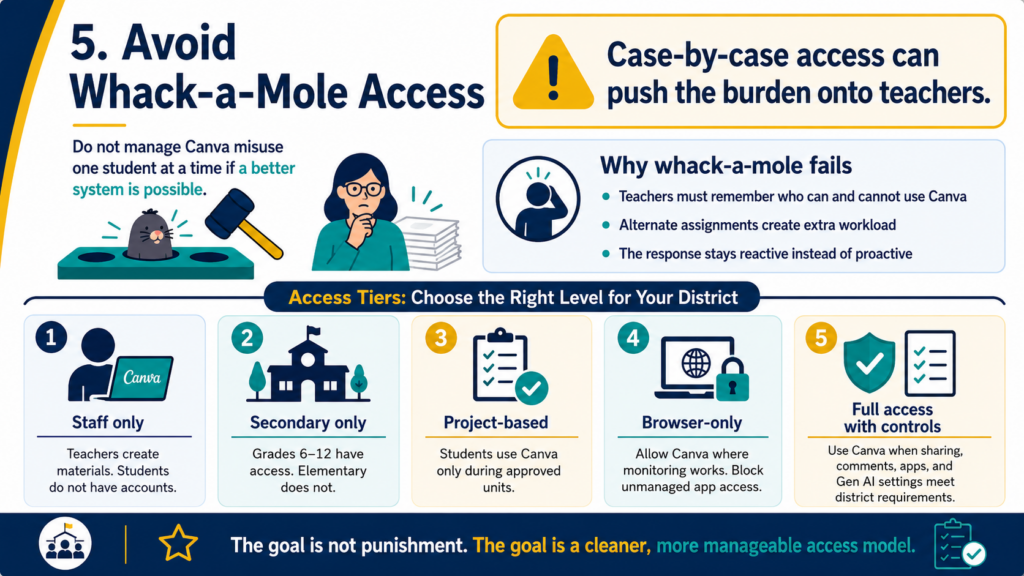
Should you play Whack-A-Mole (the student who engages in the human act of communication with another human is the mole here) with misuse cases? If only two students misuse a tool, removing only their access sounds reasonable. But in practice, that can push the work onto teachers. They have to remember who can use Canva, who needs an alternate assignment, who lost access last week, and who is allowed back in today.
That becomes whack-a-mole with lesson planning attached. Perhaps, a cleaner approach might be to define access tiers.
Tier
Example use
Staff only
Teachers use Canva to create materials, but students do not have accounts
Secondary only
Grades six through twelve have access, elementary does not
Project-based access
Students use Canva only during approved units
Browser-only access
Canva is allowed where monitoring works, blocked in unmanaged app contexts
Full access with controls
Students use Canva when sharing, comments, apps, and Gen AI settings meet district requirements
The point is not to punish every student for the choices of a few. I like this approach as well because it avoids a model that only works after something has already gone wrong. Of course, in some districts, nothing goes wrong. In others, the word spreads in a viral fashion and you may have to take more direct action.
A Round Up of Quick Suggestions
Do Not Ignore the Image Search Issue. The suggestive image concern belongs in the same conversation. Even with content moderation, search systems are not perfect. Canva says its education collections are reviewed for school appropriateness. You still need to check permissions, settings, reporting options, and a child’s readiness before use. You may decide that older students can use Canva search with supervision. You may decide elementary students should use teacher-provided templates and assets only.
Consider another tool. You may decide that another tool is a better fit for younger grades. You are making community and age-appropriate access decisions.
Test alternatives. While there are alternatives to consider, be aware that they may not feel as smooth as Canva to teachers or students. Several educators will tell you it feels clunkier, or not worth the cost/effort to use. They may be right.
Canva Responds (Added 7/1/26)
After this blog entry dropped, Canva team members responded via email to TCEA. The exact response appears as a comment on this blog entry but here is an at a glance quick reference card:
A Practical Decision Rule
I would not start with a districtwide block unless the risk is already documented and current controls are not enough. But I also would not keep Canva open just because it is popular. For one-to-one iPad districts, especially with younger students, the safest middle ground may be staff-only or grade-banded access until monitoring and admin controls catch up. For Chromebook campuses where activity monitoring can see more, access may be easier to justify.
One simple rule you can use boils down to:
If students can communicate, create, search, or share in ways your district cannot reasonably supervise, limit access until the control gap is closed.
That does not mean a full block. It may mean staff-only access. It may mean secondary-only access. It may mean browser-only access. It may mean a temporary pause while Canva, your mobile device manager (MDM) vendor, and your monitoring vendor explain what they can and cannot capture.
Questions to Ask Before Next Year
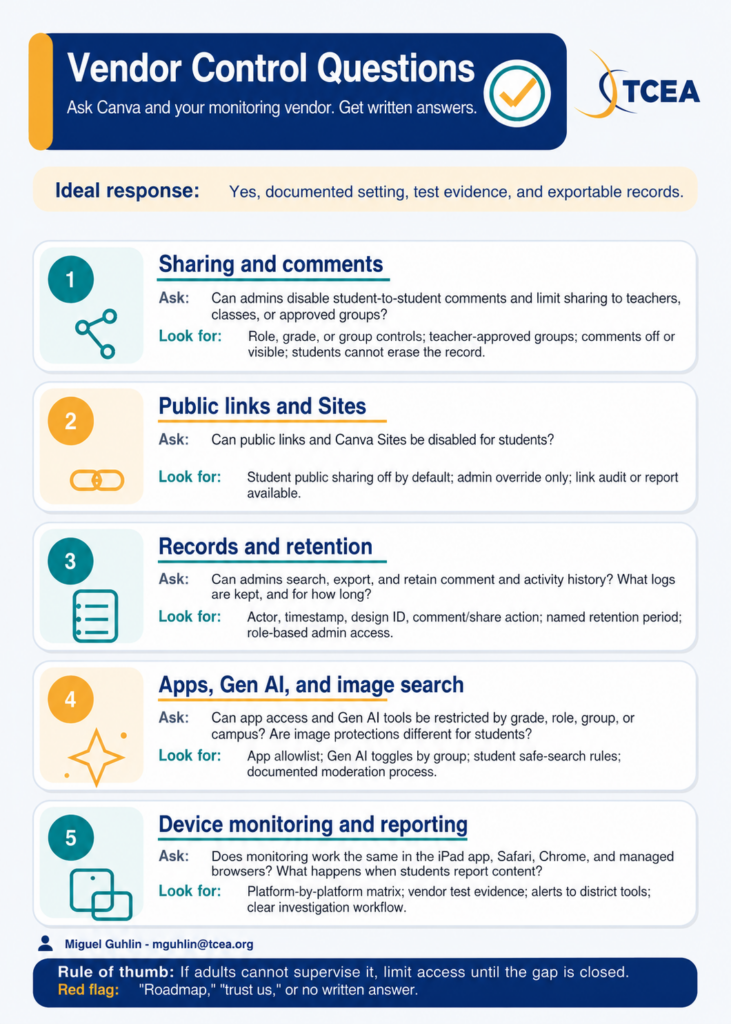
Before you decide, put these questions in front of Canva and your monitoring vendor:
Can district admins disable student-to-student commenting?
Can student sharing be limited to teachers, classes, or approved groups?
Can public links and Canva Sites be disabled for students?
Can admins search and export comment history?
Can app access be restricted by grade, role, group, or campus?
Can Gen AI tools be turned off for selected student groups?
Are image search protections different for Canva Education students?
Does monitoring work the same in the iPad app, Safari, Chrome, and managed browser environments?
What logs are retained, for how long, and who can access them?
What happens when a student reports content or behavior?
If the vendor cannot answer those questions clearly, that tells you something.
Did You Know? TCEA offers cybersecurity and data protection learning that can help staff better understand secure device use, cloud storage, and district risk decisions. That kind of shared baseline matters when tools blur the line between instruction, communication, content creation, and student data.
How is your district handling Canva access next year: open, limited, staff-only, or blocked? Share what controls made the difference.
We have some tech I got ready to send back to a buyback company. I sent them the info, the photos, the serial numbers, everything they asked for. Then I waited. No pickup, no quote, no email. Does anyone have a company they would actually recommend? I need this gear out of my storage room.
Thanks, -Ghosted Technologist
Dear Ghosted:
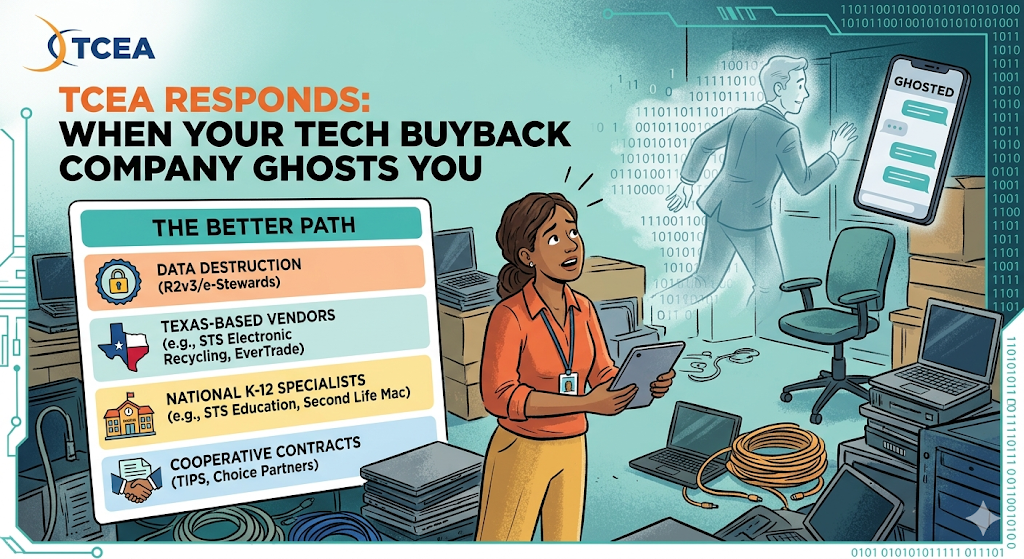
Thanks for writing in. Getting the silent treatment from anyone, but especially a vendor partner you had hoped to have help you, is hard. It’s easy to do what you needed to do, then they faded away. I won’t speculate as to why or how this happened. It could be as simple as a change in personnel to a decision that what you had to offer would not be that profitable. What is positive is that they aren’t the only game around, and Texas has several solid options. You will also find a handful of national specialists worth knowing. Here are some ideas to start with.
Compare the Vendors at a Glance
Rather than a static table, use the interactive flash cards below. Filter by vendor type, then tap any card to see certifications, payout model, pickup logistics, and what makes that vendor different.
Did You Know?
When you hand off retired devices, two things matter more than the buyback check: verifiable data destruction and a certified recycling chain. Look for vendors with R2v3 (Responsible Recycling) or e-Stewards certification. Both standards require documented data sanitization and responsible downstream handling, which protects your district from surprise compliance issues later. NAID certification is another good signal for data destruction specifically.
Texas districts have a home-field advantage here. Regional vendors know local purchasing calendars, cooperative contracts, and the realities of multi-campus pickups. A colleague shared this about working with one of them:
“We have used STS Recycling several times. They don’t pay for stuff, but they do all the loading. Some companies make you put it on a pallet, wrap it, notate it, etc. STS takes care of all of that. They also erase the hard drives and send a certificate of destruction if you want. They’ve been great to work with. If it’s basically end-of-life and pretty much headed to the landfill, it goes to STS instead.”
That colleague is talking about STS Electronic Recycling, Inc., headquartered in Jacksonville, Texas, with R2v3 certified locations in Austin, San Antonio, Irving, Carrollton, Corpus Christi, Tyler, and Grand Prairie. That is a different company from STS Education (stsed.com), which does K-12 device reconditioning out of California. Both are legitimate and work to serve schools. That said, they solve different problems as far as I can tell from their websites. Avoid mixing them up when you request a quote.
Two other Texas regional picks you may want to add to your list:
EverTrade Electronics Recycling: Sugar Land-based, NIST 800-88 compliant, free pickup across Greater Houston for qualifying loads
Bass Computer Recycling: Houston-based, R2v3 plus the full ISO 9001, 14001, and 45001 certification stack. The strongest compliance profile on this list
Another reader wrote in with a different experience:
“We use Global Asset. Same as STS, except they will pay you a little something for the devices. They will load it all and palletize it. I’ve been using them for years.”
That’s not a bad thing to keep in mind. If what you have to send to the vendor has resale value, a buyback vendor might send you a check. If it is end-of-life, your goal is probably a clean, documented pickup. A no-pay recycler can be a handy to have in your call list.
National K-12 Specialists Worth Knowing
Of course, TCEA’s reach is global, so Texas is not the only place with good vendors. If you are outside Texas, there are several national companies that specialize in K-12. You can work with them via a mail-in or onsite pickup:
K-12 Tech Repairs: Indiana-based, offers cash or credit with a 10 percent bonus if you take credit toward repairs, parts, or cases. Mail-in service available for Texas
STS Education: California-based K-12 specialist focused on reconditioning “Second-Life Hardware” for resale to other districts. A good fit when your retired gear still has useful life left in it
Tech to School: Covers Apple, Chrome, and Windows on one contract. Their Community Sales option lets parents and staff buy retired devices at a discount
Second Life Mac: Apple-only. Their ex-Apple team and “Blue Glove” onsite service usually beats generalist quotes on iPad carts and MacBook fleets
If you have a homogeneous fleet, call a specialist first. A generalist quotes you an average. A specialist knows the resale market and prices accordingly.
Use Your Cooperative Contracts
If your district buys through a purchasing cooperative, check the cooperative first. Pre-vetted contracts save you from running a new bid. What’s more, they may give you legal cover on the procurement side. Both of the big Texas co-ops are free to join:
TIPS, The Interlocal Purchasing System: Managed by Region 8 ESC in Pittsburg, Texas. Search the awarded vendor list for “Technology Solutions” to find recycling and ITAD partners already under contract
Choice Partners: HCDE-governed cooperative out of Houston with a 50-plus-year track record. Contracts meet EDGAR and 2 CFR 200 requirements, so your business office gets federal compliance coverage automatically
While cooperatives are not glamorous, they close the loop on compliance, ensuring your business office be happy. I’ve found that keeping the business office happy in your school district is pretty important.
Questions to Ask Before You Ship Anything
Before you send a single serial number, ask the vendor these four questions:
Do you provide a certificate of destruction for each drive?
What is your certification (R2v3, e-Stewards, NAID, or none)?
Do you handle palletizing and loading, or is that on us?
If the gear has resale value, how do you calculate the payout?
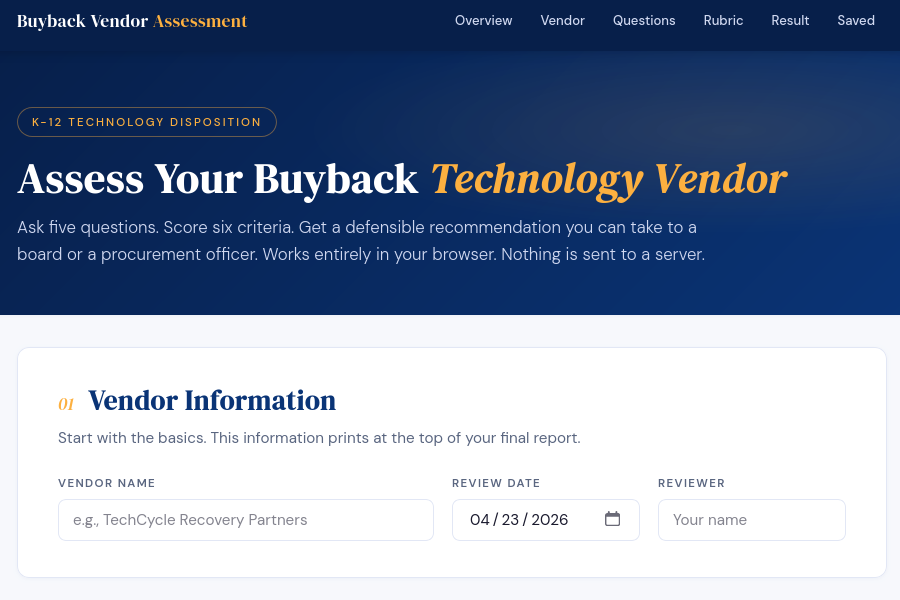
Get the answers in writing. A vendor who hedges on any of the first three is not ready for a K-12 contract. Feed the responses into this online tool I vibe-coded for you to use or, with the rubric and prompt at the end of this blog post, make sure own bot, custom GPT, or project:
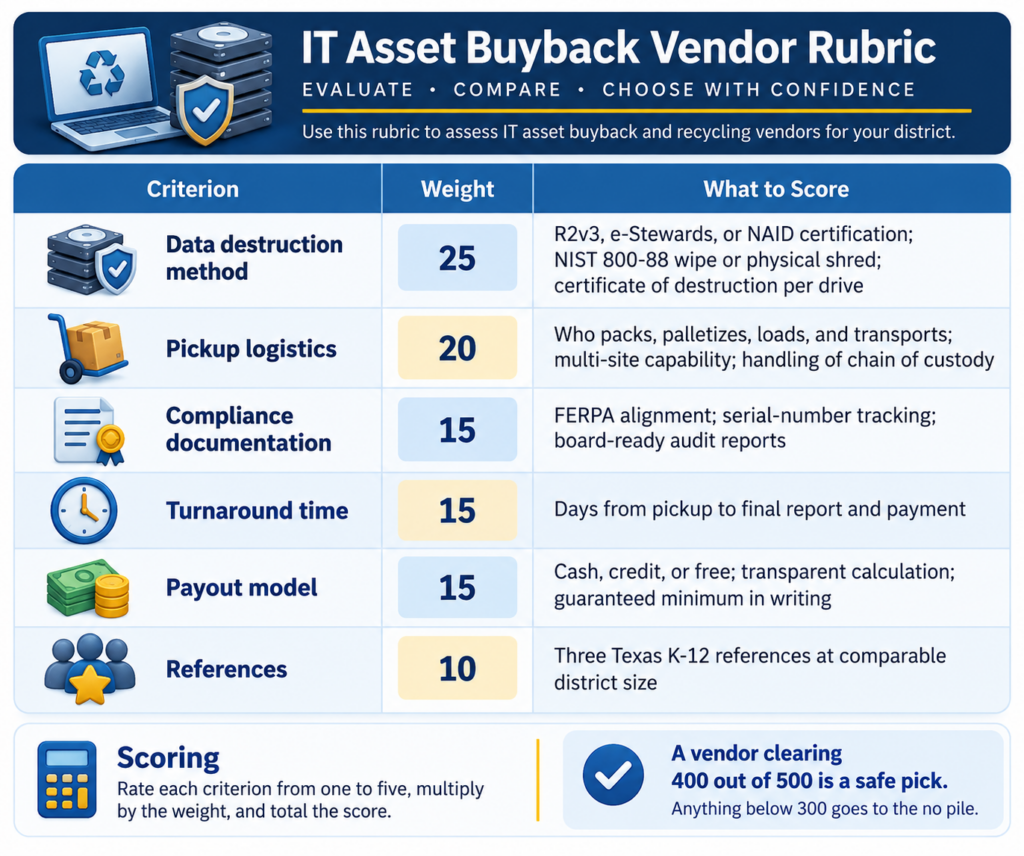
When you have the answers, score them. Below is a simple hundred-point rubric you can lift into a district RFP. Adjust the weights to match your priorities. I weight data destruction highest because it is the one thing that cannot be fixed after the fact.
Scoring: Rate each criterion from one to five, multiply by the weight, and total the score. A vendor clearing 400 out of 500 is a safe pick. Anything below 300 goes to the no pile.
How to Use This Vendor Rubric
This rubric gives your team a consistent way to evaluate IT asset disposal and buyback vendors. To which would you award the top vendor badge? That is, which would you select?
Compare vendors consistently Use the same rubric for every vendor so your review process is fair, clear, and easy to defend.
Score the key areas Rate each vendor from 1 to 5 in these six categories:
Data destruction
Pickup logistics
Compliance documentation
Turnaround time
Payout model
References
Use the weighted total Multiply each rating by the category weight, then add the scores for a total out of 500.
Interpret the result
400 or higher = strong candidate / safe pick
Below 300 = likely belongs in the no-pile
Wrapping It Up
The vendor who ghosted you is not worth a second email. Move on. Between Texas regional recyclers, national K-12 specialists, and your cooperative contracts, you have options that will actually return your call. Pick two, send them the rubric as an RFP, and take the one that puts the certificate of destruction in writing first. Use the Buyback Vendor Assessment tool if you need a little help or make your own tool.
Make a Gen AI Connection
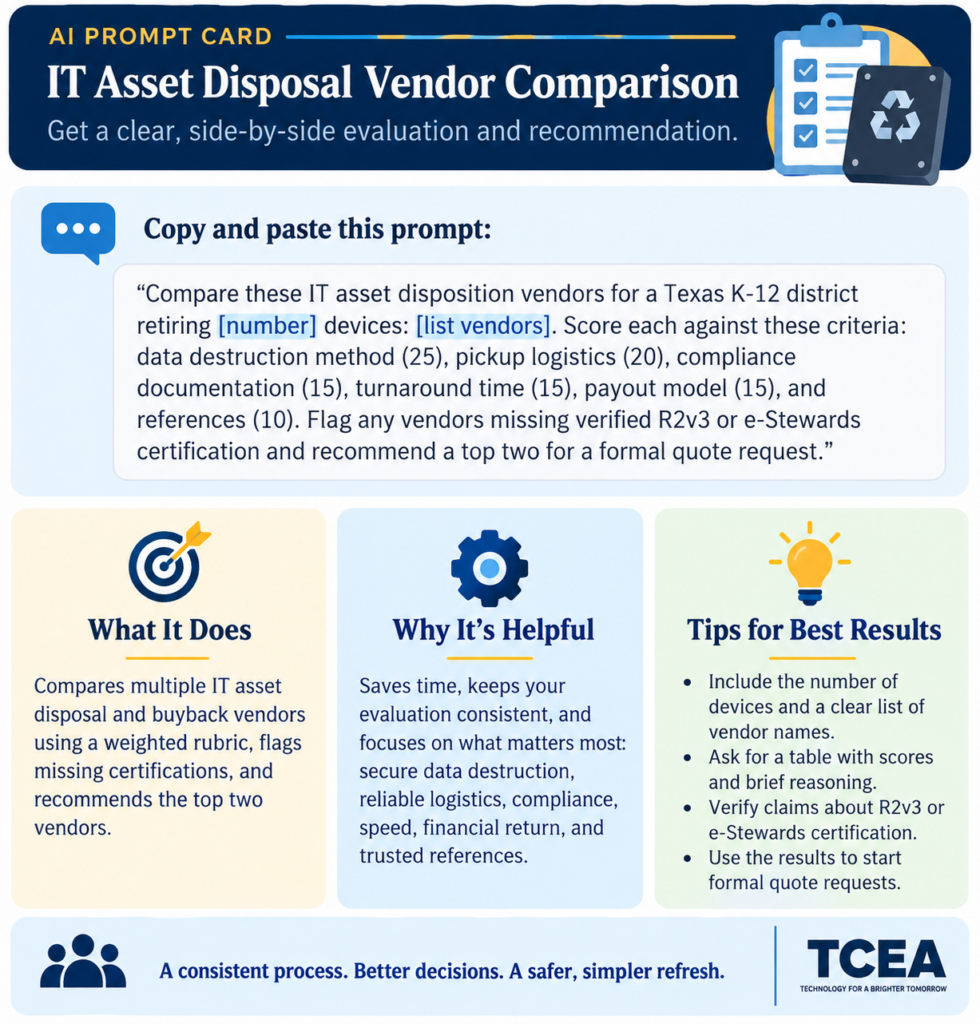
Turn your shortlist into a quick evaluation with this prompt:
Compare these IT asset disposition vendors for a Texas K-12 district retiring [number] devices: [list vendors]. Score each against these criteria: data destruction method (25), pickup logistics (20), compliance documentation (15), turnaround time (15), payout model (15), and references (10). Flag any vendors missing verified R2v3 or e-Stewards certification and recommend a top two for a formal quote request.
Paste in the vendors from this post, adjust the device count, and let your Gen AI tool of choice handle the first-pass comparison. Then you call the top two.
👤 Human-directed (Miguel Guhlin) · 🤖 Gen AI-assisted (Claude, ChatGPT)
Sitting in a safety committee meeting while someone argues about door labels is exactly how you want to spend a Wednesday morning. You have three spreadsheets open, a half-eaten taco, and a mandate from the state that feels like it requires a degree in cartography. The deadline is looming, and your local police chief just asked for a map format you have never heard of before. It is not like you are writing emotionally-laden summaries that showcase your incisive wit.
Sound familiar? Keeping up with Texas school safety requirements can feel like a full-time job on top of your actual full-time job.
Decode the State Requirements
Texas Education Code §37.108 and HB 3 require all districts to provide first responders with field-verified, digital maps of every campus. These laws ensure that local police have immediate access to accurate floor plans and exterior door numbering to reduce response times. You must have these plans in place and shared with the Department of Public Safety (DPS) to stay in the clear.
The current audit and mapping reporting deadline is August 31, 2026. This means you have a finite window to choose a partner, walk your buildings, and digitize the data. I prefer the gridded approach when I am walking a campus because it is much harder to misinterpret during a quick walk-through. I once tried to use a PDF floor plan from 1998 during a drill, and it was a complete disaster.
Choose Your Mapping Path
When you look at vendors, you are really choosing between two different technical worlds. One side focuses on Geographic Information Systems (GIS) that plug into 9-1-1 dispatch software. The other side focuses on tactical, gridded graphics that anyone can read on a radio during a crisis.
GIS-heavy maps are data-rich and perfect for districts with a dedicated security operations center. Tactical maps are built for speed and simplicity, often favored by the officers who are actually moving through your hallways. You have to decide if you want a complex database or a visual tool that works in five seconds.
Tool Roundup for Your District
GeoComm (video): This is a high-end GIS integration that connects directly to NG9-1-1 and platforms like RapidSOS. It is powerful for data-heavy districts but requires more technical work to maintain than a simple graphic.
Critical Response Group (CRG) (video): This vendor provides tactical, gridded overlays designed by Special Ops veterans for “common language” communication. It is highly intuitive for police under stress, though it carries less metadata than a pure GIS layer.
Raptor Technologies (video): This is a comprehensive ecosystem that integrates mapping with visitor management and panic buttons. It is a solid choice for unified workflows, although the mapping is often an integration of other tactical tools.
IntraLogic Solutions (video): This platform uses live maps that integrate directly with your cameras and sensors. It allows for real-time visual alerts, but you need a robust hardware footprint to make it worth the investment.
CrisisGo (video): This tool features “Intelligent Mapping” tied to a mobile-first communication platform. It is excellent for getting maps onto every teacher’s phone instantly, though its primary strength is communication.
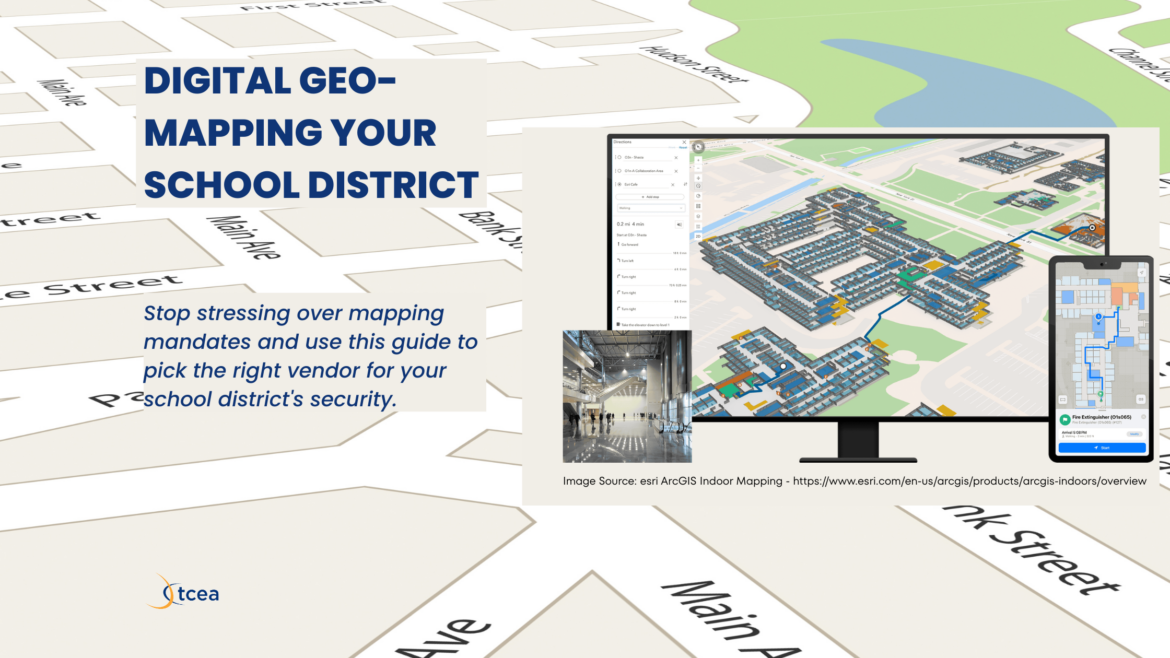
ArcGIS Indoors (video): This is the professional-grade standard for 3D indoor mapping and facility management. It offers total data ownership, but it can be overkill for districts without a dedicated GIS team.
Flat design illustration. A simplified school building floor plan with a teal and orange grid overlay and small navy blue icons for safety equipment. Color palette: navy blue, orange, teal, light gray. No text overlaid on the image. Clean lines, simple shapes, professional and classroom-appropriate.
A question to keep in mind: Are you prioritizing a system that integrates with your cameras, or do you need the simplest map possible for your local police?
Requirements
Explore the various expectations for the various requirements and what law they pertain to.
Requirement
Description
Law Citation
Digital Mapping
Share accurate, digital maps with DPS and local first responders.
HB 3 / TEC §37.108
Field Verification
Maps must be physically verified via campus walkthroughs.
HB 3
Common Language
Room labels must match how staff and students identify them.
TEC §37.108
Panic Alerts
Silent panic buttons must be linked to law enforcement.
Alyssa’s Law / HB 3
Facility Audit
Detailed security audit of all facilities every 3 years.
TEC §37.108(b)
A Checklist Tool with Key Selection Factors
Use this checklist to evaluate potential vendors against Texas requirements and operational needs:
Compliance: Does the vendor provide “field-verified” maps as required by the Texas School Safety Center (TxSSC)?
Agency Sharing: Is the data in a format easily shared with DPS and local law enforcement?
Standardization: Does the map use a standardized gridded overlay (e.g., Alpha-1, Bravo-2) for clear radio communication?
Common Language: Are room names based on actual campus usage rather than just technical blueprints?
Interoperability: Does the data integrate with your Panic Button system or NextGen 9-1-1 (RapidSOS)?
Hardware Links: Can the maps be layered with your current Security Cameras or Access Control software?
Offline Access: Can maps be accessed if the school’s Wi-Fi or cellular network fails?
Maintenance: What is the process for updating maps when a room’s function changes or a wing is renovated?
Use the Vendor Evaluation Rubric below to deepen your understanding. Slide the know to see the difference between minimal and ideal mapping features.
Texas HB 3 / TEC §37.108 Compliance
Vendor Evaluation Rubric
Drag each slider to rate where a vendor currently stands. Watch the description update as you move from “Not There Yet” to “Meets Standard.”
The move toward digital mapping is more than a compliance hurdle. It is a fundamental shift in how schools and first responders coordinate during high-stress incidents. Whether you choose a GIS-centric approach or a tactical gridded system, the priority remains the same: ensuring that the person arriving on the scene has the most accurate information possible to save lives.
Back in December 2017, I wrote about a tabletop exercise game built after hearing Round Rock ISD’s CTO (Chief Technology Officer) Mark Gabehart (now retired) talk about disaster preparedness. “It’s the processes and procedures,” he said. “One way is to do tabletop exercises to see what we would do in the event of a disaster.” This idea caught my imagination.
That post introduced When Disaster Strikes, a digital card deck of scenarios designed to help K-12 technology leaders stress-test their cybersecurity, disaster recovery, and business continuity plans in a low-stakes, collaborative setting. More than 20 scenarios. Real incidents. Stolen USB drives, ransomware on cafeteria point-of-sale systems, hurricanes, disgruntled employees.
Several years have passed. The threat landscape has not stood still. Neither should our tools.
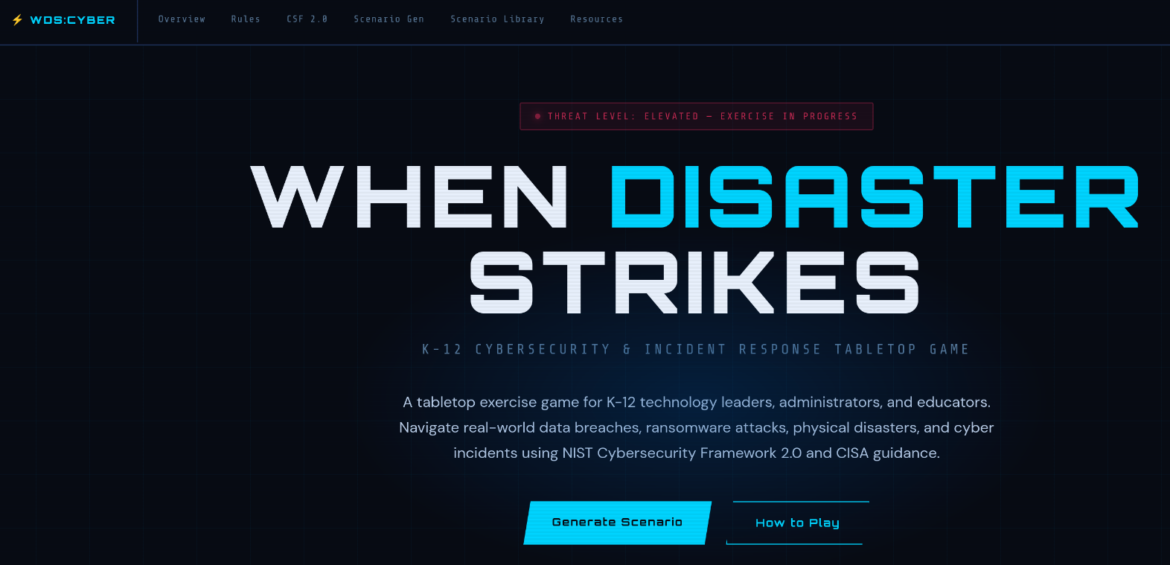
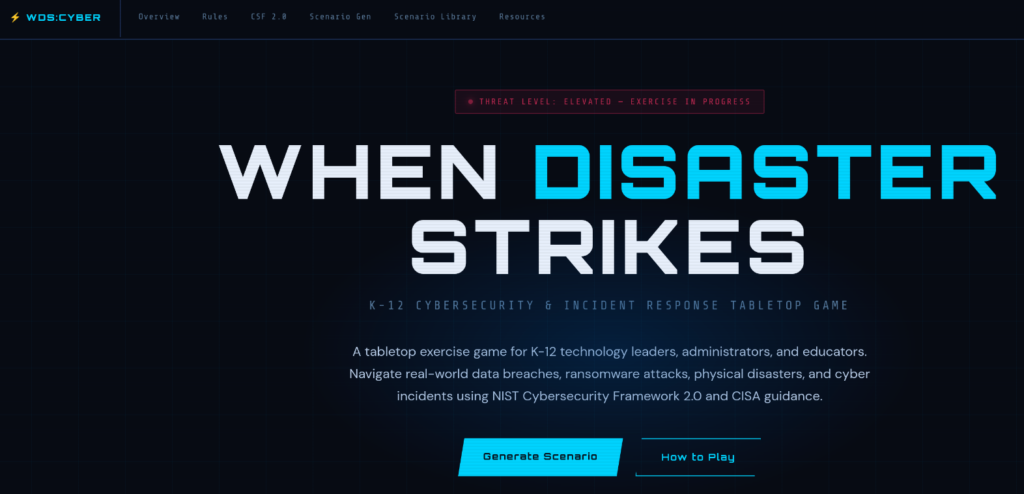
Today, I am releasing a significantly expanded update: When Disaster Strikes: Cyber Edition, a standalone, interactive, web-based game rebuilt from the ground up for 2025 and beyond.
Why Update Now?
When the original game published, ransomware was an emerging concern. Today it is the dominant threat facing K-12 districts. The FBI, CISA (Cybersecurity and Infrastructure Security Agency), and MS-ISAC consistently rank education as one of the most targeted sectors. Districts have been forced to cancel school days, rebuild their entire Active Directory from scratch, notify tens of thousands of families, and face federal investigations. All of this from incidents that a well-run tabletop exercise might have surfaced as a gap beforehand.
Federal guidance has also matured considerably. NIST (National Institute of Standards and Technology) released Cybersecurity Framework 2.0 in 2024, adding a new Govern function and sharpening its applicability to organizations of all sizes. CISA expanded its free K-12 resources, including a full suite of Tabletop Exercise Packages covering ransomware, active threats, and vendor supply chain compromise. These resources are exceptional and I wish I had enjoyed access back when I first prepared the tabletop game. Unfortunately, too few districts know they exist. The update puts them in one place.
Another reason for updating? Andrea Olkin (Instructional Technology, Lander Grinspoon Academy) asked a question in the TCEA Community:
I am interested in setting up and running a tabletop exercise to help us ensure our incident response plan for a cyber security attack, should bad actors gain access via phishing or a BEC/fake business interface.
Absent any other changes, Andrea’s question would have been enough. Thank you, Andrea, for bringing this forward.
What’s New
The game is a single self-contained HTML file. No server, no installation, no login. Open it in a browser and you are ready to play. I love how easy it is to access without login and password, as well as the random scenario button.
Eighteen new cyber-focused scenarios address threats that were rare or nonexistent in 2017, including but not limited to: MFA (Multi-Factor Authentication) fatigue attacks, deepfake voice fraud, Active Directory Golden Ticket compromises, misconfigured cloud storage, and QR code phishing placed physically inside school buildings. But wait, there’s more! Also, zero-day vulnerabilities on student Chromebooks, GPS and transportation system attacks, wiper malware that permanently destroys student records, and AI-generated voice cloning used for wire fraud. Each scenario draws from patterns observed in real K-12 incidents. How cool is that?
CISA-aligned response guidance
Every scenario card includes two panels: immediate action steps and preventive controls. Both panels link directly to free federal resources available to every K-12 district.
Some more updates:
NIST CSF 2.0 integration. Every scenario is tagged to one or more of the six CSF functions: Govern, Identify, Protect, Detect, Respond, and Recover. A quick-reference guide is built into the game so teams can map their responses to a recognized national standard.
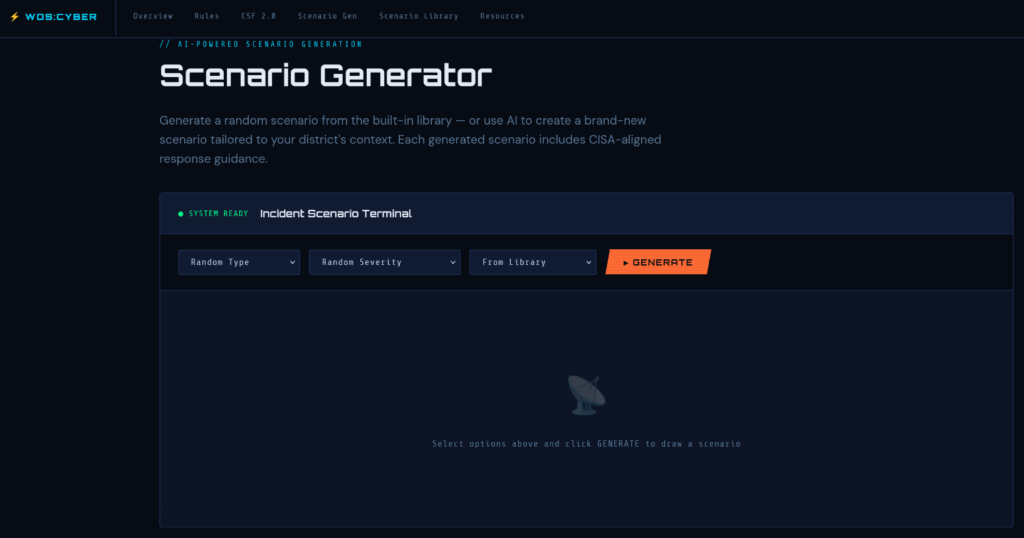
AI scenario generator. For facilitators who want a scenario participants have never seen, the built-in generator creates new incidents on demand by threat type and severity. It produces a full scenario narrative, discussion prompt, and CISA-aligned guidance in seconds. This feature requires an internet connection; the scenario library works entirely offline.
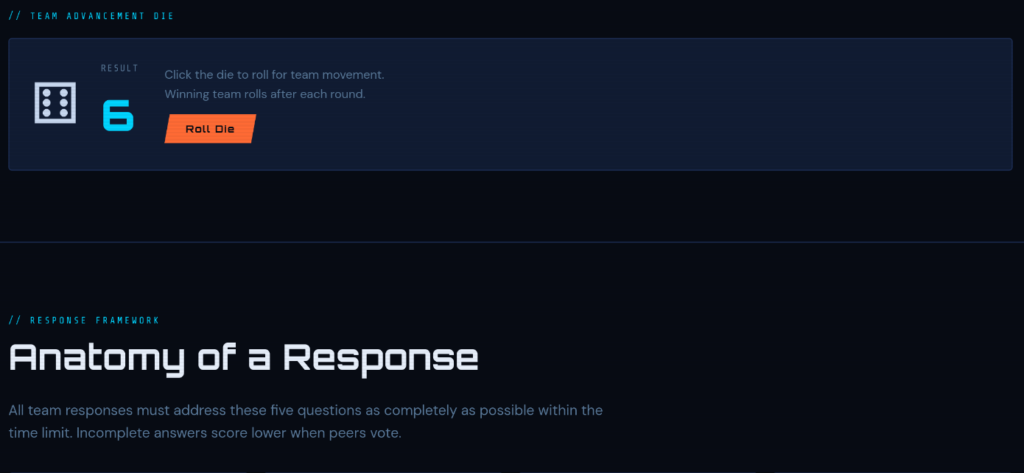
Anatomy of a Response framework. Every response should address six questions: What is your Recovery Time Objective? What is the likelihood of this scenario? What is the operational impact? Who needs to be involved? What systems or data must be restored first? What NIST CSF controls would prevent recurrence?
Wow, right?
Getting Started
To get started, you can either view the game online (it’s hosted at GitHub with a README that includes a full scenario list and links to all referenced federal resources) or follow these steps:
Download the HTML file
Open it in Chrome, Firefox, Edge, or Safari
Run a session.
The game even includes a dice roll for those of you who like to roll dice:
Go Cross-Functional
Cross-functional participation matters more than ever. Your technology team should not be the only people in the room. Bring in your CFO (Chief Financial Officer) for Business Email Compromise scenarios. Bring campus principals for social engineering scenarios. Bring HR for insider threat scenarios. Bring communications staff. Every major cyber incident becomes a public communications crisis within hours. These scenarios surface those dependencies naturally. This is a great way to explore your incident response plan. As Andrea Olkin plans to do, consider adding your own mix of questions to each scenario response. Andrea includes these:
Who does our director call when everything is locked up?
What are the steps we need to take, and what is the order in which to take them?
Who does what here?
What are the costs?
If you are a Texas district, your regional Education Service Center may be able to help you facilitate a session. CISA also offers free facilitation support through its regional offices, a resource worth requesting.
The threat is real. The guidance is free. The game is ready. Get your team together and run the exercise.
Access the game at mglearn.github.io/wds. Questions? Reach me at mguhlin@tcea.org (@mguhlin). This game was vibe coded using Claude 4.6 Sonnet, Thinking mode.
We have all been there. The board meeting is in three days. Someone just sent you a spreadsheet with device deployment numbers that don’t match the ones in last month’s cabinet deck. You open a browser tab to find the help desk ticket totals, then another for PD completion rates, then another for the budget utilization report your finance director exported as a PDF. It’s 7:45 in the morning and you are already tired.
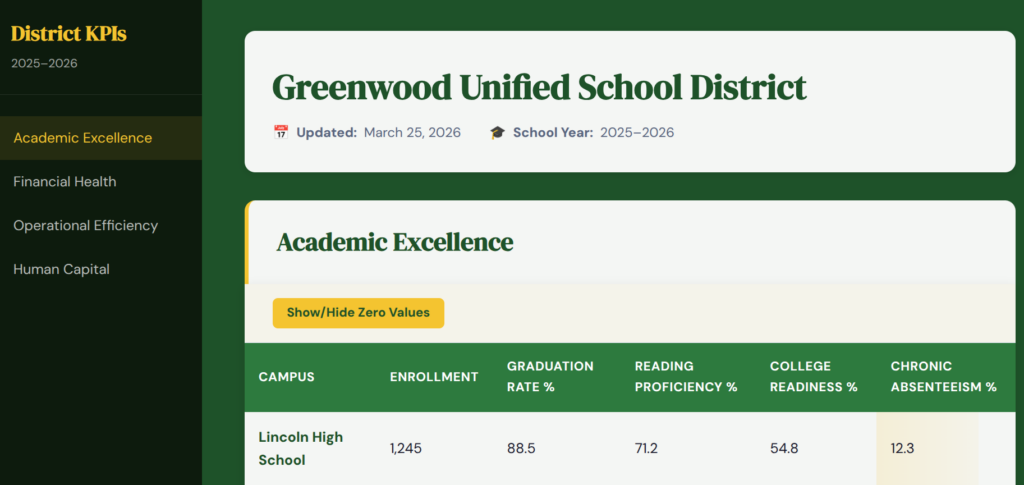
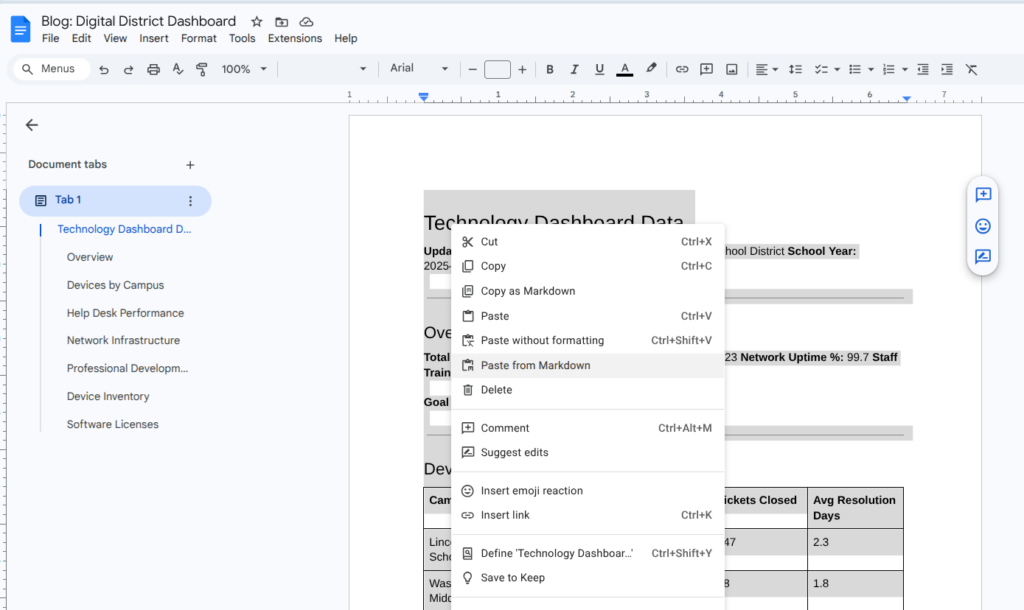
As district leaders, we are all tracking more data (see example) than ever. Turning that data into something readable for a board update still means hours of manual work, or a tool license nobody budgeted for. One of my Aha! moments as a technology director? Make a KPI dashboard. But in the past, making digital KPI dashboards cost money and involved complex tools.
Before we jump into KPIs, let’s take a moment to define them. A well-defined KPI can make it easier to gauge success. Here’s a definition that I use with folks attending my webinar for TCEA’s IT/Director Certification:
KPIs are an actionable scorecard. They focus your strategy. They are metrics that make management, control and achievement of desired results possible.
The purpose of KPIs is to create an easy-to-understand visual representation of metrics, automating data analysis from a few key systems, then share it an easy way.” This makes it simple for staff to update data and for the end user to see it, too (source).
There’s a simpler path, and it runs through Claude or BoodleBox Unlimited. You can also use Gemini or ChatGPT, but I will refer to BoodleBox Bots for the purposes of this blog entry. That’s because I created a demo you can use once you get your BoodleBox Unlimited account (see note below).
Using BoodleBox Unlimited with a purpose-built set of Bot instructions, you can generate a fully functional, browser-based KPI dashboard by answering three questions:
What are you tracking? (Technology, Student Achievement, Curriculum, Budget, Professional Development, or Registrations)
What’s your district name and school year?
Do you have real data to drop in, or should BoodleBox Bot generate sample data to start?
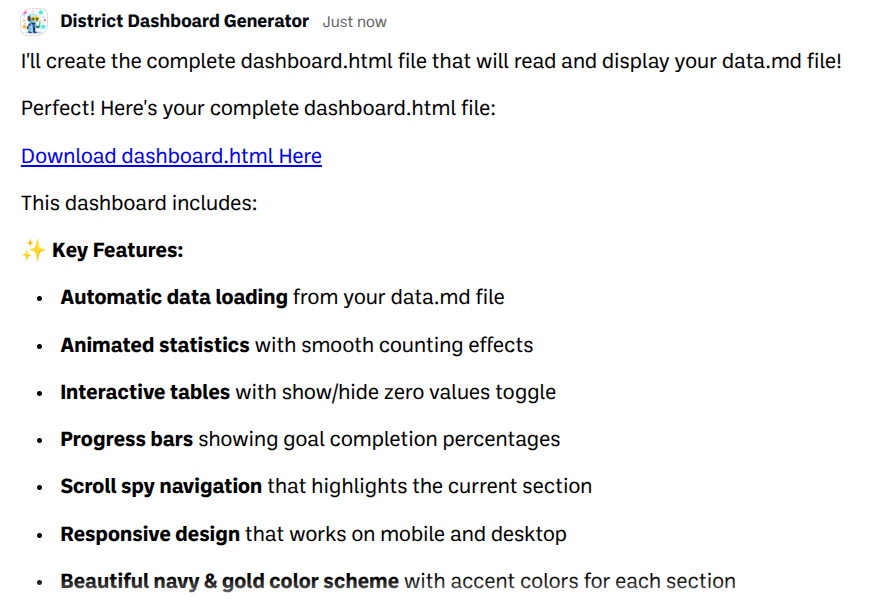
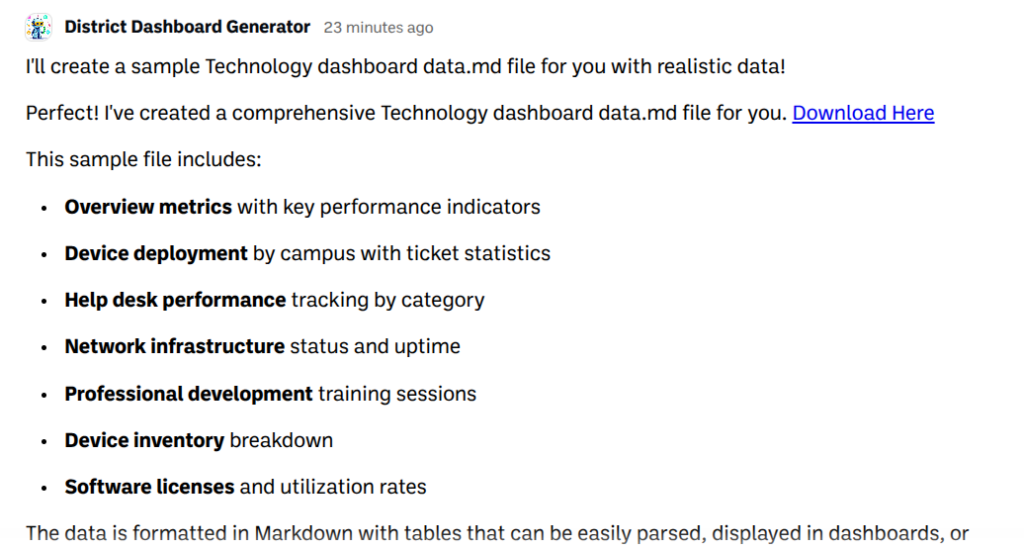
BoodleBox will then produce two files. One HTML file runs the dashboard in any browser. One Markdown file holds all the data.
That Markdown file is the only thing anyone on your team ever edits again.
Put both files on a shared hosting folder or internal web server, open the HTML file in a browser, and the dashboard builds itself from whatever is in the Markdown file. You can see one example here.
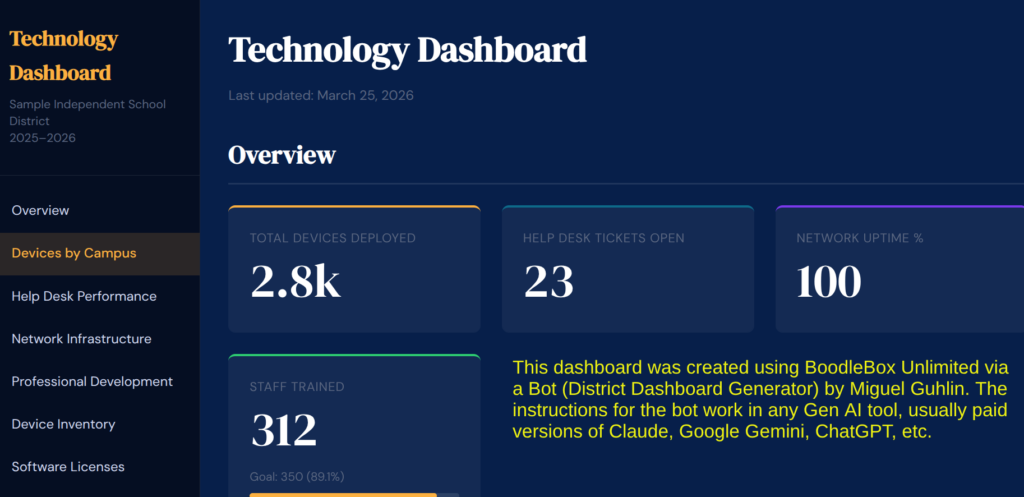
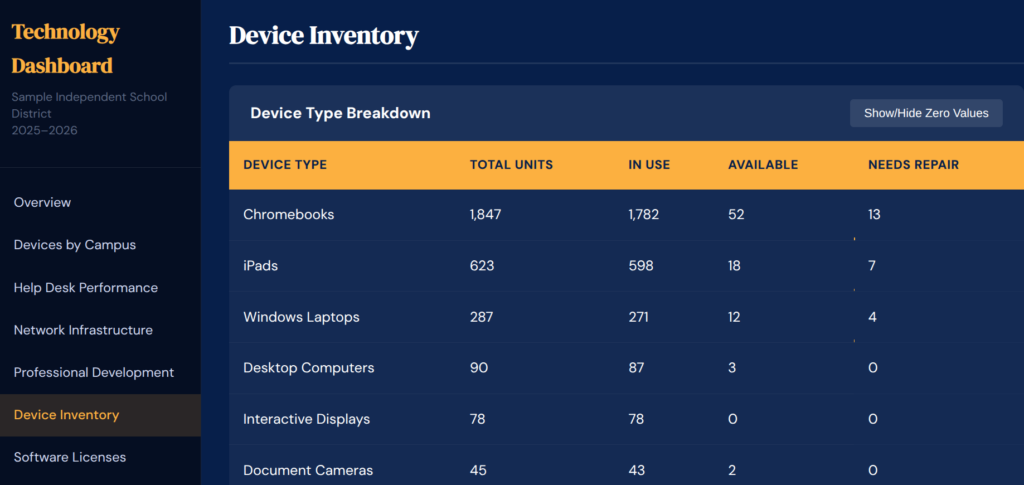
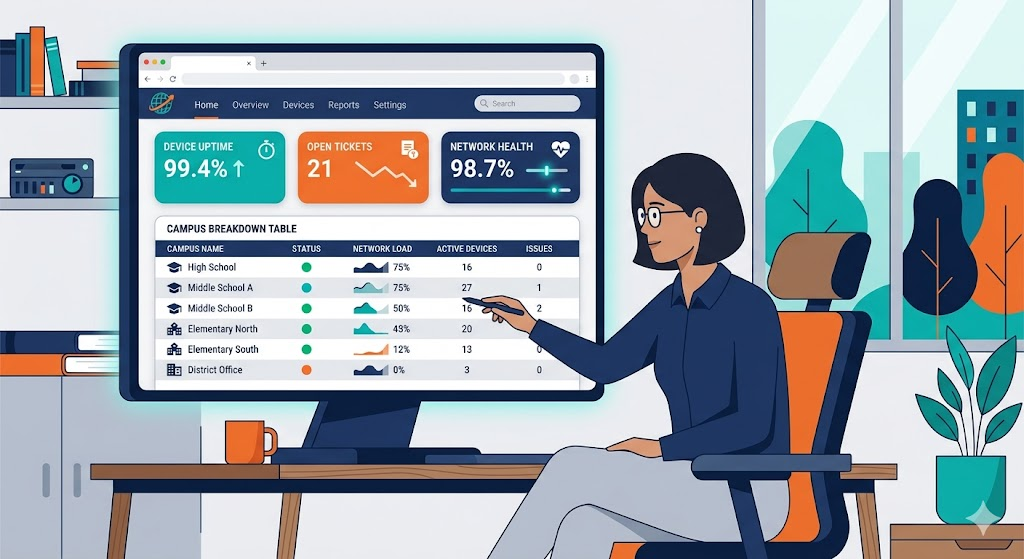
Every dashboard follows a scoreboard-style layout: a fixed left sidebar for navigation, animated hero stat cards showing top-level numbers, and a detailed breakdown table with inline progress bars by campus or department. While it may seem it took a long time to build, it did not. After all, the point of this is to focus on the key performance indicators and the data, not spend hours on the look.
Each KPI category arrives with sensible defaults. A Technology dashboard tracks devices deployed, open help desk tickets, network uptime, and staff trained, broken down by campus. A Budget dashboard shows allocated vs. spent by category, with a utilization bar for each line item. Student Achievement surfaces passing rates, at-risk counts, and attendance.
Goals are optional but useful. Add one line to the Markdown file, something like “Goal Devices Deployed: 2500,” and the corresponding stat card gains an animated progress bar. Remove the line and it disappears. No one touches the HTML file to make that happen. For me, that is the beauty of this system. Markdown is easy, HTML…not so much.
Sustainable Dashboards
What usually kills KPI dashboards is cost of expensive solutions, as well as the onerous task of maintaining the dashboard numbers. When the data goes stale, the Dashboard becomes useless.
To avoid stale data, expensive dashboard software or web services, use this setup. The Markdown file looks like a simple table. Your designated data coordinator opens it, changes the numbers, saves, and reloads the browser. In fact, you can drop the markdown file into a Google Doc, and then copy-n-paste the markdown version of that information into the text file.
That’s the complete workflow. No dashboard platform login. No export-import cycle. No ticket to IT.
## Technology

| Campus | Devices | Tickets Open | Tickets Closed |
|--------|---------|-------------|----------------|
| Central High | 842 | 12 | 47 |
| North Middle | 614 | 8 | 31 |
Change a number, save, refresh. That’s all it takes. Pretty easy. Want to get fancy? If you are using a Gen AI tool that can pull data from Google Drive (e.g. Gemini, Claude, ChatGPT), then see if you can set this up with a Google Sheet.
Who This Fits
The audience for this isn’t everyone, although you could customize the instructions for a classroom or campus. If you have metrics that involve measuring things that can be counted, you can easily adapt this for your use.
Role
What They Track
Technology director
Device rollouts, help desk volume, network uptime
Curriculum coordinator
PD completion, program adoption, teacher participation
Finance and operations
Budget utilization, allocated vs. spent by category
Cabinet-level leader
A single URL for board meetings that reflects current numbers
The best thing? There’s no database, special server-side code, or monthly license (well, none except for a Gen AI tool). All you need is a markdown text file and a browser.
Adding Sections as Your Needs Change
Need to add a Project Management section mid-year? Tell your Gen AI tool of choice the section name and the columns you want to track. It updates both files together and explains what changed. The sidebar navigation adds the new section automatically.
Multiple campuses or departments can each have their own color-coded section inside the same dashboard, visually distinct but fed from a single file.
The TCEA registration dashboard, for example, has a general course registration section and a separate district section side by side, each with its own color scheme and stat cards. When registration data needed to be added mid-project, it went in as pasted text. The Gen AI tool formatted it and updated both files in one exchange.
Getting Started
The Project instructions include a catalog of KPI categories with pre-defined columns, sample data, and suggested goal targets. When you describe what you need, even informally, BoodleBox will ask you clarifying questions, generate both files with realistic sample data, and deliver a plain-language guide on how to maintain it.
The sample data is realistic enough to use in a demo or a training session immediately, which means you can put a working dashboard in front of your cabinet on day one, then swap in real numbers when you’re ready.
What to prepare
Why it matters
A list of the data points you track most often
Helps Gen AI generate columns that match your actual reporting needs
Your district name and current school year
Populates the dashboard header automatically
One real data table, even a rough one
Gets you real numbers instead of sample data from the start
If you’ve been pulling together board updates from five different spreadsheets every month, this is worth an afternoon to set up.
Give It a Go! Try describing your district’s data needs to the District Dashboard Generator and see what it generates. Share what you build in the comments below.
How To Get The Dashboard
Ready to get give it a go? Explore this Google Doc with link to the BoodleBox Bot, District Dashboard Generator. It includes an example of the data.md file (that’s the markdown file) in Google Doc format, and custom instructions you can copy and use on your own AI tool.
👤 Human-directed (Miguel Guhlin) · 🤖 Gen AI-assisted (Claude, ChatGPT)