
 Whether you are an Android lover or just an Android user, you will find this list of gift ideas will make you green with envy. So before you spend a lot of time driving around everywhere or searching all over the Internet for great ideas, scan these ideas to find ones that be perfect for that Android person in your life this holiday season!
Lenovo Smart Display
The Lenovo Smart Display is a great tool to make your home, office, or other room smart. Enjoy the built-in Google Assistant to enjoy your favorite music, control other smart devices you are connected to, and run routines that you have created. You can even use Google Duo to make voice and video calls to your other favorite Android friends. You can get this smart display in an 8-inch model or 10-inch model. I have the 8-inch model and find that it is great – not too big for the bedroom side table.
Google Home Hub
If you want to spend less than the Lenovo Smart Display, consider getting a Google Home Hub. Smaller in size but still powerful, you will find that the Google Home Hub fits nicely in any room with its 7-inch display. I purchased one the other week to go in my kitchen and it’s been great. I have used it multiple times to pull up recipes and listen to music while in the kitchen. When I’m not using it, I set it to display favorite photos I have in my Google Photos folder…and since I shared the folder with my son, he can add his favorite photos and enjoy them in the mix while he is in the kitchen or just walking through.
Google Home Mini
The Google Home Mini goes in any room to bring convenience and connection. Ask it questions, run routines that you create, play games, and more with Google Assistant. You will enjoy this small device so much that you will find that you may need more than one. I actually have five in my house. I purchased the first one myself, and received a free one when I purchased the Lenovo Smart Display and a second free one when I purchased the Google Home Hub…then I lost track what I got the others with. If you are watching holiday sales carefully, you are sure to find items that come with a free Google Home Mini.
Smart Outlets
Even if Santa is not able to bring a smart display, then maybe you will get a smart outlet in your stocking. Smart outlets connect to your WiFi and allow you to control them through an app, Google Assistant, or Amazon Alexa. I found a pair online on sale the week before Thanksgiving for about $15, making them very reasonable. When not on sale, you may expect to pay twice that price or more for more functionality. These are great if you want to use with a lamp or other appliance where you can turn it on and off just by starting with, “Hey, Google….” Postscapes has compiled a list of recommended smart outlets to consider.
The Frame Smart TV
If you have some extra money hidden away that is burning a hole in your pocket, then consider going all out for the Samsung UN43LS03NAFXZA Flat 43” LED 4K UHD The Frame Smart TV 2018. When not using it as a crisp, beautiful TV, it can display favorite artwork. For friends who aren’t familiar with the Frame Smart TV (yet), they will think you just have high-end digital artwork on display. It has a sensor that detects when you walk into the room, at which time it will display your favorites. It will set you back about $1,300, so make sure are prepared if you decide to get one.
Connecting Your Devices
One of the powerful features of these devices (excluding the Frame Smart TV) is that you can connect them together in the Google Home app to play your favorite music on a particular designated set. I have done this so no matter where I am in the house, I have my favorite playlist, podcast, or other audio playing so I can hear. Creating routines will also help you feel like you are a tech genius even though it is very simple (but you don’t have to tell anyone that last part). For example, on my Lenovo Smart Display I created a routine so that when I say, “Hey, Google, it is time to go to bed,” my bedtime routine begins playing. That includes telling me the weather for tomorrow, asking what time I want the alarm to be set for (and then it sets it), turning off the bedroom lamp, adjusting the Nest thermostat, dropping the volume to 10%, and beginning to play a favorite playlist I have specified.
Lots of stores will be competing for your dollars during the holidays, so watch for special discounts that may reward you with some extra tech for you or another Android-loving friend. You may be surprised how much you love it…so much so that your friends will be green with envy.
Share with us in the comments what other devices, gadgets, and “stuff” make for great gifts for Android users. We’d love to hear!

 As of 2004, Cyber Security Awareness Month has been celebrated in October. This month is sponsored by a division within Homeland Security (the
 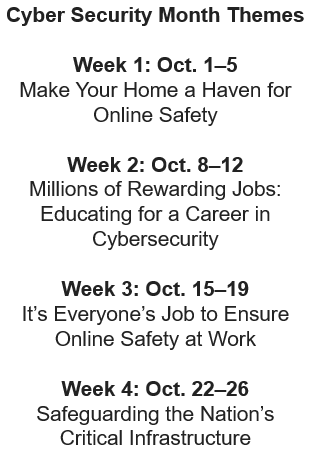 Weekly Security Themes



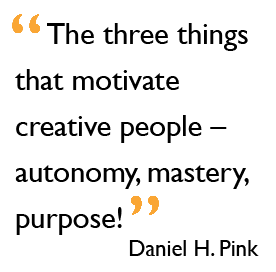 While we all want our staff to succeed, we need to admit that there is a major role that we play in making that possible. By doing (or not doing) specific things as leaders, we can inadvertently hinder their ability to succeed. And, when you think about setting them up to succeed, many of the same strategies that we use for students will also work with our staff. Daniel H. Pink summarized it best when he identified the three things that motivate creative folks: “autonomy, mastery, and purpose.” Let’s take a look at how these might play out on your campus or team as you set them up for success.

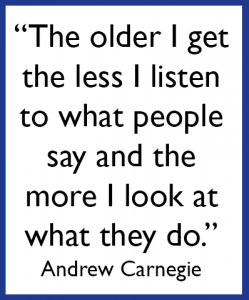 We have the opportunity to work with so many people on a regular basis. Many of them show great potential in becoming leaders if they had someone to walk along side them and help develop those skills. As
  When you see skills in others, be sure to let them know that you recognize those attributes and encourage them in using those skills. You may be the lone voice that ignites a desire for them to make a difference on a larger platform. If you have an idea of where that skill may be needed or may be a great asset, then say something like, “You are really good at explaining complex problems in a way that is understandable. Have you ever thought of a job in ____?” By articulating the skills that you see in them and sharing what a possible career trajectory might be for them in making use of that skill, you may inspire them to start considering additional growth opportunities.
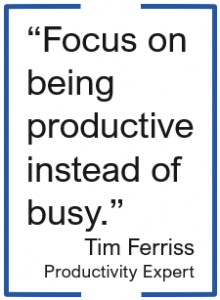 There are so many different tasks that I do which involve using either Microsoft Word or Google Docs that I have picked up a few tips and tricks over the years to help make using Microsoft Word even faster so I can get to other items on my to-do list. And isn’t that our main goal anyway? As Tim Ferriss, author of The 4-Hour Workweek, said, “Focus on being productive instead of busy.” I was training this past week on Microsoft Office and had that startling realization that there are things I know how to do in Office that I take for granted and just assume that everyone knows the same things and makes use of various tools to speed up their process. So, here is a shortened list I would share with someone if they use Word, but want to be more productive.
 Auto Recovery – Initially set at ten minutes, I dropped mine down to five. Whether I’m on my laptop on the go or plugged in at the office, if something happens and my computer shuts off, the worst case scenario is that I have only lost five minutes of work.
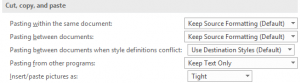 Copying/Pasting – When pasting from other programs, I typically want just the text (not the formatting), so why not set it here? I also have my pictures inserted/pasted as Tight…which is what I would change them to most of the time. The few times I want an image inserted in line with text or in front of text, I can easily change it on the fly using the Wrap Text button on the Format ribbon tab.
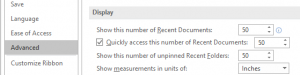 Recent Documents/Folders – It seems like I am always needing to find a Word file that I used a while back. To help make that easier, I increased the preference to show the 50 most recent documents (to quickly access them) and 50 unpinned recent folders.
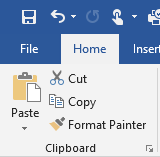 Format Painter – I cannot believe that everyone doesn’t know about the Format Painter tool! Click in the text that contains the format you want to paint somewhere else. Then, click the Format Painter tool once if you are only going to apply it once or double-click it if you want to apply it to multiple pieces of text (or graphics) in your document. If you double-click the tool, then you will need to click it again to turn it off. This tool is especially handy if you have multiple locations where you want to bold, resize, change the font, and the color!
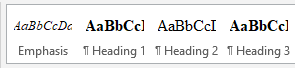 Styles – Instead of being forced to use the styles that are listed across the Home tab ribbon, consider updating them to be what you want. When your cursor is in the text that contains the formatting you want to keep, right-click on the appropriate style and select “Update…to Match Heading.” This is equivalent to boosting the Format Painter tool in that I don’t have to go and find the format in my document to click in and then grab the tool. Updating the styles makes it even easier.
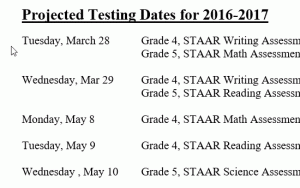 ALT+click/drag – We know that you can click and drag to select text. This shortcut is like that only on steroids! While you hold down the ALT key, click and drag to select the columns of text you want to delete. Once selected, just his the delete key or backspace key.

 Though you may feel like you are having to jump through a few hoops for your final product,