
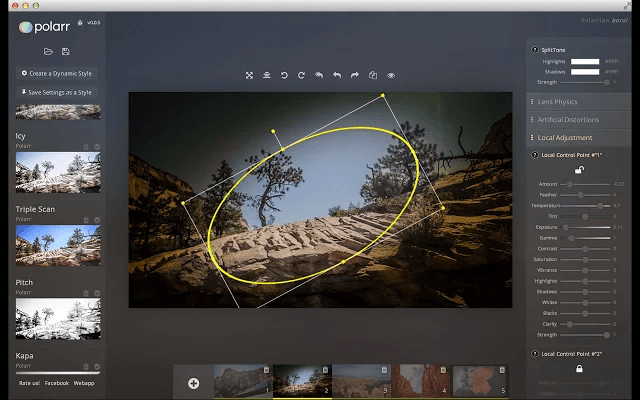
Photo editing is one of the skills that I never really learned. As I was growing up, our Kodak or Polaroid cameras didn’t allow us to make any changes to the photo, and only a full photography shop with a darkroom could change the image once it left the camera. But that’s definitely not true today. Our students should learn how to (and when to) edit photos as part of any good media literacy program. And I’ve found the perfect free resource to help them be successful doing that.
Polarr Photo Editor works on Android, iOS, Mac, Windows, Chrome web browser, any web browser, and Linux, which means it works on every device imaginable. And did I mention that it’s free? The features Polarr offers include those for basic users, as well as more advanced options. You can add a filter easily or apply automatic fixes with just one click. It also includes step-by-step, interactive tutorials to help you and your students learn photo editing basics. And there are free stock photos on the site that your students can use to practice.
For advanced users, there is a full version of Polaar which is just $19.99. (That’s about $100 less than the price of Lightroom software.) However, educators with an EDU email can receive the software for free by applying here. With the full version, you can adjust the color, lighting, detail, vignetting, HSL (hue, saturation, and luminance), RGB channel curves, toning, and distortion. You can even apply photo effects like fringing or film grain. And you can do this on a RAW file up to 40MP in size. All of the adjustments are done in real time and there’s a history panel that will quickly let you undo any change you don’t like.
Photo Editing Resources
To help students master important photo editing skills, here are a few good resources:
- Teaching Kids Photo Editing
- Downloadable Photos for Editing Practice (along with lessons for K-5)
- Teaching Photo Editing in the Classroom with Katherine Conor (process)
- Visual Literacy (book excerpt)

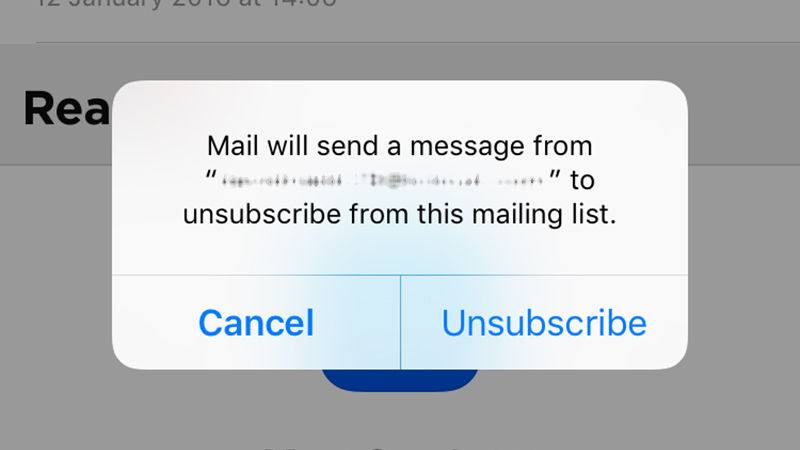 Get Rid of Unwanted Email Subscriptions – iOS 10 attempts to identify emails for which you have subscribed and now gives you an unsubscribe banner that’s easy to see (no more searching for the Unsubscribe link at the bottom of the email). Just tap the banner to automatically unsubscribe. (Of course, you wouldn’t want to do that with any email coming from TCEA!)



 I am not a selfie kind of person. But even I couldn’t resist taking my photo over and over again once I got this free app. (You can see one of my photos as a cat to the left.) MSQRD uses your app’s camera to add masks and live effects to a selfie. You can even swap faces with a friend in the same photo. It is so much fun and incredibly easy. Really, you have to try this app!
 you’ll be teaching adding fractions to your students. In the past, they have had difficulty with this concept. So you want to add an activity with an app for them to use. How do you find the right one? Try
  others may not have. Perhaps they are special education and need to use an app with a switch. Perhaps they are needing help with their emotions or learning a second language. The