
Discover tools, tips, and strategies for technology applications in education. Explore resources to enhance teaching, learning, and productivity.

We all know that there’s no such thing as a free lunch in today’s world. So I was surprised to discover Headliner. Headliner allows you to quickly, easily, and freely create short videos that are perfect for social media posts on Youtube, Facebook, Twitter, and Instagram. Unlike some other free apps, this one is really professional. In fact, it’s regularly used by the Wondery, WGBH, NPR, BBC, CNN, and others. Registration is required, but everything included with the program is completely free.
How Headliner Works
Once you create your account, you are given the option of working on a sample project. This is a great way to learn how the app works. You can change the captions and photos, play with the audio, and add other media. The sample project is from a 21-second clip about the live-action version of the Lion King, so it’s appropriate for students to work on.
You can start a new Headliner film by selecting Audiogram, Automated, or Blank Project. An Audiogram is probably the simplest one to use as it generates a basic video in just minutes. Automated transcribes your audio, pulls relevant keywords, and matches them to images. This is great if your students have recorded podcasts about their learning. (It should be noted that Automated is still in Beta and so might be a little glitchy.) Blank Project lets you start from scratch in the editor by selecting the aspect ratio you want to use for the specific social media site you want to post on. (Don’t worry if you don’t know what aspect ratio to pick; they tell you which one works best for which social media site.) To see an example video, scroll to the bottom of this page and watch the one on how plastic is ruining everything.
What’s Included
There are a ton of features included with this free tool:
- Unlimited stock images
- Text animation
- Waveforms
- Audio clipping
- Unlimited videos
- Transcription
- 1080p export
You can create a video from an audio clip to share (maximum length of 10 minutes) or make a video from a full episode of audio (maximum length of two hours) for YouTube. They even go so far as to allow you to send them any custom or brand-specific fonts that you want to use in your projects and they will associate those with your account. They also offer a free chat icon that will help answer your questions.
Using Headliner in the Classroom
While the app states that it was designed for “podcasters, marketers, musicians, publishers, and radio stations,” it also works well for communication or tech departments in school districts, as well as for secondary students. (Because the app is used by professionals, there may be some completed videos that are not appropriate for younger students.)
Because you can use Headliner to also transcribe a video you already have, it has great potential for use with ESL/bilingual students. You could upload the daily school announcement video, for example, and have it automatically closed captioned.
If you want to really incorporate creativity into your classroom, Headliner can help. Students will love being able to create their own interpretations of new content and share them on social media for others to learn from. And that’s powerful!


 This is a guest blog entry written by Claudio Zavala, Jr. He currently works as an Instructional Technology Coordinator with Duncanville ISD in Duncanville, Texas. He is an Adobe Education Leader and an ambassador for Flipgrid, Hoonuit, and Participate. Claudio is passionate about fostering creative thought and applying tools to enrich learning and experiences in the classroom. In his spare time, he enjoys blogging (
 what they’re learning,” say Kristin Houser and Karla Lant (

 Different solutions help you combine a paper notebook and the benefits of handwritten notes with digital search capabilities. You may not need a tablet if you already have a smartphone and a laptop/desktop computer.
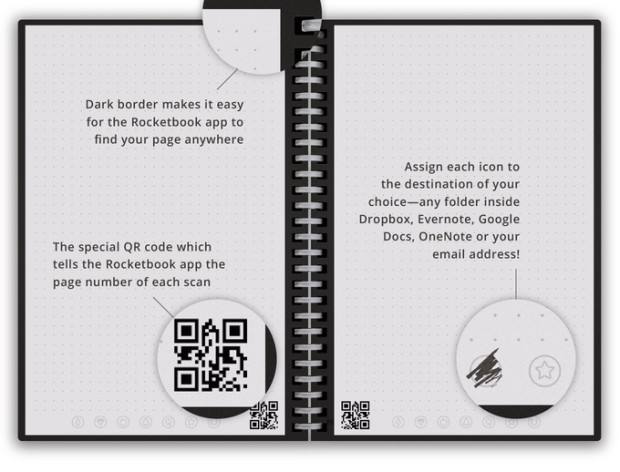 Benefits of Digital Paper