Kick off the New Year with TCEA! Find updates, tips, and inspiration to start the year strong in education and technology.
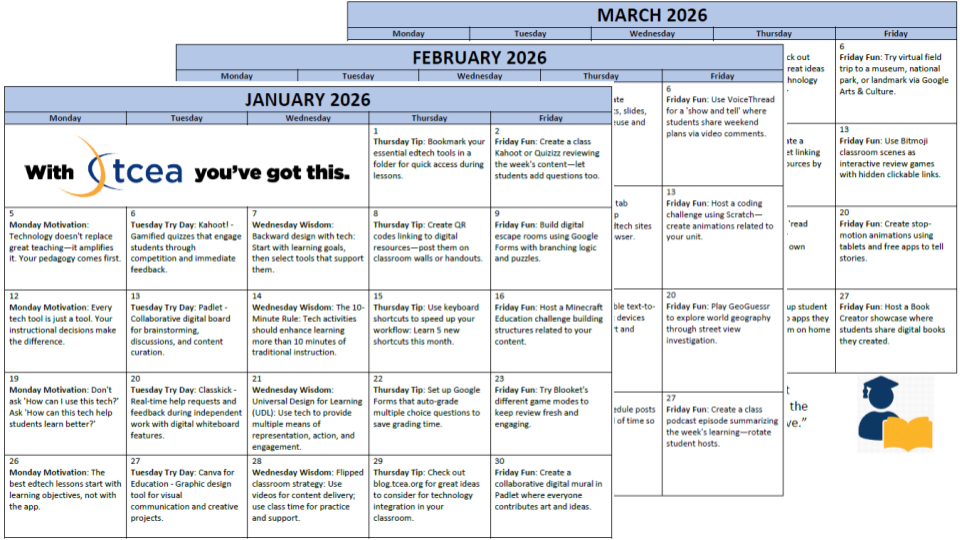
You already know that technology can enhance learning—but finding the time, tools, or inspiration to integrate it meaningfully? That’s the hard part. Whether you’re brand new to classroom tech or already dabbling with digital tools, one thing is clear: good teaching should always lead, and technology should follow.
This post introduces a year-long calendar built to support all educators—from the tech-tentative to the tech-savvy. It’s not about doing more, it’s about doing better: using simple routines and strategies that respect your time and amplify what already works in your classroom.
We’ll break down the calendar’s weekday themes, offer flexible pathways based on your comfort level, and share tips to help you customize it for your students, subject, and schedule. Whether you start small or dive deep, you’ll walk away with a plan to make 2026 your most intentional year of tech integration yet.
Why This Calendar Exists: A Yearlong Companion for Busy Educators
You don’t need more to-dos—you need better tools. Most educators want to integrate technology more meaningfully, but the real barrier is time. Between grading, meetings, and lesson planning, who has the mental bandwidth to research new tools, figure out best practices, and actually implement them?
That’s where the 2026 Technology Integration Calendar comes in. Designed with the realities of the classroom in mind, it gives you daily, bite-sized ideas that are easy to adapt to your teaching context. Whether it’s a practical Thursday tip or a creative Friday activity, every entry is there to support—not overwhelm—you.
Most importantly, this calendar keeps pedagogy front and center. Technology isn’t the goal; student learning is. Each tool, strategy, or idea is meant to amplify your instruction, not distract from it. You stay in control, choosing what aligns with your goals, curriculum, and comfort level.
Meet the Weekday Themes: Simple, Strategic, and Purposeful
Consistency reduces decision fatigue. That’s why this calendar organizes tech integration around a weekly rhythm. Each weekday has a distinct focus, making it easier to plan ahead and build habits.

Monday Motivation: Pedagogy Comes First
Start your week grounded in purpose. These prompts remind you why tech integration matters—equity, engagement, digital citizenship—and help re-center your focus on learning goals, not flashy tools.

Tuesday Try Day: Explore Without Pressure
Each Tuesday features a new tool to explore. No pressure to implement right away—just play around, reflect on its classroom potential, and bookmark it for future use.

Wednesday Wisdom: Proven Strategies
Wednesdays highlight classroom-tested frameworks like blended learning, Universal Design for Learning, or project-based tech integration. These strategies help you move from isolated tool use to cohesive instructional design.

Thursday Tip: Practical Wins
Quick, time-saving hacks—from shortcut keys to classroom management with tech. These tips are designed to boost your efficiency and reduce friction in your day-to-day tech use.

Friday Fun: Student Engagement Boosters
Fridays focus on joy. You’ll find creative, tech-enhanced activities that students love—like digital scavenger hunts, virtual field trips, or collaborative games. Use them as brain breaks, rewards, or content reviews.
Each day serves a purpose. You don’t need to use all five—just choose the ones that align with your goals and bandwidth.
A Path for Everyone: Tech Plans for All Comfort Levels
This calendar is designed for every educator, no matter where you’re starting. Whether you’re just beginning to explore classroom tech or already leading the charge in your building, there’s a pathway for you:
- If you’re tech-tentative: Start with Monday Motivation to ground yourself in purpose and Thursday Tips to build confidence with low-stakes wins.
- If you’re growing: Add in Tuesday Try Day and Friday Fun. These days let you explore and experiment without disrupting your core routines.
- If you’re tech-savvy: Lean into Wednesday Wisdom to refine your instructional design and take integration to the next level.
The calendar is structured to scaffold your growth, helping you build momentum, deepen your toolkit, and increase student ownership over time.
Tips for Success: Making It Work in Real Classrooms
Intentional tech integration isn’t one-size-fits-all. Here are a few ways to make this calendar work for you:
- Customize for your setting: Elementary teachers might emphasize age-appropriate tools and parent communication. Secondary teachers can focus on real-world applications, student choice, and digital portfolios.
- Plan monthly, execute weekly: At the start of each month, scan the calendar and choose a handful of ideas to try. Mark them in your planner so they’re part of your routine—not an afterthought.
- Collaborate intentionally: Share tools with your team, co-plan tech-enhanced lessons, or let students explore and teach each other. Families can also engage through newsletters and Friday showcase events.
- Troubleshoot proactively: Tech glitches, limited access, and curriculum constraints are real. Use strategies like station rotations, backup plans, and gradual release to stay flexible.
Start Your Intentional Tech Journey Today
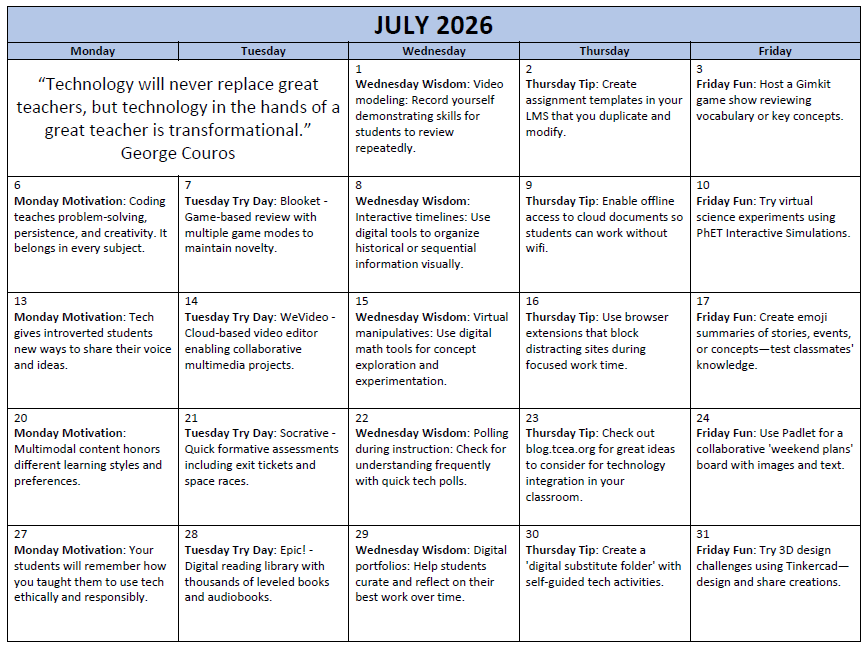
You don’t need to be a tech expert—you just need a plan. Here’s how to begin:
- ✅ Download the 2026 Technology Integration Calendar
- ✅ Choose one weekday theme to focus on this month
- ✅ Set a recurring time to reflect—what worked, what didn’t, what’s next?
Key Takeaways
- Tech should serve pedagogy, not replace it.
- The 2026 Technology Integration Calendar offers daily, bite-sized prompts to inspire intentional use.
- Weekday themes help you build habits, not headaches.
- There’s a path for everyone, from tech-tentative to tech trailblazers.
- You can start small and grow, one idea, one week, one win at a time.
Ready to Get Intentional?
🎯 Download your 2026 Tech Integration Calendar and pick your first weekday to focus on. Then, share it with a colleague and explore together!
Note: This calendar was made with the help of Claude, Gemini, and ChatGPT.