It is easy to create assignments for students that involve a lot of text. And, unless it is a reading comprehension or fluency assignment, your main goal is that they learn from the text. But, as we all too often know, several problems can happen to disrupt the learning: A student may struggle to stay focused long enough to read the article, another student may have trouble decoding some of the words correctly causing confusion and lower comprehension, and another student may find that silent reading isn’t as engaging.
Unfortunately, all these problems can occur on the same assignment with multiple students in the class. One easy solution to consider is using a free tool such as Podcastle AI.
Text with a Voice
Podcastle AI renders the page by converting text news stories and articles into podcasts. Before you dismiss this tool because it uses a computer-generated voice (your choice of male or female), give it a try; the machine learning algorithm actually makes a pretty naturally sounding voice. The other nice thing about Podcastle AI is that it is free – not “freemium,” but free! So, when you assign a blog post, article, or web page for your students to read, consider generating an MP3 file to go along with it.
Let’s walk through the steps in creating a podcast to an article that you might use with your students.
Getting Started with Podcastle AI
Begin by creating a free account. Go to http://podcastle.ai and click on the LOG IN link. You have the option of using Facebook, Google, or email to create your account. Once your account is created, you are ready to go. And believe it or not, that was the hardest step! For extra convenience, consider adding the Chrome extension.
Let’s find an article to share with our students. A site I enjoy sharing is TweenTribune. Sponsored by the Smithsonian Institute, TweenTribune is a great site for finding articles, each written in four different lexiles. I encourage your to consider creating a free teacher account for additional features and benefits. TweenTribune, on their FAQ page, describes themselves as follows:
…a free online educational service offered by the Smithsonian for use by K-12 grade Teachers and students. TTribune consists of daily news sites for kids, tweens, and teens, and includes text, photos, graphics, and audio and/or video materials prepared by the Smithsonian and others about current events, history, art, culture and science. TTribune also includes lessons, instructional and assessment tools, and opportunities for the registered users to communicate with other participants. TTribune is a moderated comment sharing community where registered Teachers can assign educational content (like news stories) to students and the students using a screen name have the ability to create comments which, if approved by their Teacher, are then published either to the other students within the Teacher’s TTribune classroom page, or publicly on TTribune.
Making the Conversion
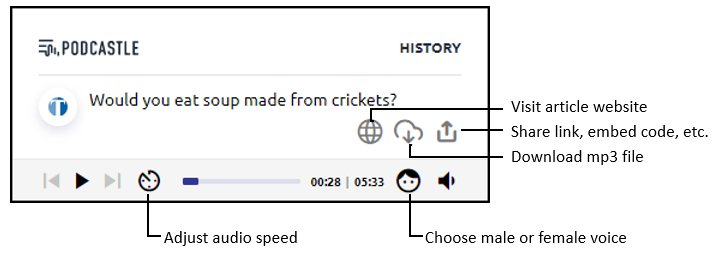
We’ll use the article titled “Would you eat soup made from crickets?” and the Podcastle AI Chrome extension. Once we are on the website we want to convert to a podcast, we click on the Podcastle AI extension. The box shown below should appear. If it has a green bar at the bottom of the box labeled “CONVERT TO PODCAST,” click on the green bar. Select whether you want a male or female voice by clicking on the face icon and selecting the other option.
While listening to the page, you can adjust the speed of the audio playback. If you download the audio, it will be rendered as male or female as indicated, but at the normal speed.
Troubleshooting
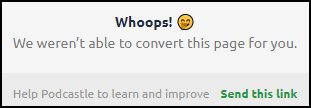
If you find a website you want to convert, but you get a message from Podcastle AI that it isn’t able to convert the page for you, you have two options.
The first option is to use the Clearly Chrome extension. With just a click, you can create a distraction-free page. Now try clicking the Podcastle AI extension. This worked for me in various instances when the page wasn’t able to convert for some reason.
The second option is to click on Send This Link in the message to share the URL with Podcastle AI so the company can tweak the tool to work with the website. If you are just using a different website here and there, using the first option may be your best route. If you find that you are using a single website for a lot of content that you want to convert, you might consider sharing with the the Podcastle AI folks and see if they can help make it convert-able.
Some Examples
Here is an example of several pages that have been converted to a podcast. Click on the page title to view the page and the audio link to hear it converted by Podcastle AI. Instead of sharing an MP3 file, the audio file links below allow you to listen online and adjust the speed as well as the voice (male or female).
- Would you eat soup made from crickets? – TweenTribune – (audio file)
- Taking Among Us! to School – TechNotes Blog – (audio file)
- The Story of an Hour – from Very Short Stories for Middle and High School Students to Read Online by Owlcation (audio file)
- How Can Educators Tap into Research to Increase Engagement During Remote Learning? – EdSurge – (audio file)
Putting Podcastle AI to Use
How can this be used for your students? Here are just a few ideas…

Math Integration
Share articles about best practices for teaching mathematics for teachers to listen to on the go. For example, Evidence-Based Math Instruction: What You Need to Know can be shared as an online file they can adjust and listen to. And, if they want to download and listen offline as an MP3, they can just click the download link.

ELA Integration
When your students are reading chapter books, look for a web page that has the chapter on it. If you can find the chapter as a PDF, then you can copy and paste the text as a page of a Google Site you created for the book. You can then use Podcastle AI to create a podcast for the page. In Google Site, select Embed and choose Insert from URL. You can view an example with Where the Red Fern Grows (chapter 1).

Social Studies Integration
If you have an article that you’ve shared with your students about a current event (such as an article from DOGO News, Time, Positive News, or BBC US and Canada News), go ahead and create a link for them to listen to the article as well. Remember, if the article isn’t able to convert, try using the Clearly extension trick mentioned earlier.

Science Integration
When creating a hyperdoc for students about a science topic that you are studying, check to see if you can convert the various sites you want your students to read as podcasts. Giving students the option to read and/or listen may assist them in comprehension and motivation.
While there are several text-to-speech convertors available, I think you will find a lot of benefits in using Podcastle AI’s features to assist your students in learning on the go. Whether it is converting a page to an MP3 that can be listened to offline or sharing a link to the audio for online listening, your students are sure to appreciate the ability to choose.
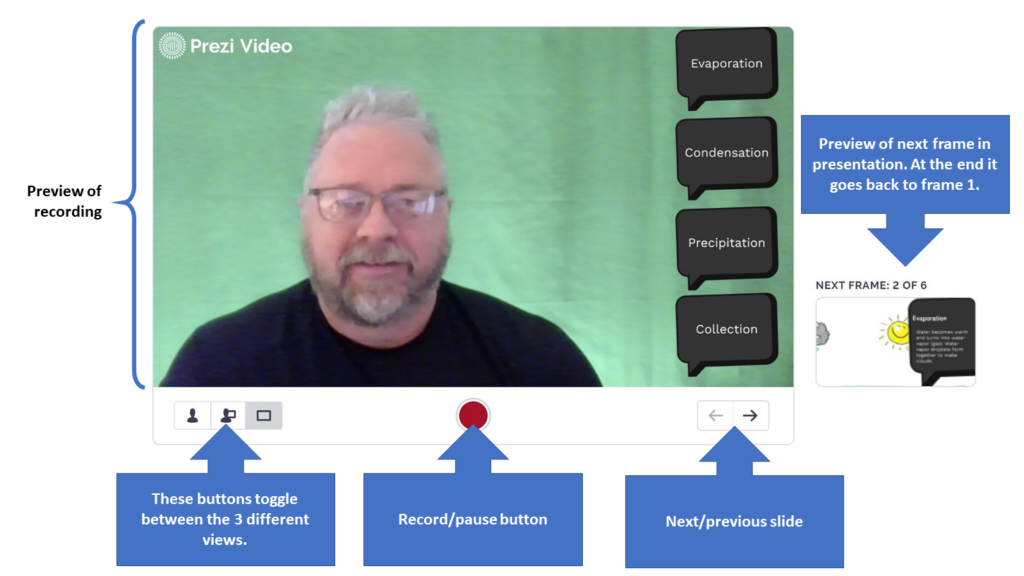
 – bottom right of your video area) to practice going through your presentation. You may need to move over or change your position. You can also use the keyboard shortcut keys (1, 2, and 3 respectively) to toggle between the three views
  : just you, you and the presentation, or the presentation with background. Notice that to the right of the video is a thumbnail of the next slide.
 This will allow you to move the purple “bookends” to trim off the beginning or ending portion(s) as needed. You are not able to remove sections within the video. Click the Done button when finished trimming.