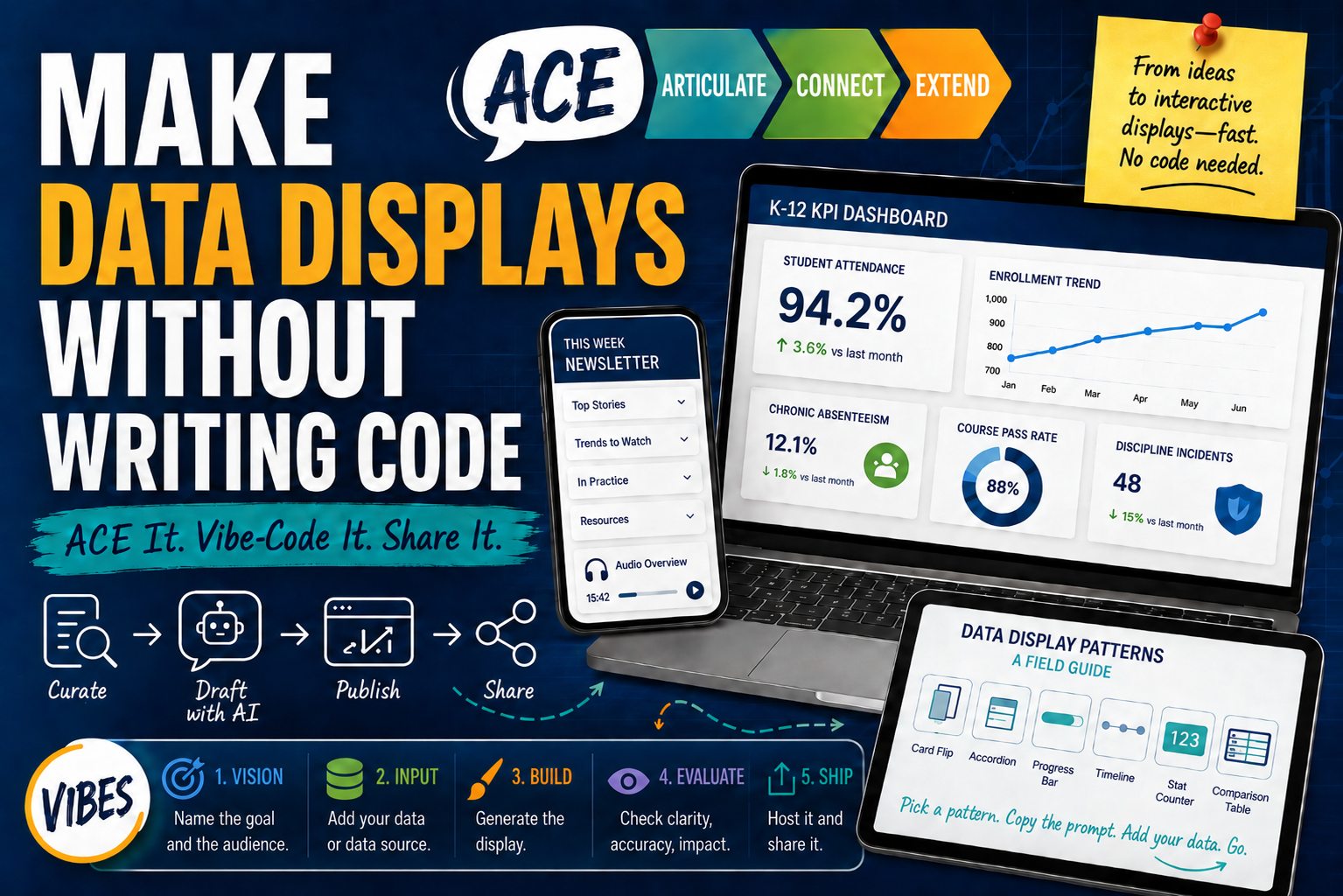
Every morning, before I get out of bed, I spend time reading articles, reports, and social media. All this content ends up somewhere, but most importantly, it helps me identify what’s going on, and how to keep up to date. One of the challenges I struggled with in the past was how to process it all and then share it in a way that’s attractive and easy. Turning all that reading into something useful is the hard part of my process. If that’s true for you, keep reading.
Top Five High-Effect Size Instructional Strategies
This chart uses the latest checked Visible Learning MetaX weighted mean effect sizes available during source review. Slice sizes are proportional to each strategy’s share of the total effect size across these five entries.
shown as 100%
-
Collective teacher efficacy
-
Cognitive task analysis
-
Constructivist teaching
-
Jigsaw Method
-
Transfer strategies
The whole approach runs on ACE It, an anchor word from SOLO Taxonomy and the surface, deep, and transfer phases in Hattie’s Visible Learning research. ACE stands for Articulate, Connect, and Extend. I use the same three moves for building things that I use for teaching them.
- Articulate It is naming what you want in plain words. This is where vibe-coding comes in. It lets a non-coder describe an idea and let the AI shape it into working code
- Connect It is fitting that idea into work you already do: newsletters, websites, and dashboards built with familiar tools
- Extend It is taking it somewhere new, into data display patterns, hosting choices, and coding agents that scale your expertise
A quick word on tokens
Before you start prompting, it helps to know what a Gen AI tool is actually reading. A chatbot does not read words or letters the way you and I do. Instead, it reads tokens, or small chunks of text, that are often a piece of a word rather than the whole thing. A rough rule for English: one token runs about four characters, so 100 tokens lands around 75 words. Why does this matter? A model’s context window, the amount it can hold at once, is measured in tokens. This covers your prompt, anything you paste, the chat history, and the reply all together.
Paid API usage gets billed per token, split between what you send and what the model writes back. Tokenization explains why a model fumbles counting the letters in a word: it sees chunks, not letters. Shorter prompts and tighter pasted data leave more room for good output. They also cost you less.
Connect It: The Publications
Let’s take a look at some of the possible ways you can take advantage of vibe-coding for practical use. Those uses include:
1-Newsletters
The newsletter side turns your curation into a publishing rhythm. My Learning Loop series is the running example. Here are three recent issues:
- AI Workflows Meet the AI Backlash
- AI in the Classroom: Context, Costs, Consequences
- The Environmental Impact of Gen AI
The finished product is an AI Interactive Newsletter with collapsible sections a busy reader can scan, plus a NotebookLM audio overview for the drive home. To curate content that goes into a newsletter, I use the free version of Raindrop.io for that. The process is curate, draft with AI, publish, and share.
Want more examples and the custom instructions behind them? Look at Field Notes and its custom instructions doc, the Triple Boot series, and From Conversations to Presentations. There is a fuller write-up in Become an AI-Powered Newsletter Architect.
2-KPI dashboards
A KPI dashboard takes your own numbers and turns them into something you can hand to a principal or a board. The K-12 KPI Dashboard Generator is a single self-contained HTML file. The data comes from a Google Sheet you control, and you can host it free on GitHub Pages, so the whole thing lives in places you already have access to. The reasoning behind it sits in KPI Dashboards Built with Gen AI. You may also want to read Metrics and KPIs Made Easy.
What surprises some folks is that you do not have to copy data by hand. You can ask the AI to write a Google Apps Script that pulls a public web table straight into your Sheet, then set a trigger so it refreshes on its own. The AI handles the code, while you decide which data matters. The data in the Google Sheet feeds the dashboard.
Did You Know? TCEA offers practical, hands-on Gen AI professional learning for educators. Browse the TCEA online courses and certifications to find one that fits your role. Sign up for The AI Essentials for Educators course, which goes in-depth into vibe-coding and provides introductions to BoodleBox, ChatGPT, Claude, Gemini, and Perplexity. It’s really one-stop shopping for Gen AI solution learning.
Extend It: The Data Display Patterns and the Prompts
When you are ready to go further, the Data Display Patterns field guide is a working catalog of examples with prompts. You pick the shape of the data display that matches the question your reader is asking, then pour your numbers in. Or, if you need inspiration in how to represent data so it’s interactive, explore the field guide. With every pattern, you get the following:
- A live demo,
- A copy-ready prompt,
- Suggested data sources, and a
- Note about where it hosts best.
Patterns split into tiers by what they depend on:
| Tier | What it uses | Examples |
|---|---|---|
| Easy | CSS only, so nothing gets stripped and it works in every host | Card flips, accordions, progress bars, comparison tables, stat counters |
| Medium | A little vanilla JavaScript for filtering, switching, or animation | Searchable lists, carousels, flashcard decks, timelines |
A KPI, just a big number with a label and a trend, is the easiest win on any dashboard. Here’s one with made-up numbers I assigned based on my feelings and usage:
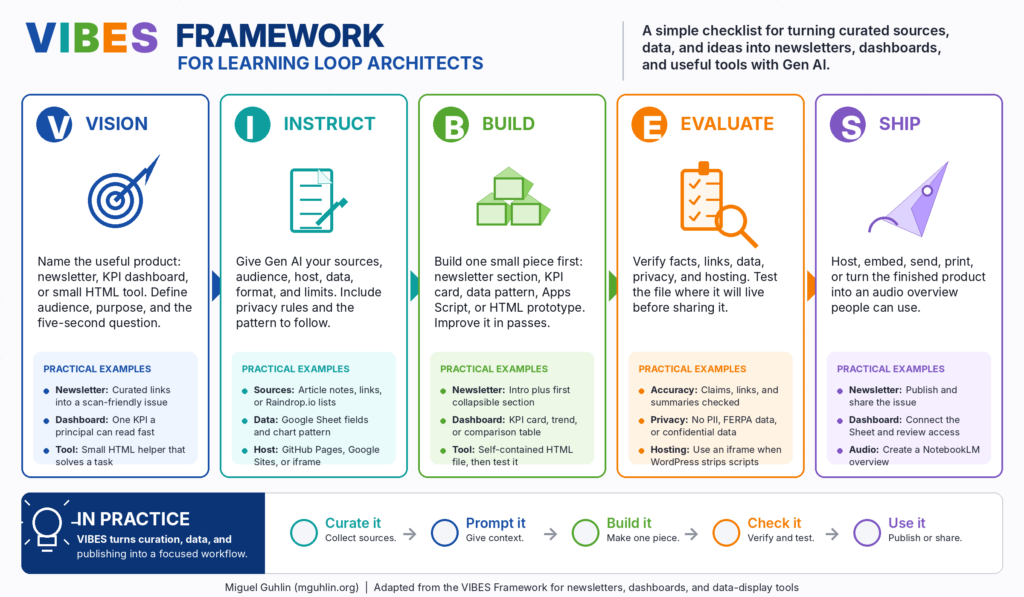
The repeatable way to build any of these is the VIBES framework, five steps adapted for visualization:
Where Your File Survives
The same file behaves differently depending on where you embed it. That’s the tough part, since you have to know where things go best. GitHub Pages serves whatever you give it. Google Sites runs your file in a sandboxed iframe, so avoid local storage there. The trap is the WordPress Custom HTML block, which keeps your CSS but strips your JavaScript on save for most users. One rule prevents most of the heartache: if your pattern uses JavaScript and you are headed to WordPress, host the file on GitHub Pages and pull it in with an iframe. The iframe keeps your script intact.
Here’s a simple GitHub tutorial to get you started. The website you see appears here.
Here’s the iFrame code in case you need it:
<iframe
  src="https://mglearn.github.io/tcea/ddp/index.html"
  width="100%"
  height="600"
  style="border:0;max-width:760px;display:block;margin:0 auto;"
  loading="lazy"
  title="Data Display Patterns, a TCEA Field Guide">
</iframe>
Coding the Tools
When you build for real, two coding agents do the heavy lifting from plain-language instructions. Claude Code runs from the terminal or desktop and is strong for clean, multi-file, self-contained builds. ChatGPT Codex (and it can also run from the terminal) is the conversational option for generating and iterating quickly. The skill you are building is describing what you want clearly, and that transfers to either tool.
The Toolkit
One reminder before the list. Do not put personally identifiable information, anything covered by FERPA, or confidential and sensitive data into any of these tools UNLESS your organization has an enterprise level contract with them to safeguard data. Treat each one as a public space.
| Free | Paid |
|---|---|
| Z.ai | BoodleBox Unlimited, code MGFREE123 for two months free |
| Mistral.ai | ChatGPT Plus |
| Claude AI free tier | Claude AI |
| Raindrop.io for tracking links | Google Gemini |
Your turn
Pick one Easy pattern from the field guide that fits data you already have. Copy its prompt into Claude, ChatGPT, or BoodleBox, then paste in your numbers or a link to an article you want visualized. Save the file and get it live on GitHub Pages or embedded through an iframe. Starting Easy means hosting is not a worry. The first one is the hardest. After that, it gets easier. What will you build first? You can see some of my own creations and special projects for TCEA.
Ready to go deeper? Explore the Data Display Patterns field guide and share what you build in the comments.