

“One of the challenges for ed tech folks to bring about change is knowing how to do it,” I said to Steve Dembo (@teach42) when he visited Austin, Tx for the TCEA TEC-SIG spring meeting. It was a conclusion I had come to after many years as an ed tech advocate. For those seeking to pursue the school makerspace will-o’-the-wisp eldritch light, overcoming this challenge is critical. This blog entry discusses this question in the context of school makerspaces.
A Question of Trust
True leaders know how to build relationships that engender trust, trust that eases the bumps and bruises of walking forward in the unknown dark. Most educational technology folks focus on the benefits of the technology as their main selling point, yet this can be insufficient. Adopting a maker attitude and building makerspaces in schools and libraries seems obvious. Yet the challenge isn’t the technology. It’s the human relationships that support any change effort. Without trust in the technologist, no technology can succeed.
Tip #1 – Build Relationships
“You have to meet with people before the big decision is made,” said one colleague years ago. “You need to introduce the ideas and information so that people have time to think about it, one on one.” This tip for relationship building is to start having conversations that genuinely show concern for the needs of others. As trust builds and as you get a sense for how others think (and feel), you can start introducing some of the core ideas of the maker movement.
Makers may be defined “as people who design and make things because they find it intrinsically rewarding to make, tinker, problem-solve, discover, and share what they have learned” (Kalil, 2013). Your school and district leaders, librarians, and teachers must understand this isn’t about the technology, but is rather about cultivating a maker attitude in themselves and students.
Tip #2 – Avoid Oversimplifying What a Makerspace Is
With that definition in mind, it may still be possible to focus on the tools and technology. That is, on Raspberry Pi vs Arduino, 3D printing vs bead-making, drones vs cardboard creations. Or it may be all of the above. As Lee Martin points out in The Promise of the Maker Movement for Education, if the focus is on the technologies and tools, then you’re missing the point. Martin goes on to point out:
…the history of the adoption of computers in schools suggests a lurking danger: a seductive, but fatally flawed conceptualization of the Maker Movement that assumes its power lies primarily in its revolutionary tool set, that these tools hold the power to catalyze transformations in education.
Tip #3 – Establish a Budget
Once you have built trust with district and/or campus leaders and gathered the as yet untrained support of librarians, you will need to establish a budget. When setting up a makerspace budget, consider what kind of space your stakeholders will find easiest to begin with and that has minimal budget impact. It’s much better to have a low-budget success than a high-cost failure stalled by expensive technology. For example, when rolling out Raspberry Pi for a summer camp, I failed to take into account the time required to setup the devices and all the necessary extras (e.g. WiFi USB dongle, cables, and stuff) needed for a student do-able activity. Worse, the cost of all the additional items killed the initiative its first year because supplies were not available from our usual vendors.
If you lack purchasing authority, you may need to pursue crowd-sourced funding options such as Kickstarter and DonorsChoose. View some suggestions and tips online.
Tip #4 – Approve the Right Vendors
Even with a budget in place, you may find yourself at a temporary impasse as your standard vendors may not have what your makerspace needs. You may need to contact sole source vendors to obtain necessary sole source letters and W9 forms to be able to do business with them. You may also want to find a convenient reseller. The reseller is someone you do have an open purchase order with that can order what you need from vendors not on your district approved list. This can be a real time-saver.
Tip #5 – Create Your Own Buzz
Aside from staying in constant contact with stakeholders who have supported you, you will also want to amplify the voices of teachers and students who have become makers. Several ways to accomplish that include:
- Conduct a weekly podcast featuring pictures/videos of student creations, no matter how cheesy they may seem at first blush. Part of your work is documenting the growth of makers in your community, so tweet, Instagram, and Facebook pictures and videos. You can schedule tweets in advance to ensure their maker attitude is on display seven days a week. Find out how here.
- Create tiered levels of experience that align to the skill level and age level of young makers. This can ensure your makers are always learning and growing towards something.
- Build up your stock of resources and setup supply lines within your academic community. This way, you will have a ready supply of cardboard and other raw materials for less techcentric activities. This will also lower your overall cost.
- Develop a community of mentors for both staff and students. Actively encourage mentoring and differentiate between levels of experience. You want to build depth of the community, and you can accomplish that by implementing badging for various aspects.
- Invite leaders to give making a try, and include students with parents. Spend time sharing the importance of cultivating a maker attitude up front, and align everything you say and do to that.
Final Thoughts
Remember that just as you are building a maker community in your space, you need to be an active participant in other maker communities. As your learners are nurtured, so must you be committed to receiving and learning with others. Some people to start following and connecting with include:
- Colleen Graves – Middle school librarian and author
- Peggy Reimers – TCEA director of professional development and creator of TCEA Makers
- Holly Storck-Post – Children’s librarian in Madison, Wisconsin who also blogs


 Taking on new skills and the learning curve that goes along with it may be a frightening and/or frustrating task for your staff members. When possible, always try to set them up for success. They may not know how to break the skill down into manageable pieces, for example, so you may need to help model that aloud. Depending on the skill, you may also need to provide additional resources or training to help them become confident and successful. Put yourself in their position and consider what might be helpful in order to stretch…without breaking.
 Talk to your staff about the additional tasks and the need to grow and take on new skills. Having an open discussion can alleviate some of the fear that comes from encountering something new, different, or unknown. When possible, ask questions to find out what they think. They may have a completely different understanding based on their past experiences (or lack thereof). Open dialogue should not be constrained to a single staff meeting however; encourage the conversation to continue. Let your staff know that you want to hear their ideas. Though you may have no control over the growth that needs to take place, you do have a great deal of influence on how well they develop capacity to meet that need.
 When talking with a friend about building capacity in his team, he mentioned that he has a few people that can juggle six or seven major things, and he has one person that can only juggle four. No matter how much he wants the four-task-juggler to grow into a five-task-juggler, he realizes that it just isn’t going to happen. And the best thing he can do is recognize it and use it to both his and his staff member’s advantage. In doing so, he needs to set realistic expectations for each individual staff member. Just because you and I find certain tasks easy to juggle doesn’t mean that a another staff member will obtain the skill with ease. If we think back over our experiences, we probably had much more time (and resources) to build capacity in that area. With that in mind, consider how you can adjust expectations, but still arrive at the required destination.

 Take time to reflect on what myths you have bought into and the impact that you can make by changing your mind and believing what is actually true…not necessarily easy but true nonetheless. If I left you with one saying to challenge you, it would be with what Steven W. Anderson (



 You might be thinking, why weren’t the teachers using the textbooks? Aren’t they aligned to the state objectives? Why wouldn’t a teacher want to use a “free” resource that is aligned to the objectives? Those are great questions, and there are probably multiple answers. But my theory is that districts slowly began to move away from a heavy dependence on textbooks as the state accountability system began to gain prominence. In order to ensure their students would do well on the state tests, districts began to build their teaching curriculum around the testing standards, especially in the areas in which their students struggled. This led many districts to begin using textbooks as a resource and not the resource. The districts began to purchase additional resources to supplement the textbooks to match their teaching curriculum. This resulted in waste as many textbooks went unused while districts spent their local money to purchase materials to supplement the state-approved textbooks.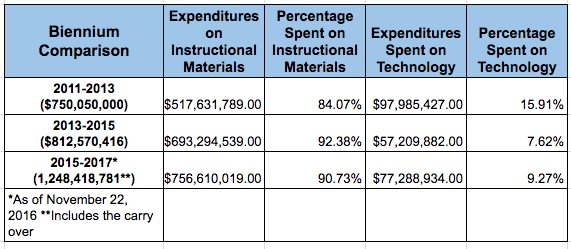
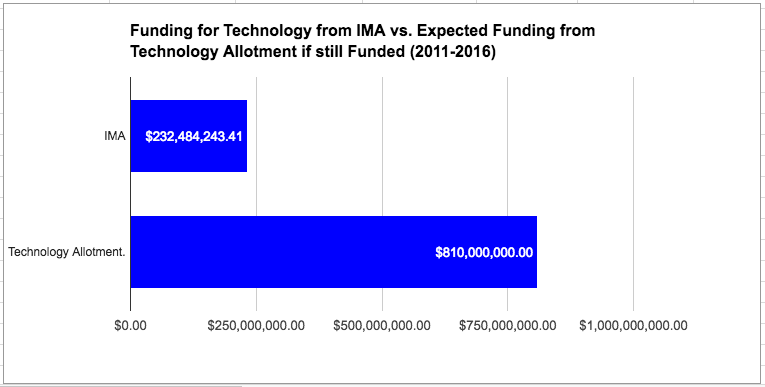
 School districts now live with the uncertainty of not knowing the cost of the next proclamation nor how much funding will be in the IMA. Prior to SB 6, the SBOE would establish a maximum price for any textbook that would be placed on their approved list. As expected, every textbook submitted for SBOE review came under that maximum price. Because the state was doing the purchasing, publishers could afford to offer the books at these prices because they knew they had a chance of selling a large number of books. SB 6 eliminated the maximum price because it was assumed that, with the new flexibility afforded in SB 6, business would decrease for the major publishers, which might mean that they would need to adjust their prices to remain profitable. The result is that the price of textbooks has increased and so has the uncertainty. Districts have no way of knowing how much the next proclamation is going to cost, so they often save whatever they don’t spend on the current proclamation to make sure they have enough for the next one.
 Since TCEA’s mission is to help districts implement a digital learning environment, the reduction in funding for technology is a grave concern. We have supported the structure of the IMA because we believe that technology should always be purchased within an instructional context. Because technology should support the instructional goals of a district, it is healthy for district personnel that support both to work together to determine how best to use district resources to meet the district’s strategic goals. This includes the IMA.