Discover resources and strategies for professional learning. Explore tools, tips, and opportunities to enhance educator growth and development.

TCEA members are some of the most dedicated and knowledgeable educators to be found. They understand the need to know and be able to use new technology tools and resources, try out promising best practices in teaching strategies, and use the latest brain research to help their students achieve. But sometimes it can be difficult to find the time to do all of that on their own. So they turn to TCEA for help.
TCEA Webinars
TCEA provides to all of its members more than 60 hours of free professional development each year in the form of webinars. These aren’t your typical sit-and-get events; instead, the TCEA professional development staff ensure that each one includes active learning components and ways for participants to share ideas and find solutions. The webinars are offered live so that interested educators can take an active part in the discussion, but are also recorded so that those who can’t attend the live learning can still get the content and resources at a time of their own choosing 24/7.
The webinars are offered in four different groups:
- Lunch and Learn – Offered every Wednesday from 11:45 a.m. to 12:15 p.m. CDT, these webinars are short tutorials on a wide variety of topics. Some of these for the 2017-2018 school year include designing engaging learning spaces, encouraging students to publish, getting started with sketchnoting, promoting student choice, and tech tools for leaders.
- Get Your Google On – The first Thursday of each month is Google day with the webinars offered from 11:45 a.m. to 12:30 p.m. CDT. These are slightly longer learning events that focus on all things Google, from secret Gmail tricks to creating ebooks with Google Suite to using Google Cast.
- Advocacy Updates – These webinars are designed to help educators keep up-to-date on state and national discussions relating to policy and ed tech use. They include state information from TEA, the IMA, the SBOE, SBEC, and the Texas Legislature, as well as national decisions.
- Webinars for Preservice or New Teachers – TCEA also offers four opportunities for new-to-the-profession educators to learn. The webinars are from 4:00 to 4:45 p.m. CDT and include I’m Officially a Teacher; Now What?, Free Resources for Teachers, Tips for Planning for the New School Year, and Principal Perspectives for New Teachers.
You can register for each webinar that you are interested in or register one time for the entire “bundle” of webinars in each group. Either way, you will receive an email reminder prior to the webinar and another email the Friday after the webinar with a link to the recorded version. And, if you want more learning, you can also access webinars from previous years simply by logging into your TCEA account and accessing the Member Benefits Group in the Social Community.
Additional Learning Opportunities
TCEA also schedules other webinars as new topics and technologies come up. These can be found in the TechNotes enewsletter, which is emailed out every two weeks beginning August 15, or in the calendar on the main page of the TCEA website.
If you’re not a TCEA member, you can join for just $49 a year and have full access to all of these webinars, as well as a wealth of other resources. If you are a preservice teacher (a college senior in an education program), membership is free. And retired educators who want to stay current can join for just $30.
Keeping up with technology can be a full-time job. Let us take some of the burden off you with these free-to-members learning opportunities. With TCEA, you’ve got this!

 inspiring advocate for diversity and inclusion. And in 2015, she developed “Marlee Signs,” the first celebrity-driven app that teaches the basics of American Sign Language on mobile devices.

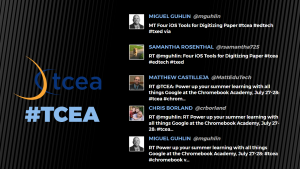 This has to be the easiest Twitter wall to set up. You have multiple themes available, can upload your logo, and identify one Twitter keyword, username, or Instagram keyword on the free version. There are four layouts (text, text and images, images, and instructions) which you can use in any combination or use all four (my preference) set on timers.
 Though not quite as extensive as The Wallrus, Activity Walls does do a nice job of showing the most recent tweets. Just identify your hashtag, set the colors (which can be a little quirky, depending on what browser you are using), and your wall is instantly created. Using Chrome, I can quickly jump to full screen for a nice projected view; using Internet Explorer, I can customize the accent, background, and text colors.
 Tweet Monsters is simple and focused. The free account is for personal use; you’ll need to contact them for pricing on corporate and other uses. Begin by identifying your hashtag. Customize text and background colors as well as the font, transition type, and transition speed. If needed, you can use the custom word filter to identify words to be filtered out and to either not show the tweet or substitute the bad word with an *. The downside of Tweet Monsters is that you only see one tweet at a time.
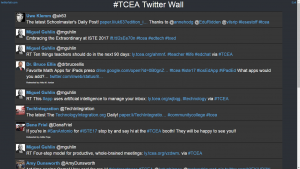 This Twitter wall has the most options available without a cost. You can add lists, searches, tweets by geolocation, exclude specific hashtags or words, and color code your timeline, mentions, and direct messages if needed. You do have a variety of setting to change regarding the speed, fall size, language, font size, and whether or not to show retweets. When finished tweaking your wall, you will want to click on the Presentation Mode link for easier viewing for your attendees. Though not the most professional looking wall, it does give the most flexibility. And, when I’m in a Twitter chat, I use this wall to follow the exchange and participate.
 Now that you have a few Twitter walls to choose from and some tips to get you started, we’d love to see what you do with them. Share the link to your Twitter wall in the comments below.