Stay updated with the latest TCEA announcements. Find news, event updates, and important information for educators and tech enthusiasts.
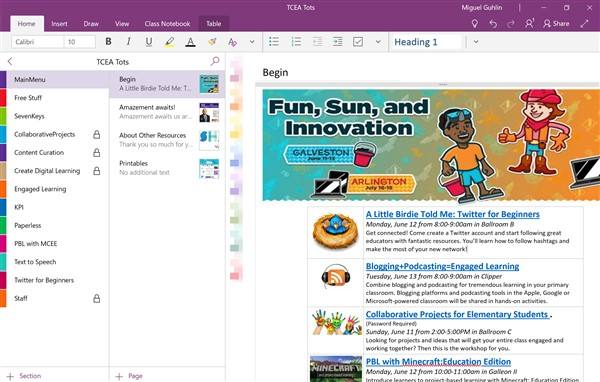
Did you catch the news updates about an enhanced OneNote, Microsoft Forms, and Microsoft Flow? Just as Microsoft works hard to enhance its classroom offerings, it is also shuttering existing services like Docs.com. This morning, I woke to the news that Docs.com, which Tom Grissom highlighted in this TCEA Podcast, would disappear and be replaced by Slideshare.com as the preferred sharing platform. Some other updates in this blog entry include changes to OneNote 2016 and OneNote. We will also take a look at Microsoft Flow and Microsoft Forms (Microsoft’s IFTTT.com type service).
Farewell, Docs.com
If you’re not familiar with Docs.com, it offered a simple way for Microsoft users to share their resources online. It described itself as a way to “showcase and discover Microsoft Word, Excel, PowerPoint, OneNote, Sway, and PDF documents for free.” Docs.com community members shared quite a bit of incredible content online, including Marjolein Hoekstra’s OneNote and Minecraft resources. The service proved invaluable as I began learning about how others were using Microsoft products like OneNote and Sway, giving me access to fantastic creations from the K-12 space and more. Here’s an excerpt from the email I received this morning about the update:
Thank you for using Docs.com. We would like to let you know that we are retiring the Docs.com service on December 15, 2017, and need you to take action to save your files. Please make sure to migrate all your content to other storage and/or sharing services on or before the retirement date to avoid losing any of your data.
As I look forward to Slideshare becoming the new sharing space, I hope that the migration process will be as smooth as suggested above. Find out about the migration process online. Some important dates to keep in mind include June 9 as the time when new Docs.com accounts will no longer be allowed; August 1 when publishing and editing of Docs.com content will stop; and December 15 when Docs.com will be completely inaccessible.
OneNote Turbo-Charged
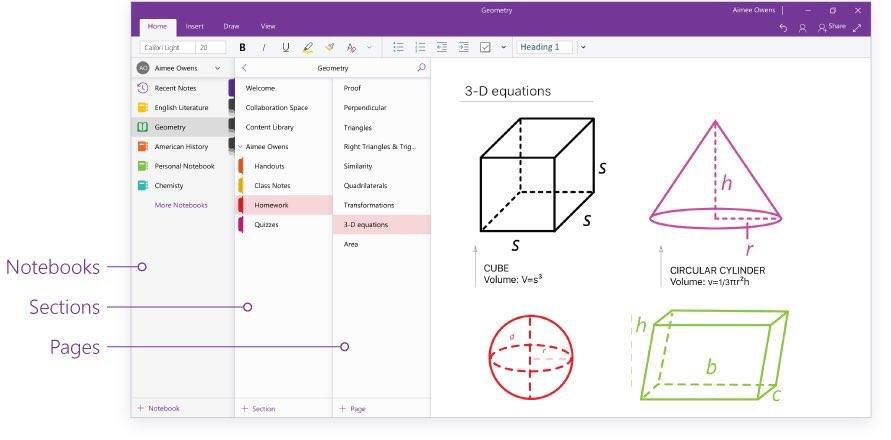 Just a few weeks ago, I recorded two video walk throughs of OneNote 2016 (now sporting a new name, OneNote Desktop) and the OneNote app on Windows 10. In that time, Microsoft has rolled out incredible changes to the OneNote app, making it my preferred OneNote tool.
That means, yes, I’m no longer using OneNote 2016 and instead, prefer the free OneNote app. The latter has a more nimble interface and responds faster to commands.
Some of the major features now available in the OneNote app include:
- Redesigned interface sets a standard interface for both OneNote app and OneNote Online (web version)
- Navigation Panes make it easy to view notebooks, sections, and pages, or show only pages
- Search notebooks with ease
- Open new window so you can have two or more OneNote windows open
- Draw menu has been enhanced with rainbow colors and more, including ink to shape and draw math problems
- Class Notebook integration (with Immersive Reader, or Learning Tools, integration coming)
Be sure to update your OneNote app to get these revised or new features. Unless you are using some esoteric feature (e.g. copy text from picture, Onetastic macros, high-end table customization, insert Excel spreadsheets), the improved OneNote app may meet your needs.
Microsoft Forms Improved and Flow Sports New Integrations
If you’ve been using Microsoft Forms, you’ll be delighted to note that it now has a new interface featuring Form thumbnails, as shown below. MS Forms also now supports a total of 68 languages.

If that wasn’t enough, Microsoft just made this announcement about Forms integration with MS Flow.
Microsoft Forms is a new part of Office 365 Education that allows teachers and students to quickly and easily create custom quizzes, surveys, questionnaires, registrations, and more. Currently in preview, the connector enables you to act whenever a new form response is submitted.
If you are accustomed to using If This Then That (IFTTT.com), Microsoft Flow offers another tool that interacts specifically with Office 365 tools (e.g. OneDrive). IFTTT is one of my favorite tools to automate the flow of information from one location to another. Introducing these connectors will make it much easier for MS Forms to get work done.
Some examples of the work that can get done include (source):
- Using Forms and Flow, you can receive email, push, or text notifications when new survey responses are submitted. You can also notify your team by posting the response to your channel on Teams, Yammer, or Slack.
- You can route the response to your favorite database service or create a new record in Google Sheet or Excel.
- You can create workflows to automate tasks based on the information received from a user (the responder).
Wait, There’s More!
If you are like many Office 365 educators, you are waiting for the biggest announcement of them all. That is, the availability of MS Classroom components into the more robust MS Teams. Having seen some of the integrations possible with MS Teams, I can only wait with anticipation to see what’s coming next. Stay tuned to the TCEA TechNotes blog for the latest updates.






 In the midst of all that you do, please take time and enjoy the
 remember all of the things that I routinely forget. She’s the one who gets text messages and phone calls from her boss at all hours of the day (and yes, I’m sorry to admit it, the night, too). She runs our robotics contests and our awards and scholarships programs, both of which have huge numbers of participants. She is also our membership software expert, which means that when the rest of us can’t make sense of the programs we use, she helps us, always very patiently. I often wonder what she must tell her husband about us each day when she goes home; I’m sure the stories about our incompetence make him laugh. But she never makes us feel stupid, even when we ask her the same question 100 times. She is always patient, and TCEA wouldn’t be what it has grown to be without her.
 Janny works the reception desk of our building, which means that she is the first face visitors see. She is also the first person on the phone and chat lines, making her the voice of TCEA, too. And that is a blessing as she is the sweetest woman I have ever met. I have never seen anyone multi-task like she does. She can be entering purchase orders, responding to a member’s frantic phone call about a forgotten password, restocking drinks for a workshop or room rental happening in our conference center, and fixing the copy machine, all while smiling. She always has a pleasant greeting and a piece of candy for the UPS, FedEx, cleaners, lawn maintenance, and post office folks who drop by, and has never once been seen with a frown on her face. Some day, when I have enough karma points, I want to be Janny.
 Carrie, our director of member services; she answers to each of our 17,556 members. And that’s a lot of bosses to have! Erin is one of the newer members of the team, but has fit in with the rest of us crazies since day one. She spends a lot of time working in our membership database system, which can cause her to go a little bug-eyed at times. And she is our official “booth babe,” traveling across Texas to talk with members and non-members alike at area events and to preservice teachers at their student teacher orientations. Unlike the rest of the staff who are more specialized, Erin is expected to know everything about TCEA: all of our programs, our offerings, and our benefits. From member webinars to our advocacy program to the daily app list to what each SIG provides, she knows it and happily shares it with everyone she comes in contact with. She is the best advocate a member could have.
 Our newest administrative professional, Ashley, supports the professional development team (Bruce, Diana, Peggy, and Miguel) and our advocate Jennifer. She is in charge of the TCEA certification programs, making sure all of the PD events are on the calendar and available for registration, mailing out completed and framed certificates, setting up for face-to-face workshops, and assisting the trainers to keep track of where they are supposed to be doing presentations when. She helps with the set up of all of our PD events, like the Tots conferences and System Admin, as well as the various academies. And she runs the convention volunteer program. She sometimes looks a little shell shocked as she has the most TCEA staffers to keep an eye on, but she manages all of them beautifully.