What does good learning look like today? The question is all the more urgent now with the push to limit screen time. Whether you argue in favor of “quality time” for technology use, it’s clear that many don’t really understand what should be happening when technology is involved in the classroom. Some would suggest a return to an evidence-based approach to teaching and learning with technology amplifying the effect. Others prefer the easier all out rejection of digital tools in learning spaces. What’s an Ed Tech advocate to do? Put learning first, always. To that end, you’ll find over 90+ activities, including daily openers like the one below you can rely on.

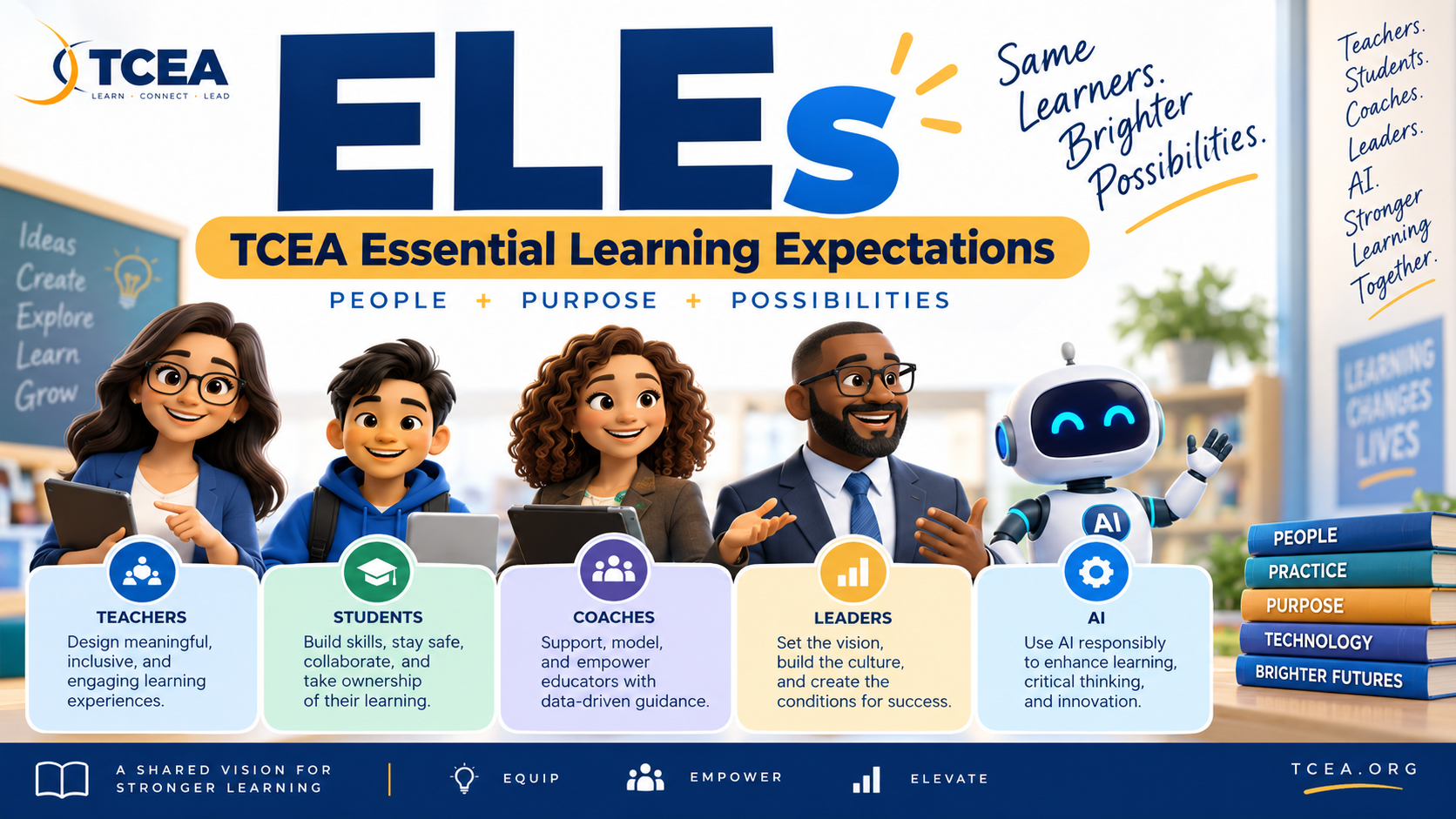
In this blog entry, you will have the opportunity to learn, or revisit, TCEA’s Essential Learning Expectations (ELEs). The TCEA ELLs were originally introduced in 2024.

Great teaching grows one strategy at a time. Join TCEA for Pedagogy Showcase: Igniting Excellence on November 7 for two and a half hours of practical, classroom-ready professional learning. Explore strategies for strengthening instruction, engaging students, making thinking visible, meeting diverse learning needs, and using digital tools and Gen AI with purpose. Leave with ideas, templates, and resources you can put to work right away.
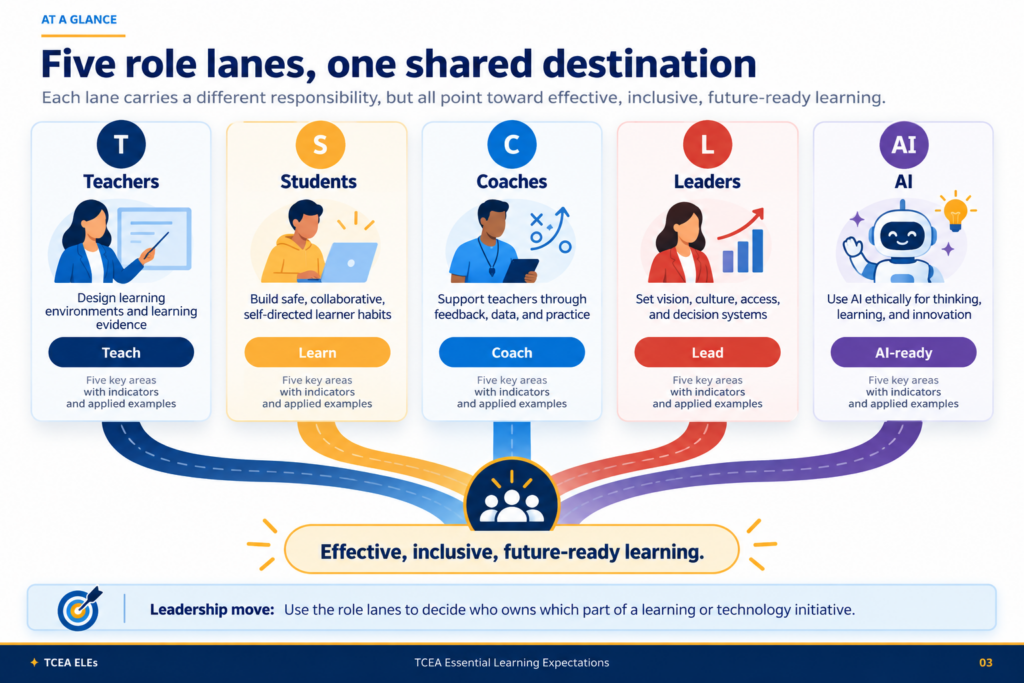
That question at the start of this blog, “What does good learning look like today?,” sits at the center of the updated TCEA Essential Learning Expectations (ELEs). The framework gives teachers, students, instructional coaches, school leaders, and anyone working with AI in education a common language for making better choices.
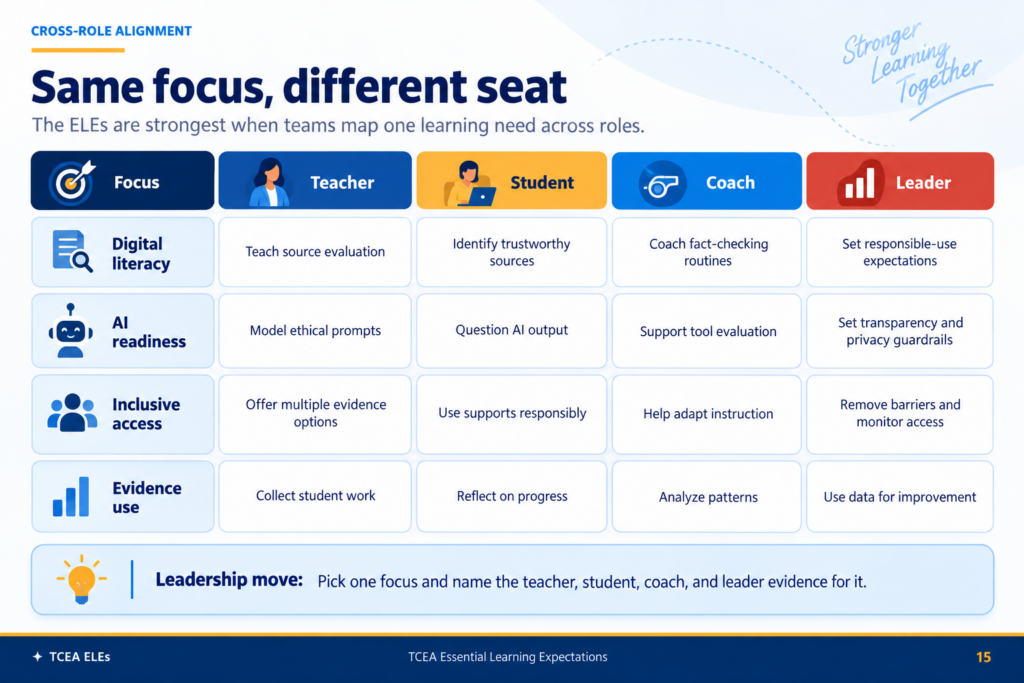
The updated TCEA ELEs make the work visible: what the learner does, what the teacher designs, what the coach supports, what the leader protects, and where AI fits.
I like this version because it makes one thing harder to ignore. Technology use by itself is not evidence of learning.
“This is absolute GOLD! I am so impressed with all you have compiled, created and organized! You seem to have thought of everything – organized by role, linked back to ELEs and also the TEKS, strategies/activities with and without technology, and separated by grade level. My favorite part is the daily opener. This keeps the conversation and learning on-going instead of random, segmented topics.”
– TCEA Member
The TCEA ELE Activity Bank with Printables
Wish you had a bank of activities in multiple languages (e.g. English, Spanish, Vietnamese) to address a wide variety of digital and Gen AI literacy? Explore the ELE Activity Bank, maybe do a search on “screen time” or other hot topics.
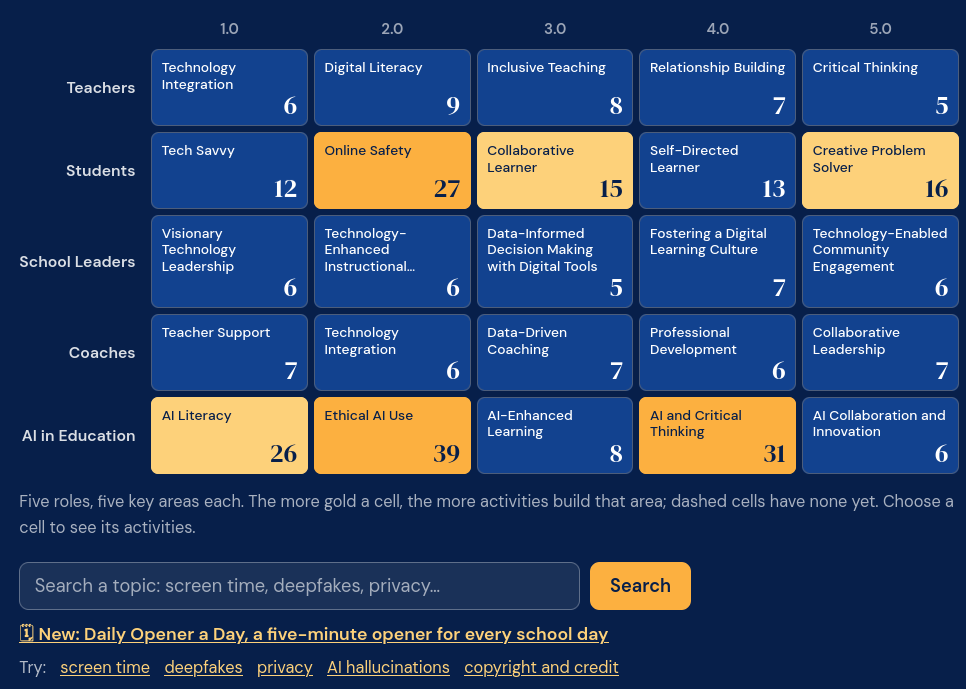
The ELE Activity Bank includes 90+ ready-to-run activities with Daily Opener a Day built on the TCEA Essential Learning Expectations. That’s 50+ for professional learning and 40+ for K–16 classrooms. The number of activities is subject to increase.
Each activity weaves in Gen AI literacy, digital citizenship, or media literacy. And, every activity comes with print-ready handouts, and many do not any devices at all. You could spend a lot of time facilitating professional learning using the ELE Activity Bank, or jump in with student activities.
Let’s take a look at the major components of the TCEA Essential Learning Expectations (ELEs).
1. Teachers Design the Learning Environment
The teacher ELEs focus on technology integration, digital literacy, inclusive teaching, relationship building, and critical thinking. The emphasis is on purposeful choices, not adding a device or app because it happens to be available.
Teacher scenario: Ms. Ramirez plans a seventh grade research lesson. Instead of starting with a tool, she starts with the evidence she wants. Students should compare sources, explain why one is more trustworthy, and cite evidence. She chooses a digital annotation tool because it helps students show that thinking.
Student scenario: Jordan marks claims, identifies the author’s evidence, and flags a questionable source. The tool matters because it helps Jordan make reasoning visible.
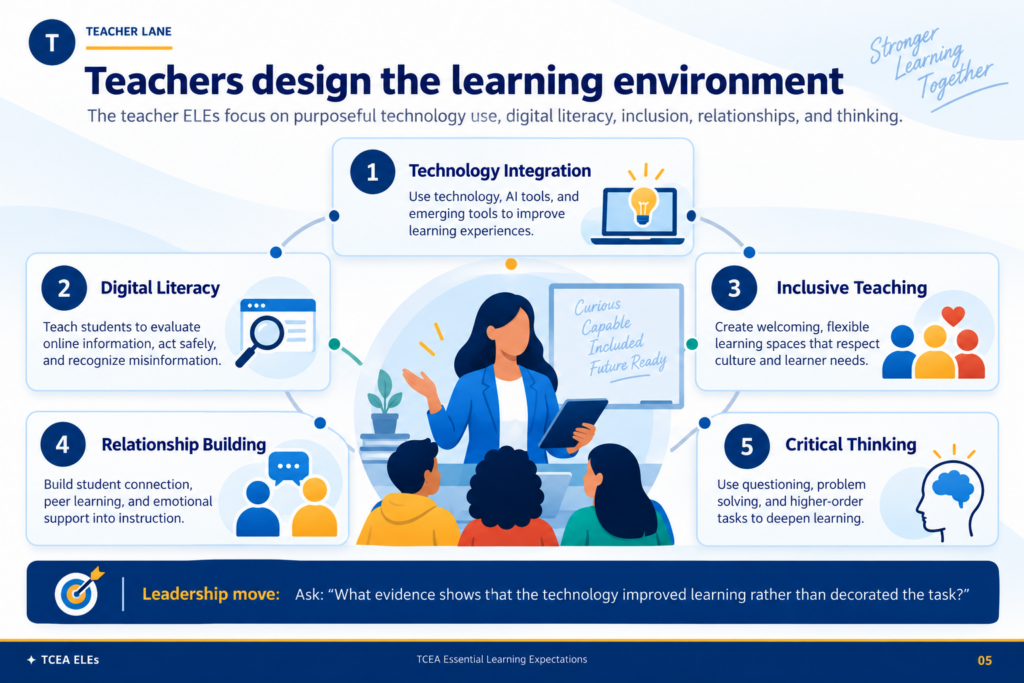
You might ask, “What evidence shows the technology improved the learning?”
2. Students Move from Tool Users to Learning Owners
The student ELEs center on being tech savvy, staying safe online, collaborating, becoming self-directed, and solving problems creatively.
Teacher scenario: Mr. Lee asks students to create a digital portfolio. As you might imagine, he does not grade the number of apps used. Students explain why they chose a format, how they protected personal information, and what they changed after feedback.
Student scenario: Maya adds a short reflection to each portfolio entry. She explains which tool she chose, why it fit the task, and what she did when the first approach did not work.
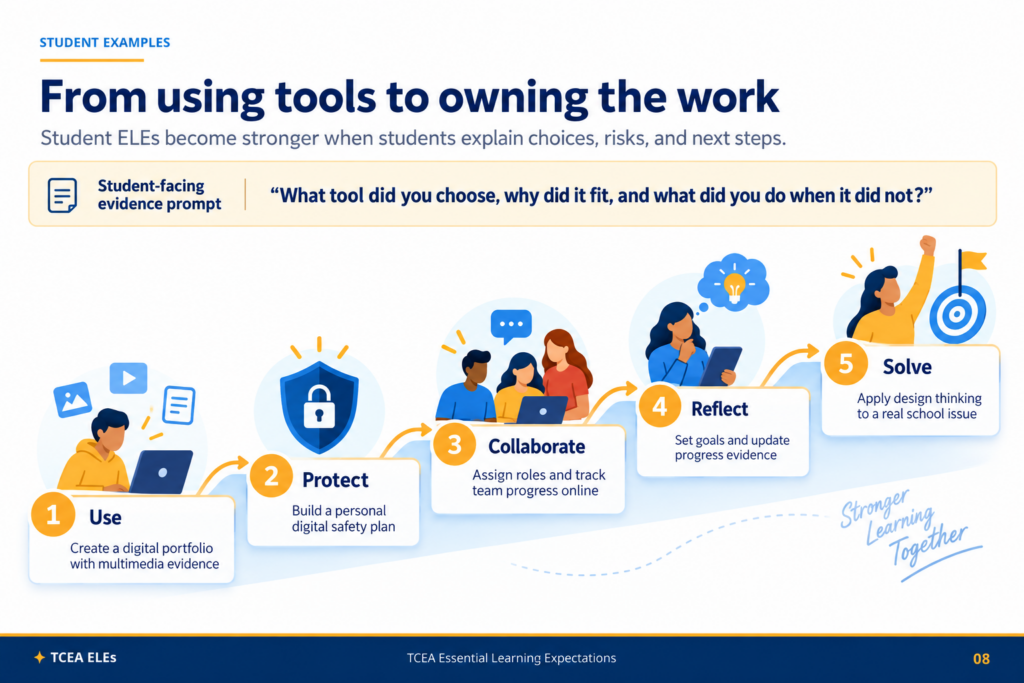
That is a stronger picture of digital learning than “students made a slideshow.” Connect these tools to high-effect size instructional strategies.
3. Coaches Turn Expectations into Practice
The coaching ELEs focus on teacher support, technology integration, data-driven coaching, professional development, and collaborative leadership. The framework suggests a practical coaching cycle: listen, co-plan, model, measure, and adjust.
Teacher scenario: After watching a video-recorded lesson, a teacher and the instructional coach notice that students are completing digital activities but giving shallow answers. Together, they redesign one lesson so students must explain relationships and support claims with evidence.
Student scenario: The next week, students answer fewer questions, but their responses include evidence and reasoning. The coach and teacher review those responses before deciding what to change next.
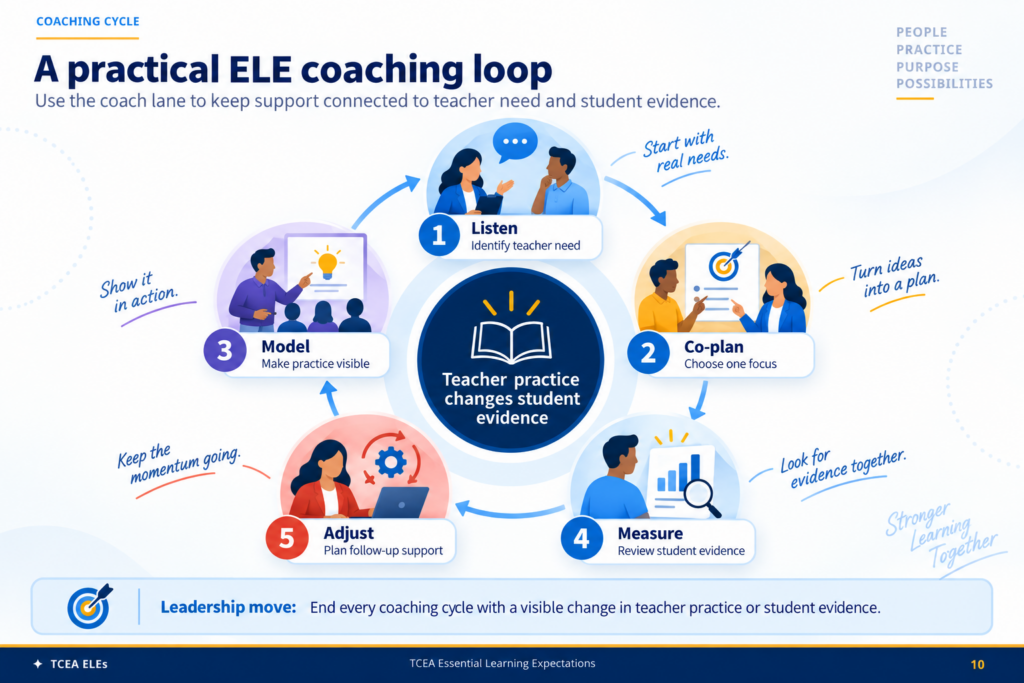
The coaching question becomes, “What changed in teacher practice or student evidence?”
4. Leaders Set the Conditions for Digital Learning
School leaders often have their own lane. That lane includes visionary technology leadership, technology-enhanced instructional leadership, data-informed decision making, digital learning culture, and community engagement.
Teacher scenario: A principal wants every department to use a new platform. Before rollout, teachers are asked what instructional problem it solves, what training they need, and how student work will show whether the change helped.
Student scenario: Students test the platform and report that one part is difficult to use with a screen reader. The campus treats that feedback as implementation evidence, not a side issue.
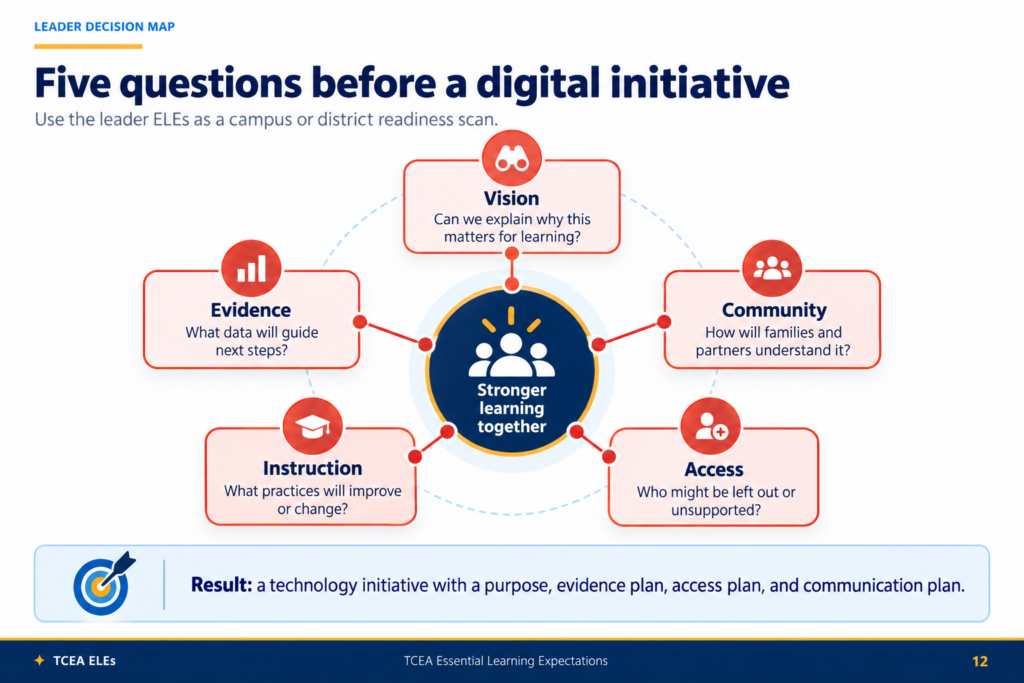
Leaders can run a quick five-question check:
- What is the vision?
- What evidence will guide us?
- What changes in instruction?
- Who might be left out?
- How will families understand the change?
Those questions move the conversation beyond buying the tool, an important consideration given budget cuts. TCEA.org’s Professional Learning team can assist with this. Reach out for suggestions.
5. AI Expectations Cut Across Every Role
Gen AI, or AI for short, in education is not a separate corner of the framework. It crosses every role. The five areas are AI literacy, ethical AI use, AI-enhanced learning, AI and critical thinking, and AI collaboration and innovation.
Teacher scenario: A teacher lets students use a Gen AI tool to brainstorm questions for a science investigation. Students must verify suggestions, reject weak ideas, and explain which question they chose.
Student scenario: Elena notices that one AI-generated claim does not match the source material. She checks another source, revises the claim, and documents what changed.
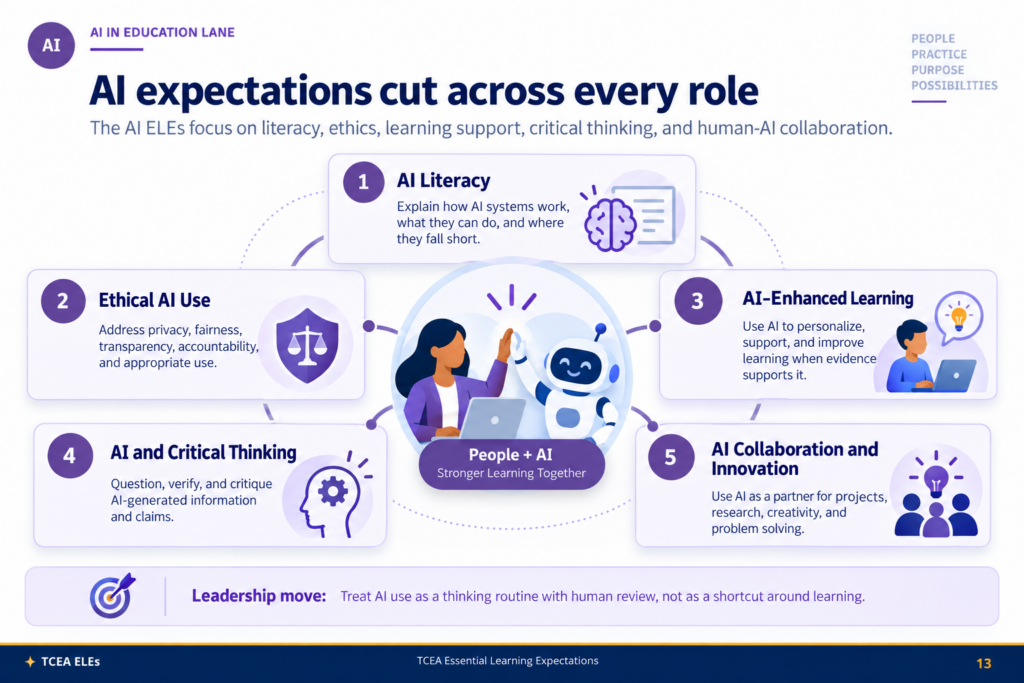
The real benefits result when students engage in actions, such as questioning, verifying, and making decisions about content.
Use the ELEs as a Planning Checklist
One of the most practical ways to use the updated ELEs is to start small. Pick one lesson, professional learning session, tool pilot, or campus initiative. Choose the role lane that matters most, then ask what evidence is missing.
If the work is strong, you should be able to name what the teacher is doing, what the student is doing, how support will be provided, what leaders need to monitor, and where AI belongs, if it belongs at all. That gives teams a shared language for stronger learning without turning technology into the destination.
👤 Human-directed (Miguel Guhlin) · 🤖 Gen AI-assisted (Claude, ChatGPT)