
TCEA has been supporting the use of technology in education for almost 40 years now. As we get ready to celebrate that anniversary, we’ve spent time looking at the realm of classroom ed tech and how far it’s come. We know that the real power of any technology relies upon how it’s used. So how well is ed tech being implemented?
To our dismay, we found that we haven’t made the progress we had hoped for. Yes, there are pockets of excellence where the technology truly enhances student achievement. But in most cases, there has been little change in daily teaching and learning. Looking critically at today’s ed tech landscape can not only reveal flaws in current practice, but potentially inform better uses and better technologies in the future. After all, technology is only part of the picture. The other part depends on how we understand and shape our teaching. Tech moves fast, and our learning strategies should not only keep up, but drive the conversation around ed tech.
The Research Is Clear
Unfortunately, the research on the effective use of tech is not positive.
U.S. fourth-graders who report using tablets in all or nearly all of their classes are a full year behind in reading ability compared with peers who report never using tablets in their classes. Internationally, students who report greater use of technology in their classrooms score worse on the PISA exam, the major international student assessment, even when accounting for differences in wealth and prior performance. This is all according to a recent report by the Reboot Foundation. (source)
These findings align with prior research that found essentially the same thing three years ago: High levels of technology use in the classroom tend to correlate with lower student performance.
In the past when we heard this kind of research, we were quick to point out that the study may have been flawed or the students studied may not all have had access to devices or the broadband provided for their work wasn’t sufficient. But I think it’s time for us to really talk about technology and and learning.
What’s Really Happening
The question that we have to ask ourselves is not whether technology can accelerate learning, because there are lots of studies that show that it can. The question instead is why isn’t it doing so right now. What’s preventing us from making truly effective use of technology for learning?
And after studying this question for the past year, we believe that we have found the answer. We’ve been talking with dedicated CTOs and technology leaders and visiting lots of amazing school districts and campuses working very hard to implement tech and make things better for students. And throughout all of that, we’ve found educators having conversations and professional learning about powerful tools and apps and websites. The focus has been on what the technology can do and on how the students can use it. The problem with that, though, is that’s not the conversation we should be having. Instead, our focus should be on how student interaction with tech will improve learning. We have to talk about the teaching and learning.
Two Questions to Ask
As we plan for tech use in the classroom, we must begin asking two questions:
- Is the technology linked to a specific learning goal? If the answer to this question is “no,” then why are we using it? We all know that there simply isn’t enough time each day to cover all the content that successful students must know. So if the devices and software aren’t directly tied to specific learning, we should abandon them. (Yes, you read that right.)
- Does the technology follow research-proven methods of how we learn? I am afraid that most educators today don’t think about this question because we aren’t current on the latest research on learning. This again is a time issue. There have been huge strides in the past 25 years proving what works best for learning, but I rarely hear teachers or leaders talking about this. It is time for us to talk about what instructional strategies work best and how and when technology can support those strategies.
One Solution
In order to see full-fledged and powerful use of technology to enhance student achievement moving forward, we must begin training all educators and leaders to answer the two questions above. Luckily, TCEA is here to help with that mammoth job. We are hosting a one-day learning event on Saturday, September 28, 2019. The Innovative Learning Strategies Conference is focused on helping educators answer the two questions above by providing hands-on, minds-on sessions tying research-proven instructional strategies to the effective use of technology. Bring a team and start learning how you can ensure that technology does make a difference in learning for all of your students.




 What would you add to the list? Has your school or department created a parody of a song to showcase the work that you do? If so, share it in the comments below and let others enjoy your production. In the meantime, if you hear singing while you are waiting for the elevator, it might just be me.
 that the option to access the Google Play Store on your Chromebook is enabled in the dashboard. You can check your Chromebook by going to Settings. Scroll down until you see the Google Play Store (beta) section. If the option is greyed out, then you’ll need to bake a batch of cookies to take to the domain administrator and ask if they can enable the feature. (Giving cookies increases the chances of having this feature enabled by 64 percent.) If you log in with your personal Google account on the Chromebook, you’ll notice that it is already enabled. But you do NOT want to use your personal account with your students and other teachers. For safety reasons, you always want to use your district account, even if that means bribing the domain administrator or waiting a few days for it to be enabled.
  Once the option to enable is made available, you’ll be able to enable it in Settings and manage Android preferences (similar to if you were setting Android preferences on an Android phone or tablet).
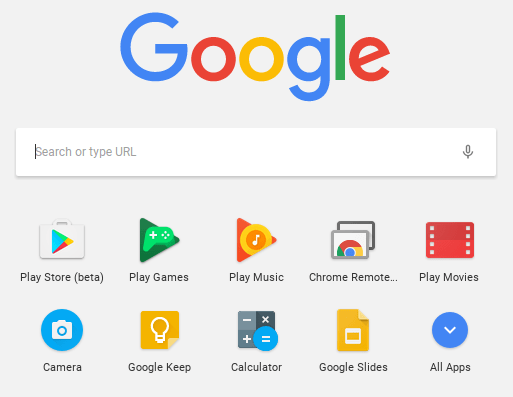 Yippee! You have it enabled. So where it it? Click on the Launcher icon which, by default, is the icon on the bottom left on the shelf. You will now see the Play Store (beta) icon. This beta Play Store is currently a stipped down version of the Play Store you would see if you accessed it through the browser. And yes, you will need to use the beta Play Store to install Android apps. When accessing the store via the browser, your Chromebook will not be an option in the dropdown list of compatible devices. Once you click on the beta store, you will recognize the various categories to help you narrow down what type of app you are looking for. If the developers have not completely finished updating the app in question, it may be available as a beta version. When I spot checked several of the Android apps I have on my phone, almost all were available and ready in the Play Store. You might even find that some app developers have made their product available as a Chrome app (that you install via the Web Store) and an Android app (that you install via the beta Play Store). Either way, once installed, they will appear in your launcher window.
 Autodesk SketchBook – Whether it is illustrating, diagramming, or sketchnoting, you’ll find this to be a simple app to use. When done, save the image to your Chromebook.
 Trello – More than just a to-do list app, Trello can help you keep track of projects. You can work alone or collaboratively with classmates to keep track of project-based learning activities.
 Trading Cards – This isn’t your traditional trading card maker. Templates provided include fictional person, real person, fictional place, real place, object, event, and vocabulary. Once you enter information on the front and back of the card, you can share it as a photo to your photo gallery.
 Pic Collage – Share your message with pictures! Pic Collage lets you start by selecting your photos and then adding them to a grid with templates (start with a themed background) or freestyle (begin with a blank slate and add to it). You can also easily add text and search for photos on the internet to add to your collage.


 “Are teachers and curriculum departments being disintermediated as students engage in self-transmediation, crafting the story of themselves across time and space?” When I first wrote that question down, I had no idea that The Transmediated Self was actually a real term. Rather, I was searching for a term that defined learning in a hyper-connected present where people AND things were constantly plugged in and communicating information. Yet it is a term that has profound implications for self-determination in learning. We do not yet appreciate the always-connected aspect of technology and its impact on in transforming our