Explore tools, strategies, and insights for educational leadership. Discover resources to inspire and support effective school and district leaders.

In the previous blog entry in this series, I shared that solving wicked problems involves different approaches, each of which will be received differently by your supervisor or those with the power to pay for an expensive project. This is part two in the series.
Speak to an administrator at the cabinet level, and they all have one expectation: “Keep it to one page.” A one-page document can make all the difference, and I can honestly say that I have had hundreds of thousands of dollars funded through a well-written executive summary submitted to superintendent level staff.
Scenario #1 – Insufficient Power
“When the power poles in the computer labs were put in, the maintenance department failed to connect the power.”
“Wait!” the technology director asked surprised. “Are you saying that all these power poles do not have power in them? Are you just daisy chaining the power from one outlet?”
“Yes,” replied the media specialist. “That is exactly what we have had to do. As you can guess, we can’t put as many computers in this room as we would like. And I’m worried about overloading power. Isn’t that unsafe or something? I’ve told my principal, but she doesn’t have the money to get it done and it should have been done when they built the school several years ago.”
In this scenario, there are several issues. The first is that the maintenance department failed to connect the power. The second is that no one followed up for years to address the issue when it was fresh, plus the temporary/permanent solution may be unsafe or result in greater damage to the campus’ infrastructure. The fourth, and most important, consequence is that the lab cannot be used at full capacity, preventing students from taking advantage of the computers. In fact, some of those computers have been moved out of the lab because there is insufficient power.
Something needs to happen. The answer to this scenario involves an executive summary focused on getting things done.
Join the ongoing TCEA Microsoft Innovative Educator (MIE) SkypeChat via your mobile device or online. Explore and share concepts at the intersection of teaching, learning, leading, and technology!
Note the brevity, as well as the key elements, of the Executive Summary below:
Executive Summary for Ardent ISD High School Campus Electrical Needs
|
Overview |
The Ardent ISD High School campus currently has several computer labs. However, each lacks critical electrical connections. The lack of electrical connections prevent full utilization of the computer labs, impacting their use for high stakes assessments:
|
||||||||||||
|
Staff Impact |
Staff who employ the computer labs adjoining library. |
||||||||||||
|
Student Impact |
All students at the campus would be affected. |
||||||||||||
|
Budget Available |
Campus has not identified funding for infrastructure needs. |
||||||||||||
|
Professional Learning |
Not applicable |
||||||||||||
|
Products |
Improved network support and responsiveness, upgraded lab. |
||||||||||||
|
Stakeholders |
Campus; Maintenance Department; Technology Department |
Why is this necessary?
High School campus labs lack electrical connections needed to “complete” the labs. Inadequately wired rooms have consequences on performance of equipment and reliability.
What happens if we don’t implement?
High school campus labs will continue to face electrical issues caused by poles that were never wired for electrical. Furthermore, new equipment will sit unused in the labs.
Potential summary of costs are as follows (estimated since quotes are not yet available):
- Electrical in Labs: $1,000 (estimate)
How will we measure success?
All labs will be at 100% utilization and have functional network and electrical connections.
When will this happen?
This is scheduled for the 2016-2017 budget year.
In the next blog entry, we will explore another approach to getting projects funded out of existing budgets: the Standard Proposal.
“Our kiddoes are stuck in a portable building with no Internet,” challenged a kindly, experienced principal, smiling her demand, “and I’m not sure why. Can you help me, please?”
In any environment, there are various ways of accomplishing goals and objectives and of receiving funding for needed projects. In some locations, a conversation that moves participants towards action suffices, while in others, the value is placed on a formal presentation or proposal. In the next few blog entries, I explore several ways that most supervisors will ask for plans of action. Having successfully introduced and implemented several types of technology projects, I hope that these suggestions will save you some time.
Approach #1 – Conversations that Result in Action (and Funding)
“The network conduit pipe needs to be installed to a ‘pull box,’ capped when not being used, with a pull string, and the pipe needs to be buried, not laid in an open trench.” I had just come from seeing the work a small district maintenance team had done and snapped a few pictures.
The response was to the question “Why can’t the district maintenance department do the job at a lower cost?” Of course, they had stated they knew how to do the job of putting a network conduit pipe in place, but had done so poorly, a fact evidenced by several photographs. Obviously, not doing these things resulted in several problems. When it rained, the network conduit pipe was filled with water and the networking contractor could not run the cable without a pull string. This resulted in a delay of several months to the project during the school year.
The goal was to outsource the job to networking professionals who knew the proper way to install a conduit pipe. But how to get district leadership to understand the necessary cost and that saving money really was just wasting time?
Join the ongoing TCEA Microsoft Innovative Educator (MIE) SkypeChat via your mobile device or online. Explore and share concepts at the intersection of teaching, learning, leading, and technology.
When working with others who approve budgets for a project, it is absolutely critical to introduce expensive ideas in informal conversations that focus on the needs of the organization. Your responsibility, as the person proposing the information, is to clearly articulate the need(s) of the organization. It’s not YOU that wants to spend money; rather, you are compelled by the need you have encountered.
Make sure to have these conversations with all stakeholders prior to having a formal meeting. These kinds of conversations will carry the day for the needs you have expressed and the people you serve. When possible, obtain pictures or photos. Following this approach enables leadership to not be overwhelmed with technical information and to clearly see the problem.
It’s clear that while talk is cheap, conversations can result in much-needed action.
A Problem for You to Solve
Let’s explore an additional scenario which features a wicked problem, a problem that has endured for years, and see how you would handle it. Leave your approaches in the comments.
“When the power poles in the computer labs were put in, the maintenance department failed to connect the power.”
“Wait,” the technology director asked in surprise, “Are you saying that all these power poles do not have power in them? Are you just daisy chaining the power from one outlet?”
“Yes,” replied the media specialist. “That is exactly what we have had to do. As you can guess, we can’t put as many computers in this room as we would like. And I’m worried about overloading power. Isn’t this unsafe or something? I’ve told my principal, but she doesn’t have the money to get it done and it should have been done when they built the school several years ago.”
In the next blog entry, we will explore another approach to getting projects funded out of existing budgets: the Executive Summary.
Since the year is getting rolling now, you may be thinking of ways to send information and success stories home with your students. Why make paper newsletters that might go home every week, but never get read? Why not make something more engaging?
I’m always on the lookout for fresh ways to share classroom content. Here are some quick ways to revamp your classroom, or campus, e-newsletter:
- Smore – If you simply want your current newsletter to look better, then Smore is for you. Smore offers beautifully designed templates that let you create your e-newsletter very quickly. You can then publish via email or social media or post on your teacher or campus website. Smore can track who opens the email and works seamlessly on all devices. The educator’s version is $59/year, which is very reasonable for unlimited flyers.
- Blog – With a blog in Blogger, Weebly, or Wordpress, to name a few, you can easily create an ongoing series of posts that beat out print any day of the week. The benefit of going digital is that people can get your content via email, Twitter, Facebook, Google Plus, and any other social media platform that allows you to craft an IF This Then That (IFTTT) recipe. You can embed content (like video, audio, and images) into each blog entry to make it more engaging, and you can also schedule when it will appear online. What’s more, you can grab the RSS feed for the blog and feed it into a mobile app that parents can view on the go. View an example.
- YouTube – Create a YouTube channel and combine all your news into a video broadcast. There are lots of possibilities here and engagement is easy. View an example
- Touchcast – Touchcast, a free, powerful iPad app, allows you to blend news broadcasts, websites, and more, including green screen, into an easy-to-use interface that will have you looking like the person on the evening news. You end up with a video e-newsletter that you can publish via Touchcast or share on YouTube. View an example
- LucidPress – This is a nice tool that allows you to blend video, audio, and text in a multi-page format. Unfortunately, unlike the other options mentioned, it costs money. View an example.
- Microsoft Sway – Sway is a powerful tool for e-newsletter creation that allows you to blend audio, video, and more into a rolling view that works on any device. View an example.
- Office Mix – Take a Powerpoint slide show and organize it like a newsletter, then share it online with MS Powerpoint Online so anyone can view it. Use Office Mix to add audio narration and interactive quizzes to keep the reader engaged, as well as make content viewable as a movie.
Of course, these seven ideas are all powerful alternatives to creating a paper newsletter. But what happens when you need something you can print for the people who don’t know what to do with digital content, something that can also be viewed online via a mobile device or on a computer? One response to this question is the eighth and final tip for creating an e-newsletter: Google Slides.
Google Slides makes it possible to easily embed video from YouTube, images, text, and more. It can be visually attractive on the printed page as well as on your mobile device. What’s more, you can embed it on your website or blog so that it can be viewed at the appropriate size or full-screen.
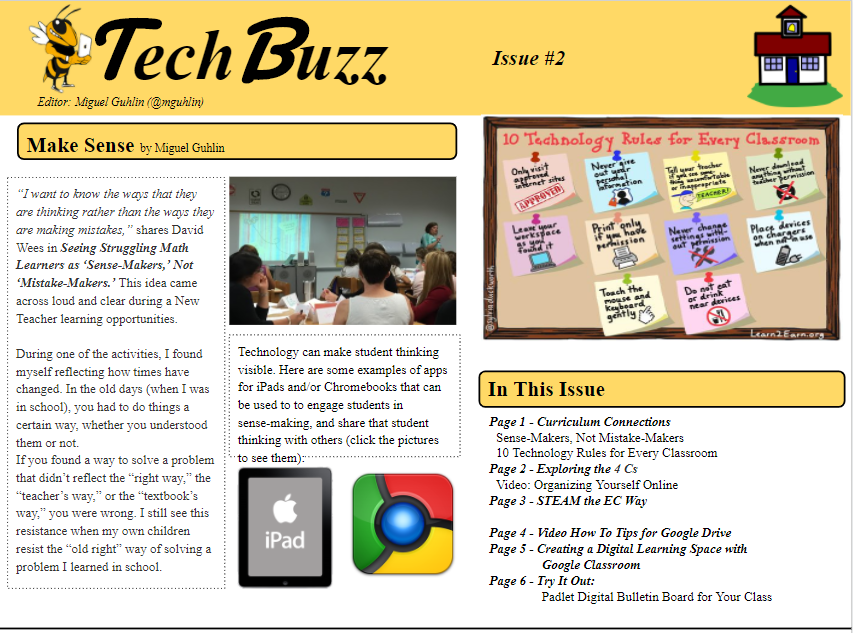
You can see what that looks like in the examples shown below:
Join the ongoing TCEA Microsoft Innovative Educator (MIE) SkypeChat via rour mobile device or online. Explore and share concepts at the intersection of teaching, learning, leading, and technology!
At a recent #TxEduChat, one of the questions asked was “How do school leaders go about equipping educators through professional development in a way that leads to authentic empowerment?” That’s a tremendously powerful question, so let’s explore how the strategic application of technology can lead to authentic empowerment.
Tip #1 – Amplify Teachers’ Voices in Campus Decisions
“You want me to be a member of the campus site-based committee?” I asked my principal. As a third-year teacher, I wasn’t looking forward to spending time sitting in after-school meetings. Yet in those meetings with my principal, I never felt like my voice was heard; rather, it was muted, too soft-spoken for meetings where few knew what would happen as a consequence of a decision. With mobile apps like Skype (10 Ways Teachers Motivate and Empower with Skype), Appear.in, and Voxer (read stories here of educational uses), campus leaders can create a no-cost virtual space to connect and quickly share ideas. In these spaces, quiet voices are amplified because, while the talkers may speak, the quiet educators can be heard in equal measure.
Tip #2 – Deepen Relationships
“Miguel,” asked the Athletic Director for the eleventh time since the start of the school year, “when is the FitnessGram data file going to be uploaded so we can conduct our assessments?” Unfortunately, the delay was that this program was in the midst of change. I accurately reported updates, if any, and followed up. When the information finally was released earlier, I was no longer employed in the district. But I made sure the Athletic Director had the information. We had started this journey together and it only made sense to finish it. Make the effort to be consistent, be predictable, share relevant resources that connect to people’s needs, and, by doing that, you build trust.
When we look at deepening relationships, we’re actually concerned with building trust. When we think of campus and/or district culture, we often think of the face-to-face interactions that people have in shared spaces. Having the right technology in place can help augment the positive connections that occur in those shared spaces. But deepening trust is really a person-to-person activity, isn’t it?
Tip #3 – Promote Quality Professional Development Opportunities
Looking for quality professional development? While there are many learning opportunities, including unconferences and #edcamps, YouTube videos, blogs, and just-in-time social media (e.g. Periscope, Voxer, Blab.im), you can always count on TCEA professional development learning and opportunities. From member-centric Lunch-n-Learn and Get Your Google On webinars, as well as a host of certification courses for 21st Century Administrators and Campus Technology Specialists, Microsoft Innovative Educator (MIE) courses, Chromebook and iPad academies, and IT Director courses in face-to-face and virtual spaces, TCEA has a lot to offer. You can find tons of resources online from TCEA’s directors of professional development, each of whom is committed to learning and sharing with and for you and is also a former educator. As an example, here is my collection of resources in a OneNote Notebook, TCEA Connect! (Aren’t OneNote Notebooks awesome?)
And you can join various Diigo groups that are focused on sharing great resources for all interested learners (not just members). For example, consider joining the 3D Printing Diigo group, which features a wide variety of resources for 3D printing. Or join the TCEA Microsoft Innovative Educator (MIE) group (and take advantage of upcoming training dates).
Authentic empowerment happens when you connect people together so they can collaborate with each other. Consider developing what Amy “@friedtechnology” Mayer suggests are individualized technology plans for teachers. These “ITPs” help close the learning gap.
And you know what? Everything shared in this blog entry can accelerate learning for teachers. If you accelerate teacher learning, you impact student learning. Isn’t that amazing? No, it’s TCEA amazing!
A campus or district administrator has a lot on his plate these days, including getting faculty opinions and buy-in on both small and large initiatives. What he doesn’t have is time to solicit that buy-in.
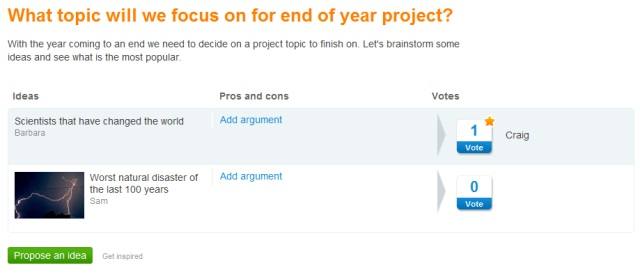
Now there’s a free tool that can help. Tricider offers fast and easy brainstorming and voting so that people can collaboratively make decisions. Unlike common survey tools which require set responses, it allows participants to add their own ideas, arguments, and discussion to a Tricider question. When the deadline for discussion and brainstorming is up, participants are asked to vote on the ideas presented. With its simple ask a question, brainstorm and discuss, and then vote process, this is one tool you’ll use over and over again.
The author of the question can invite participants via a shared link, email, Twitter, Facebook, or LinkedIn. And there are lots of ways to customize the discussion, from having new or better ideas emerge to the top to including pictures and links. No registration or log in is required, which makes Tricider very easy for everyone to use. But if you do register, then you are given a plethora of additional features, all included free.
To see how it works, I’ve posted a sample question below. Just click on the Add New Idea button and put in your answer. You can then add an argument, if you wish, or vote for one of the other choices. Please try it out.
I can see Tricider being used with students, particularly for small group work. You could even use it for entire classes or grade levels to discuss and vote on favorite books, prom king and queen, cafeteria rules, etc. And if your family is trying to decide on a vacation location or a gift to give Grandma from all of you, it will do the trick. You can set the poll to be private or share it with the whole world, which opens even more opportunities for collaboration. It’s just such a great, quick tool and I hope you’ll give it a try!
Are you a…learner? Teacher? Leader? Innovator? Take advantage of the no-cost TCEA Microsoft Innovative Educator (MIE) academies taking place throughout Texas over the next few months. TCEA and Microsoft have partnered to make these professional learning opportunities available to anyone, member or non-member, FREE! Find a location near you at the list appearing at the bottom of this blog entry.
What is the TCEA Microsoft Innovative Educator Academy?
The newly re-designed TCEA MIE one-day academies provide participants with specific instructions and suggestions for blending technology into the classroom curriculum. Some of the topics include:
- Create narrated slideshows, digital stories, and information-rich slideshows that enhance teaching, learning, and leading.
- Organize classroom lessons for students that allow them anytime, anywhere access to embedded videos and content, great for flipped learning opportunities.
- Develop web-based forms to capture real data from respondents and then aggregate data for analysis.
- Connect with educators, students, and others via international connections using tools like Skype.
- Explore a wealth of lesson plans and ideas that help you meet ESSA expectations for blended learning using technology.
- Learn how to create resources and easily share them with others via the web.
Attendees will have the opportunity to craft powerful conversations about learning in a hyper-connected world, as well as receive hands-on practice and modeling with Office 365 for Education tools like OneNote, Docs.com, Sway, Office Mix, and Office Forms.
Note: Did you know that when you attend the TCEA MIE one-day academy, you receive access to a OneNote Notebook, which you can read on any device, chock-full of curated content, video tutorials, articles, and more?
But wait, there’s even more! AFTER the TCEA MIE session, you will have the opportunity to join the TCEA MIE Diigo Community, an online group open to all regardless of whether you are a TCEA member or not.
And, if that wasn’t enough, you are also invited to participate in the upcoming TCEA MIE SkypeChats that will begin in August 2016 with special guests. In the meantime, join the TCEA MIE SkypeChat and get access to sneak previews of audio interviews with MIE practitioners.
Opportunities to Take Your MIE Innovation to a Whole New Level
|
Session Date |
City |
Location |
Registration Link |
|
7/18/2016 |
Abilene |
Region 14 Education Service Center |
|
|
8/2/2016 |
Killeen |
Killeen ISD Career Center |
|
|
8/4/2016 |
Lumberton |
Lumberton Performing Arts Center |
|
|
8/8/2016 |
Austin |
TCEA Conference Center |
|
|
8/19/2016 |
Kilgore |
Region 7 Educational Service Center |
|
|
9/9/2016 |
Arlington |
University of Texas at Arlington, College of Education |
|
|
9/19/2016 |
Pittsburg |
Region 8 Educational Service Center |
|
|
9/23/2016 |
Edinburg |
Region 1 Educational Service Center |
|
|
9/28/2016 |
Victoria |
Region 3 Educational Service Center |
TCEA currently offers several distinct certification programs to assist educators in becoming more proficient in specific areas. Three specific certifications (Campus Technologist, 21st Century Administrator, and Technology/IT Director) consist of required coursework, a final project, and a portfolio. Coursework within these certifications takes place via a combination of live webinars, online courses, and/or face-to-face trainings. While each certification begins in September, anyone can join at any time during the year and jump in with the coursework and catch any missed courses when they are repeated or the following fall. Our newest certifications (Chromebook Level 1 and iPad Level 1) consist of self-paced coursework culminating in a final lesson plan submitted to demonstrate integration of information learned.
Below is the list of people who have completed their certification during the Spring of 2016. They did an amazing job and should be congratulated on their success!
Campus Technology Specialist Certification
This certification is designed for campus educators wanting to develop and demonstrate abilities to integrate technology effectively and build capacity at the local campus level. This certification is designed for teachers, librarians, and technology specialists. Graduates for Spring 2016 earning this certification include:
- Lyndsey Blackstock, Brazosport ISD
- Christie Burns, Brazosport ISD
- Katie Chirhart, Caddo Parish, LA
- Annette Clark, Sheldon ISD
- Bryn Hagemeister, Dallas ISD
- Cynthia Johansen, Brazosport ISD
- Kristen Leonard, Brazosport ISD
- Megan Miller, Winnsboro ISD
- Michelle Moreland, Lamar CISD
- Emily Turner, Liberty Hill ISD
- Janelle Safford, Winnsboro, ISD
- Misty Wilson, Brazosport ISD
21st Century Administrator Certification
This certification is designed for district administrators, campus principals, assistant principals, teachers, and librarians wanting to develop strategic leadership skills to ensure that effective and engaging 21st century educational technology learning experiences for students are being provided and to change classroom instruction to match the needs of today’s students. Graduates for Spring 2016 earning this certification include:
- Sally Wilson, All Saints Episcopal School, Beaumont
- Becky Zalenik, Sheldon ISD
Technology/IT Director Certification
This certification is designed for educators who wish to become (or already are) district-level technology or IT directors by developing skills to lead staff and students in the effective visioning, implementation, and use of educational technology. Graduates for Spring 2016 earning this certification include:
- Randall Bakos, Dallas ISD
- Ronald Byrd, San Antonio ISD
NEW! Chromebook Certification (Level 1)
This certification is to help classroom teachers build foundational skills in using the Chromebook as an effective instructional tool with their students. This program is completely online and self-paced, making it convenient for educators with busy schedules. Graduates for Spring 2016 earning this certification include:
- Laura Howard, San Angelo ISD
- Lauren Hickman, Lubbock ISD
- Kayla Burgoon, Lubbock ISD
- Scott Firenza, Lubbock ISD
More information about certifications that TCEA offers can be found here. If you have questions about any of the certifications, you can always contact Dr. Bruce Ellis at bellis@tcea.org or by calling 512.450.5396.
Care to learn some ways you can organize your digitally disorganized administrator? Whether your boss is a superintendent, a campus principal, or a collaborator in need of assistance, this blog entry can help her get organized with a few simple apps and suggestions!
Note: This blog entry focuses on apps that work on Android, iOS, and Windows devices.
Tip #1 – Organize Your Email
“Hundreds of emails flow into my supervisor’s inbox,” shared one secretary. “Even though she has a smartphone and could sort her email on the go, the built-in email app doesn’t get the job done.” Whether your supervisor uses MS Exchange, Hotmail, or Gmail, she now has access to some easy-to-use email clients that work quite well. Two good solutions include CloudMagic, which works on Android, iPhone, and iPad, or Readdle’s Spark (iOS only). Both make it easy to sort your messages into folders and/or forward to somewhere else, like OneNote, since they include built-in support.
Tip #2 – Collect and Organize Critical Documents
“Every day,” shares one assistant, “my supervisor and I receive a large quantity of documents, some of which are digital, others that are mostly paper. Instead of having to wait until she gets back to the office for me to digitize them, what could my supervisor do to scan the documents?” Whether it’s business cards, invoices, permission slips, or other school paperwork, you can easily capture these documents with an app like Readdle‘s Scanner Pro or Microsoft OfficeLens and save them to the cloud (e.g. Dropbox, Google Drive, or OneNote). Text in the images is searchable, and you can also add some keywords or tags.
Tip #3 – Check That Off Your List!
“What I like to do every morning is make a checklist for what she will be doing each day.” The assistant held up her phone and waved it in front of me with a smile. “When she checks the list, there’s a list of things to do by location.” With Google Keep, you can put all your list items for your supervisor online, inserting checkboxes in front of each item. As she finishes them throughout the day, she can simply tap on the checkbox to place a checkmark. And Google Keep lets you set up location-based reminders, so you can help your supervisor be more efficient as she goes from one campus to another.
Tip #4 – Track Your Meetings
“At the end of the day, my boss comes back with a stack of papers from all the meetings she has been to. I wish there was a way for her to organize them as she gets them so it makes more sense.” Show her how to get into OneNote 2016 and tap on the microphone to record the entire meeting. In addition to typing notes with the audio recording of the meeting synchronized to the written notes, the administrator can snap pictures of meeting paper materials, including business cards, meeting agendas, and handouts, for inclusion in the meeting notebook.
And, finally, consider how you will protect the privacy of sensitive data with this last tip.
Tip #5 – Protect Confidential Information
With OneNote, you are able to “protect” sensitive notes that may contain confidential information. Encryption once was difficult to do, but now it is inexcusable to have sensitive data not protected. In OneNote 2016, your supervisor can right-click a section and choose “Password Protect.” This allows you or your supervisor to add a password and that section cannot be opened without the password. Some caveats: 1) You might not be able to view password-protected sections on all devices; 2) Audio and video recordings are not protected in the OneNote 2007 section format; and 3) To search password-protected sections, you need to unlock them first.
Another school year is almost over and I hope that it’s been a great one for you and the students you serve. I know that you’re counting down the days, to summer vacation packing up your stuff, and looking forward to at least a few days of rest and relaxation. But before you go, here are a few things you must do to close the year out:
Celebrate! You have accomplished some amazing things this year, whether you are a teacher, a librarian, a technician, or an administrator. You tried new approaches, you worked long hours, and you made a difference in the lives of students and staff. You are AMAZING!!! Spend some dedicated time to think about the fruits of your labor and really enjoy the great things you have done.
Cogitate. While you have been awesome this school year, you can be even better next year. Take some time to reflect on the past year, the successes and the failures. What are one or two things you want to do differently in the new year? What preparation and resources will you need to make to be successful? What might the results be? What might be the roadblocks that get in your way and how will you work around them?
Innovate. New technologies and tools will continue to arrive, and you need to take time to learn how they might fit you and the ones you work with. If you’re a TCEA member, go ahead and register for all of next year’s free-to-you Lunch and Learn and Get Your Google On webinars and we’ll send you weekly reminders for each session. These webinars are all about technology integration using a wide variety of tools and websites, perfect for upping your game. They’re also recorded; so if you can’t attend them while they’re live, register anyway and receive a link to the recorded webinar, with all of its resources, to listen to any time.
Investigate. You’ve heard about some of the new trends in education this year. Which ones will you adopt to re-create learning for your students or staff? Will you put in a maker space? What about blended learning? Will your students have access to new devices, such as Chromebooks, in the classroom? Will you try Project-Based Learning or flipped staff meetings? Is your district Future Ready or going Google? The summer is the perfect time to learn more about potential solutions and plan on how you might implement them. Take advantage of all of the summer learning that TCEA offers and get a jump on the new school year.
Dedicate. Dedicate some time to yourself and to refreshing your mind and body. The past months were long and hard at times, and you need to fully recuperate so that you can be at your best for the next year. Take a trip, sleep late, eat too much chocolate, read a good book, spend time with family and friends. You deserve this!
I recently came across a quote by John Ashcroft, former governor for Missouri and a previous Attorney General, saying, “The worst mistake a boss can make is to not say ‘Well done.’” Hearing that caused me to reflect on several previous leaders I had. I once had a supervisor who asked me, “When I tell you that you’ve done a great job, would you rather it be in private or a group setting?” Taken aback, I had to think for a moment; the previous supervisor rarely offered up any praise and that seemed to have become the norm…until the new supervisor arrived.
That got me to thinking about how this year has gone: Who have I worked with that I’ve appreciated their work, but failed to communicate my gratefulness to them? In today’s fast-paced work environment it is easy to quickly look to the next problem that needs to be conquered without taking time to recognize those that helped you get past this problem. So, as the school year comes to a close, I offer you several resources to help you say “Well done” to those special individuals around you.
- The written note – If writing out a thank you note doesn’t come easy, consider taking a look at some examples to help prime the pump and make the wordsmithing easier. Hallmark makes it easy by sharing with you their secret formula to writing a simple but powerful thank you note. Last year, our PD department had a WOW! notebook that we used to recognize each other. When we saw someone on the team going above and beyond, we would write a note in the WOW! Notebook to the person and hand it to them as we said thank you. The ball was now in their court to pass on the gratitude by noticing someone else. It was nice to look back over the notes written by the different team members to see what others had done well that I had overlooked or were unaware of.
- Incorporate a culture of expressing thanks on a regular basis – Follow SnackNation’s example. Doing it weekly as a team may not fit your department’s schedule, but be sure to make an effort to have it on a consistent and timely basis.
- Leverage social media to say “Great job!” When doing so, consider which tool your staff member uses, and, if your district or department has their own account that you can post to, use that tool as your outlet. Otherwise, include your department’s or district’s hashtag or handle in the post. Here are some additional hashtags to pick from and add to your post: #LeadByExample, #WellDone, or #GreatJob.
- Create an Above and Beyond the Call of Duty (ABCD) Award – This award can be given out each month. Put checkpoints in place to hear from those your department serves in order to get feedback on how well your team is doing and how they are making a difference. Use this feedback as part of your criteria for the ABCD Award.
- Designate a trophy – A trophy or other item can be given to a staff member who does well. Our department this year will be using a trophy. Similar to our WOW notebook, once you get it, you’ll have a week to pass it on (pay it forward) to other coworkers by recognizing someone else’s work.
No boss or leader wants to be considered ungrateful, though it can easily be seen as that when we overlook those who are playing important roles around us. So, before the school year comes to a close, be sure to take the time to say “Well done.” Then leave a comment and let me know ways you have honored others to let them know you appreciate their hard work. And, if you would like a list of additional resources that I’ve curated on this topic, email me and I’ll send them to you.