This is a guest blog post written by Tosh McGaughy, a Digital Learning Specialist in Birdville ISD. You can learn more about her and access her resources here.
Lori Gracey currently serves as the executive director of the Texas Computer Education Association (TCEA) and is responsible for training technology directors, administrators, curriculum supervisors, librarians, and teachers across the country. Since 2009, she has led TCEA in membership and revenue growth, helped to pay off their building and purchase a new, larger building, and implemented new conferences, partnerships with other associations, and professional development opportunities for members and non-members. She serves more than 75,000 members and oversees a staff of 20. Lori has served on the board of the Texas Society of Association Executives and SXSWedu, and she has served as the Regional Program Chair for the ISTE 2017 and 2021 Convention in San Antonio. Lori has 28 years of experience in education, with 22 years as a curriculum and technology director.
This is a guest blog post written by Tosh McGaughy, a Digital Learning Specialist in Birdville ISD. You can learn more about her and access her resources here.
The following is a guest blog post by April Whitehead about things she learned during TCEA 2016. April serves as the District Instructional Technologist for Hamshire-Fannett ISD.
Tuesday
After attending “You Can’t Just Google It!” on Tuesday morning, I feel much more prepared to address copyright and Creative Commons during teacher professional development. As an instructional technologist, I train teachers on best practices for using digital resources, but I don’t go into great depth or detail. Basically, teachers hear “Make sure you cite your sources. Don’t let students just Google an image and use it. Use the “research tool in Google Docs.” That’s about it.
Amy, Krista, and Shannon from Round Rock ISD mapped out their approach to teaching students and teachers about Creative Commons (CC). CC licenses provide a simple way for creators to label their work (whether it’s a photo, website, video, or presentation) so that others will know if it’s okay to share, remix, or reuse. Any picture or document that is published online is protected by copyright. That’s so easy to forget! But, if you find a picture with a CC license, you can easily see if or how you can use it.
The Round Rock team shared great websites that help you find resources with CC licenses. For photos, Pixabay and Morguefile were great, but Unsplash was my absolute favorite!
Matt Lyons and William Jeffery shared some of my favorite new-to-me sites of TCEA 2016. Their #RevengeoftheMaps session showed just how versatile and fun digital maps are. Confluence.org for snapshots of latitude and longitude confluences, Geoguessr for a fun “guess where you are” game in Google Street View, and Gapminder for visualizing geographical data were some of the highlights. William shared a stupendous idea for using the My Maps in Google maps. He showed how students can build their own interactive map by dropping in markers and adding text, pictures, and even 360° YouTube videos! I can’t wait to try that with our teachers and students at HF.
Wednesday
I love going to sessions taught by Peggy Reimers from TCEA, and her “Just the Google Gravy” session was super fun, as I expected. She went over some cool Google tricks like “do a barrel roll” (Google it!) and the “Google a Day” search challenge. Flippity.net was the star of the session, in my opinion.
Flippity converts your Google sheet into all kinds of useful things. You can make flashcards or PD certificates. You can track digital badges for students. You can make a quiz that awards a certificate. You can make an awesome random name generator that also randomly groups students. I could have saved so much time if I had this when I taught middle school! As an instructional technologist, I’m definitely going to use it to make randomized groups for PD activities. The most fun Flippity tool was the Flippity quiz show generator. I had heard of this, but I’d never made time to investigate it. Peggy showed us how simple it is to edit the Flippity template to make a cute Jeopardy-style quiz show. This is another tool I’ll be adding to my tech PD sessions!
A new study released by Microsoft reveals that the average adult now has an attention span less than that of a goldfish: just eight seconds. That’s amazing, isn’t it? That means that, after only eight seconds, participants in your staff development session will be reaching for their mobile devices, checking email, viewing their social media feeds, and not paying any attention to you. How can you as a professional development provider compete? Here are some tips and tricks to help keep your staff engaged and learning.
Integrate emotionally-driven content. We listen much more when our emotions are involved. So be sure to tell a story about the content they are learning and make it personal, if you can. Use images and graphics on your slides that are powerful and convey a certain feeling. Don’t be afraid to share a problem you experienced while using the particular tool or skill you are teaching.
Stop the slideshow frequently. Research says that a presenter should re-connect with the audience after presenting just three slides of information. At that point, it’s time to get them involved in something a little more active than listening. This could be something as simple as asking them to Pair/Share, type in something in TodaysMeet, add an idea to a Google Doc, or just raise their hands if they agree with what has been presented. What matters is that they stop zoning out and refocus on the content that is being presented.
Grow your tool belt. As a great teacher, you need a tool belt that is constantly expanding with ways to keep your audience involved in the learning. Adults can become bored using the same tool over and over, just like students do. So be sure to follow @TCEA on Twitter and gain a new tool every day or so to keep the focus new and fresh.
Get everyone involved. Regardless of the professional learning setting, it is critical that we do everything in our power to get each attendee actively participating.
Chunk it. Avoid cognitive overload by breaking the learning into small, manageable segments. Don’t use large blocks of text in your slides and avoid too many bullet points. Help the learners be successful by designing smaller modules or activities.
Give them the gift of time. We all need time to practice a new concept or skill repeatedly in order to be successful. So be generous with how much time you give attendees to practice on their own or with a partner. Make sure the time is structured, however, so that it’s not wasted. Scaffold the time with small projects and a clear explanation of what they need to accomplish.
Since this blog took longer than eight seconds to read, I hope you are still with me. If so, let me know how you are ensuring that your learners are actively engaged by posting your ideas in the Submit a Comment section below. And thanks for continually working to make professional development better for your staff!
Carolyn Mitchell shares more of what she’s learned at the TCEA 2016 Convention. Carolyn is a Digital Learning Specialist at Lewisville ISD and can be found on Twitter @cbmitche.
Want to engage your students? Want to tell stories and share content in a new and different way? Interactive maps can be used to tell stories, solve problems, and connect students with their community and the world. In a 90-minute BYOD session facilitated by a Lewisville ISD Digital Learning Specialist and the Science Department chair from Bishop Dunne High School in Dallas, attendees were treated to the power of the map and how leveraging free ArcGIS Online resources and software can open up the world and allow students to make connections between content and the issues that concern us today.
Map-making has evolved from the flat Mercator projections of our childhood to web-based, interactive maps that can be layered with data and used to develop critical thinking and problem-solving skills. The power of GIS (Geographic Information Systems) comes from the integration of digital data, satellite data, tabular information, and aerial photographs to create new information in the form of a map. In a nutshell, GIS works by using computer software to read and cross-reference geographic information that are created as layers; the information contained in these layers is represented by points, lines, polygons, and images. These layers are placed on a coordinate base map, and the layers can be manipulated to draw conclusions based on the viewable data.
While the science behind GIS may sound technical, creating a map can be both creative and rewarding. Even better, there are pre-made maps and classroom resources provided by Esri. And they’re free! Attendees at today’s workshop were able to explore the gallery of maps available at ArcGIS.com and glean ideas of how they can incorporate these maps into classroom instruction. Additionally, attendees examined the geoinquiries (15-minute, standards-based, inquiry activities) to teach map concepts. The one-page geoinquiries use ArcGIS Online to support the content and contain learning objectives, technical “how-to’s,” textbook references, and whole class formative assessment items. The geoinquiries for science and social studies are great ways to introduce content or reinforce content learning.
Additionally, workshop participants explored the world of story maps and saw how they could create their own maps using a template. With Woody Guthrie’s “This Land Is Your Land” as their theme, participants created a map using a layer of landforms found in ArcGIS Online. This simple map was then turned into a story map by using a story map template and adding text and images that highlighted the lyrics from the song. This was an engaging and creative way to tell a story.
Finally, workshop attendees received information on how to apply for ArcGIS Online organizational accounts so that students can create and share maps with each other and with students across the organization. These ArcGIS Online organizational accounts are free accounts distributed by Esri as part of the ConnectEd educational initiative.
So get busy, have fun, and explore the world of interactive maps!
This is a guest blog post by Lisa Monthie written while attending the TCEA 2016 Convention. Lisa is a Professional Development Specialist at Waco ISD.
Video streaming can be a bit intimidating. From choosing the correct app/platform to finding meaningful ways to connect the learning to the tech, video streaming can seem daunting. Concerns arise about the dangers involving live video streaming. Who exactly is watching this broadcast? How can educators safely connect our students globally while keeping them safe? Furthermore, how do I begin video streaming?
First, explore the many options for video streaming. Different platforms offer different protections and features. Periscope, for example, allows the user to block inappropriate tweets. Google Hangouts limits your audience and Appear.in allows you to mute any participant.
Start small…use a trusted source, such as friend in another city or state and participate in a Mystery Hangout. Try a private broadcast using Periscope or a Google Hangout with a friend. Find and view a Blab over a specific “tag” or subject. Use Google+ or Microsoft Educator Community to begin expanding your classroom walls. Have your classes virtually play Rock, Paper, Scissors (or versions of RPS in other languages) or present class projects (or Makerspaces) to a global audience. Try Google Hangouts on Air, and broaden your audience even more. Allow students to see the chat occurring during the Hangout, and allow those chatting to participate in the fun by asking questions/posting replies.
Introduce the tool by modeling it yourself. Harness the help of a parent to try out the tools. Broadcast the students in your classroom to parents, administrators, and other community members. Then, allow the students to try the tools.
Lastly, have fun learning the tools. Print off task cards and challenge students (and/or faculty) to complete the assigned tasks in groups.
You can access Lisa’s handout on live video streaming here.
This is a guest blog post by Tosh Mcgaughy, a Digital Learning Specialist from Birdville ISD. Tosh is attending her first TCEA convention and has a blog full of great ideas and resources here.
My favorite resource was Prism, where students can close-read and highlight text with digital tools that can be shared with the whole group and analyzed and discussed based on frequency of highlighting with a “text visualization” function. This is a brilliant tool to help these students see the complex thought processes that go into reading comprehension while also giving them practice using digital tools to do this, just like the online STAAR A assessments.
This is a guest blog post by Shana Russell, who is the Campus Technology Specialist at Lutheran High North in Houston. You can read more of her work here.
Well, shiver me timbers! Monday morning at the convention, Kirsten Wilson and Sue Fitzgerald taught us how to “Create a Band of Pirate Coders.”
This instructional technology coach and librarian did not set out to create a coding club. Their group originated with the formation of a “tech lunch club” where student library assistants taught other students how to use Google sites. By being attentive and listening to the needs of the students, Kirsten and Sue quickly realized that these kids wanted something more than just Google sites. Some might call it a mutiny, but they saw that the students attending these sessions had a passion for computers and coding, and the tech lunch club soon evolved into a group of “pirate coders.”
Kirsten and Sue lacked the programming knowledge to actually teach the sessions, but this did not stop them. They acted as facilitators and helped their student teachers set goals, plan lessons, and collaborate with one another. Students set up days to meet during lunch and were so enthusiastic that they sometimes showed up at the library daily, sometimes even before the librarian, to work on their programs.
As Sue states in her blog, “It is unrealistic nor good instructional practice to presume the teacher remains the expert and captain of the ship. For motivation, passion, and creativity to be fostered in students, we have to stop being the tyrannical captain and become the endearing Love Boat Captain, Merril Stubing.”
By allowing the students to captain the ship, Sue and Kirsten discovered that they could sail limitless seas. I left their session motivated to start a mutiny of my own at our high school. Hopefully, they won’t make me walk the plank.
This is a guest blog post from Carolyn Mitchell, a Digital Learning Specialist from Lewisville ISD.
What’s your blend? Blended learning is a hot topic at TCEA this year, and at a workshop on Monday morning, Lewisville ISD Digital Learning Specialists shared the theory behind blended learning, introduced workshop participants to the LISD BlendED program which supports blended learning on the district’s high school and middle school campuses, and empowered workshop participants to determine what the “blend” might look like in their districts, campuses, and classrooms and how to design classroom learning experiences for a blended model.
In a video highlighted by student voices, Sandy Lumley of Marcus High School briefly explained how blended courses were structured for juniors and seniors who choose to take these courses at Marcus and then specifically discussed how she blends learning for students in her Algebra 2 classroom. Students shared what they liked most about their blended Algebra 2 class—personalization of the learning and the opportunity to have flexibility in their schedules—but also the opportunity to work with Ms. Lumley one-on-one and to collaborate with their peers. Students de-bunked the myth that they were teaching themselves by participating in a blended learning class.
Workshop participants learned that there were many types of blended learning models that were part of the blended learning taxonomy, yet their definitions are purposely ambiguous so as not to force a “structure” to the model. Administrators and teachers contemplating an implementation of a blended learning model are given the freedom to innovate based on what their vision of blended learning should look like in their particular circumstances.
With the ISTE and iNACOL standards as the focus for the instructional design, the implementation of the learning experiences, and the expectations for teachers, coaches, and administrators, attendees were given the opportunity to use Pollmaker to determine what their blend should look like based on a series of questions. Conclusions were affirmed, or in some cases, a new blended learning path was considered. Workshop participants saw how the blend could be transformed using Understanding by Design (UbD), the Universal Design for Learning (UDL), and the SAMR model (Substitution, Augmentation, Modification, Redefinition) to design authentic learning experiences that are both engaging and strategic.
Attendees explored tools that could be deployed to turn standard classroom lessons into interesting participatory experiences. Some that were found to be particularly interesting and effective were TedEd, eduCannon, and Teach-Em video tools for creating interactive lessons; Curriculet, Google Docs, and No Red Ink for creating experiences that allow students to interact with content, and the Blended Learning Toolkit. Padlet, Trello, and Dotstorming were of particular interest as collaborative tools to “start the conversation” and share knowledge.
Workshop participants left the session with a blueprint of what their brand of blend could look like, with tools to jump start the learning, and with the understanding that there is no “right way” to blend. The time, the place, and the space are up to you and your students.
This is a guest blog post from the TCEA 2016 Convention by Jamie Locklin. Jamie is the Director of Digital Learning in Hays CISD.
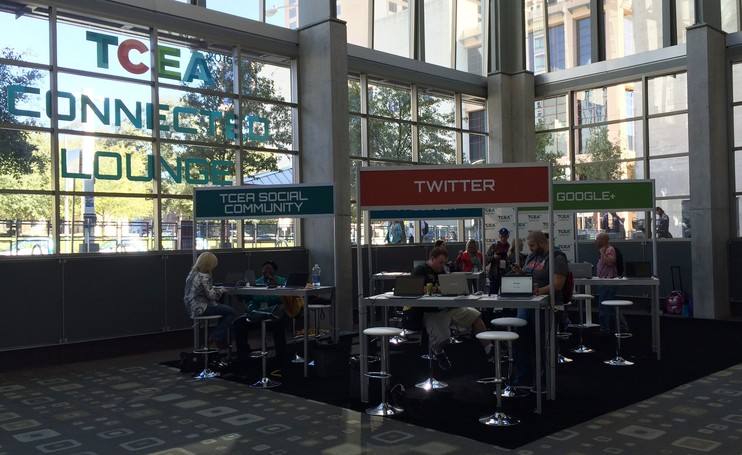
This year at the TCEA Convention, there is a Connected Lounge (on the first floor near the TCEA booth) to help facilitate learning and connecting for those who are both new and veteran social media users. Awesome spaces have been designed to help connect the education world on Twitter, Google+, the TCEA Social Community, and Facebook. Experts are available in each area to walk you through the process or just to have a conversation and connect with while at the conference.
In addition to this awesome space, there is a small teaching space where I was honored to hear the always-inspiring Dean Shareski present. Dean challenged us in thinking “What’s Your Story?” to remember that social media is “social” as its primary purpose and to not get lost in making it so “professional” that we forget that sometimes people just need “silly” or entertaining moments as well. Dean shared this video to help show how silliness is sometimes what bonds us and grows us closer together.
I honestly could not agree more, and in my session that followed his that surmised the work of Austin Kleon in his book “Show Your Work,” I furthered this thought. Educators need to remember that by sharing the messy process that is teaching and learning, it can make all of us us collectively better.
As Dave Weinberger would remind us, “The smartest person in the room is the room” and the smartest learning decision you can make at TCEA is to #GetConnected.
This is a guest blog by TCEA member Tosh McGaughy, a Digital Learning Specialist in Birdville ISD.
I am new to a position in Digital Learning this year in my district between Ft. Worth and Dallas. Coming straight out of the classroom, I am unique in my department in that I am the only person who has never attended a TCEA convention before today! When my secret was revealed, they were all very encouraging and full of advice and tips. Their guidance and mentoring has brought me to this moment, as I sit, well-caffeinated, in a hotel ballroom listening to music as I wait for my academy to start. Here is an abbreviated list of their TCEA convention wisdom.
As I sit here now, I am eager to start this week of learning. My teenaged children back home have texted me. I’ve had two strong coffees. I slept well. My devices are all fully charged, and I’m connected to the WiFi. My first TCEA convention is something I have been looking forward to for many months, and now it is all about to begin. Bring on the learning!