
If you’re looking for a tool to help students think critically, make connections, or to spark their curiosity, Google’s Learn Everything experiment is worth a look. This interactive resource from Google Arts & Culture explores knowledge webs that grow in real time based on your interests. It’s an open invitation to ask questions and learn everything, just like the name says.
About Learn Everything
Learn Everything is an experimental learning experience powered by Google Gemini. To get started:
- Take a photo of an everyday object nearby, such as a plant, coffee cup, burger, or pet, using your device’s camera.
- Enter a topic or concept you want to explore.
- Choose your audience: Beginner, Intermediate, or Advanced.
- Click Explain.
Using your photo as a visual metaphor, an explanation of that topic is generated. The tool also generates follow-up questions and branching concepts. In addition, you can ask follow-up questions or dive into related topics for deeper exploration once the initial explanation appears.
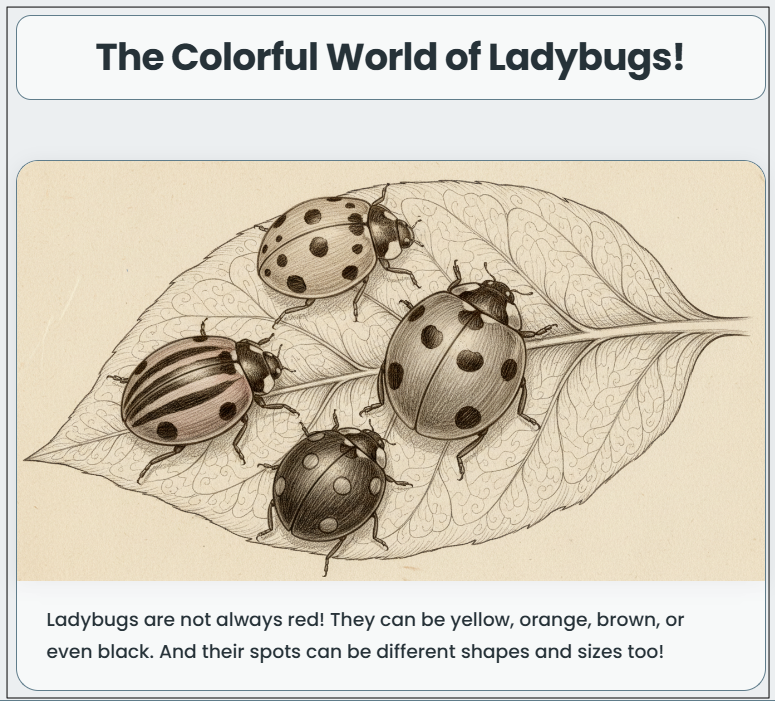
Then I asked Learn Everything to tell me about the colors of ladybugs.
Classroom Ideas
Build Background Knowledge
Before introducing a new unit, let students explore the topic and its connections. They’ll come to class with context and questions.
Curiosity Journals/Bell Ringers
Give students 10–15 minutes to explore a topic related to the day’s lesson. Then, ask them to write down five things they learned and one question they still have. This is great for bell ringers or early finishers.
Research
Have students snap a photo or select a starting topic and follow the knowledge web to develop a research question they want to pursue.
Vocabulary and Concept Mapping
Use the tool to explore academic vocabulary in context. For example, if you’re teaching photosynthesis, see how the tool explains it with metaphors and which related ideas emerge.
Visual Thinking Activities
Ask students to take a photo (a classroom object, nature item, or artwork) and use the tool to explore academic concepts through that lens. This is great for cross-curricular connections.
A Few Tips for Teachers
- Try it first to see how metaphors and follow-up questions unfold.
- Use it on larger screens for group demos or pair activities.
- Let students explore topics that matter to them.
Try It
With just a photo, students can unlock a world of ideas, visual metaphors, and smart connections that deepen understanding and drive curiosity. Whether you’re supporting research skills, presenting a new topic, or just giving students space to wonder, this Google experiment is a fresh, AI-powered way to make thinking visible and fun. To explore more Google experiments, like Learn Everything, check out our other TCEA Technotes blogs.
