Are you ready to make your next career move? Want to know how you can achieve escape velocity and get into the tech director orbit? Every other week, someone will ask me, “How do I begin my journey to becoming a technology director?” When I left the classroom, my goal was not to become a technology director. Rather, it was to learn what I needed to know. Every time I thought I knew enough, I would find out I did not. Then, I realized that I needed the authority and responsibility to advance teaching, learning and leading with technology. Why couldn’t the current technology director get the job done? Why did students and staff have to wait on time-sensitive solutions? These all motivated me to keep learning.
If you are on a similar journey, you may find the following tips useful. After reflecting on my journey, I’d like to share those insights. In this short blog entry, I’ll share some of what I’ve learned. The rest, you may need to discover on your own.
Did You Know?
Sign up for one of our Google Certified Educator certifications. You’ll learn about more than Google Meet, as well as earn 12 CPE hours per course. Use these courses to get Google Educator certified. Find out more online.
Planning for Success
You can divide the steps to success in myriad ways. Here are the steps as I see them:
Achieve escape velocity
Prepare well
Distinguish between management and leadership
Let’s take a moment to review what each of these mean.
#1 – Achieve Escape Velocity
Are you familiar with the term, “escape velocity?” It popped into my head one sunny afternoon. A technology applications teacher was sitting in my air-conditioned portable building quizzing me. She asked, “How did you get to where you are?” The question took me back in time. I realized that my journey was completely different than what her’s. That said, it had some similarities. The first is that she would have to achieve escape velocity:
In physics, escape velocity is the least speed needed for an object to escape. Escape from what? Escape from the gravitational influence of a massive body. The escape velocity from Earth is about 11.186 km/s (6.951 mi/s; 40,270 km/h; 25,020 mph) at the surface.
When your boss, your organization thinks they know you so well that you have little more to offer, how do you escape? How do you achieve escape velocity? The truth is, you will have to leave. Instead of claiming the comfort and shelter of a familiar space, you will need to embark on a journey. And, as Bilbo Baggins told Frodo in Tolkien’s The Lord of the Rings:
“It’s a dangerous business, Frodo, going out your door. You step onto the road, and if you don’t keep your feet, there’s no knowing where you might be swept off to.”
That’s the truth. If you’re OK with that, then follow these steps:
Be visible at the regional and state level (e.g. TCEA, ISTE, CoSN, TxDLA, ASCD/Texas ASCD, CAST)
Ready to go to your first interview? Before you say “Yes,” ask yourself about the following:
Is there a roadmap to success that identifies best path, common roadblocks and detours?
Do you have an eportfolio? That is, a digital portfolio that highlights your strengths? That identifies areas of growth? Each illustrated with real life examples from your experience?
Have you aligned your skills, certifications, and experiences to the job announcement expectations? Do you know YOUR stuff?
This can be the challenge. You are going to spend a lot of time preparing for the job. While some people “luck into” the job because of the relationships they have, you will need to know your stuff. And, there is no quicker way to find out what you lack in experience than real-world situations. Get the experience before you start a new job.
Here are the ABCs of preparing well:
A- Build Your PLN
One way to start is to build your professional learning network (PLN). The toughest challenge isn’t keeping up with the technology. Rather, it is understanding how to leverage it for your organization. In the past, we faced limits. Now, learning isn’t restricted to a special event bound by time and place.
Our learning takes us beyond a meeting, or a conference or from 8:00 to 3:30 PM when school is in session. Today, we tap into a flow of conversation, a web-based learning ecology, that we can learn from 24 hours a day, 7 days a week.
B- Seek Insight
Leaders often face a blind spot. Ask yourself how much you know about the real story compared to what your current leader does. Chances are, you have some operational details they would love to have but no one wants to tell them. You may want to read First Things First: A Technology Leader’s First Steps blog entry.
The questions you start with determine where you end up. For example, you could ask the following:
How do you bring about change in an organization that doesn’t want to change?
How do you start and put in place projects to achieve success?
How do you change policies and procedures, or work around them?
Or, you might ask, “How can I build relationships with everyone to increase the trust factor? How will othes perceive me when I deliver on my word and get things done in a strategic way? How can I have crucial conversations that build mutual purpose and respect?” These are all powerful questions to ask. You may end up answering all.
One of my favorite fables for leadership is Kotter’s Our Iceberg is Melting. Here’s a quick video overview:
This is an amazing fable with profound implications. Be sure to read the book.
Here’s a tip. When you have to exert top down authority that your organization has granted you, you’re done. Time to reflect on your mistakes, and begin again elsewhere.
You will need relationship smarts to navigate any number of roadblocks and challenges. If challenges were dances, your dance card would be full up. You must learn to dance with change and love it even when you get stepped on, kicked, or worse.
And this list only scratches the surface. What do you do when principals complain about tardy equipment deliveries? How do you tell the superintendent it’s the warehouse’s fault, not your technicians? It’s all about emotional intelligence, trust, and relationships. Management of complex projects is one thing. Leadership is another.
Ready to start?
Still motivated to pursue a technology director position? Your journey may be only beginning. Keep hold of your tenacity, determination, and lifelong learning ambition. You’ll need them.
Many administrators I know spend their time between two devices. The devices include their Windows 10 computer and their smartphone, usually an iPhone. If you’re using a Windows 10 or Mac computer, then you may be unaware of a powerful, free tool that can help you stay organized. In this blog entry, we’ll explore a few tips that take advantage of Joplin to organize your email, critical documents, contacts, to-do lists, and more.
Safeguarding Data
Before we go any further, let’s take a moment to explore why we would use a free, open source note-taking and to-do tool. As administrators, we often deal with sensitive data that requires encryption. Wouldn’t it be neat to have a tool that featured end to end encryption? That way, it doesn’t matter if someone did get access to your smartphone, iPad, or laptop/desktop device. The data would safeguarded.
The tool we’ll be using is the free, open source tool, Joplin. It saves data in encrypted format in your cloud storage solution, such as Dropbox. If you have used Evernote, then you’re familiar with how Joplin works. The only caveat is that you cannot access Joplin data via a Chromebook or web browser. You CAN save information from the web (such as articles, blog entries, pictures) to Joplin.
Let’s explore a few ways Joplin can make your life simpler. In the last tip, we’ll discuss encryption.
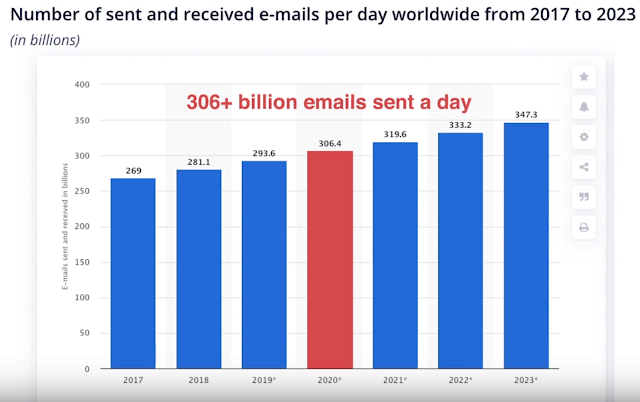
“I get hundreds of email per day. Most are throw-aways, but a few I need to refer to time and again. They are process and procedures of how we do things. I try saving them in Google, but they get lost.” One way to overcome email challenges like this is to create a notebook in Joplin. Use that notebook to house critical messages, processes, and procedures.
Use the Joplin Web Clipper to copy critical content from your G Suite EDU inbox to Joplin. The Web Clipper is a browser extension that allows you to save web pages and screenshots from your browser.
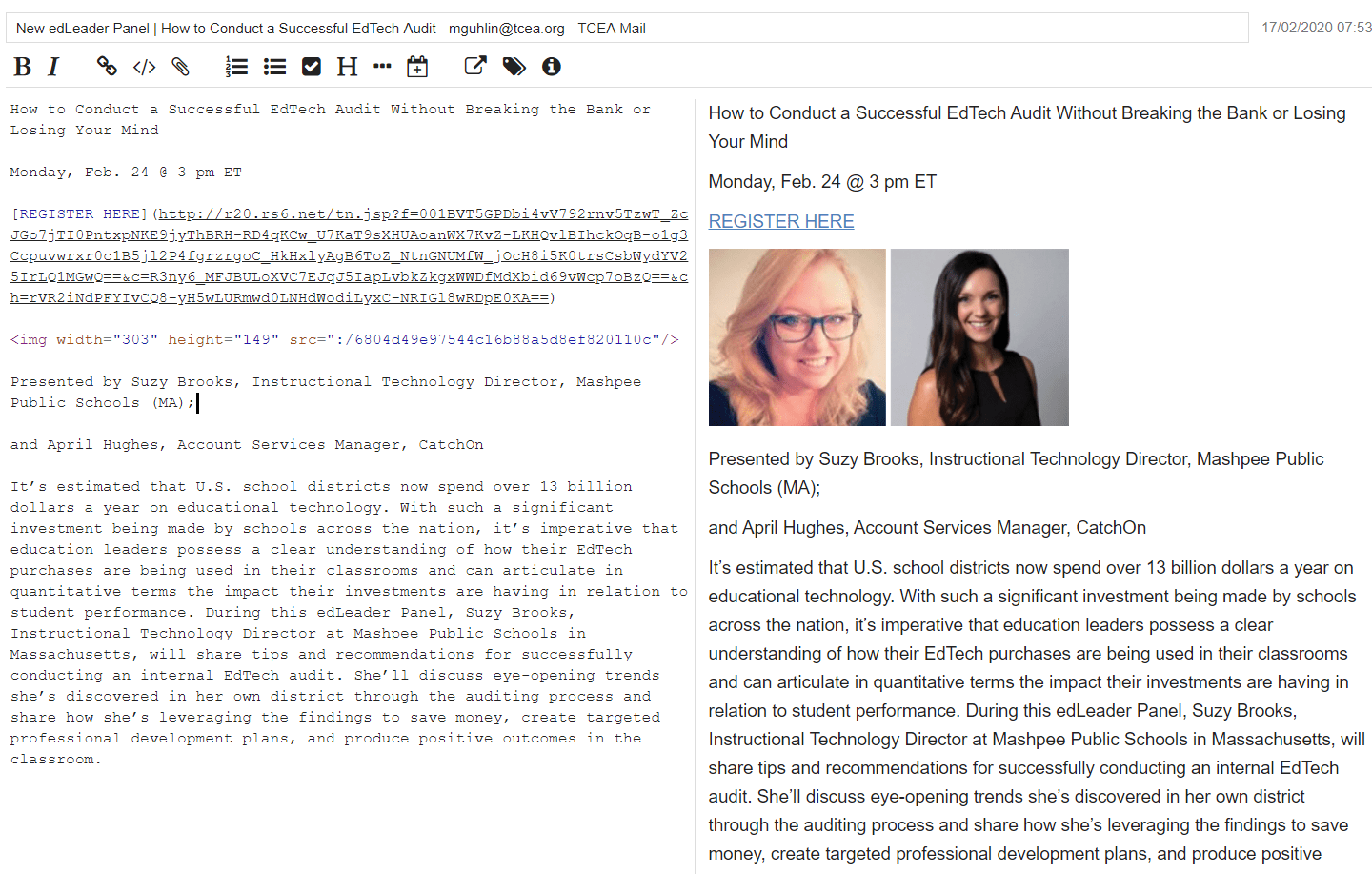
For example, I received this email about conducting technology audits. Since it’s a webinar I would like to attend, I saved the message (which arrived via Gmail) to Joplin. You can see the original message below, followed by how it looks in Joplin:
From My Email Inbox:
What It Looks Like in Joplin:
One of the main benefits is that I now have a Markdown-formatted, easy-to-edit version on my device. This is a great way to pull content from the web and remix it. Once this content is in my Joplin notebook, I’m able to move it around and put it in any notebook I want via click-n-drag.
Did You Know?
Sign up for one of our Google Certified Educator certifications. You’ll learn about more than Google Meet, as well as earn 12 CPE hours per course. Use these courses to get Google Educator certified. Find out more online.
Tip #2 – Save Digital Documents
Tools like Google Drive and Microsoft OneDrive make saving scanned documents easy. While both house your data, the data is not encrypted at rest. That means that anyone who gains access to your account can see them. This can happen via a phishing attack or cloud storage hack.
The questions I often get from security-savvy administrators is, “Is it encrypted? Is it safe?” They are leery of trusting anything to cloud storage without encryption. Joplin can be their perfect assistant. It offers end-to-end encryption, protecting data while in transit from your device to the cloud. It also encrypts that data while at rest. This means that, even if someone gets access, they will not be able to read or view the contents of your notes.
Pictures you save to your Joplin notebook feature encryption. Of course, once you save a picture into Joplin, make sure to remove it from your smartphone’s photo gallery.
Tip #3 – Check That Off Your List!
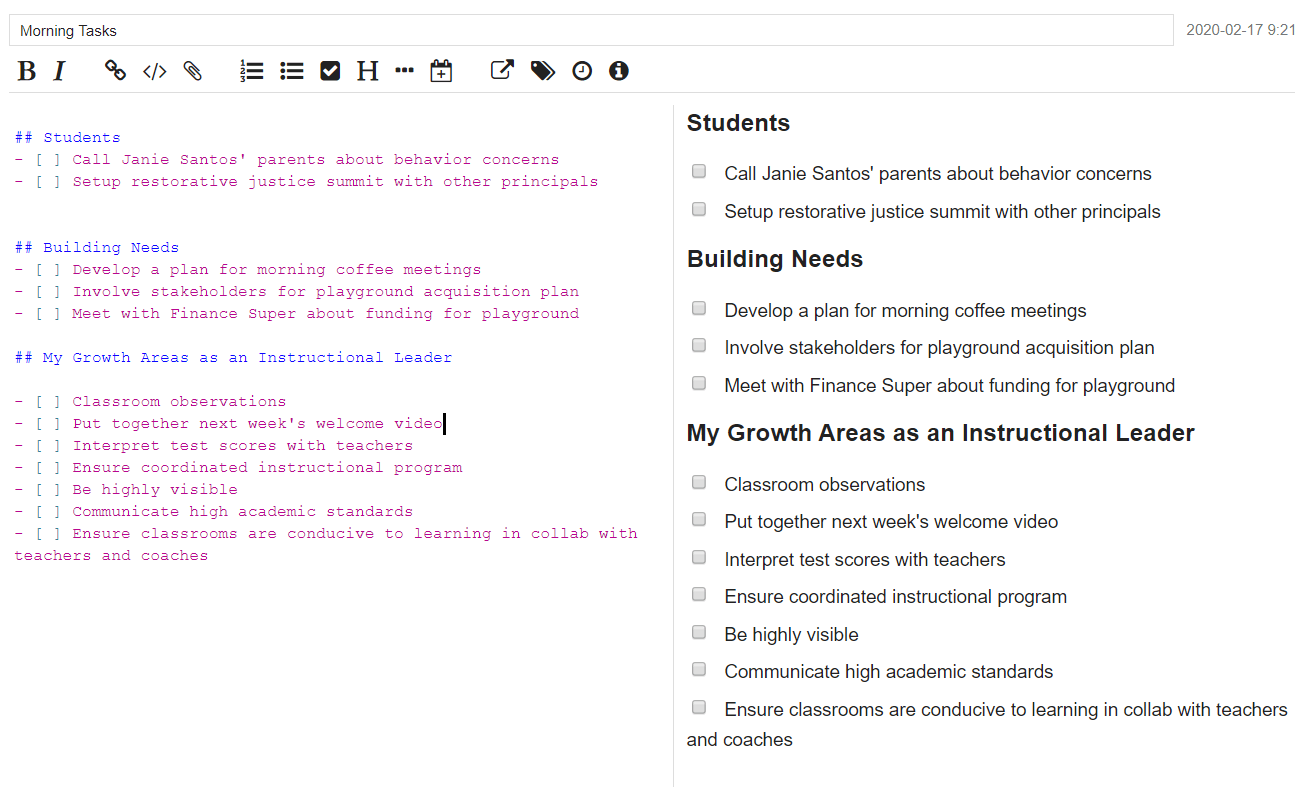
“What I like to do every morning is make a checklist of what I need to do each day.” She held up her phone and waved it in front of me with a smile. “If I run into new items, I add them to my digital checklist and keep going!”
A lot of us have “To-Do” lists, but it’s so easy to see them as a list of items that never gets worked through. While many are using Microsoft To Do (which got a workover from Wunderlist folks) and Google Keep. others may not want a collaborative tool. One of the challenges of relying on a cloud to-do manager is that it may not sync up in low bandwidth environments. As such, you can rely on Joplin because it keeps a copy of all your to do lists and notes on each device you have.
Tip #4 – Track Your Troubles
“The ceiling is dripping right into this computer lab,” pointed out a colleague. I opened up a note in the Joplin notebook I had setup for the campus and snapped a picture. I added the the classroom number and now I had a visual record of a building problem. Later, when I got back to my office, I could write an email and attach the evidence.
Use the Joplin app as a trouble-tracker and documentation tool. School administrators run into problems daily. Snap a picture of the problem into a Joplin note to keep a record of it.
Tip #5 – Manage Your Meetings with Joplin
Stuck attending an endless parade of meetings? In most meetings, we write notes that won’t make sense to others. With a keyboard, I am able to take detailed notes. I can also snap pictures of meeting materials. This could be business cards, meeting agendas, and handouts. This makes organizing so much easier. Even if you take notes on paper, you can later snap a picture and drop it into your meeting notebook on Joplin.
I’ve tried all sorts of digital note-taking tools and digital styluses, and I keep coming back to the old tools. Those tools? Pad-and-pen or a keyboard, then save it all into a Joplin note.
You can also track vendor interactions. Any campus or district administrator knows that vendors are going to come calling. Depending on how I set up my notebooks in Joplin, I can organize by project and match vendors to the job. This makes it easier later.
A Note About Encryption Before We Finish Up
Protecting your private data, including notes about work, can be a real money saver. When you encrypt data at rest, you ensure that others cannot access sensitive data. What’s more, it’s protected under the Texas Safe Harbor law.
That means that what’s encrypted doesn’t have to be reported as lost or stolen. That’s a money saver because it means you don’t have to pay for identity protection for affected parties. Joplin encrypts data stored in your digital notebooks and cloud storage (e.g. Dropbox). I hope you’ll take advantage of encryption (but don’t lose the password).
What else could you save in Joplin’s Notebook app? A few more I can think of include travel receipts, critical notes, and more. Take a moment to explore Joplin and see if it works for you. Remember, if you don’t have any security concerns, then Google Keep may work well for you. If you need a full-featured text editor, then Microsoft OneNote may meet your needs. It’s a question of what you need the most. Since I am a minimalist, Joplin works well for me. Find out if it will for you.
What digital tools are available to help the school principal or administrator be more effective? After decades of research, we know what the principal’s primary role is to practice instructional leadership. That has the greatest effect on student learning. In this blog entry, we’ll explore digital tools that make that job easier.
Before we do that, let’s review some of the research.
What the Research Says: Instructional vs Transformational Leaders
The climate and culture of school mediate the principal’s impact on learning (Source). We know that different kinds of leadership are more effective than others. For example, Hattie’s research points out that transformational leadership differs from instructional leadership.
Reminder: John Hattie says that any instructional strategy has an impact on learning. The average impact on learning of any strategy is 0.40. Anything greater than a 0.40 effect size accelerates student growth in a calendar year.
What are the effect sizes for these two types of leadership? Transformational leadership has an effect size of 0.11. Instructional leadership has an effect size of 0.42.
Activities associated with instructional leadership had a greater impact than those associated with transformational leadership” (Source).
What activities do researchers associate with instructional leadership?
Engaging in classroom observations
Interpreting test scores with teachers
Focusing on instructional issues
Ensuring a coordinated instructional program
Being highly visible
Communicating high academic standards
Ensuring class atmospheres are conducive to learning
Paul Bambrick-Santoyo has some specific suggestions as well in his book, Leverage Leadership. He offers seven levers that allow for consistent growth. We’ll explore some of his points in the next section below.
If a principal can adopt these behaviors that speed student growth, shouldn’t he? Researchers and reformers say, “Yes.” Many principals ask another question:
Are there digital tools that enhance these activities?
The answer to that question is also an affirmative.
Digital Tools Enhance Instructional Leadership
Let’s examine each of the activities. There have been a variety of digital tools shared that make these activities easier. I’m going to adjust Hattie’s wording a little to make it clearer, then share a potential digital tool. If you know of others, please drop them in the comments. That invitation is open to solution providers, as well.
Did You Know?
Sign up for one of our Google Certified Educator certifications. You’ll learn about more than Google Meet, as well as earn 12 CPE hours per course. Use these courses to get Google Educator certified. Find out more online.
While some educators are using Google or Microsoft Forms, there are others. Some of the problems with “home-made” solutions may include:
Tough to aggregate data across the school with a data dashboard solution (e.g. Domo, Google Data Studio)
Hard to get data in and out of the spreadsheet Forms saves data in for feedback purposes
Permissions and account management can be a problem when trying to keep data private
To that end, finding a dedicated solution is necessary. Let’s examine three activities of an instructional leader.
Activity #1: Engaging in Classroom Observations
Engaging in classroom observations can be stressful and tough. When done in the wrong way, it can engender resentment among teachers. This is often due to a lack of transparency in communications. There may be a gap between expectation of what the teacher should do and what they actually do. That can result in stress for both the teacher and principal. While coaching for results can address this, the principal plays a critical role.
The principal can reduce resentment and confusion by conducting regular walkthroughs and adding more communication. (Note that classroom observations are not the same thing as appraisal walkthroughs.)
A few digital tools appear below. These can ease confidential communications while gathering critical data for campus-wide analysis. Two tools include:
Bullseye for Schools. This tool works to capture observations aligned to rubrics. It also allows you to capture videos and take notes on what is observed.
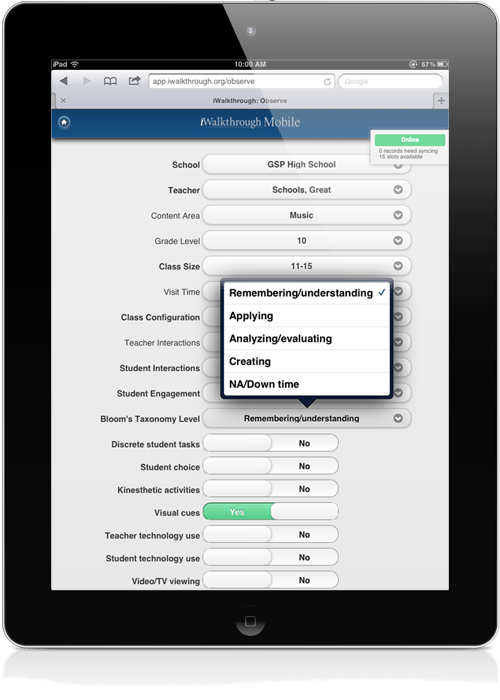
iWalkthrough Classroom Observation tool. This is a tool that works on your device of choice via a web browser. It allows you to collect three to five minutes of observation data, then analyze it. You can analyze a teacher’s work or aggregate across the campus, district, or nation.
Activity #2: Interpreting Test Scores with Teachers
“Do you have a data wall in your school?” This question is often asked among principals. Data walls in teacher planning areas focus staff on potential growth areas. These days, data walls are often electronic and appear in data dashboards. These dashboards have the potential to identify areas of growth. But, data walls may reflect interim assessments and may have a negative effect on students and staff. In fact, a Harvard study found that teachers often do not understand the underlying problems that block student growth. For example, in response to math problems, teachers “often proposed non-mathematical reasons for students’ failure” (Source). Then, teachers moved on. This suggests that the teachers studied lacked the depth in mathematics to understand collected data.
Focus on patterns in the data that suggest long-term strategy changes. Some tips:
Work through data together with a content expert (especially in dense content areas like math, science, reading)
Explore what implications it has for instruction
Ask what systematic checks for understanding could you put in place to ensure long-term student support
What’s the next student outcome you can support students in reaching? The next after that? Plan lessons to support that.
A big part of analysis is crafting a shared system of norms and strategies. You can use coaching and microteaching to encourage reflection needed. In Leverage Leadership, the author suggests the following:
Share video clips of master teachers.
Have teachers discuss what they have seen in small groups before sharing with whole group.
Develop a specific set of norms or system that every teacher in every classroom will commit to implementing.
Teachers rehearse the system in pairs.
Teachers engage in a dress rehearsal, offering critiques for that work, with teachers acting as students.
By the time students arrive, every teacher knows exactly where s/he is supposed to be and exactly what he or she is supposed to be doing at all times.
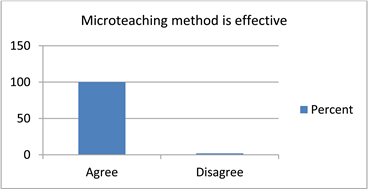
Focusing on instructional issues may best done with coaching tools. One way to focus on instruction in the classroom could involve micro-teaching. Micro-teaching enjoys an effect size of 0.88, making it quite effective. The Visible Learning Meta X database defines it in this way (edited):
A technique in which a teacher delivers a short, video-recorded lesson. The teacher and/or others analyze the lesson for improvement purposes.
There are many digital tools available to record teachers in action. Associating the video with a teacher’s record could involve a specific tool (e.g. Bullseye). To get the full effect Hattie references, you will have to do more than record a classroom. Fisher and Frey (2019) suggest the following:
Each video clip must be fuel discussion between a teacher and a colleague (observer).
The video must encourage the teacher, not the observer, to notice what they do and how what the teacher does impacts students’ learning.
The observer asks reflective question without stating what s/he thinks of the lesson. The observer’s job is to think with the teacher about what is in the video clip.
You can see an example via this link. What I notice is how reflective the teacher is about her teaching and student learning.
The best part of microteaching (see toolkit) involves giving and receiving constructive feedback. Participants do so with an open mind and align their comments to academic goals. Done right, it improves the teacher’s self-confidence in a safe space of mutual respect.
This confidence can inspire students to rely on the teacher more. This student-teacher relationship leads to greater teacher credibility. And, as you may know, teacher credibility has an effect size of 1.09. When all teachers become credible, you achieve collective teacher efficacy (1.39).
Collective Teacher Efficacy (1.39): The shared belief by a group of teachers that they have the skills necessary. And the belief that they can use these skills to have a positive impact on student outcomes.
In this blog entry, we took a look at three activities instructional leaders engage in. I hope each examination of an activity assisted your thinking about what it takes to be a leader who impacts student learning.
While it may be commonplace for finance or IT workers to work remotely, it is definitely not usual to have school teachers and district employees working remotely. That is, until now. Working remotely is a great benefit for some people, while others consider it akin to torture to endure what seems like solitary confinement.
So, what do you do if you are managing staff that are now trying to figure out this whole “working from home” thing? We have a few tips for you and would love to hear what additions you would add to our list. Let us know in the comments!
Set Guidelines and Expectations
If your staff has not worked remotely before, it is advisable to provide clear guidelines and expectations to them. Office rules that were once understood take on a whole new meaning when everyone is dispersed — including supervisors. See what others in your capacity are doing and what expectations they are communicating. Tweak those to fit your district’s policies and your personality.
Just like in your work environment previously this year, your staff perform better when they understand what is expected, what success looks like, and have the freedom to ask questions and get clarification. Being in a forced remote working situation makes that even more critical.
Encourage Routines
“Routines” don’t have to be a negative word. Whether we realize it or not, we all most likely have routines at work each day. Routines provide predictability, which, in turn, can help us cope and adjust to new situations more quickly. If your routine when you arrive at work is to get a cup of coffee, talk with your coworker for five minutes, and check email before diving into the heavy lifting for the day, consider how that might translate to working at home.
Some routines may need to be adjusted a little to fit the new environment of working remotely. At the office, you probably don’t think much about your routines; you just do them. Pause for a moment and actually write down what your routine might look like now. It might even help to put start and stop times to tasks and activities on your schedule. Decide to try it out for a few days and examine it as you are going through it.
After a few days, examine what you wrote out and tweak as needed. Building predictability into your day will help you get in a rhythm of being more productive and satisfied with how you are managing the “new normal.”
Get Moving
If you are like me, you may do more walking at work than you realize. Trips to the printer, restroom, front desk, break room, etc. all add up to not being quite so sedentary while in the office. If I’m not conscious of it, though, I may realize (afterwards) that I’ve been sitting in the same spot on the sofa for several hours working.
While it’s great to get in the zone, we don’t want to neglect our body. Encourage your staff to take a fifteen-minute walk mid-morning and then again about an hour or so after lunch. Getting up and getting the blood pumping doesn’t necessarily mean doing cardio, but it does mean that your staff will most likely be able to think better and therefore work better.
Have Face-to-Face Communications
Even when we cannot meet in person for staff meetings, we can still meet online and try to emulate some of the practices that we benefit from in face-to-face meetings. Plus, changing to a quarantined environment with little transition time makes it even more beneficial to see others, and to be seen.
There are some reports and bits of information that can be effectively shared by email. And, in a normal office environment, it might be advisable to cancel a meeting if there was no real need to get together. That is, if everything could be handled via email and collaborative documents. But right now, even if you don’t have a heavy agenda, it is important for everyone to feel connected.
Now that we at TCEA are all working remotely, at least through the next couple of weeks, one of our rules is that everyone has their video camera on during meetings. We aren’t meeting high executives or CEOs and trying to win over million dollar accounts; we are meeting with each other in real life situations, which sometimes means an occasional kid or pet running through the background, the doorbell alerting that a package has been dropped off, or (gasp!) a house that hasn’t had a maid step on the premises in years (if ever).
Keep Things Light
Yes, these are serious times. Yes, we are all under a lot of stress. That’s why it’s important for leaders to find ways to make staff feel less frightened and more able to handle the situation. You can do that by putting some fun in their day.
At our first TCEA remote staff meeting, we played a Kahoot! game to get to know each other even better and to help us reconnect. At our next one, Executive Director Lori Gracey has said that it will be silly hat day for us all and we should come to the Zoom meeting with our best bonnets on. I’m sure there will be other surprises as this sheltering in place continues. But that seems less stressful because we are all in it together and able to laugh at each other.
Gauge Your Staff
You should already know your staff. You know those that do better when you drop in for just a minute each morning, those that think of being quarantined and working alone is better than a Disney cruise, and those that need your occasional reassurance that they are doing a great job. Working remotely doesn’t change any of that. So, as you think about your staff, consider how you can be that same great leader you are in person, but now via telecommuting.
You don’t want to micromanage, but you do want to help each staff member in a way that is meaningful to them. Unfortunately for you, though, this will probably take more time on your part and require you to be more conscious of your actions. But you can do it. You are a great leader and that is what great leaders do.
Thank Those Going the Extra 1,000 Miles
While what the teachers are doing with distant students is absolutely amazing, there are other staff members who are also going above and beyond. The cafeteria workers, the bus drivers, the other admin members of the team — all of them are putting the needs of the children first, sometimes even about their own health or family. Be sure to let them know how much you appreciate them for that.
And don’t forget your tech staff. While we’ve been talking about digital learning for years, being thrown into the deep end of the pool like this without preparation or training time is scary. They believe that this remote learning can be a true boon for student empowerment and achievement. But they are stressed beyond belief right now as they try to solve issues like digital equity, parents who don’t understand how technology works, log in and software problems, and more. Give them a virtual high five to show that you’ve noticed their very hard work.
At times like these, your leadership skills may shine even brighter. Those things that were taken for granted by you and others will more likely be noticed when done with intention. As you support your staff and fellow administrators, consider these tips to help make it an easier transition in a chaotic time.
I know this isn’t an exhaustive list that I’ve shared, so I’m asking you to add to it in the comments below. What tip or activity that you’ve thought of has helped you and your staff? Do you have a boss that has done something well to make this time easier to manage? Give a shout out in the comments below. This is the place to pay it forward so other leaders can implement your ideas and further everyone’s success.
Every new school year, our district witnesses a significant increase in the number of student situations and mental health concerns taking place across our 39 campuses. These incidents involve students in the upper-elementary grades all the way up through high school and are a major cause of concern for our entire district.
Knowing that students who are in crisis aren’t always going to share their fears and worries with an adult, we needed a student safety platform that would put our administrators, counselors, and teachers in closer touch with students. We’re a Google district and most of our campuses are 1:1, which means the majority of our students express themselves more freely in email, essays, and through other digital means.
We adopted the Gaggle student safety platform over two years ago, gaining one more way to recognize and help students in crisis. Prior to that, we only heard about those online interactions secondhand and had no way of accessing the content.
In an era where worries about student situations, social issues, and mental health concerns compound upon themselves every year, getting an alert about a student who is writing a suicide note to his parents on his Google account creates real opportunities for successful intervention. And this really happens, by the way. We also have a flowchart and system that allows us to utilize our resources outside of school hours.
How We Do It
Here are five ways we’ve learned to help struggling students:
Form a crisis team for when situations arise. Some of the hardest times for our students are when they are alone. Knowing this, we have an after-hours flow chart and system in place. Working together, our counseling department and safety teams assess the urgency level and then respond accordingly. We address the alert as it happens. That means reaching out to parents, sending police out to the home to perform welfare checks, or taking whatever steps necessary to mitigate the potential problem.
Don’t close the case prematurely. After handling the situation, we give the student immediate resources for evaluation. For example, we work closely with our two counties’ mobile crisis units, which can be dispatched immediately to determine if the student needs help at no cost to families (or, if recommended, provide an emergency room visit or psychological evaluation). We are not a mental health facility at the school district, but we recognize the need and will screen to understand the level of assessment that’s necessary for the student’s specific situation.
Incorporate social-emotional learning into the curriculum. We’ve built mental health awareness into our curriculum, utilizing the Sanford Harmony Social-Emotional Program, and every one of our campuses provides training on suicide awareness. We also bring in organizations like Grant Halliburton, which does a lot in the area of suicide awareness and prevention. We’re very aware that this is significant in our district, and we know that if we’re not meeting our students’ social and emotional needs, then they’re not going to be able to learn.
Provide after-hours counseling. Potential problems aren’t limited to school hours, so we opened a counseling center that families can visit for free in the evenings. The response to this offering has been overwhelming — we opened in January 2020, and already have a lengthy waiting list. We currently have about six counselors and are in the process of adding more.
Use technology to be proactive and vigilant. One thing that differentiates our district is our background and our ongoing focus on social and emotional learning. We know that we need cameras, surveillance, and other tools that districts are using, but the real results come when you get to the root of the problem. For us, that means using the student safety platform and our Anonymous Alerts app to prevent cyberbullying and bullying, and also gathering good information on students who are using email to talk to their friends about being depressed and harming themselves. Technology gives us the proactive advantage of being able to call someone and make sure they’re okay.
“We Had No Idea”
We want to give kids the tools they need to feel safe at home—or wherever they want to use them—without fear of retribution. With no student suicides in school year 2018-2019, we know that we cannot prevent them, but we take all possible steps to minimize the possibility. Our district can literally feel the extreme appreciation of parents when we contact them to let them know about a potential problem.
In most cases, their initial response is “We had no idea.” Using the monitoring and filtering tools, we’re helping to proactively raise those awareness levels with additional resources and get the healing process started quickly.
As an educator who’s been “doing this” for a very long time now (my, how the years how flown!), I have learned the importance of stopping once and a while to simply think. We get so busy in our day-to-day lives, hurrying to get things done and to help our students and colleagues and parents and community members. It’s easy to get so caught up in that whirlwind of activity that we forget that we have to recharge, too.
So I’ll ask you this simple question: What have you done recently for your own growth and sanity? And while many of you will probably answer that you attended the TCEA 2020 Convention & Exposition recently, and that is certainly a growth event, you may not have taken the time to really sit and think about all that you learned there after you returned home.
Setting Aside Time
I attended a powerful workshop on leadership last week. While there, I took tons of notes and constantly found myself saying “Oh, that would be great to implement” or “What a fantastic idea! I know that can help our members.” But once I got back to my office, those notes were put aside as I dealt with a myriad of small fires and the needs of my board and staff. What was missing was scheduled time for me to sit, with my office door closed and my technology turned off, and think. I needed time to internalize all that I had learned, to see how the pieces fit together, and to process my next steps. I needed dedicated time to consider how those new ideas could best be used in my particular situation. I needed time to take that new learning and apply it to innovative approaches for the future. I needed time.
Putting Innovation on Your Calendar
Now I know that as overwhelmed, incredibly overworked educators, time is one commodity that we simply don’t have enough of. And I also know that there really are only 24 hours in a day with no way to get more added. But I still believe that setting aside some of that precious time to sit and think is an absolute requirement, regardless of our role or of how busy we are. So I’ve begun scheduling thinking time on my calendar. I’ve let my assistant know that, unless the building is on fire, I am not to be interrupted during those few moments. I shut my door, close out my email and turn off my phone. I pull out the notes from something that I learned recently and some blank paper and a pen and I think about its meaning, its relevance, and how it might fit in with everything else that I do. I doodle and scribble and, as I sit there, ideas begin flowing. My mind seems a little clearer and, by the end of the time I’ve set aside, I am calmer and recharged and ready to move ahead.
It doesn’t seem to matter how short this time is. While I obviously process more given more time, even just 15 minutes seems to make a difference. So I would encourage you, actually beg you, to try setting aside just a little time on your calendar to sit and think. I believe you will see a profound difference in your mental state, in how you approach new problems, and how you grow intellectually. Then drop me a line at lgracey@tcea.org and let me know how this innovation time (or whatever name you give it) is working for you.
Happy thinking!
I would be remiss if I didn’t mention that one of the best ways to schedule a good block of thinking time is to attend the Elementary Technology Conference. Held June 14-16 in beautiful Galveston, TX, this event provides not just innovative learning experiences, but a fabulous on-the-beach location that is perfect for thinking. Register now and join me as we sit and learn and think together.
Michael Bonner rose to prominence when a music video he helped his second grade class produce went viral. As the views racked up, people took notice, including TV host Ellen DeGeneres, who surprised Bonner by interviewing and showcasing his work on her popular talk show.
After that, Bonner’s career took off. Continuing to teach, he also travels the worlds helping inspire his fellow educators to use fun, unconventional ideas to connect with students. That’s why he’s one of our featured presenters at the 2020 TCEA Convention & Exposition.
As a preview for his much-anticipated talk, we chatted with Bonner about his career and the lessons he’s learning along the way.
“The Problem Was Really Me” Says Michael Bonner
Bonner’s success didn’t start in front of cameras and on global stages. It started with failure.
He began his career at South Greenville Elementary in Greenville, South Carolina. “I was teaching the essential questions: who, what, where, when, why, and how,” he says, “and I thought I did good with the lesson.” He laughs. “But only two of 20 [students] passed.”
That hit him hard. “I was like, ‘What is going on?’ And I started to point the finger at the children, not realizing the problem was really me.”
So he tried again, this time giving his students an end goal. “I said, if 14 of you pass, I’ll make a music video for you. And they look at me with determination, and it was something different, even for second-graders.”
They passed on the next try. So Bonner helped produce a video featuring the students about the lesson and quietly uploaded it on Friday. He didn’t tag Ellen; he just posted it for the class to see the reward for their hard work and mastery.
Unconventional Education
But through the magic of internet vitality, the video spread. “That video has a life of its own,” he says, “and ever since that moment, it’s been a wonderful thing, because it proves to me that it’s okay to be unconventional in education.” Now at the Ron Clark Academy in Atlanta, Michael Bonner believes his notoriety comes not just from the energy he brings to his students and his personal talents, but to his desire to understand how people work and learn. As a young teacher, he picked up on it quickly.
“I quickly found out that children from all different backgrounds have the capability to learn. It just takes a teacher who’s willing to fight through biases and give the proper instruction needed to be successful.”
After the Ellen appearance, schools and educators began to reach out, asking for Bonner to speak with educators about the ways he keeps his students engaged. It quickly grew. In the past three years, he’s presented at more than 130 events around the world. “It’s been a really great way to meet with teachers who really want to improve the education system,” Bonner says of his international speaking engagements.
Originally, Bonner thought he’d work in psychology. It seemed like a steady human-centered job with good pay. He didn’t want to follow a psychology PhD course, however, though his interest in the field has remained consistent. He says it helps him understand and work with students, coworkers, and well, just about everyone.
“Understanding neuroplasticity, how the brain works, it’s been a great supplemental piece of who I am as an educator. Using psychology in the classroom has benefited me so much, because social-emotional learning is a real thing.”
He’s convinced that educators must continue their focus on understanding the populations where they teach, and using that understanding to connect with the students under their care. That understanding, he says, can only come in concert with administrators, students, and the community at large.
Bonner hints that this understanding — of diversity in communities and even between individuals, as well as the leadership required to bring it together — will be a major part of his featured presentation at TCEA 2020.
Strategic technology planning can’t exist without in the trenches support. How do you prepare your technology department for this kind of work? In this blog entry, we’ll share tips for practical educational technology planning.
The Big Picture
When beginning the journey of technology planning, balance long-term and short-term goals. You want the quick win of increasing device accessibility, but you must avoid the loss stemming from inadequate bandwidth or wireless access points. You must therefore plan long-term to increase your bandwidth and wireless access across all buildings. The short-term win comes when everyone can connect to the WiFi.
When planning ahead, know you will need to address these important priorities:
Long-term planning
Identifying areas of need
Obsolescence planning and equipment replacement
Budget allocations and sources of funding such as bond, eRate, Technology Instructional Materials Allotmentm local, and grants
May I share some quick tips for practical technology planning to address these with you?
Tip #1: Create a Knowledge Management Site
“Did you think you could remember all the details for many projects in your head and a few post-its?” grumbled a large urban school district project manager. She had forgotten a few key details in the deployment of new switches. The main one that caused problems was the lack of an email announcing the schedule for this project. Deliveries of equipment had begun, but schools had no idea of incoming equipment.
Project management and knowledge management go hand in hand. Project management (see this Project Management Wakelet) is essential to every undertaking in a school district. Put technology to work to ease this for all involved, including those with technology projects.
A knowledge base, a.k.a. knowledge management, website could have facilitated this. Creating one is easy but maintaining it can be difficult. Technology directors must make a habit of logging all plan details. It’s also important for support staff to grow accustomed to the work.
Another way to find out what’s going on is to try the personal touch. Try two stars and a wish. What are TWO things technology is doing right? What is ONE thing you wish we could improve? Visit every campus and each department in the district and get their response. Rank the wishes and celebrate the stars. Get it done within your first three months on the job.
Here’s one story of how that works:
When I first started here, I scheduled individual conversations with every administrator. I met with technology and teaching staff. I had good conversations and took lots of notes. I asked each to identify “two stars and a wish.” The one thing was something that would impact their school.
I mentioned their “stars” when I spoke at school committee meetings. This allowed me to make sure they heard that I valued their existing successes. This was true even though they might be small, or things I didn’t think were stars. I managed to find something in them that I could praise. Then, I used the “wish” list so that during that first year I made headway (at least some progress) on every item.
This is part of my building relationships strategy. People want to know you care before they care about what you know. So working on their wishes showed I listened and made what they cared about a priority for me, which showed I cared.
How will you build relationships and show people you care? Establish benchmarks for each aspect of your work, then grow from there.
Tip #3: Inventory Job Duties
Ask the technology team, “What is the actual work that you do that takes up your time?” Get them to write it down. This data can assist you in seeing who does what and who says they do more than they do. You will also be able to plan ahead for growth in resources and staff.
For example, one district I worked for did not know how much time they spent on account management. Every staff member took calls about resetting staff passwords. This took a bite out of everyone’s time and delayed many projects. While the technology team had a suspicion they were spending a lot of time on this, no one had put two and two together. When we replaced that time and effort with a single sign-on system, we recovered the time. The data collected also facilitated reorganization and reclassification of jobs and people got pay raises.
Ask the questions to streamline your technology department. This will yield benefits. Your technology plan will reflect increased efficiency and effectiveness.
Tip #4: Make a Top Ten List
It’s easy to get lost in the weeds. Take your assessment data and come up with a Top Ten list of priorities. Use this at every opportunity. Do your stakeholders understand what the district’s needs are?
Here’s one example. How could you create a top ten list that gives voice to organizational needs?
Tip #5: Keep Up to Date with State and National Legislation
Keep up to date with state and national legislative priorities. You can use them to shape the focus of your ed tech planning, as well as build a sense of urgency. You can use legislative priorities to send a message. One message? Technology makes a difference. For example, in 2019, blended learning grants were set up for districts to take advantage of.
The state dedicated two million dollars to professional development. Could your district piggyback a new instructional initiative on a micro-credentialing program? You wouldn’t know that if you didn’t follow TCEA advocacy efforts.
These five tips for practical e dtech planning make preparing for the future easier. With these tips, you can lay the foundation for solid technology progress.
Educators are gravitating towards Instagram as their primary social media platform. One reason is that you can set Instagram to post to Facebook, Twitter, and Tumblr, making it very poweful. I’ll admit that I’ve been a reluctant Instagram user myself, but in writing this blog entry, I spent a weekend exploring and want to share a few insights and tips that I discovered with you. You may find they assist your efforts to share successful stories. And that can only be a win for your library, school, or district on Instagram.
Quick Instagram Statistics
The following stats come from Hootsuite’s AdsEspresso. Here are my top five picks from their exhaustive list:
As of June 2018, there are almost one billion active users and 500 million daily active users.
The like button (a heart) gets tapped 4.2 billion times a day.
Two out of three Instagram users fall into the ages of 18-29.
Instagram images get an average of twenty-three percent more engagement than those on Facebook. And posts with videos get 38% more engagement than those with images.
The best time to post on Instagram for educators is on Thursdays at 4:00 or 5:00 p.m. for most engagement.
The statistics go into many other relevant areas. Did you know that images with texture, white space, and a single dominant hue get more engagement? I had no idea. Or that images with blue as the dominant color get 24% more likes than those with red? Hashtags (the longer, the better) also increase engagement, up to 12.6%. The Hootsuite article is full of more insights. Be sure to give it a close reading.
What Makes Instagram Powerful?
“People post ninety-five million images onto Instagram daily. That’s thirty-five billion a year” says Kantar. Instagram’s reach continues to grow. I’m attracted because in a single post, I can share to four social media outlets. Instagram’s instant publishing to itself, Facebook, Twitter, and Tumblr makes connecting easy. Apply artificial intelligence (AI) analytic tools to Instagram, and trends and patterns emerge. You may want to read Kantar’s article for a tale of two brands.
If a picture is worth a thousand words, 35 billion images equals digital stories of epic proportions. What’s more, Instagram features ads, newsfeed posts, and stories. Together, they have the potential to offer amazing learning opportunities.
Tip #1: Create Instagram Stories from Templates
Not crafting stories yet? You need to be. Seventy-percent of users watch Instagram stories daily. While you can make stories in Instagram yourself, why not rely on available templates? To get access to those, you may want to get one or both apps. To give you an idea of what’s possible, check out this video workshop from Later.com.
Two apps that may inspire your Instagram stories include Over and Posters. Over is the app featured in the video above. What makes these two apps stand out is their use of templates for Instagram stories. Aside from the obvious benefits of using templates, consider these points:
Templates spark fresh ideas for your own stories.
These blueprints assist you in deciding where text, images, and logos will go. This frees you from design to focusing on content.
Add your own brand colors, videos, images, and animations to create a uniform look.
Use a consistent template for your stories to increase audience awareness.
Create a storyboard to organize your stories.
Find more tips in this blog entry. One last tool you may want to check is Buffer’s Pablo. Combine Pablo with Buffer.com to facilitate posting to Instagram. More on that in tip #3.
Tip #2: Sharing and Re-sharing
“Instagram does not claim ownership of any content you post,” says Mark Dalton. “It is common practice…to re-share content on Instagram.” He points out that you should cite the source. Developing original content is tough work, but it’s important to do so. Don’t limit yourself to your own original content. Make sure to highlight the work of others with credit given. You may also want to ask for permission from the original poster. This is even more true outside of K-12 education posters, who may not be as understanding.
For example, I love Tony Vincent and Shake Up Learning’s posts on Instagram. Informative and colorful define their efforts. Reposting their work is almost always an effort to celebrate their work. The benefit for them? I can help them reach a broader audience.
As my awareness of Instagram has grown, I have reposted or “regranned” myself. The original posters have thanked me for highlighting their work. Several tools are available to do that.
Did You Know?
If you try to open a Google Play Store app link with your G Suite EDU account, you will get an error. Make sure you click on links while logged in with a personal/consumer Google account. Or tap the links for Android on that type of device.
After a bit of research and hands-on exploration, here are my top two favorites:
Both work well, allowing you to grab images and/or video. What I love about Regrann is the tutorial. It walks you through several features and then gives you the opportunity to try it out. It makes reposting content easy and quick. That’s key in a multi-step process that can be confusing for some.
Tip #3: Schedule Your Posts
Want to know what my favorite feature, common to Tweetdeck, Hootsuite, and Buffer, is? The ability to schedule tweets in advance. In fact, that makes twitter chats and tweet meets possible. Albeit mistaken, my reluctance to embrace Instagram came from the inability to schedule. I was glad to discover you can schedule Instagram posts in advance.
What’s more, research shows that the more you post to Instagram, the greater the engagement. Posting also increases follower growth engagement. When you are trying to connect with your academic community, that’s important, right? You can double your follower growth rate by posting once or more per day. That’s four times faster than posting less than once a week (source).
Some tools you can use to schedule your posts include:
Tailwind (Android / iOS): Sends SMS reminders to notify you when it’s time to post to Instagram. It suggests the best times to post for most engagement. While there is a free trial, it will cost money for a monthly/annual contract.
ViralTag: “Schedule posts, pins at optimal times and keep your audience engaged through out the day. Viraltag supports all major social networks including Instagram, Pinterest, Facebook, Twitter, Tumblr & Linkedin.”
Looking for another exciting way to engage? DriftCreate recommends you use Instagram Carousels. These do not require any special software, but involve adding many pictures to a single post, but not in collage view. Readers end up having to swipe to see the images.
Use them often. Engagement will go up if users expect to swipe.
To encourage swiping, include an arrow or text. Or use overlapping graphics to give users a sneak peek of the next slide. Or do both!
Provide value. You’re asking for more from your followers–more swipes and more reading. So make sure it’s worth it to them.
To create contrast between slides. use a flexible template for your type and add visual contrast between slides to help users want to keep swiping.
Include a LIKE THIS POST reminder and a hashtag.
Visit link in bio for more creating effective carousels.
In addition, you may want to review these Instagram carousel image dimensions. One of the aspects I had trouble with on my Instagram posts was the idea of the “link in the bio.” The expectation was, I thought, that you would change the link in the bio. This seemed a tedious approach to sharing content. There is an alternate approach to dealing with links.
Tip #5: Make Links Easy to Find
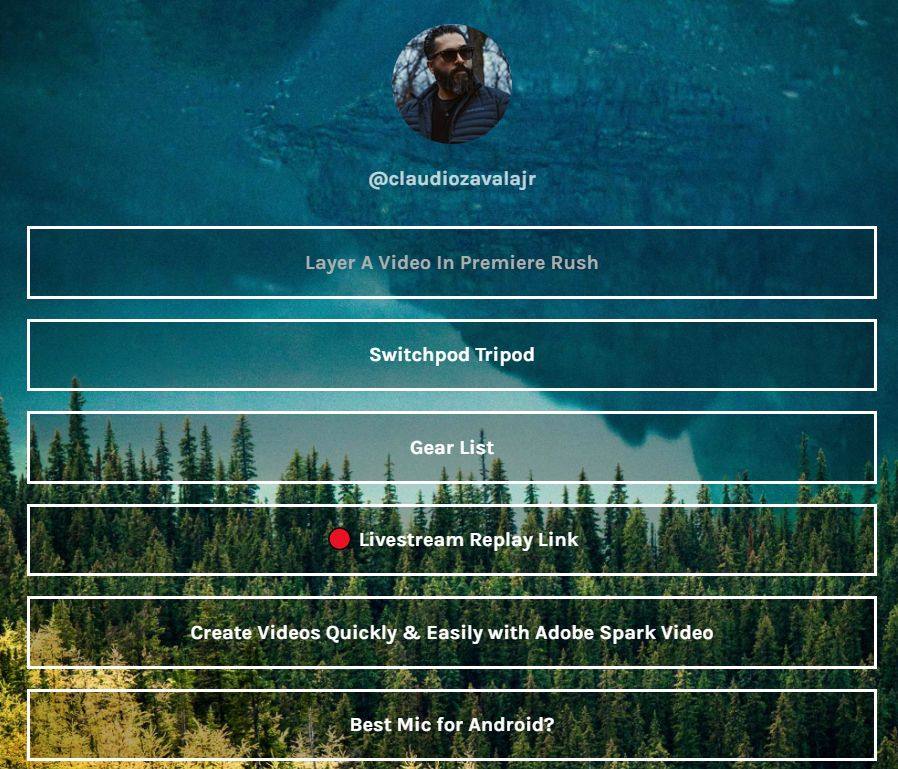
Why does Instagram make linking in post descriptions difficult? The reason why is that links in post descriptions don’t work. They are not clickable (or tappable). One workaround I found both Texas Tribune and Claudio Zavala (TCEA member) employ is to use Linktr.ee.
“Let your content live longer than the feed,” says the Linktr.ee website. Here’s a short description from them:
Linktree is a free tool for optimising your internet presence. You get one link to house all the content you’re driving followers to. Share that link anywhere, like your Instagram bio, Facebook posts or Twitch profile.
Linktr.ee offers free service which works quite well. Pro users ($6 a month) get many more features well worth the upgrade for a school district or organization. I have two Linktr.ee accounts, one for personal, another for my professional account.
See Claudio Zavala, Jr’s Linktr.ee account below:
Using Linktr.ee makes sharing content links for your Instagram posts much easier.
Tip #6: Insights from TCEA’s Sara Qualls
When I began writing this blog entry, I asked TCEA.org’s resident Digital Marketing Specialist, Sara Qualls, for tips. Here are a few she shared with me:
Don’t forget the hashtag even in stories. It’s essential!
With hashtags, you can link your FB/Instagram stories as well. This makes it easier to redirect users to both asking them to follow both in your story.
Don’t forget those hashtags (put them in the comments).
The key is good content and consistency. Once you hit 10,000, you have capability of links in stories and then you’re golden.
Storify Your Success
“Use stories and make it personal,” was Sara’s last piece of advice. When I applied the tips mentioned in this blog entry, I immediately saw engagement rise. As a school administrator celebrating school success, Instagram makes the work easier. I wish I had listened to the librarian who started sharing student book talks via Instagram. Don’t wait. Start now.
“What’s the retention policy for email?” asked a recent participant at the TCEA SysAdmin event. Another tough, companion question might be, “How are you archiving your social media?” As schools transition from newsletters to blogs, tweets, and Facebook posts, archiving expectations arise. The need for archiving public information on smart devices is increasing. Digital public information, subject to open records requests, doesn’t care where it may appear. It may pop up on private devices and email/social media accounts. New laws make the pursuit and tracking of that data legal. Are you ready to provide archived social media? Let’s explore how others have done that and what schools can do now.
“The general forms in which the media containing public information exist include… email, internet posting, text message, instant message, other electronic communication” (Source:Goverment Code Chapter 552, Public Information)
Social Media Archiving in Texas
Did you know that your district’s social media posts are a state record? Social media falls under the Texas Public Information Act (updated September 1, 2019). Let’s take a quick look at open records requests, as well as records retention.
Open Records Requests
As a technology director in the past, I assisted my school district Central Office to respond to open records requests. This often meant providing information in digital, encrypted format to the district’s lawyers. First, though, I had to dig through an email archive (e.g. Google Vault, Datacove) to find pertinent information. With the wealth of social media sharing going on, I shudder to think what that process would have looked like.
Peruse this section of the Guide and you’ll find the following:
Content posted by the agency or the public on an agency’s social media website is a state record (Government Code, Section 441.180(11)), and is subject to State Records Retention requirements in Government Code Chapter 441, Subchapter L,441.180-205.
That means that public schools may soon find themselves digging through their staff’s social media shares. What’s your organization or school district’s retention policy for social media? You may want to take another step back and consider what your social media policy is for your district. The Texas DIR’s Social Media Resource Guide offers some detailed recommendations that merit a close reading.
Is Your Tech Department Ready?
Are technology departments staffed to provide social media posts from staff? Worse, what happens when staff delete offending social media posts? What will you do then? A common strategy for individuals involves deleting offending content. They may even disable their account. This makes the offending posts tough to get to via traditional means. That strategy is not available to organizations. Consider the following:
An agency may be prohibited from deleting social media records, regardless of its established records retention policy, if the record is the subject of legal claims or actions (Government Code, Section 441.187). In addition, state and federal courts require the preservation of relevant records if a judicial or administrative action is reasonably foreseeable, even if such action is not yet initiated.
Do your district leaders work with data on their personal/home smartphones or laptops? If so, government entities now have the power to require access to public information stored on those private devices. On September 1, 2019, the Public Information Act (PIA) was updated. Senate Bill 944 gives government officials the power to look at public information on private devices. This means you need to find a way to document and keep records of communications, no matter where they originate or are kept.
Reflections on Social Media Use
Do you keep your private and public work separate? You may need to in light of SB 944. Most of us keep our private and public data on one device. We use private devices to handle public information. Many teacherpreneurs do this, but they may need to reconsider their “one account for personal and work” approach. Educators are reaching out via social media. They use social media in powerful ways that enhance teaching, learning, and leading. What happens when that open records request comes in for social media? Will it sweep up personal tweets, Facebook and Instagram posts? What about SnapchatintheClassroom? Some juggle many accounts in one app, while others use one account for private and public. Let’s take a quick look at two relevant areas.
Area #1: Disclaimers
While many post disclaimers, they may not be as effective as they once were. Disclaimers can be problematic for employers, but not for the reason you might think.
The more you control [employee accounts and employee behavior on social media], the more you will be legally responsible for everything that happens” (Source:Heather Bussing, “Eight Reasons Social Media Policies Backfire,”HR Examiner)
Educators are relying on disclaimers as a way to distinguish between private and public. While this may work for now, they also need to develop a strategy for rendering to Caesar what is Caesar’s. That is, public information traded on private devices and accounts.
Area #2: Social Media Management
Instead of trying to channel both public and private information through one social media account, some separate the two. That means they have two (or more) accounts for each social media service. If called on to produce public/work information, it’s easy to provide the username and password for the work account. No risk to private or personal information of the employee occurs. Tools like Buffer, Hootsuite, Sprout Social) make it easier to funnel content automatically. Facebook and Instagram have also worked to make multi-account logins possible. This makes it easier to see and share to work-connected accounts. It also simplifies the number of apps you have to have on your device. Instead of needing four to eight apps, you can switch accounts as needed with the native app (e.g. Facebook, Instagram, Twitter).
Problems Ahead: Towards School-Issued Social Media?
If you use your private social media account for sharing public information, you may run into a problem. What would happen if your private account got swept up in a review trying to capture public information sharing? Some may come to the same realization I did. Keep private and work separate, even if your disclaimers are in place. Until now, it was a free for all as to who created social media accounts. We may soon find ourselves using school-issued accounts. Can you see yourself with a school-issued Facebook? How about Twitter or Instagram? Now imagine yourself logging into those accounts with a single-sign on (SSO) solution. That might end the problem that schools face. In the meantime, social media archiving solutions may be an intermediary step. Remember, “courts require the preservation of relevant records.” So, how do we do that? This video may provide some insight.
Social Media Archiving (SMA) Solutions
Getting a SMA solution may help technology departments and assist those who don’t have time to dig across social media in response to an open records request. Email archiving solutions sprang up in response to demand and now social media archiving solutions are appearing. Here are a few for your consideration. Pricing for most was not viewable on their sites.
ArchiveSocial: It is a social media archiving solution for public agencies and K-12 districts. Use it to maintain public records of social media. Per their website, “ArchiveSocial connects directly to social networks such as Facebook and Twitter to capture and preserve the content on your pages – ensuring you can easily respond to records requests.” View their ebook, Solution Overview. You can find a price overviewon their website.
Jaethon: In use by NorthEast ISD in San Antonio, Texas, Jaethon offers both email and social media archiving. They offer an ebook and onsite videos to expand your understanding.
MirrorWeb: Adapted from their website: “Significant moments occur on websites and social media channels all the time. We want to save them. So we provide digital archiving of online electronic publications.”
PageFreeze: Adapted from their website, it takes compliance and litigation off your plate. It automates archiving your websites, social media. You can access the archived items via a cloud-based dashboard.
Smarsh: “Helping regulated organizations to capture, archive and supervise the newest communication channels to meet compliance and e-discovery challenges head-on.”
In their ebook (linked above), Jaethon points out the following benefits of adopting a social media archival solution:
Capturing and archiving messages and posts through a variety of capture
methods, from proxy-based to endpoint capture;
Stopping unauthorized access and limiting liability through access controls, rogue account identification, identity management and disclaimers
• Stopping rogue posts with pattern-matching technology;
• Notifying admins about where stopped posts originated with alerts
and reporting;
• Implementing restrictions on messages that contain time-sensitive data or words and patterns that require further review with supervisory
measures and
• Automating all of these processes
Start Thinking About Social Media Archiving
Now is a good time to begin to think about your district’s needs in relation to social media archiving. Let me know if you have any questions or discover even more solutions!
















 When I began writing this blog entry, I asked TCEA.org’s resident Digital Marketing Specialist, Sara Qualls, for tips. Here are a few she shared with me: