It’s Friday the 13th. I’m not superstitious, but wouldn’t it be fun to code an activity? Here’s one you can try using a free, browser-based Python tool:
The challenge: It’s Friday the 13th, and a mysterious locker has appeared at school. Students write a short Python program that reveals a silly surprise depending on which locker number they choose. Friday, November 13, 2026 is an opportunity for this quick coding challenge, with no installation, no frightening content, and no prior Python experience required.
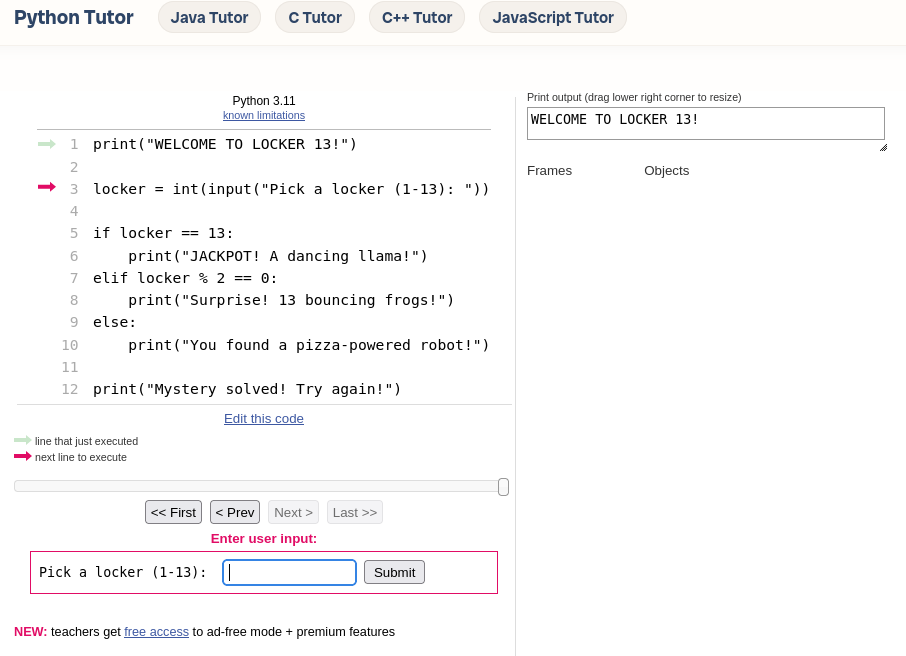
Students practice input(), print(), variables, and if/elif/else statements. Try it at CodeHS or PythonTutor.
Step 1: Copy and run this Python code
print("WELCOME TO LOCKER 13!")

locker = int(input("Pick a locker (1-13): "))

if locker == 13:
    print("JACKPOT! A dancing llama!")
elif locker % 2 == 0:
    print("Surprise! 13 bouncing frogs!")
else:
    print("You found a pizza-powered robot!")

print("Mystery solved! Try again!")
Step 2: Predict, run, and test
That type of activity would have terrified me as a youngster. I bet I’m not alone struggling with coding.
The Struggle is Real
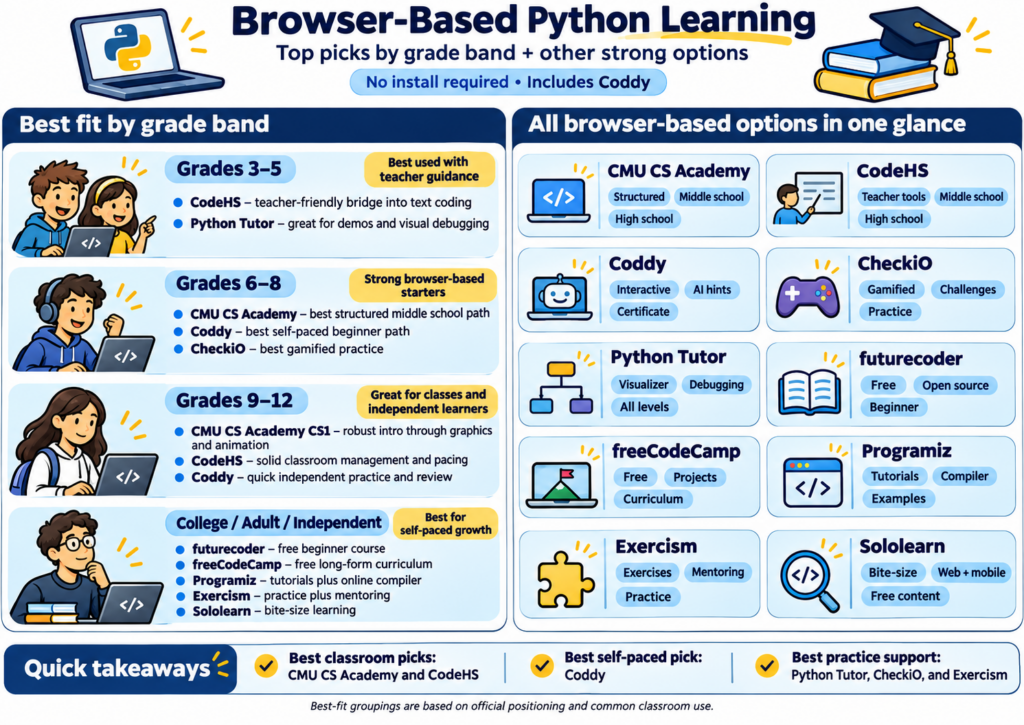
Do you struggle with coding and/or introducing others to coding? You may find this particular free Python tutor a fun way to get started. If you want to learn Python or introduce coding to students, tools like Coddy may be worth exploring. They may remove setup headaches, emphasize hands-on practice, and provide just-in-time assistance you get stuck. There are several solutions that do that. This blog shares a few.
Python is one of those coding languages that comes in handy in the strangest ways, my daughter has pointed out. I never imagined coding with Python would be useful to a Geographic Information Systems (GIS) professor. Even I have stumbled into it upon occasion while vibe-coding solutions.
Imagine sitting down to learn Python, only to spend your first hour installing software, configuring an editor, and troubleshooting error messages. You haven’t written a single line of code, and you’re already wondering whether this was a good idea. In fact, that’s been my experience every time.
Tools like Coddy offer a simpler starting point, especially for beginners and educators exploring programming.
1. Start Coding Without Installing Anything
One advantage of Coddy is its browser-based approach. Open the website, choose Python, and begin working through interactive lessons. There’s no need to install Python or configure a development environment. For educators working with Chromebooks or students using different devices, that’s worth considering.
The course starts with fundamentals such as variables, operators, and conditional statements. It gradually introduces loops, functions, data structures, and object-oriented programming.
You can focus on learning the language rather than getting the computer ready.
2. Learn by Doing, Not Watching
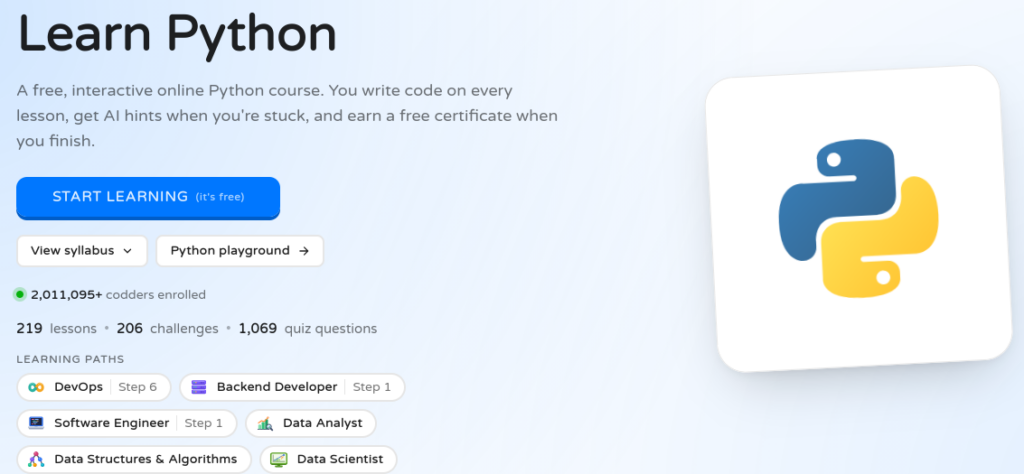
Coddy’s Python course currently advertises 219 lessons, 206 coding challenges, 1,069 quiz questions, and six projects. Learners practice coding as they progress through the lessons.
Projects include a bill-splitting calculator, a daily expense tracker, and a contact book application. These provide opportunities to apply programming concepts to recognizable problems. I especially like the idea of learners tackling a small challenge, checking their results, and then trying again.
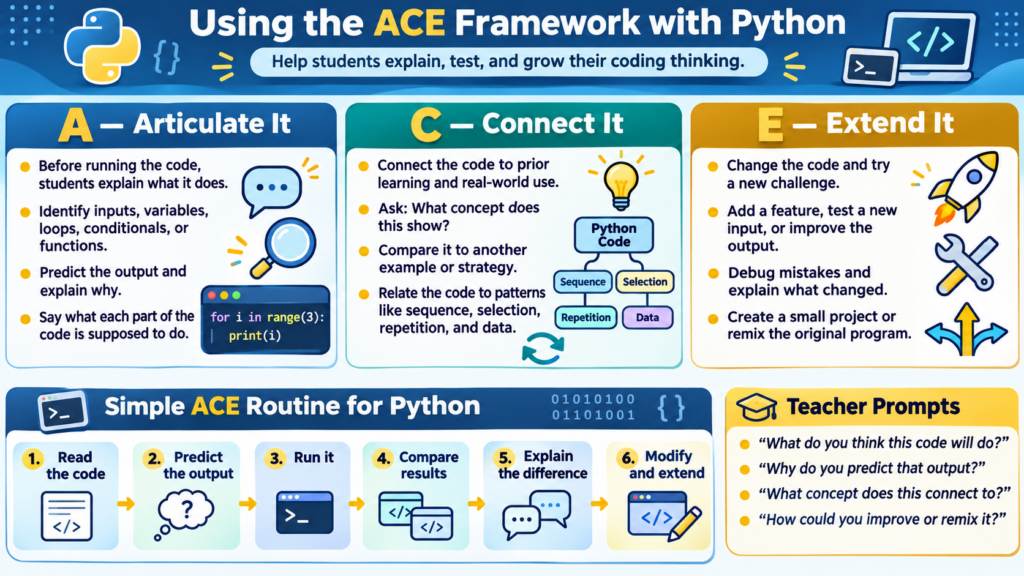
For classroom use, consider asking students to explain what their code does before running it. Have them predict the output, test their prediction, and explain any differences. You can also use the Articulate It, Connect It, Extend It (ACE) framework.
3. Get Help When You Need It
Getting stuck is part of learning to program. Coddy includes Gen AI-assisted hints designed to help learners work through problems without immediately revealing solutions. It also provides quizzes, audio explanations, progress tracking, and certificates of completion.
What about cost? Coddy makes its courses and certificates available for free. However, free accounts have daily activity limits and restrictions on Gen AI tutoring. Paid plans remove some of those limits and add features.
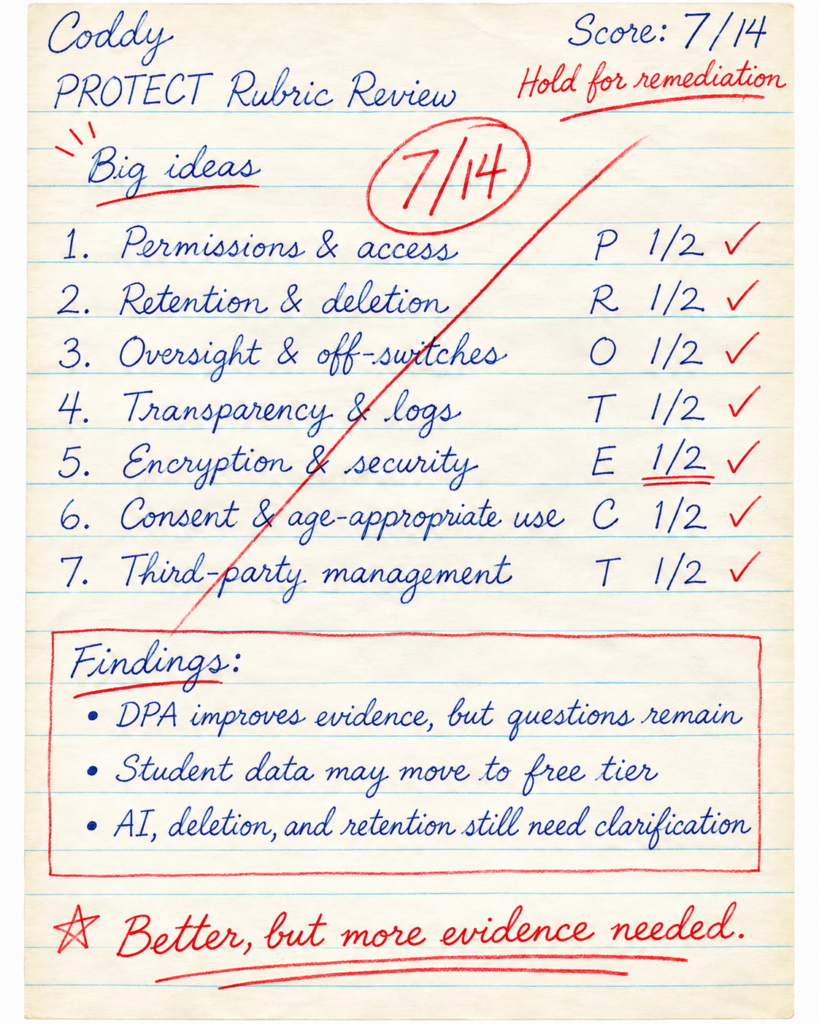
TCEA PROTECT v3 Rubric Assessment
Educators should also know that Coddy’s terms require users to be at least 13 years old. Schools should review its privacy practices and institutional options before assigning student accounts. A preliminary PROTECT v3 assessment reveals the following:
Visit Coddy’s Python course and complete the introductory lessons. Then try one of the coding challenges without asking for a hint. See how far you get. And, remember, there are a variety of other tools. Find the one that works best for your students. Be sure to take PROTECT assessments into account for each.
If you’re looking for an approachable way to begin learning Python, a few minutes of actual coding may tell you more than another hour of watching tutorials.
Wish you could learn the most popular programming language in 2023? If your answer is, “Yes, and I wish I could teach it to my students in grades 5-12!” you are in for a treat. What is the most popular programming language? It is now Python. What’s more, the PopularitY of Programming Language Index (PYPL) ranks Python as high:
“Worldwide, Python is the most popular language. Python grew the most in the last five years.”
And, per the 2022 Octoverse report, the use of Python grew by more than twenty-two percent. It enjoys more than four million developers on GitHub. But, wait. You haven’t read the best part yet. Students in middle school are learning how to use Python. Why not prepare yourself and teach it?
Teachers now have access to a Python programming language course! The online, self-paced course is available through TCEA, a nonprofit education association. It’s mission? To advance “teaching and learning through the use of technology.”
Participants in the Python Educator course get sample code and have the opportunity to work through hands-on projects. In the end, they learn and earn a certificate and digital badge.
Teaching Children to Use Python
The TCEA course developer, James Abela, serves as head of computing in an Apple Distinguished School in Kuala Lumpur. “We need to teach children skills that are useful,” says James Abela. You can use Python with popular STEM tools you may already use, such as the micro:bit.
This course teaches educators how to use Python tools and come up with exercises to use in the classroom. Educators who enroll in the course also get a free TCEA membership. Once completed, they receive the following:
12 CPE credits
A digital badge
A digital certificate of completion
Course access lasts for one full year from the date of enrollment in the course. The course can be started at any point in the year and worked on in a self-paced manner.
Python Course Modules
The course includes five modules, shared below:
Module 1: Getting Started
Python is available on all devices from Chromebooks to iPads. Start by choosing the right development tools for you! Install these tools on your device or access Python development tools online, and make your very first program.
Module 2: Variables and Operators
A computer’s power is its ability to automate simple tasks. Start to harness some of that power via the use of variables and operators in Python.
Module 3: Selection
See the world as a computer sees it! Everything is a 1 or 0, true or false, yes or no. This is how every computer makes decisions. Learn to give the computer clear instructions to make effective selections.
Module 4: Iteration
Learn how to change your simple selections to speed through challenges with iteration. You will use loops that enable you to execute many instructions. This makes solving problems and performing calculations a quick task.
Module 5: Lists and the Random Function
Known for its data science and use of lists, Python enables you to organize and sort data. Learn how to use the random function to create simple games and data sets.
Now that you know what is in the course, let’s take a look at course prerequisites and who should take this course.
Course Prerequisites and Requirements
The purpose of this course is to provide foundational knowledge. The target audience is educators teaching grades 5-12 who want to start their Python learning journey. By the end of the course, you will have an excellent grounding in Python. You’ll also walk away with key computational concepts!
How to Sign Up
Although the course is available for $39 per person, a discounted price of $34 per person is possible if you sign up a group of 10 or more. Contact Miguel Guhlin (mguhlin@tcea.org) for pricing quotes for 10 or more people. Large groups can also pay via the TCEA Credit Card Authorization Form. Interested?
One of the significant shifts in the updated Texas Essential Knowledge and Skills for Technology Applications, or TA-TEKS, is a focus on teaching computer science skills. In fact, the revised TA-TEKS require foundational computational thinking skills to be taught as early as kindergarten.
This focus on computer science isn’t unique to us here in Texas. Already, 42 states have adopted computer science education standards, and 27 states, including Texas, require high schools to offer computer science to students.
“Across the country, there’s a growing movement to provide computer science education to every student, in every school, at every grade level,” says Keith Oelrich, CEO of Learning.com.
Students can begin to develop essential computational thinking skills at the earliest grades in school, without even using a computer, and gradually build toward learning the coding and computer programming languages that allow them to create their own projects.
Programming with Python
Python is one of the most popular programming languages in the world, opening doors to in-demand careers in data analysis, artificial intelligence, cybersecurity, and app development. Hundreds of thousands of companies, including some of the most well-known brands of our era – Facebook, YouTube, Netflix, Etsy, Tesla – are powered by Python.
At Learning.com, we’re very excited about our recent acquisition of Codesters, after years of partnership with the company. With the acquisition, Learning.com can offer even more of Codesters’ popular interactive, web-based Python coding curriculum to schools through our existing comprehensive EasyTech digital literacy curriculum and EasyCode computer programming curriculum.
Codesters helps students learn key coding principles using Python. In each lesson, students complete a project through a series of activities that include coding challenges, debugging practice, and quizzes. Each lesson ends with an additional coding exercise in which students create their own project applying the skills learned.
Our high-school level offering includes advanced Python lessons and even prepares students for certifications that can directly lead to jobs.
Breaking Barriers with Python Webinar
Join us on April 6, 2023 for the TCEA webinar, Breaking Barriers with Python to learn more about this powerful coding language and how you can prepare your students for the new TA-TEKS, and equip them to excel in the digital world.Click here to register.
For the past few years, many librarians have included coding activities in their curriculum. Yet most librarians themselves do not know how to code. They might feel as though they do not have time to learn something new. They might be intimidated by computer science. Or maybe they feel like they are all thumbs when it comes to technology. The good news is that one does not have to be a genius to learn a few coding shortcuts with Python that will make their job easier.
How Can Python Be Used in a Library?
Python is a powerful programming language that is easy to learn and can be used to simplify repetitive tasks. There are several ways that librarians can use Python: automate social media accounts, remove missing or duplicated data from your ChalkDust statistics spreadsheet, or create virtual booktalks. Let’s explore a few functions for Python and some resources for curious librarians who want to know more about Python.
Using Python to Convert Text to Speech
Recently, while working on a virtual booktalk project, I wanted to use a text-to-speech (TTS) converter, because I do not like the way my voice sounds when recorded. For a variety of reasons, none of the websites I found fit my requirements (free and ongoing in comparison to paid or freemium). Then, I realized that I had the skills to make my own converter using Python. Even better – someone had already created one! I just needed to copy the code and tweak a couple of variables before I had exactly what I needed. A few minutes later, I had a program that allowed me to input a bit of text and then convert that text into speech, saving it to an mp3 file. The only cost involved was about ten minutes of my time, and I can reuse the converter any time I need.
Text-to-Speech Converter Using Python
Using Python to Automate Tweets
Another timesaving use for Python is to automate your library’s Twitter account. With a few lines of code, you can set your Twitter account to send out tweets at whatever time interval you want – one hour, two hours, or thirty-six hours. The hardest part about this process is actually not the code. As a matter of fact, much like the text-to-speech converter I mentioned earlier, the code for setting up and automating your Twitter account can be found with a simple search. Most of your time and effort will actually go into completing the necessary form and getting the key codes from Twitter.
Using Python with Spreadsheets
When working with spreadsheets, I can compare two or more Excel files for differences, and then record the differences into a .txt file that I can share with others. In addition, I can use Python to clean up missing or duplicated records from hundreds of entries in a spreadsheet. I only have to write the code once. Then, anytime I want to compare files or clean up some data, all I have to do is type in one command to run the program.
For those who are concerned about privacy and Internet security, once you are comfortable with Python, try making a password generator that lets the user change parameters, like how many characters to use for the password, whether to include special symbols, or whether to include a specific number of random words like the password appearing in the XKCD comic above. Of course, there are already some tools that create random passwords, but there is always the possibility that those tools also record the passwords that they generate. To be honest, nothing connected to the Internet is 100% safe. With my own program, I worry less about my passwords being recorded.
If you would like to get started with Python to automate basic tasks, the following is a list of resources for beginners. I recommend starting with “Automate the Boring Stuff” by Al Sweigert and “Python Crash Course” by Eric Matthes. There are many other tutorials and videos on Python projects all over the Internet. YouTube is a treasure chest for finding tutorials that will walk you through projects step by step, and videos are a great way to get started because they can be paused and replayed when needed. Keep in mind, however, that there is no right or wrong way to learn how to code. Find whatever method works best for you.
Books
“Automate the Boring Stuff with Python” by Al Sweigart. (free)
Al Sweigert provides free access to digital copies of all his books through his website. “Automate the Boring Stuff with Python” has both step-by-step instructions and practice projects. Sweigert also offers free print copies to anyone who wants to write a review for one of his books. This book is great for those who would rather take what they need than read the book from cover to cover.
“Python Crash Course: 2nd Edition” by Eric Matthes ($39.95 print; $31.95 Ebook)
“Python Crash Course” complements the information covered in Sweigart’s “Automate the Boring Stuff with Python.” This book is divided into two parts, with the first section covering basic Python. The second part contains three sections: a video game, data visualization, and web applications. These sections highlight the versatility of Python. Readers can skip around or read from front to back.
A repository for librarians of Python programs I have created to make my job easier. Hopefully, it will do the same for you!
Are you interested in learning even more about how to use Python to automate tasks in our library? Join Monica as she walks you through step-by-step Twitter automation with Python at TCEA 2023. No coding experience is required. Register before January 10 to get the $50 advanced pricing discount!