

You have a stack of IEPs to write, a caseload that keeps growing, and maybe thirty minutes before your next meeting. A colleague mentions she’s been using artificial intelligence to draft goals in seconds. Your first thought isn’t “That sounds efficient.” It’s “Is that even legal?”
It’s a smart question. IEPs contain some of the most sensitive information a school holds: disability diagnoses, medical history, behavioral data, and academic performance. Getting this wrong isn’t just an inconvenience. It’s a potential FERPA violation.
Here’s the good news: you can use AI to write IEPs safely. The risk doesn’t live in the tool. It lives in what you type into it. Once you understand that distinction, everything changes.
The Real Risk Isn’t AI. It’s What You Type.
FERPA, the Family Educational Rights and Privacy Act, protects what the law calls personally identifiable information (PII) in student education records. PII includes direct identifiers such as a student’s name or identification number, and indirect identifiers such as a student’s date of birth, or any other information that could be used to distinguish or trace a student’s identity.
When you type a student’s name, ID number, or diagnosis into a general-purpose AI tool that isn’t covered by a district-approved data agreement, you’re potentially disclosing PII to a third party without authorization. That’s the line you don’t want to cross.
About 12 states specifically stress the importance of avoiding inputting PII into AI systems, and roughly 21 states list data security concerns as a focus in their AI guidance for schools. Your district may already have its own policy. Check before you prompt.
The solution isn’t to avoid AI. It’s to anonymize before you type.
What a Safe AI Prompt Actually Looks Like
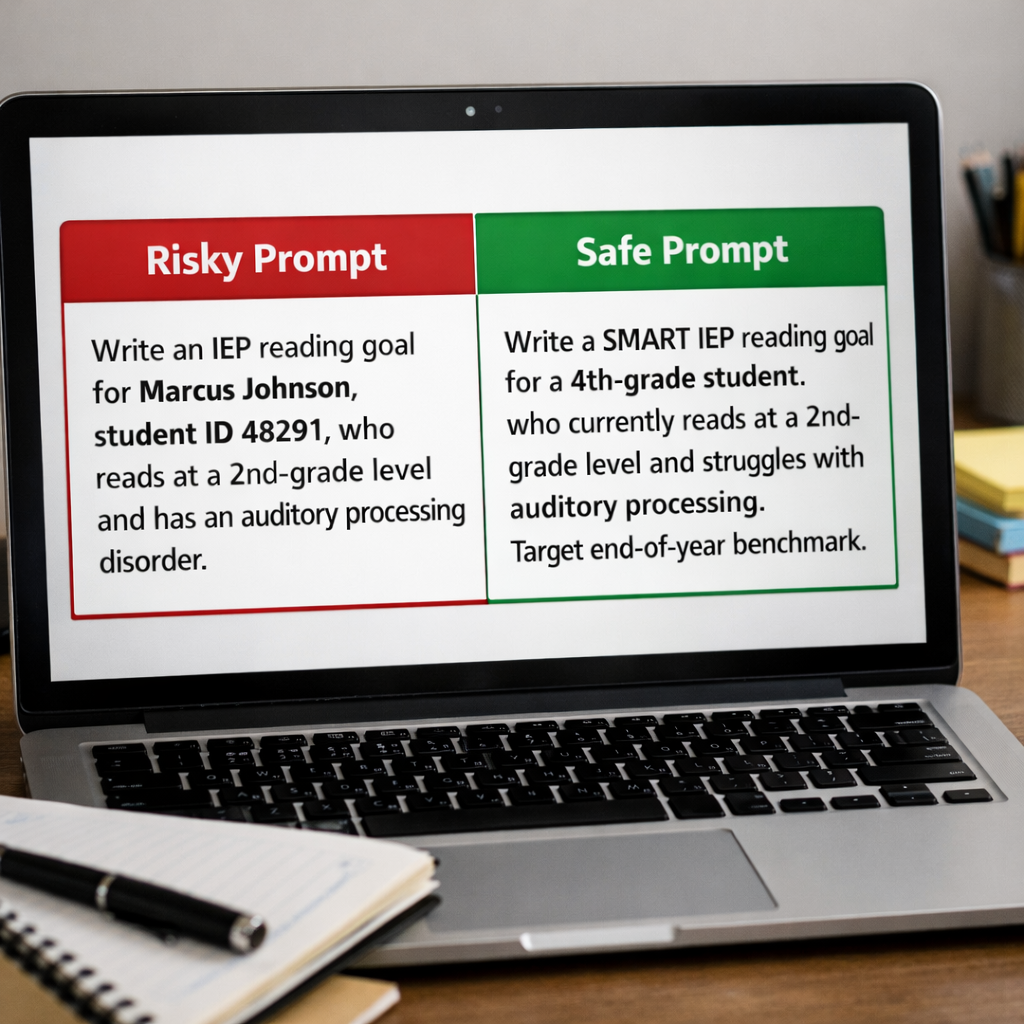
Most teachers instinctively know not to type a student’s full name. What many don’t realize is that student ID numbers also count as PII under FERPA, a detail that catches even experienced educators off guard. Here’s what the difference looks like in practice:
Risky prompt: “Write an IEP reading goal for Marcus Johnson, student ID 48291, who reads at a second-grade level and has an auditory processing disorder.”
Safe, anonymized prompt: “Write a SMART IEP reading goal for a fourth-grade student who currently reads at a second-grade level and struggles with auditory processing. Target end-of-year benchmark.”
The second prompt gives the AI everything it needs to produce a strong draft. The student is protected. IEPs require detailed information about students’ disabilities, learning needs, medical history, and academic performance, which makes data privacy a critical concern when using generative AI tools. Stripping out identifiers before you prompt is the single most important habit you can build.
Three Practical AI Tips: No Subscription Required
You don’t need a specialized platform to use AI effectively for IEP drafting. Tools like ChatGPT, Gemini, or Claude can handle this work well when you know how to prompt them.
1. Use the Persona Prompt. General AI tools don’t automatically behave like special education experts. Tell them to. Open your session with something like: “You are a veteran Special Education Coordinator with 20 years of experience writing IDEA-compliant IEPs.” This single line shifts the quality and tone of every response that follows.
2. Build a Prompt Library. Stop rewriting the same instructions from scratch. Keep a simple document with ready-to-paste prompts for each IEP section: PLAAFP, SMART goals, accommodations, and behavior plans. When you’re under time pressure, you open the doc, swap in anonymized student descriptors, and paste. Two minutes of setup saves 20 minutes of drafting. Scroll down to access the link to the AI Prompt Bank for Special Education Teachers which includes an excellent set of prompts to get you started.
3. Use the Reverse Outline for Quality Checks. Already have a draft that feels off but you can’t pinpoint why? Paste it into an AI tool and ask: “Does this goal meet SMART criteria? Suggest two ways to make the measurement more specific.” This turns the AI into an editor, not just a generator, and it’s one of the most underused moves in the workflow.
The IEP Architect: Set It Once, Use It Every Time
The most powerful efficiency move isn’t a single prompt. It’s a system prompt. Paste the text below into the “Custom Instructions,” “System Instructions,” or the very first message of any AI chat. From that point forward, the AI will follow these rules automatically, including the privacy guardrails.
"You are an expert Special Education Consultant specializing in IDEA-compliant IEP development. Your rules: Write SMART goals only, with specific mastery criteria. Use a strength-based tone. Write so clearly that a teacher who has never met the student could implement the plan immediately. Never ask for or use real names, birthdates, or IDs. Refer to the subject as 'the student' or 'Student A.' When I provide data, draft the requested IEP section and suggest one executive functioning tip related to the goal. Acknowledge this role by saying: 'IEP Architect ready. What data are we working on today?'"Once it responds that it’s ready, drop in your messy, anonymized notes. Three sentences of raw observation become a professional multi-paragraph draft, because the AI is already operating inside your standards, not its defaults.

The Rule to Post Above Your Desk
Before you hit send on any AI prompt, ask yourself one question: Could someone use what I just typed to identify a specific student? If the answer is “yes,” or even “maybe,” rewrite it. No name, no ID, no birthdate, no combination of details specific enough to point to one child.
AI is a draft-builder. You are still the professional of record.
Key Takeaways
- FERPA’s risk with AI isn’t the tool. It’s unprotected PII in your prompts.
- Student ID numbers count as PII and must be removed, not just names
- Anonymized prompts give AI everything it needs to produce strong IEP drafts.
- A persona prompt, a prompt library, and the reverse outline technique work in any free AI tool.
- The IEP Architect system prompt builds privacy guardrails into every session automatically.
- Always check your district’s AI policy before using any tool with student-related content.
Special education teachers are already doing the hardest, most human part of IEP writing: observing students, building relationships, and advocating for what each child actually needs. AI can handle the blank page. You handle everything that matters.
Ready to put this into practice? Download the AI Prompt Bank for Special Education Teachers, a free resource with 25+ ready-to-use, privacy-safe prompts covering IEP writing, parent communication, behavior plans, progress monitoring, differentiation, and supporting general ed teachers.
Have a prompt that’s been a game-changer in your work? Share it in the comments. The best ideas in special education have always traveled teacher to teacher. This is no different.

1 comment
The distinction between ‘the tool is the risk’ vs ‘what you type is the risk’ is the most important point here. A lot of the fear around using AI in special education comes from conflating the two. Anonymization before prompting is a simple practice that eliminates most compliance concerns, yet most teachers have never been taught to think about it that way. This should be part of every district’s AI onboarding.